lt200420
New member
I know this has already asked/posted but it needs to be posted again/dealt with...
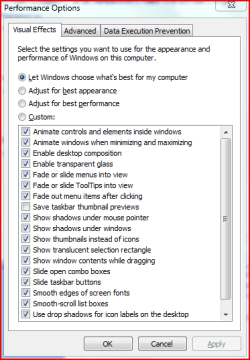
I've been trying to find a way to disable/remove the taskbar thumbnail preview in Windows 7. I've google searched to death lookin for a way how but nothing.
I'm aware that there is the option to do so in gpedit.msc and in regedit (hkey_current_user\software\microsoft\Windows\DWM where it says enableaeropeek change value to 0, but i assure u those methods do not work.
any help/info would be greatly appreciated
I've been trying to find a way to disable/remove the taskbar thumbnail preview in Windows 7. I've google searched to death lookin for a way how but nothing.
I'm aware that there is the option to do so in gpedit.msc and in regedit (hkey_current_user\software\microsoft\Windows\DWM where it says enableaeropeek change value to 0, but i assure u those methods do not work.
any help/info would be greatly appreciated
My Computer
At a glance
Windows 7 x64 6.1.7600 Build 7600AMD Athlon 64 X2 6000+ 3.0ghz4GB OCZ Reaper DDR2 800mhzATI 3870HD
- OS
- Windows 7 x64 6.1.7600 Build 7600
- CPU
- AMD Athlon 64 X2 6000+ 3.0ghz
- Motherboard
- Gigabyte GA-MA69GM-S2H
- Memory
- 4GB OCZ Reaper DDR2 800mhz
- Graphics Card(s)
- ATI 3870HD
- Sound Card
- Realtek HD Audio
- Monitor(s) Displays
- ASUS VW246H 24"
- Screen Resolution
- 1920x1080
- Hard Drives
- System-500GB Seagate Barracuda w/32mb cache
Storage-2TB Hitachi w/32mb cache
- PSU
- Coolmax 500W
- Keyboard
- Microsoft Wireless Laser Desktop 5000
- Mouse
- Microsoft Wireless Laser Desktop 5000
- Internet Speed
- DSL 6MBPS down/512KBPS up