How can i format this partition

defpony

New member
Local time
8:38 PM
Messages
3
Hi, I'm trying to format a partition with a windows7 install on it.
The windows7 installed on it BSOD every boot so is useless.
I managed to get a fresh windows7 install on drive (C) which is working and I'm currently using.

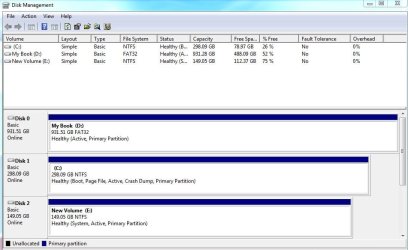
The partition I'm trying to format is (E). See screenshot.
I have deleted the boot in msconfig, but I believe I cant format the partition because it is marked 'system'???

Disk management won't let me format the partition nor will the two partition management programs I've tried.
I just want to use the drive as storage and rid all windows off it.

Any help greatly appreciated thanks.
disk_management.JPG
 

My Computer

OS
Windows 7 Ultimate x64

My Computer

Computer Manufacturer/Model Number
Too many to describe...
OS
Windows 7 x64 pro/ Windows 7 x86 Pro/ XP SP3 x86
Such a long drawn out process and hasn't got me anywhere so far.

I first made (D) and (E) drives inactive and disconnected them, and proceeded to do the startup repair with just (C) drive connected and with a windows 7 dvd. The first time i got to the System Recovery Options screen there was no OS listed, i continued with the process and selected Startup Repair. The repair was unsuccesful, but in the View diagnostic and repair detail tab I was able to see that it identified the correct problem, it just didnt fix it.

I went through this process three times to no change. Then I'm not exactly sure what happened, but it got into the Windows Boot Manager screen and came up with a winload.exe error. It was trying to load an old install of vista (which i thought all traces of had been deleted). Now everytime I get to the System Recovery Options screen with just (C) drive connected Windows Vista comes up as the OS. And I'm unable to select Next because I have the windows 7 dvd in the drive.

Not sure what to try next.
 

My Computer

OS
Windows 7 Ultimate x64

My Computer

OS
ME/XP/Vista/Win7
Such a long drawn out process and hasn't got me anywhere so far.

I first made (D) and (E) drives inactive and disconnected them, and proceeded to do the startup repair with just (C) drive connected and with a windows 7 dvd. The first time i got to the System Recovery Options screen there was no OS listed, i continued with the process and selected Startup Repair. The repair was unsuccesful, but in the View diagnostic and repair detail tab I was able to see that it identified the correct problem, it just didnt fix it.

I went through this process three times to no change. Then I'm not exactly sure what happened, but it got into the Windows Boot Manager screen and came up with a winload.exe error. It was trying to load an old install of vista (which i thought all traces of had been deleted). Now everytime I get to the System Recovery Options screen with just (C) drive connected Windows Vista comes up as the OS. And I'm unable to select Next because I have the windows 7 dvd in the drive.

Not sure what to try next.

Why didnt you just delete the partition in disc management to start with, then create a new partition and format it - that will automatically remove it from the boot menu and your ready to go under normal circumstances this will work.

Im not sure what you have done but with Sea tools dos for seagate drives you can zero drives, which wipes them so they behave the same as a new drive, then the drive needs to initialized before it can be used. Sea tools dos (iso) can also be used with other drives if the manufactures of the drives dont have a utility.

To fix the problem if you havet got anything you need on the 2 w7 drives concerned (C AND E) you could do that, and you would be sweet - then throw the w7 install dvd in the drive - it will locate the drives in custom install - from memory it initializes the drives automatically - well the one your going to install w7 to, and all you have to do is create a partition or just select it and it will do that also. Firstly, in the bios, make sure the drive you need to install w7 to is selected as the first drive to boot to. Under drives in the bios - you will see three drives, select the top one, and then in its options, select the drive you want to install to then save and exit the bios. The other drive may need to be initialized after your up and running in disk management. No boot problems as everything has been scrubbed.

Just try this if theog's solution fails, but i doubt it, my method takes a fair while to zero the drives if you choose the safest option to grind them completely to zero - im not sure of the risk in taking the short-cut zeros, but they all there - basically they grind less of the drive and some corrupted files may be left.
 

My Computer

OS
XP, Vista, W7 64bit Home Premium
CPU
Intel Core Duo 6850 3.0 ghz @ 3.7 ghz
Motherboard
Asus P5E
Memory
4GB Corsair DDR 2 PC-6400
Graphics Card(s)
Ati 4870 1ghz
Sound Card
Supreme FX 11
Monitor(s) Displays
View Sonic VX1962wm
Screen Resolution
1680 X1050
Hard Drives
3 Seagate Sata Drives 160gb 250gb 500gb
PSU
Thermaltake 600 watt
Case
NZXT Alpha
Cooling
3X120cm Fans
Keyboard
Microsoft Digital Media Pro Keyboard
Mouse
Microsoft Wheel Mouse Optical
Internet Speed
1.5Mb to 8Mb/384k
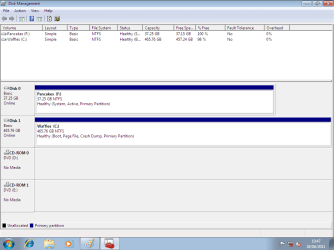
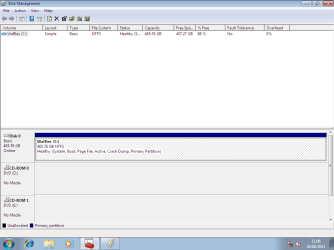
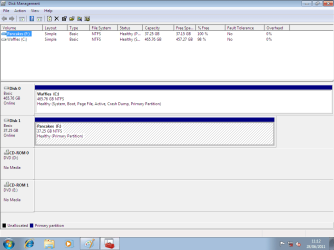
I finally got rid of the 'system' tag on (E) drive and able to format it by following theog's advice and rearranging the cables so my boot drive was disk 0. I also created and used a windows recovery cd instead of using the windows install dvd.

The only side effect from this process is now msconfig says im booting Microsoft Windows Vista (C:\Windows) : Current OS; Default OS. And it says Vista in the System Recovery Options screen too.
Even though its clearly booting windows7 and winver confirms this.
I think the only solution to this is to do a 'upgrade' install of windows7 so i might just ignore it for the time being.

Thanks for all your help.
 

My Computer

OS
Windows 7 Ultimate x64

My Computer

OS
ME/XP/Vista/Win7
Back
Top