How can I maximize fan speed?

AlinGraur

New member
Local time
6:45 PM
Messages
5
Location
Ploiesti, Romania
Hello!
I just noticed that my GPU and CPU are above 60 degrees C. I tried to use SpeedFan and all of my 3 coolers were @ 0 RPM. I guess it doesn't support my motherboard. I don't really get well with hardware. If you answer, can you be more specific, please.
Thank you!
PS: I just joined this forum and I suppose you can see my specs, 'cause I typed them into those boxes when I registered.
 

My Computer My Computer

Computer Manufacturer/Model Number
HP Pavilion dv6-2120eq
OS
Windows 7 Ultimate 32-bit
CPU
2.30 gigahertz AMD Turion II Dual-Core
Motherboard
Hewlett-Packard 3636 33.23
Memory
3070 Megabytes Usable Installed Memory
Graphics Card(s)
ATI Mobility Radeon HD 4500/5100 Series
Sound Card
AMD High Definition Audio Device
Monitor(s) Displays
Generic PnP Monitor (15.3"vis)
Screen Resolution
1366x768
Hard Drives
500.00 Gigabytes Usable Hard Drive Capacity
PSU
Microsoft ACPI-Compliant Control Method Battery
Keyboard
Standard PS/2 Keyboard
Mouse
KeyOffice M6097
GPU temps can run into the 80s when gaming. Your temps aren't alarming. You could try something like HWInfo32 to see if it recognizes your fans and their RPM.

HWiNFO32 Download

Have you confirmed by eyeball that your fans are in fact spinning?
 

My Computer My Computer

Computer type
PC/Desktop
Computer Manufacturer/Model Number
Ignatz Special; 4 speed manual gearbox; factory air conditioning; one of one
OS
Windows 7 Home Premium SP1, 64-bit
CPU
Intel Skylake i5-6600K, not overclocked
Motherboard
AsRock Z170M Extreme 4, micro ATX
Memory
8 GB HyperX DDR4-2666 (2 x 4 GB)
Graphics Card(s)
none; graphics are integrated on CPU
Sound Card
onboard: Realtek ALC1150; external: USB Behringer UF0-202
Monitor(s) Displays
Dell S2340M 23 inch IPS
Screen Resolution
1600 x 900
Hard Drives
System: Crucial MX100 series SSD, 128 GB;
Data: Samsung Spinpoint 103SJ, 1 TB;
Backup: WD Caviar Green WD30EZRX-00D8PB0, 3 TB
PSU
Rosewill SilentNight 500 watt fanless, semi-modular
Case
Antec Solo II
Cooling
Noctua NH-U12S; Noctua F12 intake, Noctua S12A exhaust
Keyboard
Microsoft 200 6JH-00001 USB
Mouse
Dell or Microsoft optical wired; USB
Antivirus
Microsoft Security Essentials and Malwarebytes Premium
Browser
Pale Moon
Other Info
All fans PWM; speeds at idle: CPU circa 500 rpm; intake circa 600 rpm; exhaust circa 600 rpm; CPU temps 27 idle and 47 C load in a warm room (27 C/81 F) when running Intel Extreme Tuning Utility stress test.
Yes, my fans are spinning. I noticed from some time now that my notebook is getting very hot quickly (almost burning) if I put it on some straight surface when I'm on High Performance.

@ignatzatsonic: Where can I check if my fans are recognized with that software? It's a little to much complicated for me.
 

My Computer My Computer

Computer Manufacturer/Model Number
HP Pavilion dv6-2120eq
OS
Windows 7 Ultimate 32-bit
CPU
2.30 gigahertz AMD Turion II Dual-Core
Motherboard
Hewlett-Packard 3636 33.23
Memory
3070 Megabytes Usable Installed Memory
Graphics Card(s)
ATI Mobility Radeon HD 4500/5100 Series
Sound Card
AMD High Definition Audio Device
Monitor(s) Displays
Generic PnP Monitor (15.3"vis)
Screen Resolution
1366x768
Hard Drives
500.00 Gigabytes Usable Hard Drive Capacity
PSU
Microsoft ACPI-Compliant Control Method Battery
Keyboard
Standard PS/2 Keyboard
Mouse
KeyOffice M6097
I'd at least look at what HWInfo says.

What are you doing when the notebook is "very hot"? Idling? Gaming? Reading this forum?
 

My Computer My Computer

Computer type
PC/Desktop
Computer Manufacturer/Model Number
Ignatz Special; 4 speed manual gearbox; factory air conditioning; one of one
OS
Windows 7 Home Premium SP1, 64-bit
CPU
Intel Skylake i5-6600K, not overclocked
Motherboard
AsRock Z170M Extreme 4, micro ATX
Memory
8 GB HyperX DDR4-2666 (2 x 4 GB)
Graphics Card(s)
none; graphics are integrated on CPU
Sound Card
onboard: Realtek ALC1150; external: USB Behringer UF0-202
Monitor(s) Displays
Dell S2340M 23 inch IPS
Screen Resolution
1600 x 900
Hard Drives
System: Crucial MX100 series SSD, 128 GB;
Data: Samsung Spinpoint 103SJ, 1 TB;
Backup: WD Caviar Green WD30EZRX-00D8PB0, 3 TB
PSU
Rosewill SilentNight 500 watt fanless, semi-modular
Case
Antec Solo II
Cooling
Noctua NH-U12S; Noctua F12 intake, Noctua S12A exhaust
Keyboard
Microsoft 200 6JH-00001 USB
Mouse
Dell or Microsoft optical wired; USB
Antivirus
Microsoft Security Essentials and Malwarebytes Premium
Browser
Pale Moon
Other Info
All fans PWM; speeds at idle: CPU circa 500 rpm; intake circa 600 rpm; exhaust circa 600 rpm; CPU temps 27 idle and 47 C load in a warm room (27 C/81 F) when running Intel Extreme Tuning Utility stress test.
I'd at least look at what HWInfo says.

What are you doing when the notebook is "very hot"? Idling? Gaming? Reading this forum?

Well, I just switch to Power Saver and get it a little high up in the air.

A couple of hours ago it just restarted and when I touched the back of it, it was impossible to keep my hand on it.
 

My Computer My Computer

Computer Manufacturer/Model Number
HP Pavilion dv6-2120eq
OS
Windows 7 Ultimate 32-bit
CPU
2.30 gigahertz AMD Turion II Dual-Core
Motherboard
Hewlett-Packard 3636 33.23
Memory
3070 Megabytes Usable Installed Memory
Graphics Card(s)
ATI Mobility Radeon HD 4500/5100 Series
Sound Card
AMD High Definition Audio Device
Monitor(s) Displays
Generic PnP Monitor (15.3"vis)
Screen Resolution
1366x768
Hard Drives
500.00 Gigabytes Usable Hard Drive Capacity
PSU
Microsoft ACPI-Compliant Control Method Battery
Keyboard
Standard PS/2 Keyboard
Mouse
KeyOffice M6097
You need to find out your fan RPMs. For all you know, they are already running at max speed.

To repeat myself:

I'd at least look at what HWInfo says.

What are you doing when the notebook is "very hot"? Idling? Gaming? Reading this forum?
 

My Computer My Computer

Computer type
PC/Desktop
Computer Manufacturer/Model Number
Ignatz Special; 4 speed manual gearbox; factory air conditioning; one of one
OS
Windows 7 Home Premium SP1, 64-bit
CPU
Intel Skylake i5-6600K, not overclocked
Motherboard
AsRock Z170M Extreme 4, micro ATX
Memory
8 GB HyperX DDR4-2666 (2 x 4 GB)
Graphics Card(s)
none; graphics are integrated on CPU
Sound Card
onboard: Realtek ALC1150; external: USB Behringer UF0-202
Monitor(s) Displays
Dell S2340M 23 inch IPS
Screen Resolution
1600 x 900
Hard Drives
System: Crucial MX100 series SSD, 128 GB;
Data: Samsung Spinpoint 103SJ, 1 TB;
Backup: WD Caviar Green WD30EZRX-00D8PB0, 3 TB
PSU
Rosewill SilentNight 500 watt fanless, semi-modular
Case
Antec Solo II
Cooling
Noctua NH-U12S; Noctua F12 intake, Noctua S12A exhaust
Keyboard
Microsoft 200 6JH-00001 USB
Mouse
Dell or Microsoft optical wired; USB
Antivirus
Microsoft Security Essentials and Malwarebytes Premium
Browser
Pale Moon
Other Info
All fans PWM; speeds at idle: CPU circa 500 rpm; intake circa 600 rpm; exhaust circa 600 rpm; CPU temps 27 idle and 47 C load in a warm room (27 C/81 F) when running Intel Extreme Tuning Utility stress test.
You need to find out your fan RPMs. For all you know, they are already running at max speed.

To repeat myself:

I'd at least look at what HWInfo says.

What are you doing when the notebook is "very hot"? Idling? Gaming? Reading this forum?

I answered your questions. As I said, that program kinda beats me.
 

My Computer My Computer

Computer Manufacturer/Model Number
HP Pavilion dv6-2120eq
OS
Windows 7 Ultimate 32-bit
CPU
2.30 gigahertz AMD Turion II Dual-Core
Motherboard
Hewlett-Packard 3636 33.23
Memory
3070 Megabytes Usable Installed Memory
Graphics Card(s)
ATI Mobility Radeon HD 4500/5100 Series
Sound Card
AMD High Definition Audio Device
Monitor(s) Displays
Generic PnP Monitor (15.3"vis)
Screen Resolution
1366x768
Hard Drives
500.00 Gigabytes Usable Hard Drive Capacity
PSU
Microsoft ACPI-Compliant Control Method Battery
Keyboard
Standard PS/2 Keyboard
Mouse
KeyOffice M6097
We aren't able to communicate, so I will check out of this.
 

My Computer My Computer

Computer type
PC/Desktop
Computer Manufacturer/Model Number
Ignatz Special; 4 speed manual gearbox; factory air conditioning; one of one
OS
Windows 7 Home Premium SP1, 64-bit
CPU
Intel Skylake i5-6600K, not overclocked
Motherboard
AsRock Z170M Extreme 4, micro ATX
Memory
8 GB HyperX DDR4-2666 (2 x 4 GB)
Graphics Card(s)
none; graphics are integrated on CPU
Sound Card
onboard: Realtek ALC1150; external: USB Behringer UF0-202
Monitor(s) Displays
Dell S2340M 23 inch IPS
Screen Resolution
1600 x 900
Hard Drives
System: Crucial MX100 series SSD, 128 GB;
Data: Samsung Spinpoint 103SJ, 1 TB;
Backup: WD Caviar Green WD30EZRX-00D8PB0, 3 TB
PSU
Rosewill SilentNight 500 watt fanless, semi-modular
Case
Antec Solo II
Cooling
Noctua NH-U12S; Noctua F12 intake, Noctua S12A exhaust
Keyboard
Microsoft 200 6JH-00001 USB
Mouse
Dell or Microsoft optical wired; USB
Antivirus
Microsoft Security Essentials and Malwarebytes Premium
Browser
Pale Moon
Other Info
All fans PWM; speeds at idle: CPU circa 500 rpm; intake circa 600 rpm; exhaust circa 600 rpm; CPU temps 27 idle and 47 C load in a warm room (27 C/81 F) when running Intel Extreme Tuning Utility stress test.

My Computer My Computer

Computer type
PC/Desktop
Computer Manufacturer/Model Number
Me
OS
Win 7 Ultimate x64
CPU
FX-8350 @ 4.6 GHz so far
Motherboard
Asus M5A97 EVO
Memory
ADATA XPG V1 Series Black 8GB DDR3 1600
Graphics Card(s)
Sapphire R9 270x Dual-X
Sound Card
Xonar DGX w/ Corsair Vengence 1300
Monitor(s) Displays
Acer S232HL Abid
Screen Resolution
1920x1080
Hard Drives
120 GB OCZ Vertex 3
500 GB Seagate 7200.12
PSU
Antec Earthwatts 650W Green
Case
Antec Three Hundred
Cooling
Cooler Master 212 EVO
Keyboard
Logitech G510
Mouse
Logitech G500s
Internet Speed
35000/3000
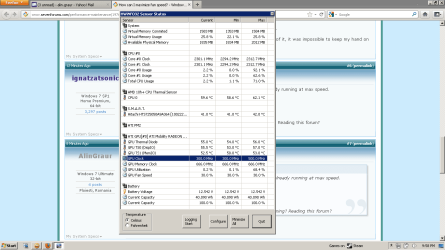
Well, I sorted that software out and this is what it says. I just attached and image. Now I keep it in the air, that's why temps are good.
 

Attachments

  • Untitled.png
    Untitled.png
    28.4 KB · Views: 367

My Computer My Computer

Computer Manufacturer/Model Number
HP Pavilion dv6-2120eq
OS
Windows 7 Ultimate 32-bit
CPU
2.30 gigahertz AMD Turion II Dual-Core
Motherboard
Hewlett-Packard 3636 33.23
Memory
3070 Megabytes Usable Installed Memory
Graphics Card(s)
ATI Mobility Radeon HD 4500/5100 Series
Sound Card
AMD High Definition Audio Device
Monitor(s) Displays
Generic PnP Monitor (15.3"vis)
Screen Resolution
1366x768
Hard Drives
500.00 Gigabytes Usable Hard Drive Capacity
PSU
Microsoft ACPI-Compliant Control Method Battery
Keyboard
Standard PS/2 Keyboard
Mouse
KeyOffice M6097
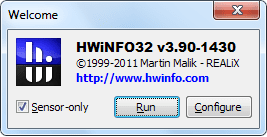
Start HwInfo 32 and in first window select sensor only and Run.

Untitled.png

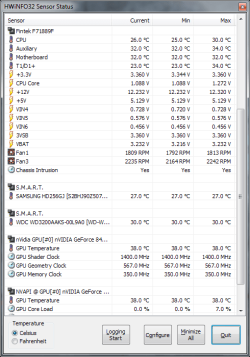
You'll see something like this after that.
1.png
 

My Computer My Computer

Computer type
PC/Desktop
Computer Manufacturer/Model Number
Custom Build
OS
Windows 10 Pro x64
CPU
Intel Core i5 4440 @Stock
Motherboard
Gigabyte Z97 D3H
Memory
4 x 4GB HyperX Fury DDR3
Graphics Card(s)
Gigabyte GTX 1050Ti O4G
Sound Card
Integrated
Monitor(s) Displays
Dell P2417H
Screen Resolution
1920 x 1080
Hard Drives
Samsung EVO 850 120GB / Toshiba DT01ACA050 1TB 7200prm 32MB
PSU
Riotoro Onyx 750W
Case
NZXT H500 Black-Red
Cooling
Stock CPU + NZXT 120mm + 2x120mm red fans
Keyboard
Modecom Volcano Lanparty
Mouse
Asus ROG Gladius / DeepCool E-Pad Plus
Internet Speed
DOCSIS 50/3 Mbit
Browser
Google Chrome
Other Info
Asus K55VJ(i5 3210M, GT635M / 2GB, 8GB DDR3, 500GB HDD)
Hello,

Here is a little Question for you, When you say its getting HOT it is the Battery pack that's get hot or under the Keyboard area, also now this bit is going to sound iffy but do it and see. Lick your lips and place over the vent that the air blows out and see if you have enough air coming out. The fan may be working but it may not be pulling enough air out. This is caused by DUST in the vents that are mainly on the bottom.
 

My Computer My Computer

Computer Manufacturer/Model Number
Home Build.
OS
Windows 7 Home Pre
CPU
Q8200 Intell 2.333
Motherboard
Asus P5Q3 Delux
Memory
DDR3 1333 4gig
Graphics Card(s)
Ati HD4870
Sound Card
Onboard Soundmax. 7.1
Monitor(s) Displays
1, 20" Samsung
Screen Resolution
1600/900
PSU
Good enough
Case
Le Shark
Cooling
FAN FAN FAN FAN, Thermaltake Minitype 90 with speed fan 4.
Keyboard
Standard, Gaming Wolfking
Mouse
Cm-storm-inferno-wired-gaming-mouse
Internet Speed
Sky Crappy upto 20meg I get a whapping 5.8mbs.
Back
Top