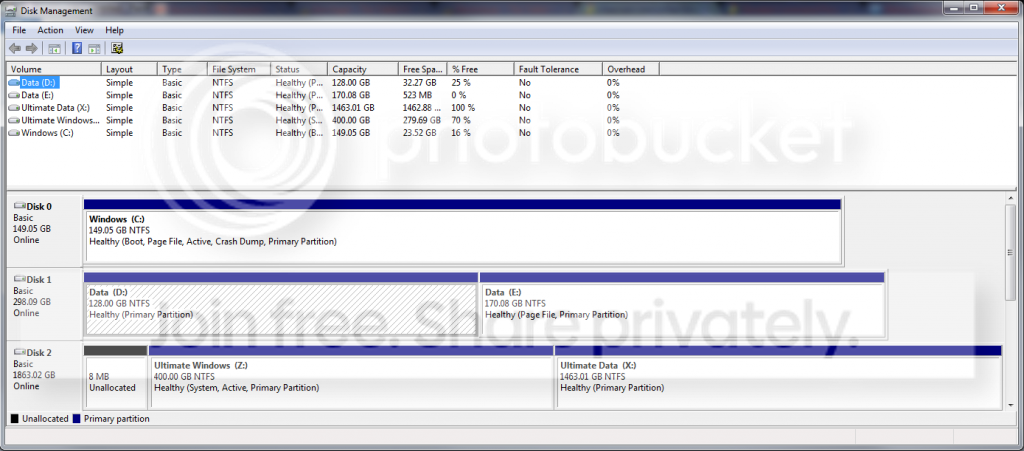
I asked you:
If you enter BIOS you can change the boot priority. You see options like CD/DVD, USB, Harddisk.
Is there an option to specify which harddisk to boot from?
Can you answer please. You have to force boot from new disk where Z is on. How should machine know to boot from it otherwise?
If you enter BIOS you can change the boot priority. You see options like CD/DVD, USB, Harddisk.
Is there an option to specify which harddisk to boot from?
Can you answer please. You have to force boot from new disk where Z is on. How should machine know to boot from it otherwise?
My Computer
At a glance
Microsoft Windows 7 Home Premium 64-bits 7601...Intel(R) Core(TM) i3 CPU M 370 @ 2.40GHz4,00 GBATI Mobility Radeon HD 5400 Series
- Computer type
- Laptop
- Computer Manufacturer/Model Number
- ACER ASPIRE 5742G
- OS
- Microsoft Windows 7 Home Premium 64-bits 7601 Multiprocessor Free Service Pack 1
- CPU
- Intel(R) Core(TM) i3 CPU M 370 @ 2.40GHz
- Motherboard
- Acer Aspire 5742G
- Memory
- 4,00 GB
- Graphics Card(s)
- ATI Mobility Radeon HD 5400 Series
- Sound Card
- (1) AMD High Definition Audio Device (2) Realtek High Defi
- Screen Resolution
- 1366 x 768 x 32 bits (4294967296 colors) @ 60 Hz
- Hard Drives
- WDC WD5000BEVT-22ZAT0