How can i move files (Including Windows) Onto a New HDD From a old one

I asked you:

If you enter BIOS you can change the boot priority. You see options like CD/DVD, USB, Harddisk.
Is there an option to specify which harddisk to boot from?

Can you answer please. You have to force boot from new disk where Z is on. How should machine know to boot from it otherwise?
 

My Computer My Computer

At a glance

Microsoft Windows 7 Home Premium 64-bits 7601...Intel(R) Core(TM) i3 CPU M 370 @ 2.40GHz4,00 GBATI Mobility Radeon HD 5400 Series
Computer type
Laptop
Computer Manufacturer/Model Number
ACER ASPIRE 5742G
OS
Microsoft Windows 7 Home Premium 64-bits 7601 Multiprocessor Free Service Pack 1
CPU
Intel(R) Core(TM) i3 CPU M 370 @ 2.40GHz
Motherboard
Acer Aspire 5742G
Memory
4,00 GB
Graphics Card(s)
ATI Mobility Radeon HD 5400 Series
Sound Card
(1) AMD High Definition Audio Device (2) Realtek High Defi
Screen Resolution
1366 x 768 x 32 bits (4294967296 colors) @ 60 Hz
Hard Drives
WDC WD5000BEVT-22ZAT0
If you are very sure X and Z are primary now and Z is marked active in disk managemnt. you can reboot. Set BIOS to boot from physical disk where Z is on. Possible? If not possible:
  • Shutdown and power off machine. Remove power from outlet.
  • Open machine and change physical disk (C) and physical disk (Z). Do it by swapping sata data cables on disk side. Or on motherboard side. (not both sides of course).
  • Close machine. Attach power and boot
Works? All drive letters are still the same as it was at point of cloning. But of course Z is called C now. And old C has a free drive letter. Please check

Post results

Also do http://www.sevenforums.com/tutorials/330-system-protection-turn-off.html
Be sure protection is on for new C. It must show picture as is in step 10
Any ghost drives in list? Put system protection OFF on ghost disks (if any). They are gone from list afterwards
 
Last edited:

My Computer My Computer

At a glance

Microsoft Windows 7 Home Premium 64-bits 7601...Intel(R) Core(TM) i3 CPU M 370 @ 2.40GHz4,00 GBATI Mobility Radeon HD 5400 Series
Computer type
Laptop
Computer Manufacturer/Model Number
ACER ASPIRE 5742G
OS
Microsoft Windows 7 Home Premium 64-bits 7601 Multiprocessor Free Service Pack 1
CPU
Intel(R) Core(TM) i3 CPU M 370 @ 2.40GHz
Motherboard
Acer Aspire 5742G
Memory
4,00 GB
Graphics Card(s)
ATI Mobility Radeon HD 5400 Series
Sound Card
(1) AMD High Definition Audio Device (2) Realtek High Defi
Screen Resolution
1366 x 768 x 32 bits (4294967296 colors) @ 60 Hz
Hard Drives
WDC WD5000BEVT-22ZAT0
Z doesn't have boot in disk managemant but it's primary and active...
 

My Computer My Computer

At a glance

Windows 7 Ultimate 64-bitIntel i7-3820 @ 3.60GHz24GB2xNvidea GTS 450 SLI
Computer type
PC/Desktop
Computer Manufacturer/Model Number
Custom Build
OS
Windows 7 Ultimate 64-bit
CPU
Intel i7-3820 @ 3.60GHz
Motherboard
MSI X79A-GD45 8D
Memory
24GB
Graphics Card(s)
2xNvidea GTS 450 SLI
Monitor(s) Displays
HP w2408h 24" monitor
Screen Resolution
1920x1200
Hard Drives
2 Terrabyte 6GB/s HDD
Case
Cooler Master 912 HAF
Cooling
Intel Water Cooling for CPU, 6 Fans.
Internet Speed
100MB/s
Antivirus
None - Like a Boss
Z doesn't have boot in disk managemant but it's primary and active...
Did you force in bios to boot from new physical disk? Or could you only select harddisk in boot priority?
If impossible... swap physcial disk where C is on with physical disk with Z on.
 

My Computer My Computer

At a glance

Microsoft Windows 7 Home Premium 64-bits 7601...Intel(R) Core(TM) i3 CPU M 370 @ 2.40GHz4,00 GBATI Mobility Radeon HD 5400 Series
Computer type
Laptop
Computer Manufacturer/Model Number
ACER ASPIRE 5742G
OS
Microsoft Windows 7 Home Premium 64-bits 7601 Multiprocessor Free Service Pack 1
CPU
Intel(R) Core(TM) i3 CPU M 370 @ 2.40GHz
Motherboard
Acer Aspire 5742G
Memory
4,00 GB
Graphics Card(s)
ATI Mobility Radeon HD 5400 Series
Sound Card
(1) AMD High Definition Audio Device (2) Realtek High Defi
Screen Resolution
1366 x 768 x 32 bits (4294967296 colors) @ 60 Hz
Hard Drives
WDC WD5000BEVT-22ZAT0
See #42
 

My Computer My Computer

At a glance

Microsoft Windows 7 Home Premium 64-bits 7601...Intel(R) Core(TM) i3 CPU M 370 @ 2.40GHz4,00 GBATI Mobility Radeon HD 5400 Series
Computer type
Laptop
Computer Manufacturer/Model Number
ACER ASPIRE 5742G
OS
Microsoft Windows 7 Home Premium 64-bits 7601 Multiprocessor Free Service Pack 1
CPU
Intel(R) Core(TM) i3 CPU M 370 @ 2.40GHz
Motherboard
Acer Aspire 5742G
Memory
4,00 GB
Graphics Card(s)
ATI Mobility Radeon HD 5400 Series
Sound Card
(1) AMD High Definition Audio Device (2) Realtek High Defi
Screen Resolution
1366 x 768 x 32 bits (4294967296 colors) @ 60 Hz
Hard Drives
WDC WD5000BEVT-22ZAT0
Every single boot device i choose ends up loading C, what the ****...


EDIT: i swapped C and Z SATA cables but it didn't do anything
 

My Computer My Computer

At a glance

Windows 7 Ultimate 64-bitIntel i7-3820 @ 3.60GHz24GB2xNvidea GTS 450 SLI
Computer type
PC/Desktop
Computer Manufacturer/Model Number
Custom Build
OS
Windows 7 Ultimate 64-bit
CPU
Intel i7-3820 @ 3.60GHz
Motherboard
MSI X79A-GD45 8D
Memory
24GB
Graphics Card(s)
2xNvidea GTS 450 SLI
Monitor(s) Displays
HP w2408h 24" monitor
Screen Resolution
1920x1200
Hard Drives
2 Terrabyte 6GB/s HDD
Case
Cooler Master 912 HAF
Cooling
Intel Water Cooling for CPU, 6 Fans.
Internet Speed
100MB/s
Antivirus
None - Like a Boss
Z doesn't have boot in disk managemant but it's primary and active...
If you cloned C to Z...it's fine. Z is active and primary... nice.

In http://www.sevenforums.com/tutorials/783-elevated-command-prompt.html
Code:
bcdedit/store  Z:\boot\bcd  /enum  all

All lines with device, osdevice. ramdisksdidevice, filedevice point to Z (or boot) instead C? No references to C at all? Then bootmenu is fine.

just force boot from new physical disk where Z is on. Or swap sata cable to place where C is
 

My Computer My Computer

At a glance

Microsoft Windows 7 Home Premium 64-bits 7601...Intel(R) Core(TM) i3 CPU M 370 @ 2.40GHz4,00 GBATI Mobility Radeon HD 5400 Series
Computer type
Laptop
Computer Manufacturer/Model Number
ACER ASPIRE 5742G
OS
Microsoft Windows 7 Home Premium 64-bits 7601 Multiprocessor Free Service Pack 1
CPU
Intel(R) Core(TM) i3 CPU M 370 @ 2.40GHz
Motherboard
Acer Aspire 5742G
Memory
4,00 GB
Graphics Card(s)
ATI Mobility Radeon HD 5400 Series
Sound Card
(1) AMD High Definition Audio Device (2) Realtek High Defi
Screen Resolution
1366 x 768 x 32 bits (4294967296 colors) @ 60 Hz
Hard Drives
WDC WD5000BEVT-22ZAT0
Every single boot device i choose ends up loading C, what the ****...


EDIT: i swapped C and Z SATA cables but it didn't do anything
How did you swap?

detach cable from C disk (not from motherboard) and put in Z.
 

My Computer My Computer

At a glance

Microsoft Windows 7 Home Premium 64-bits 7601...Intel(R) Core(TM) i3 CPU M 370 @ 2.40GHz4,00 GBATI Mobility Radeon HD 5400 Series
Computer type
Laptop
Computer Manufacturer/Model Number
ACER ASPIRE 5742G
OS
Microsoft Windows 7 Home Premium 64-bits 7601 Multiprocessor Free Service Pack 1
CPU
Intel(R) Core(TM) i3 CPU M 370 @ 2.40GHz
Motherboard
Acer Aspire 5742G
Memory
4,00 GB
Graphics Card(s)
ATI Mobility Radeon HD 5400 Series
Sound Card
(1) AMD High Definition Audio Device (2) Realtek High Defi
Screen Resolution
1366 x 768 x 32 bits (4294967296 colors) @ 60 Hz
Hard Drives
WDC WD5000BEVT-22ZAT0

My Computer My Computer

At a glance

Windows 7 Ultimate 64-bitIntel i7-3820 @ 3.60GHz24GB2xNvidea GTS 450 SLI
Computer type
PC/Desktop
Computer Manufacturer/Model Number
Custom Build
OS
Windows 7 Ultimate 64-bit
CPU
Intel i7-3820 @ 3.60GHz
Motherboard
MSI X79A-GD45 8D
Memory
24GB
Graphics Card(s)
2xNvidea GTS 450 SLI
Monitor(s) Displays
HP w2408h 24" monitor
Screen Resolution
1920x1200
Hard Drives
2 Terrabyte 6GB/s HDD
Case
Cooler Master 912 HAF
Cooling
Intel Water Cooling for CPU, 6 Fans.
Internet Speed
100MB/s
Antivirus
None - Like a Boss
Every single boot device i choose ends up loading C, what the ****...


EDIT: i swapped C and Z SATA cables but it didn't do anything
How did you swap?

detach cable from C disk (not from motherboard) and put in Z.

Yes,
So if you follow cable from Z you see it's connected to motherboard. It's exactly same spot as was C. Correct? If so

Run repair you computer from F8 menu. Enter "command prompt"
Code:
diskpart
list vol
exit
What's drive letter of Z. It's definitely not Z now!! Assume it's K
Code:
bootsect/nt60 K: /force
bootsect/nt60 K: /force /mbr

If succesully... you'r sure mbr and bootsector are fine. Try to boot.
If fails...try to boot without old C connected at all
 

My Computer My Computer

At a glance

Microsoft Windows 7 Home Premium 64-bits 7601...Intel(R) Core(TM) i3 CPU M 370 @ 2.40GHz4,00 GBATI Mobility Radeon HD 5400 Series
Computer type
Laptop
Computer Manufacturer/Model Number
ACER ASPIRE 5742G
OS
Microsoft Windows 7 Home Premium 64-bits 7601 Multiprocessor Free Service Pack 1
CPU
Intel(R) Core(TM) i3 CPU M 370 @ 2.40GHz
Motherboard
Acer Aspire 5742G
Memory
4,00 GB
Graphics Card(s)
ATI Mobility Radeon HD 5400 Series
Sound Card
(1) AMD High Definition Audio Device (2) Realtek High Defi
Screen Resolution
1366 x 768 x 32 bits (4294967296 colors) @ 60 Hz
Hard Drives
WDC WD5000BEVT-22ZAT0
All lines with device, osdevice. ramdisksdidevice, filedevice point to Z (or boot) instead C? No references to C at all? Then bootmenu is fine.

Nope, Pritey much all C:
 

My Computer My Computer

At a glance

Windows 7 Ultimate 64-bitIntel i7-3820 @ 3.60GHz24GB2xNvidea GTS 450 SLI
Computer type
PC/Desktop
Computer Manufacturer/Model Number
Custom Build
OS
Windows 7 Ultimate 64-bit
CPU
Intel i7-3820 @ 3.60GHz
Motherboard
MSI X79A-GD45 8D
Memory
24GB
Graphics Card(s)
2xNvidea GTS 450 SLI
Monitor(s) Displays
HP w2408h 24" monitor
Screen Resolution
1920x1200
Hard Drives
2 Terrabyte 6GB/s HDD
Case
Cooler Master 912 HAF
Cooling
Intel Water Cooling for CPU, 6 Fans.
Internet Speed
100MB/s
Antivirus
None - Like a Boss
in disk management you see disk 0 disk disk 1. If you swap connectors.... disk 0 and disk 1 contents should be swapped.
 

My Computer My Computer

At a glance

Microsoft Windows 7 Home Premium 64-bits 7601...Intel(R) Core(TM) i3 CPU M 370 @ 2.40GHz4,00 GBATI Mobility Radeon HD 5400 Series
Computer type
Laptop
Computer Manufacturer/Model Number
ACER ASPIRE 5742G
OS
Microsoft Windows 7 Home Premium 64-bits 7601 Multiprocessor Free Service Pack 1
CPU
Intel(R) Core(TM) i3 CPU M 370 @ 2.40GHz
Motherboard
Acer Aspire 5742G
Memory
4,00 GB
Graphics Card(s)
ATI Mobility Radeon HD 5400 Series
Sound Card
(1) AMD High Definition Audio Device (2) Realtek High Defi
Screen Resolution
1366 x 768 x 32 bits (4294967296 colors) @ 60 Hz
Hard Drives
WDC WD5000BEVT-22ZAT0
All lines with device, osdevice. ramdisksdidevice, filedevice point to Z (or boot) instead C? No references to C at all? Then bootmenu is fine.

Nope, Pritey much all C:
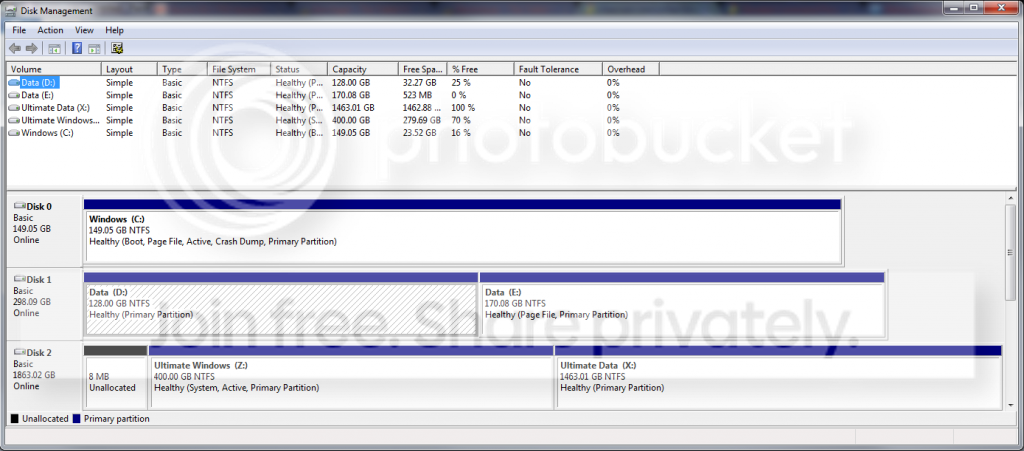
... alright. Now I understand. Post screenshot of disk management. It most likely boots from Z but loads C. Is Z marked system in disk management?
 

My Computer My Computer

At a glance

Microsoft Windows 7 Home Premium 64-bits 7601...Intel(R) Core(TM) i3 CPU M 370 @ 2.40GHz4,00 GBATI Mobility Radeon HD 5400 Series
Computer type
Laptop
Computer Manufacturer/Model Number
ACER ASPIRE 5742G
OS
Microsoft Windows 7 Home Premium 64-bits 7601 Multiprocessor Free Service Pack 1
CPU
Intel(R) Core(TM) i3 CPU M 370 @ 2.40GHz
Motherboard
Acer Aspire 5742G
Memory
4,00 GB
Graphics Card(s)
ATI Mobility Radeon HD 5400 Series
Sound Card
(1) AMD High Definition Audio Device (2) Realtek High Defi
Screen Resolution
1366 x 768 x 32 bits (4294967296 colors) @ 60 Hz
Hard Drives
WDC WD5000BEVT-22ZAT0
DiskManagment_zps1c854c9d.png


Yes it is marked as System
 

My Computer My Computer

At a glance

Windows 7 Ultimate 64-bitIntel i7-3820 @ 3.60GHz24GB2xNvidea GTS 450 SLI
Computer type
PC/Desktop
Computer Manufacturer/Model Number
Custom Build
OS
Windows 7 Ultimate 64-bit
CPU
Intel i7-3820 @ 3.60GHz
Motherboard
MSI X79A-GD45 8D
Memory
24GB
Graphics Card(s)
2xNvidea GTS 450 SLI
Monitor(s) Displays
HP w2408h 24" monitor
Screen Resolution
1920x1200
Hard Drives
2 Terrabyte 6GB/s HDD
Case
Cooler Master 912 HAF
Cooling
Intel Water Cooling for CPU, 6 Fans.
Internet Speed
100MB/s
Antivirus
None - Like a Boss
Alright... you did the clone wrong! You didn't make it primary and active. Macrium didn't adjust the bootmenu and device letters in registry. We gonna fix it now. Read carefully.

In elevated command pormpt:
Code:
bcdedit/set {current} description "Win7 old"

Now add a new boot entry
Code:
bcdboot Z:\windows

both commands succesful? Reboot. You get a bootmenu. Select win7 old and it boots to old C
Select other option and it boots the new windows.

Boot to the new windows. Post screenshot from new windows. Most likely almost the same... not finished yet. Stay in new windows but don't do anything important!
 

My Computer My Computer

At a glance

Microsoft Windows 7 Home Premium 64-bits 7601...Intel(R) Core(TM) i3 CPU M 370 @ 2.40GHz4,00 GBATI Mobility Radeon HD 5400 Series
Computer type
Laptop
Computer Manufacturer/Model Number
ACER ASPIRE 5742G
OS
Microsoft Windows 7 Home Premium 64-bits 7601 Multiprocessor Free Service Pack 1
CPU
Intel(R) Core(TM) i3 CPU M 370 @ 2.40GHz
Motherboard
Acer Aspire 5742G
Memory
4,00 GB
Graphics Card(s)
ATI Mobility Radeon HD 5400 Series
Sound Card
(1) AMD High Definition Audio Device (2) Realtek High Defi
Screen Resolution
1366 x 768 x 32 bits (4294967296 colors) @ 60 Hz
Hard Drives
WDC WD5000BEVT-22ZAT0
Alright thankyou, i finally got there... i went into msconfig and i had two boot options, C: and Z:, thanks man! :D
 

My Computer My Computer

At a glance

Windows 7 Ultimate 64-bitIntel i7-3820 @ 3.60GHz24GB2xNvidea GTS 450 SLI
Computer type
PC/Desktop
Computer Manufacturer/Model Number
Custom Build
OS
Windows 7 Ultimate 64-bit
CPU
Intel i7-3820 @ 3.60GHz
Motherboard
MSI X79A-GD45 8D
Memory
24GB
Graphics Card(s)
2xNvidea GTS 450 SLI
Monitor(s) Displays
HP w2408h 24" monitor
Screen Resolution
1920x1200
Hard Drives
2 Terrabyte 6GB/s HDD
Case
Cooler Master 912 HAF
Cooling
Intel Water Cooling for CPU, 6 Fans.
Internet Speed
100MB/s
Antivirus
None - Like a Boss
When booted succesfully in new win7.. disk mangement still shows wrong drive letters (Z is still called Z). Maybe it's fine already. To repair that. Be sure to boot to new win7.
run regedit
Navigate to HKEY_LOCAL_MACHINE\SYSTEM\MountedDevices
In right pane you see a lot of things. But you see \DosDevices\Z: and \DosDevices\C:

Rename \DosDevices\Z: to \DosDevices\QQ
Rename \DosDevices\C: to \DosDevices\Z:
Rename \DosDevices\QQ to \DosDevices\C:

So you actually swapped C and Z

Now reboot again to new win7. Post disk mangement output
 

My Computer My Computer

At a glance

Microsoft Windows 7 Home Premium 64-bits 7601...Intel(R) Core(TM) i3 CPU M 370 @ 2.40GHz4,00 GBATI Mobility Radeon HD 5400 Series
Computer type
Laptop
Computer Manufacturer/Model Number
ACER ASPIRE 5742G
OS
Microsoft Windows 7 Home Premium 64-bits 7601 Multiprocessor Free Service Pack 1
CPU
Intel(R) Core(TM) i3 CPU M 370 @ 2.40GHz
Motherboard
Acer Aspire 5742G
Memory
4,00 GB
Graphics Card(s)
ATI Mobility Radeon HD 5400 Series
Sound Card
(1) AMD High Definition Audio Device (2) Realtek High Defi
Screen Resolution
1366 x 768 x 32 bits (4294967296 colors) @ 60 Hz
Hard Drives
WDC WD5000BEVT-22ZAT0
Assuming correct drive is called C now in disk managent:

http://www.sevenforums.com/tutorials/330-system-protection-turn-off.html
Be sure to disable syetem protection on ghost drives listed there. They will disappear afterwards. Be sure to do step 10 for new C. So restore system settings and previous versoins of files must be turned on. Space 10GB is enough.
Settings for other disk you may decide yourself.
 

My Computer My Computer

At a glance

Microsoft Windows 7 Home Premium 64-bits 7601...Intel(R) Core(TM) i3 CPU M 370 @ 2.40GHz4,00 GBATI Mobility Radeon HD 5400 Series
Computer type
Laptop
Computer Manufacturer/Model Number
ACER ASPIRE 5742G
OS
Microsoft Windows 7 Home Premium 64-bits 7601 Multiprocessor Free Service Pack 1
CPU
Intel(R) Core(TM) i3 CPU M 370 @ 2.40GHz
Motherboard
Acer Aspire 5742G
Memory
4,00 GB
Graphics Card(s)
ATI Mobility Radeon HD 5400 Series
Sound Card
(1) AMD High Definition Audio Device (2) Realtek High Defi
Screen Resolution
1366 x 768 x 32 bits (4294967296 colors) @ 60 Hz
Hard Drives
WDC WD5000BEVT-22ZAT0
When you boot into the clone now is it C? It should be lettered C if the cloning was done correctly set to Auto. If not I would do it over.

Also since you cloned to a Logical partition, the Win7 boot files cannot be placed on a Logical partition until it is converted to Primary, marked Active and then run Startup Repair up to 3 separate times.

Since you were not told to run the Startup Repairs, but instead manually edited the BCD, chances are the job was not done completely. When you reboot and tap the F8 key, do you have the Repair My Computer choice at the top of Advanced Boot Options? If not run Startup Repair several times.

I would also have the new OS drive in Disk0 slot, still set first HD to boot in BIOS setup, no other partition marked Active.
 
Alright thankyou, i finally got there... i went into msconfig and i had two boot options, C: and Z:, thanks man! :D
New disk should be called C now when booted from new win7!! Do the registry trick!
 

My Computer My Computer

At a glance

Microsoft Windows 7 Home Premium 64-bits 7601...Intel(R) Core(TM) i3 CPU M 370 @ 2.40GHz4,00 GBATI Mobility Radeon HD 5400 Series
Computer type
Laptop
Computer Manufacturer/Model Number
ACER ASPIRE 5742G
OS
Microsoft Windows 7 Home Premium 64-bits 7601 Multiprocessor Free Service Pack 1
CPU
Intel(R) Core(TM) i3 CPU M 370 @ 2.40GHz
Motherboard
Acer Aspire 5742G
Memory
4,00 GB
Graphics Card(s)
ATI Mobility Radeon HD 5400 Series
Sound Card
(1) AMD High Definition Audio Device (2) Realtek High Defi
Screen Resolution
1366 x 768 x 32 bits (4294967296 colors) @ 60 Hz
Hard Drives
WDC WD5000BEVT-22ZAT0
Back
Top