How can I re-install Windows 7 after installing Windows 8

illmatic

New member
Local time
3:00 PM
Messages
5
When Windows 8 came out it was around 30-something dollars. It was a good deal and I upgraded rather ignorantly. I don't hate it, but I don't love it. I loved Windows 7.

I installed it and then burned it into a DVD. It gave me some options, I think only 2. Either keep files or custom install. I chose custom...

So is there a way to go back? I really don't know how, but I do have the CD my original computer came with for Windows 7, not sure how to go about it. Any detail help would be good.

C'mon brahs, Another member to the windows 7 community! >_>
 

My Computer My Computer

At a glance

Windows 8 Pro 64-Bit8.0GB RAMAMD Radeon HD 6410D
Computer type
PC/Desktop
Computer Manufacturer/Model Number
CyberPowerPC
OS
Windows 8 Pro 64-Bit
Memory
8.0GB RAM
Graphics Card(s)
AMD Radeon HD 6410D
Antivirus
Windows Defender
Browser
Mozilla Firefox
What do you mean by your "original computer"? Do you mean your previous computer? Is it a Windows 7 installation DVD? If so, then is it an OEM copy? Or is it a Retail copy? If it's a Windows 7 installation DVD that came with your previous computer, then it's likely an OEM copy which means that it cannot be used on a different computer. If it's retail, then you can install it on a different computer as long as the previous computer is no longer using it.

So anyway, if it's a retail installation DVD for Windows 7, then all you have to do is use it to install Windows 7 in the same way that you installed Windows 8, only this time you'd boot to the DVD and choose the Custom installation.
 

My Computer My Computer

Computer type
PC/Desktop

My Computer My Computer

At a glance

Windows 10 Pro x64 ; Xubuntu x64Intel i7 860 @ 2.80 GHz O/C'ed to 4.0GHz16GB Corsair Vengance DDR3 @ 661 MHz Dual Cha...EVGA NVidia GTX 560 1024MB
Computer type
PC/Desktop
Computer Manufacturer/Model Number
Golden Mk. I.4
OS
Windows 10 Pro x64 ; Xubuntu x64
CPU
Intel i7 860 @ 2.80 GHz O/C'ed to 4.0GHz
Motherboard
Gigabyte P55A-UD3R Rev.1. Award BIOS F13
Memory
16GB Corsair Vengance DDR3 @ 661 MHz Dual Channel (9-9-9-24)
Graphics Card(s)
EVGA NVidia GTX 560 1024MB
Sound Card
Realtek Integrated
Monitor(s) Displays
Dual Samsung SyncMaster 2494HS
Screen Resolution
1920*1080 and 1920*1080
Hard Drives
1*Samsung 840 EVO 120GB SSD;
1*OCZ Vertex 2 60GB SSD;
2*Samsung F3 SpinPoint 1TB in RAID0;
1*Samsung F1 SpinPoint 1TB;
2*Western Digital 1TB External USB 3.0
1*Western Digital 500GB External USB 3.0
1*Seagate 500GB External USB 2.0
PSU
Thermaltake ToughPower QFan 750W
Case
Thermaltake Element S VK60001W2Z
Cooling
Corsair H60 Water Cooling, 2*230mm and 2*80mm case fans
Keyboard
Logitech G110
Mouse
Logitech MX518
What do you mean by your "original computer"? Do you mean your previous computer? Is it a Windows 7 installation DVD? If so, then is it an OEM copy? Or is it a Retail copy? If it's a Windows 7 installation DVD that came with your previous computer, then it's likely an OEM copy which means that it cannot be used on a different computer. If it's retail, then you can install it on a different computer as long as the previous computer is no longer using it.

So anyway, if it's a retail installation DVD for Windows 7, then all you have to do is use it to install Windows 7 in the same way that you installed Windows 8, only this time you'd boot to the DVD and choose the Custom installation.

I bought my computer and it came with a Windows 7 CD. I then installed windows 8 on that computer. I still have the same computer and I still have the windows 7 cd. I just keep hearing on forums that it's not possible to go back. But if it's as easy as just using the CD again and follow the steps, what about the whole "installing drives" thing I'm ignorant about doing and other things that I must do (If I have to do it). Im kind of lost on that one
 

My Computer My Computer

At a glance

Windows 8 Pro 64-Bit8.0GB RAMAMD Radeon HD 6410D
Computer type
PC/Desktop
Computer Manufacturer/Model Number
CyberPowerPC
OS
Windows 8 Pro 64-Bit
Memory
8.0GB RAM
Graphics Card(s)
AMD Radeon HD 6410D
Antivirus
Windows Defender
Browser
Mozilla Firefox
Read the tutorial posted earlier.

Regards,
Golden
 

My Computer My Computer

At a glance

Windows 10 Pro x64 ; Xubuntu x64Intel i7 860 @ 2.80 GHz O/C'ed to 4.0GHz16GB Corsair Vengance DDR3 @ 661 MHz Dual Cha...EVGA NVidia GTX 560 1024MB
Computer type
PC/Desktop
Computer Manufacturer/Model Number
Golden Mk. I.4
OS
Windows 10 Pro x64 ; Xubuntu x64
CPU
Intel i7 860 @ 2.80 GHz O/C'ed to 4.0GHz
Motherboard
Gigabyte P55A-UD3R Rev.1. Award BIOS F13
Memory
16GB Corsair Vengance DDR3 @ 661 MHz Dual Channel (9-9-9-24)
Graphics Card(s)
EVGA NVidia GTX 560 1024MB
Sound Card
Realtek Integrated
Monitor(s) Displays
Dual Samsung SyncMaster 2494HS
Screen Resolution
1920*1080 and 1920*1080
Hard Drives
1*Samsung 840 EVO 120GB SSD;
1*OCZ Vertex 2 60GB SSD;
2*Samsung F3 SpinPoint 1TB in RAID0;
1*Samsung F1 SpinPoint 1TB;
2*Western Digital 1TB External USB 3.0
1*Western Digital 500GB External USB 3.0
1*Seagate 500GB External USB 2.0
PSU
Thermaltake ToughPower QFan 750W
Case
Thermaltake Element S VK60001W2Z
Cooling
Corsair H60 Water Cooling, 2*230mm and 2*80mm case fans
Keyboard
Logitech G110
Mouse
Logitech MX518
What do you mean by your "original computer"? Do you mean your previous computer? Is it a Windows 7 installation DVD? If so, then is it an OEM copy? Or is it a Retail copy? If it's a Windows 7 installation DVD that came with your previous computer, then it's likely an OEM copy which means that it cannot be used on a different computer. If it's retail, then you can install it on a different computer as long as the previous computer is no longer using it.

So anyway, if it's a retail installation DVD for Windows 7, then all you have to do is use it to install Windows 7 in the same way that you installed Windows 8, only this time you'd boot to the DVD and choose the Custom installation.

I bought my computer and it came with a Windows 7 CD. I then installed windows 8 on that computer. I still have the same computer and I still have the windows 7 cd. I just keep hearing on forums that it's not possible to go back. But if it's as easy as just using the CD again and follow the steps, what about the whole "installing drives" thing I'm ignorant about doing and other things that I must do (If I have to do it). Im kind of lost on that one

It's possible to go back as long as you boot to the installation DVD and perform the Custom installation.
 

My Computer My Computer

Computer type
PC/Desktop
I'd use the latest official installer with SP1 and media refresh provided in Step 1 of the tutorial. If you'll stick with the steps you'll end up with a perfect install.
 
I did a clean install but when i got to the partitions part there was system reserved and primary. One had like 100mbs and the other had more. I watched a video on Youtube whether to delete or format where this guy says that if you delete Windows will format things by itself. So I did delete both System and Primary and then click next. I had a problem with connecting to the internet afterward, And then I remembered I had a Cd for drivers. I reset the computer after installing the Cd but it got weird so I just re-inserted the CD, and installed the drivers by opening the CD through explorer. I have done windows software updates but there's like 15 out of around 150+ updates that were failed and I can't seem to fix. Not sure if I did it right but everything seems to be running ok now.
 

My Computer My Computer

At a glance

Windows 8 Pro 64-Bit8.0GB RAMAMD Radeon HD 6410D
Computer type
PC/Desktop
Computer Manufacturer/Model Number
CyberPowerPC
OS
Windows 8 Pro 64-Bit
Memory
8.0GB RAM
Graphics Card(s)
AMD Radeon HD 6410D
Antivirus
Windows Defender
Browser
Mozilla Firefox
Keep updating and rebooting when requested. The system will sort itself out once the updates have been completed.
 

My Computer My Computer

At a glance

Windows 10 Pro x64 ; Xubuntu x64Intel i7 860 @ 2.80 GHz O/C'ed to 4.0GHz16GB Corsair Vengance DDR3 @ 661 MHz Dual Cha...EVGA NVidia GTX 560 1024MB
Computer type
PC/Desktop
Computer Manufacturer/Model Number
Golden Mk. I.4
OS
Windows 10 Pro x64 ; Xubuntu x64
CPU
Intel i7 860 @ 2.80 GHz O/C'ed to 4.0GHz
Motherboard
Gigabyte P55A-UD3R Rev.1. Award BIOS F13
Memory
16GB Corsair Vengance DDR3 @ 661 MHz Dual Channel (9-9-9-24)
Graphics Card(s)
EVGA NVidia GTX 560 1024MB
Sound Card
Realtek Integrated
Monitor(s) Displays
Dual Samsung SyncMaster 2494HS
Screen Resolution
1920*1080 and 1920*1080
Hard Drives
1*Samsung 840 EVO 120GB SSD;
1*OCZ Vertex 2 60GB SSD;
2*Samsung F3 SpinPoint 1TB in RAID0;
1*Samsung F1 SpinPoint 1TB;
2*Western Digital 1TB External USB 3.0
1*Western Digital 500GB External USB 3.0
1*Seagate 500GB External USB 2.0
PSU
Thermaltake ToughPower QFan 750W
Case
Thermaltake Element S VK60001W2Z
Cooling
Corsair H60 Water Cooling, 2*230mm and 2*80mm case fans
Keyboard
Logitech G110
Mouse
Logitech MX518
Did you even read the tutorial? It explains how drivers are handled in Win7 which is not at all like you did them. Perhaps you should read it again.

Why would you ask for help here and then ignore the tutorial which shows you exactly how to get a perfect reinstall, even after it was referenced three times?
 

My Computer My Computer

At a glance

Windows 7 Ultimate 32-Bit & Windows 7 Ultimat...Intel Core i7 CPU 950 @ 3.07GHzOCZ 6GB (3 x 2GB) 240-Pin DDR3 SDRAM DDR3 160...ATI Radeon HD 5700 Series
Computer Manufacturer/Model Number
Custom Built
OS
Windows 7 Ultimate 32-Bit & Windows 7 Ultimate 64-Bit
CPU
Intel Core i7 CPU 950 @ 3.07GHz
Motherboard
ASUS P6T DELUXE V2
Memory
OCZ 6GB (3 x 2GB) 240-Pin DDR3 SDRAM DDR3 1600 OCZ3X1600R2
Graphics Card(s)
ATI Radeon HD 5700 Series
Sound Card
OnBoard
Hard Drives
WD6400AACS-00M3B0 (640GB SATA )
PSU
CORSAIR 850w
Case
NZXT LEXA
Cooling
Intel Stock Heatsink Fan
Keyboard
Microsoft Wireless Laser Keyboard 7000
Mouse
Microsoft Wireless Laser Mouse 7000
I did a clean install but when i got to the partitions part there was system reserved and primary. One had like 100mbs and the other had more. I watched a video on Youtube whether to delete or format where this guy says that if you delete Windows will format things by itself. So I did delete both System and Primary and then click next. I had a problem with connecting to the internet afterward, And then I remembered I had a Cd for drivers. I reset the computer after installing the Cd but it got weird so I just re-inserted the CD, and installed the drivers by opening the CD through explorer. I have done windows software updates but there's like 15 out of around 150+ updates that were failed and I can't seem to fix. Not sure if I did it right but everything seems to be running ok now.

You may need to reboot and try again. Sometimes when a bunch fail like this, you have to keep trying and rebooting over and over and this sometimes only gets one installed at a time - but at least they all get done.
 

My Computer My Computer

Computer type
PC/Desktop
Did you even read the tutorial? It explains how drivers are handled in Windows 7 which is not at all like you did them. Perhaps you should read it again.

Why would you ask for help here and then ignore the tutorial which shows you exactly how to get a perfect reinstall, even after it was referenced three times?

Well I read it, and I don't see anything specific on drivers other than the fact that most of the updates for them would be done via the Windows Software Update.

It said...

9. The installer is mostly driver-complete, with newer arriving quickly via optional Windows Updates. So after install connect to your network after installing LAN driver if necessary, enable hardware driver auto-updating, install all rounds of Important and Optional Updates.

After the custom installation (after it was all done), I did install the LAN driver. It even says, "Installing LAN driver if necessary". I did enable everything, including "Optional Downloads". Everything works fine. My only real issue is that some updates couldn't be successful, and it was only like 13 of them so far. 1 for sure (Internet Explorer 10) failed because I already had something better (Internet Explorer 10.1)

If I misread it, then Ok but I kind of did what was mentioned there.
 

My Computer My Computer

At a glance

Windows 8 Pro 64-Bit8.0GB RAMAMD Radeon HD 6410D
Computer type
PC/Desktop
Computer Manufacturer/Model Number
CyberPowerPC
OS
Windows 8 Pro 64-Bit
Memory
8.0GB RAM
Graphics Card(s)
AMD Radeon HD 6410D
Antivirus
Windows Defender
Browser
Mozilla Firefox
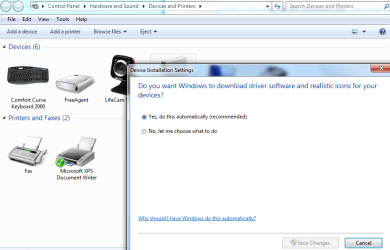
. Did you enable Auto updating drivers from the blue link?

Then did you keep running "all rounds" of updates with reboots until there are no more?
 
It says it's "automatic".
 

Attachments

  • Windows 7 Drivers Automatic Updates.png
    Windows 7 Drivers Automatic Updates.png
    37 KB · Views: 2

My Computer My Computer

At a glance

Windows 8 Pro 64-Bit8.0GB RAMAMD Radeon HD 6410D
Computer type
PC/Desktop
Computer Manufacturer/Model Number
CyberPowerPC
OS
Windows 8 Pro 64-Bit
Memory
8.0GB RAM
Graphics Card(s)
AMD Radeon HD 6410D
Antivirus
Windows Defender
Browser
Mozilla Firefox
Again, you may need to reboot and try again. Sometimes when a bunch fail like this, you have to keep trying and rebooting over and over and this sometimes only gets one installed at a time - but at least they all get done.
 

My Computer My Computer

Computer type
PC/Desktop
Back
Top