
How can I recover data from HDD now showing as Unallocated?

grasstuft

New member
Local time
1:28 PM
Messages
2
Hi,

I'm trying to recover the data (including some treasured family photos) from a Western Digital 320GB HDD that died in my sister's desktop HP PC using my Windows 7 work Dell laptop. I can only see the disk using Disk Management, where it shows as unallocated.
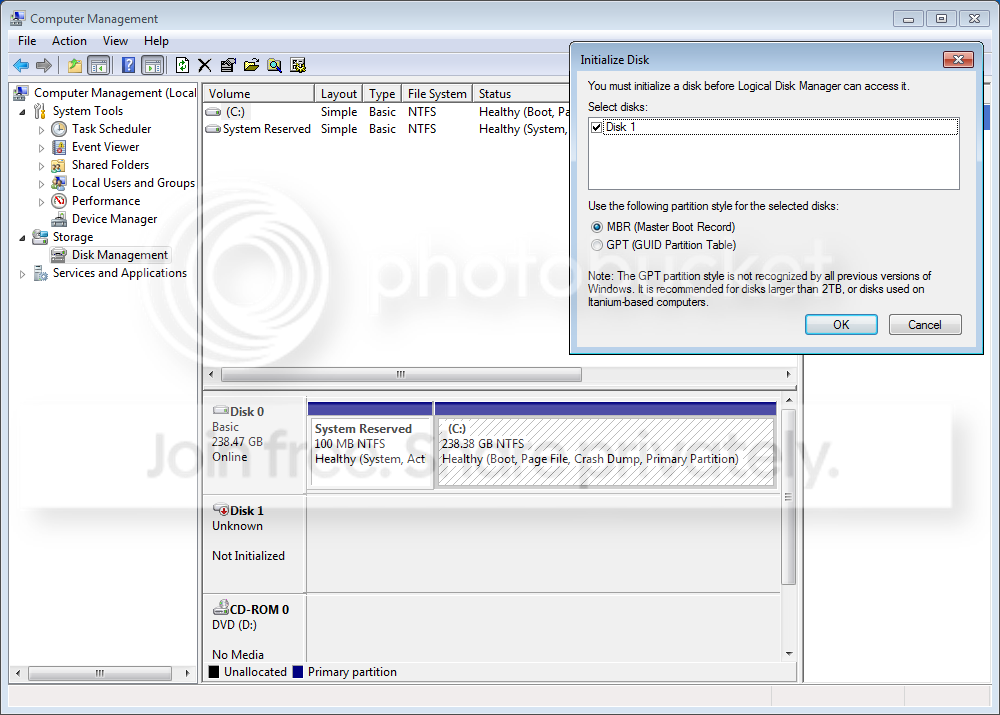
disk-man_zps05e36060.png


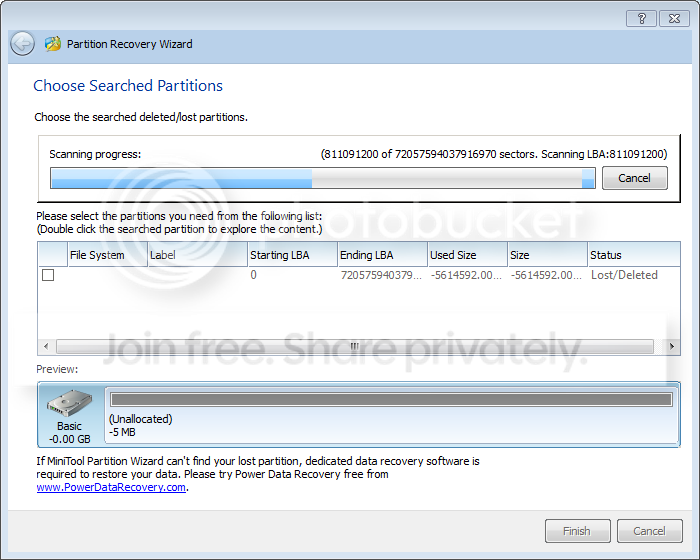
The drive itself failed (was making horrible clicking noises) and I have since replaced the board using a duplicate drive bought from eBay. I have been following advice from this thread, and have been running a so-called 'quick scan' using the free version of Mini Tool Partition Wizard Home Edition's Partition Recovery Wizard. It's been running for over 5 days now on a 320GB drive, and is only a fraction of the way through.
prw-ss_zpsa61b76a0.png


So my question is this, am I wasting my time doing the 'quick scan'? At this rate I will be lucky if it finishes before Christmas. Please someone tell me there's a faster way?
 

My Computer My Computer

At a glance

Windows 7
Computer type
PC/Desktop
Computer Manufacturer/Model Number
Dell
OS
Windows 7
The number of sectors shown on the PRW image seems way too large for a 320GB HDD. Usually when a partition is lost the HDD has died or is dying. The clicking noise you heard is evidence the drive is gone. There's only two moving parts in an HDD, the spinning disks/platters and the Voice Coil Relay that moves the arms that hold read/write heads across the disk/s, the clicking is from the VCR 'snapping' the arms back against the stop/rest.
How a Hard Drive Works - YouTube
 

My Computer My Computer

At a glance

Windows 7 Ultimate 64-bit, Windows 8.1 64-bit...
Computer type
PC/Desktop
Computer Manufacturer/Model Number
Customs, Dell, Gateway, HP, Toshiba, Acer, ASUS
OS
Windows 7 Ultimate 64-bit, Windows 8.1 64-bit, Mac OS X 10.10, Linux Mint 17, Windows 10 Pro TP
Keyboard
Microsoft
Mouse
Microsoft
Who advised you to change the board? !!!!

How did you determine the board was defective?!!!!

Did the board you replaced have the same exact part Number?!!!!

What if it was not the board but a physically damaged mechanical?!!!!!

That thread you had mentioned - that damn jumanji's post - does not apply here and who advised that?

From what I see now, and the questionable things you have done - I have already questioned - I am afraid you are nowhere near any salvation. *sigh*

IMO, you may perhaps need a professional recovery service.

Anyway, wait to see if it catches someone else's expertise here.
 

My Computer My Computer

At a glance

Windows 7 Home Premium 32 bit
OS
Windows 7 Home Premium 32 bit
Who advised you to change the board? !!!!

I got the idea from a YouTube video. :o

How did you determine the board was defective?!!!!

It was a shot in the dark, but I think I was right because the drive is not clicking and at least is now showing up in Disk Management, whereas it wasn't before.

Did the board you replaced have the same exact part Number?!!!!

The drive had the same model no, and the board number was near enough. :D

What if it was not the board but a physically damaged mechanical?!!!!!

I am sure it was the board, see above.

That thread you had mentioned - that damn jumanji's post - does not apply here and who advised that?

LOL, it was me. I should have asked a week ago granted, but at least I have a non-clicking semi-recognized drive now (although that's not much use if I can't see the data on it).

IMO, you may perhaps need a professional recovery service.

That is what I am trying to avoid, but if all else fails.....

Anyway, wait to see if it catches someone else's expertise here.

Thanks, will do.
 

My Computer My Computer

At a glance

Windows 7
Computer type
PC/Desktop
Computer Manufacturer/Model Number
Dell
OS
Windows 7
If PW Partition Recovery fails since it is only for deleted OS's, then next I would try the PW Data Recovery Wizard from its boot disk or Recuva - Features.

These are more lightweight. The best solution I know to try to know for sure if data is recoverable yourself is Get Data Back, which will not charge you until it actually finds data.
 
Back
Top