Solved How can i rename my wireless network connection?

Thanks for trying to help CommonTater very appreciated. :D

But you have reached the same conclusion i've reached in my last post before this...i should not mess with the bloo3$# register. ;)

No problem... maybe the others will have better suggestions.

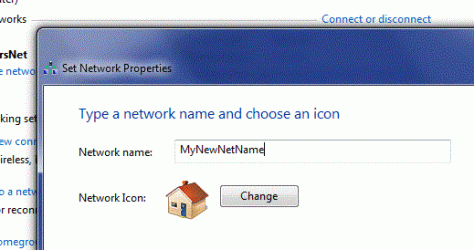
In your place I'd rename it with the right click method I showed you for the display name and leave the registry entries alone, as we agree.

I do get into the registry a lot, I'm not afraid to tinker so long as I have some basic idea what I'm messing with but experience has taught me that hardware device settings are not something you mess with.

I can't rename either of them, the wireless connection name nor the wireless adaptar name. (if i want to change them to their original name windows 7 says that they already exist).
 

My Computer My Computer

At a glance

Microsoft Windows 7 Ultimate 64 bits 7601 Mul...Intel(R) Core(TM) i7-3770K CPU @ 3.50GHz8.00 GBNVIDIA GeForce GTX 670
Computer type
PC/Desktop
Computer Manufacturer/Model Number
Custom Build
OS
Microsoft Windows 7 Ultimate 64 bits 7601 Multiprocessor Free Service Pack 1
CPU
Intel(R) Core(TM) i7-3770K CPU @ 3.50GHz
Motherboard
ASUSTeK Computer INC. P8Z68-V PRO GEN3
Memory
8.00 GB
Graphics Card(s)
NVIDIA GeForce GTX 670
Sound Card
Omega Striker
Monitor(s) Displays
Viewsonic vx2250wm
Screen Resolution
1920 x 1080 x 32 bits (4294967296 colors) @ 60 Hz
Hard Drives
V9CPETXT
Seagate 1TB.
PSU
Corsair Gold Series AX850
Case
nvidia 690 advanced II
Cooling
Air
Thanks for trying to help CommonTater very appreciated. :D

But you have reached the same conclusion i've reached in my last post before this...i should not mess with the bloo3$# register. ;)

No problem... maybe the others will have better suggestions.

In your place I'd rename it with the right click method I showed you for the display name and leave the registry entries alone, as we agree.

I do get into the registry a lot, I'm not afraid to tinker so long as I have some basic idea what I'm messing with but experience has taught me that hardware device settings are not something you mess with.

I can't rename either of them, the wireless connection name nor the wireless adaptar name. (if i want to change them to their original name windows 7 says that they already exist).

So... rename them something else... Like "Wireless" and "Lan"... or something to your taste. I know it's a pain but the alternative is to ignore the original problem entirely...
 

My Computer My Computer

At a glance

XP Pro SP3 X86 / Win7 Pro X86Amd 64 x2 4200 (2.4ghz)Kingston DDR2 800 2gbNvidia GF-8400
Computer Manufacturer/Model Number
Homebrew
OS
XP Pro SP3 X86 / Win7 Pro X86
CPU
Amd 64 x2 4200 (2.4ghz)
Motherboard
Asus M2N-MX SE Plus
Memory
Kingston DDR2 800 2gb
Graphics Card(s)
Nvidia GF-8400
Sound Card
Realtek on Motherboard
Monitor(s) Displays
Acer x-193bw
Screen Resolution
1440 x 900
Hard Drives
Western Digital 500g
PSU
350watt In-Win
Case
In-Win
Cooling
Air
Keyboard
yes
Mouse
yes
Internet Speed
5mpbs
Other Info
Also ASRock ION 330 as HTPC (on XP).
Acer Aspire as GP netbook (on XP).
No problem... maybe the others will have better suggestions.

In your place I'd rename it with the right click method I showed you for the display name and leave the registry entries alone, as we agree.

I do get into the registry a lot, I'm not afraid to tinker so long as I have some basic idea what I'm messing with but experience has taught me that hardware device settings are not something you mess with.

I can't rename either of them, the wireless connection name nor the wireless adaptar name. (if i want to change them to their original name windows 7 says that they already exist).

So... rename them something else... Like "Wireless" and "Lan"... or something to your taste. I know it's a pain but the alternative is to ignore the original problem entirely...

Agree, messing with the registry made more harm than good, with XP it was easy to solve all this.
 

My Computer My Computer

At a glance

Microsoft Windows 7 Ultimate 64 bits 7601 Mul...Intel(R) Core(TM) i7-3770K CPU @ 3.50GHz8.00 GBNVIDIA GeForce GTX 670
Computer type
PC/Desktop
Computer Manufacturer/Model Number
Custom Build
OS
Microsoft Windows 7 Ultimate 64 bits 7601 Multiprocessor Free Service Pack 1
CPU
Intel(R) Core(TM) i7-3770K CPU @ 3.50GHz
Motherboard
ASUSTeK Computer INC. P8Z68-V PRO GEN3
Memory
8.00 GB
Graphics Card(s)
NVIDIA GeForce GTX 670
Sound Card
Omega Striker
Monitor(s) Displays
Viewsonic vx2250wm
Screen Resolution
1920 x 1080 x 32 bits (4294967296 colors) @ 60 Hz
Hard Drives
V9CPETXT
Seagate 1TB.
PSU
Corsair Gold Series AX850
Case
nvidia 690 advanced II
Cooling
Air

Attachments

  • Capture.GIF
    Capture.GIF
    23.7 KB · Views: 15
Last edited by a moderator:

My Computer My Computer

At a glance

Win7 32-bit
OS
Win7 32-bit
Fixed here - How do I manually remove a corrupted, hidden, wireless network adapter - Microsoft Community

Open a command line window and type the following two lines:

set devmgr_show_nonpresent_devices=1
start devmgmt.msc

In this Special Device Manager Window; on the menu, click View then Show Hidden Devices

The unwanted devices will appear dimmed. You can right-click on them from there and uninstall them.

Then go back to your network center and rename your adapters to what you want without the # sign.
 

My Computer My Computer

At a glance

Windows 7 Ultimate x64
OS
Windows 7 Ultimate x64
Fixed here - How do I manually remove a corrupted, hidden, wireless network adapter - Microsoft Community

Open a command line window and type the following two lines:

set devmgr_show_nonpresent_devices=1
start devmgmt.msc

In this Special Device Manager Window; on the menu, click View then Show Hidden Devices

The unwanted devices will appear dimmed. You can right-click on them from there and uninstall them.

Then go back to your network center and rename your adapters to what you want without the # sign.

What this command line did was, it opened a special device manager window which not only had the hidden devices but greyed-out hidden devices (not viewable in regular device manager)

Once I removed those greyed out versions by uninstalling them, I was able to rename my 'Wireless Network Connection 3' to just 'Wireless Network Connection'.

Damn! That '3' annoyed the hell out of me!
 

My Computer My Computer

At a glance

Windows 7 Ultimate x64
OS
Windows 7 Ultimate x64
I tried to last method posted above and found a hidden "Ras Async Adapter" that I couldn't uninstall or disable. I tried a workaround where I renamed the driver file to a .bak but after that it disappeared from the Device Manager completely. I still wasn't able to rename my connection from "Wireless Network Connection 2" back to just "Wireless Network Connection."

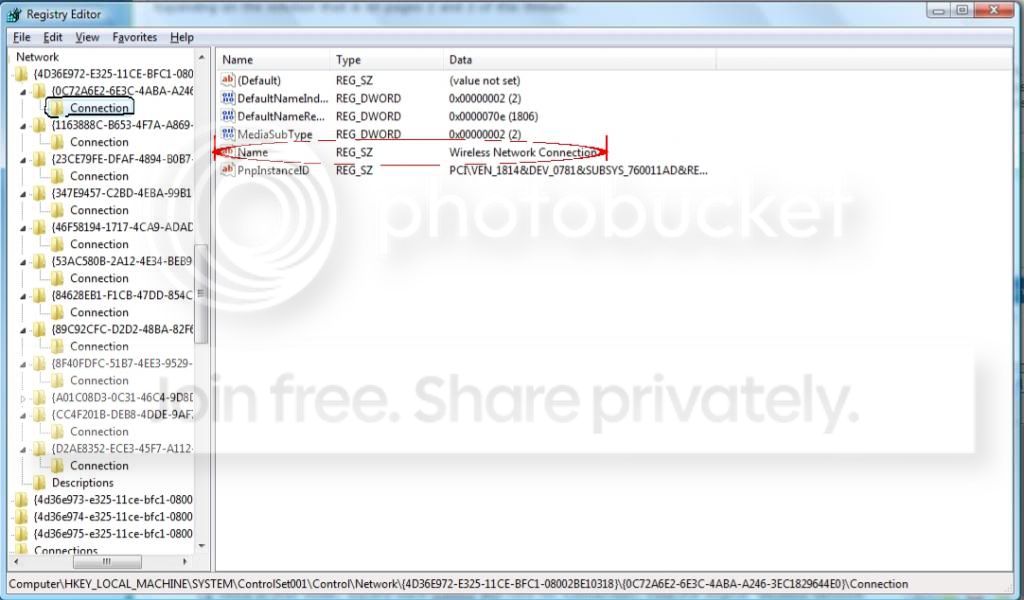
Expanding on the solution that is on pages 2 and 3 of this thread...

HKEY_LOCAL_MACHINE > SYSTEM > ControlSet001 > Control > Network > {4D36E972-E325-11CE-BFC1-08002BE10318}

Once in that folder, expand each subkey and click on "Connection." Find the original "Wireless Network Connection" and "Wireless Network Connection 2" (or whatever yours shows up as) as 'Name', modify the key for the former to one that isn't being used (in my case, "Wireless Network Connection 3," but those with multiple numbers will be better off with "CRAZZZY"), then rename the latter 'Name' key to "Wireless Network Connection." Then, optionally, you can rename the first to "Wireless Network Connection 2."

Project01.jpg
 

My Computer My Computer

At a glance

Windows 7 x64AMD Turion II M500 @ 2200MHz4096MB (2 x 2048 DDR2-SDRAM )AMD M880G with ATI Mobility Radeon HD 4200
Computer Manufacturer/Model Number
HP dv4-2048ca
OS
Windows 7 x64
CPU
AMD Turion II M500 @ 2200MHz
Motherboard
HP 3642
Memory
4096MB (2 x 2048 DDR2-SDRAM )
Graphics Card(s)
AMD M880G with ATI Mobility Radeon HD 4200
Sound Card
HP SB600 High Definition Audio Controller
Monitor(s) Displays
SAMSUNG - 14 inches
Screen Resolution
1280 x 800
Hard Drives
Western Digital WD50 00BEVT-60ZAT1 SATA Disk Device (500GB)
Keyboard
Microsoft Natural PS/2 Keyboard with HP QLB
Mouse
HID-compliant mouse
Back
Top