How Can I Tell Which Processes I Can Turn Off

BruhthaKuga

New member
Local time
6:51 PM
Messages
71
Location
Gamma Quadrant
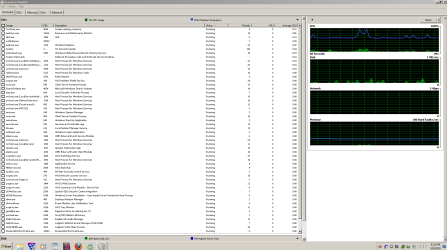
I got a serious Hard on, I shouldn't be having performance problems like I do. When I check CPU usage with no apps running what is the blue line? It's at about 65% is that CPU usage? I also see some green at the bottom which seems more like it?

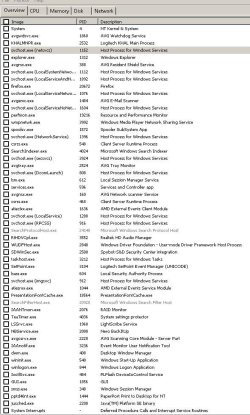
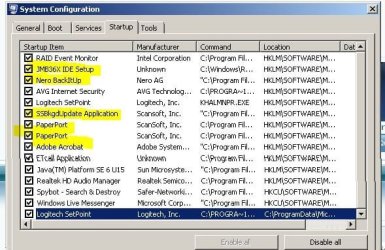
How do I tell which of the processes listed for CPU and RAM that I can not come on at start up. Some of them I know like Paper Port, I don't use it often and only want it on when I am directly using it. Others I don't know what they are.

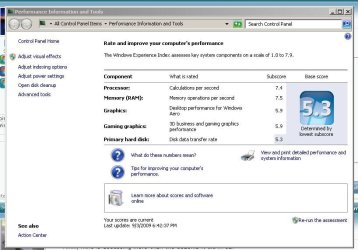
I believe that some of my performance issues came when I updated my graphics drivers. With a MSI 4670HD whose drivers are best?
 

Attachments
  • Resource Monitor 9-3-9.PNG
    Resource Monitor 9-3-9.PNG
    39.8 KB · Views: 317
  • CPU Usage 9-3-9 All.JPG
    CPU Usage 9-3-9 All.JPG
    105.8 KB · Views: 252
  • Memory Usage All 9-3-9.JPG
    Memory Usage All 9-3-9.JPG
    115.5 KB · Views: 148
  • Windows Experience Index 9-3-9.JPG
    Windows Experience Index 9-3-9.JPG
    66.5 KB · Views: 185

My Computer My Computer

At a glance

64 bit Windows 7 Ultimate (Free from Windows ...I7 920 (stinking CO)6GB Patriot Viper DDR3 (3 x 2GB) 1333 (PC3 10...MSI 4670 1GB
Computer Manufacturer/Model Number
z#k&x%
OS
64 bit Windows 7 Ultimate (Free from Windows 7 Launch Event)
CPU
I7 920 (stinking CO)
Motherboard
Gigabyte GA-EX58-UD4P
Memory
6GB Patriot Viper DDR3 (3 x 2GB) 1333 (PC3 10666) 7-7-7-20
Graphics Card(s)
MSI 4670 1GB
Sound Card
Realtek ALC889A (onboard)
Monitor(s) Displays
Samsung LN52A650
Screen Resolution
1920 X1080
Hard Drives
32GB OCZ Vertex 1VTX30G SSD (OS Boot Drive)

80GB WD Caviar Blue WD800JD (Auxilery Drive for SSD off loading)

500GB Seagate Momentus ST9500325AS (Personal Storage)
PSU
Antec EA750
Case
Antec 180 I got from Craigslist free? Or was it Freecycle
Cooling
Intel OEM, Case side off, PC Duct Taped to Window A/C unit
Keyboard
Piece of Crap I Found Dumpster Diving
Mouse
Logitech Optical Trackman (Tracking Ball)
Internet Speed
Varies, Downloads from 121MB to 12MB Upload from 3MB to 25MB
Other Info
Uber Chronometric Particle Emitter with the Verteron Exovector extrapolated to the sub neutrino level and Hyper Calibrated with a zero gravity tritonium / unobtainium alloy infused Collaborating Meter
Blue line is frequency of the cpu.
Your cpu has power save function that adjust frequency when needed.
Green line is cpu usage, which seems pretty nice.
Nothing to worry about.

To know what processes can be excluded from boot, you need to type the filenames unknown to you in Google and research the several answers you get.

Especially look for the comments like process is not needed, or not critical, or not necessary.

Then still be careful, and try to link the given comments to what you know of your machine and installed software/hardware.

If you are confident the startup is not needed, you can disable it.

Then, and this is very important!!!. You disable them one by one.
I mean disable one, and reboot, to see what happens.

This way you will always know which one to re-enable when it goes wrong.

Good luck, and good learning. :D

greetz
 

My Computer My Computer

At a glance

Win7 Build 7600 x86Pentium II 300MHz32mb EDO RAMDiamond Viper
OS
Win7 Build 7600 x86
CPU
Pentium II 300MHz
Motherboard
Asus
Memory
32mb EDO RAM
Graphics Card(s)
Diamond Viper
Sound Card
Soundblaster 16
Monitor(s) Displays
14" AOC CRT 16K color
Screen Resolution
800x600
Hard Drives
300mb Quantum fireball
PSU
110 Watts
Cooling
Passive
Keyboard
Trust Ergonomic
Mouse
Generic
Internet Speed
256K u 128K d
If I may add one thing to the above excellent potential solution - Rather than disable a service set it's start mode to manual - this will ensure that a service that is not needed will not be started but if you change something in the system that requires the service it will automatically start as required
 

My Computers My Computers

  • At a glance

    Windows 11 Pro x64 [Latest Release and Releas...Ryzen 9 5950X, 3.8 - 5.2 MHz64GB [2 x 32GB] DDR4 3200MHz4GB NVIDIA GEFORCE GTX 1650 Ti
    Computer type
    PC/Desktop
    Computer Manufacturer/Model Number
    ChillBlast - Custom to my design
    OS
    Windows 11 Pro x64 [Latest Release and Release Preview]
    CPU
    Ryzen 9 5950X, 3.8 - 5.2 MHz
    Motherboard
    Asus Prime X570-Pro
    Memory
    64GB [2 x 32GB] DDR4 3200MHz
    Graphics Card(s)
    4GB NVIDIA GEFORCE GTX 1650 Ti
    Sound Card
    On-board SPDIF to 5.1 System + HDMI [5.1 system]
    Monitor(s) Displays
    32" UHD 32 Bit HDR Monitor + 43" UHD 4K 32Bit HDR TV
    Screen Resolution
    2 x 3840 x 2160 @60Hz
    Hard Drives
    1TB M2 SSD OS, 500GB Fast Access SSD, 2 x 8TB Data + Various Externals from 1TB to 4TB, 10TB NAS
    PSU
    NZXT C750 80 PLUS Gold 750W Modular PSU
    Case
    Workstation Case [Matt Black]
    Cooling
    NZXT Kraken X63 280mm CPU Cooler +2x Quiet Case fans
    Keyboard
    Logitech Wireless MX Keys & K400 + others
    Mouse
    Logitech Wireless MX Master 3S
    Internet Speed
    920 MB Down 50 MB Up
    Antivirus
    BitDefender Total Security Pro
    Browser
    Chrome (always run latest Non-Beta)
    Other Info
    Also run ...
    Laptop - Quad 8GB - Windows 10 Pro x64
    Nexus 7 Android tablet x2
    Samsung 10.2" tablet
    Blackview TAB 8 4G Android Tablet c/w Keyboard
    Wacom Intuos Pro Medium Pen Pad
    Wacom Intuos Pro Small Pen Pad
    Wacom Expresskeys Remote
    Loopdeck+ Graphics Controller
    Shuttle Pro v2 Control
  • At a glance

    Windows 11 Pro x64 Latest RPIntel I7 10750H 5.0GHz32GB [2x16GB] DDR4 2933 MHznVidia GTX1650Ti 4 GB GDDR6
    Computer type
    Laptop
    System Manufacturer/Model Number
    Dell XPS 17 10750H
    OS
    Windows 11 Pro x64 Latest RP
    CPU
    Intel I7 10750H 5.0GHz
    Motherboard
    Dell XPS
    Memory
    32GB [2x16GB] DDR4 2933 MHz
    Graphics Card(s)
    nVidia GTX1650Ti 4 GB GDDR6
    Sound Card
    Stock [Realtek] 4 Speaker
    Monitor(s) Displays
    17" IPS UHD+ Infinity Edge Touchscreen
    Screen Resolution
    3840 x 2400
    Hard Drives
    2TB M2 NVMe, 4TB External + various 500GB & 1TB External NVMe (also have access to spinner HDD from
    PSU
    Stock
    Case
    Stock XPS Aluminium & Carbon Fibre
    Cooling
    Stock - Active Fan Control
    Keyboard
    Backlit + Various Logitech
    Mouse
    Stock Track Pad + Logitech MX Trackball
    Internet Speed
    72 MB Down 18MB Up
    Browser
    Chrome
    Other Info
    Also run ...
    Laptop - Quad 8GB - Windows 10 Pro x64
    Nexus 7 Android tablet x2
    10.2" tablet
    Sony Z3 Android Smartphone
    Wacom Intuos Pro Medium Pen Pad
    Wacom Intuos Pro Small Pen Pad
    Wacom Expresskeys Remote
    Loopdeck+ Graphics Controller
    Shuttle Pro v2 Control Pad
    10TB NAS
If I may add one thing to the above excellent potential solution - Rather than disable a service set it's start mode to manual - this will ensure that a service that is not needed will not be started but if you change something in the system that requires the service it will automatically start as required

Excellent addition, I might add. :p:D

Thanks.

PS for the OP:
To go to services and disable them type services.msc in the start->search box
Be extra careful with services. Most are essential.

To disable regular program exe files, type msconfig in the start->search box
and go to startup tab
 

My Computer My Computer

At a glance

Win7 Build 7600 x86Pentium II 300MHz32mb EDO RAMDiamond Viper
OS
Win7 Build 7600 x86
CPU
Pentium II 300MHz
Motherboard
Asus
Memory
32mb EDO RAM
Graphics Card(s)
Diamond Viper
Sound Card
Soundblaster 16
Monitor(s) Displays
14" AOC CRT 16K color
Screen Resolution
800x600
Hard Drives
300mb Quantum fireball
PSU
110 Watts
Cooling
Passive
Keyboard
Trust Ergonomic
Mouse
Generic
Internet Speed
256K u 128K d
You Doodes are Awesome, Thanxabil!
 

My Computer My Computer

At a glance

64 bit Windows 7 Ultimate (Free from Windows ...I7 920 (stinking CO)6GB Patriot Viper DDR3 (3 x 2GB) 1333 (PC3 10...MSI 4670 1GB
Computer Manufacturer/Model Number
z#k&x%
OS
64 bit Windows 7 Ultimate (Free from Windows 7 Launch Event)
CPU
I7 920 (stinking CO)
Motherboard
Gigabyte GA-EX58-UD4P
Memory
6GB Patriot Viper DDR3 (3 x 2GB) 1333 (PC3 10666) 7-7-7-20
Graphics Card(s)
MSI 4670 1GB
Sound Card
Realtek ALC889A (onboard)
Monitor(s) Displays
Samsung LN52A650
Screen Resolution
1920 X1080
Hard Drives
32GB OCZ Vertex 1VTX30G SSD (OS Boot Drive)

80GB WD Caviar Blue WD800JD (Auxilery Drive for SSD off loading)

500GB Seagate Momentus ST9500325AS (Personal Storage)
PSU
Antec EA750
Case
Antec 180 I got from Craigslist free? Or was it Freecycle
Cooling
Intel OEM, Case side off, PC Duct Taped to Window A/C unit
Keyboard
Piece of Crap I Found Dumpster Diving
Mouse
Logitech Optical Trackman (Tracking Ball)
Internet Speed
Varies, Downloads from 121MB to 12MB Upload from 3MB to 25MB
Other Info
Uber Chronometric Particle Emitter with the Verteron Exovector extrapolated to the sub neutrino level and Hyper Calibrated with a zero gravity tritonium / unobtainium alloy infused Collaborating Meter

My Computer My Computer

At a glance

Windows 8.1 PRO3rd Generation Intel Core i7‐3612QM CPU @ 2.1...8GB DDR3NVIDIA GeForce GT 525M (128 bit), 1GB Grpahics
Computer type
PC/Desktop
Computer Manufacturer/Model Number
DELL VOSTRO 3650
OS
Windows 8.1 PRO
CPU
3rd Generation Intel Core i7‐3612QM CPU @ 2.10GHZ
Memory
8GB DDR3
Graphics Card(s)
NVIDIA GeForce GT 525M (128 bit), 1GB Grpahics
Screen Resolution
1920X1080
Hard Drives
750GB 5400RPM
Just a reminder to be extremely careful here. Many, but not all, services are dependant on the running of other service(s). In turn, they affect the operation of yet other service(s).

Before you change the setting of a service from its default, check for any implications this may have on other services. Generally speaking, it is fairly safe to disable those services which don't depend on others and upon which others don't depend.

Nigel's advice here http://www.sevenforums.com/performa...tell-processes-i-can-turn-off.html#post253343 is sound advice. For more information, see http://www.sevenforums.com/tutorials/2495-services-start-disable.html

If in any doubt, err on the side of caution and leave the service on its default setting.
 

My Computer My Computer

At a glance

Windows 8.1 Pro RTM x64Intel Core-i5-3570K 4-core @ 3.4GHz (Ivy Brid...4 x 4GB DDR3-1600 Corsair Vengeance CMZ8GX3M2...MSI GeForce GTX770 Gaming OC 2GB
Computer type
PC/Desktop
Computer Manufacturer/Model Number
Dwarf Dwf/11/2012 r09/2013
OS
Windows 8.1 Pro RTM x64
CPU
Intel Core-i5-3570K 4-core @ 3.4GHz (Ivy Bridge) (OC 4.4GHz)
Motherboard
ASRock Z77 Extreme4-M
Memory
4 x 4GB DDR3-1600 Corsair Vengeance CMZ8GX3M2A1600C9B (16GB)
Graphics Card(s)
MSI GeForce GTX770 Gaming OC 2GB
Sound Card
Realtek High Definition on board solution (ALC 898)
Monitor(s) Displays
ViewSonic VA1912w Widescreen (VGA)
Screen Resolution
1440x900
Hard Drives
OCZ Agility 3 SSD 120GB SATA III x2 (RAID 0)
Samsung HD501LJ 500GB SATA II x2
Hitachi HDS721010CLA332 1TB SATA II
Iomega 1.5TB Ext USB 2.0
WD 2.0TB Ext USB 3.0
PSU
XFX Pro Series 850W Semi-Modular
Case
Gigabyte IF233
Cooling
1 x 120mm Front Inlet 1 x 120mm Rear Exhaust
Keyboard
Microsoft Comfort Curve Keyboard 3000 (USB)
Mouse
Microsoft Comfort Mouse 3000 for Business (USB)
Internet Speed
NetGear DG834Gv3 ADSL Modem/Router (Ethernet) ~4.0 Mb/s (O2)
Antivirus
Avast! 8.0.1497
Browser
IE 11
Other Info
Optical Drive: HL-DT-ST BD-RE BH10LS30 SATA Bluray
Lexmark S305 Printer/Scanner/Copier (USB)
WEI Score: 8.1/8.1/8.5/8.5/8.25
Asus Eee PC 1011PX Netbook (Windows 7 x86 Starter)
Services Leblanc

I did the msconfig thing and there are some things I don't want to start at startup, if I disable them in msconfig (uncheck the box) am I "Disabling" only the "Automatic Start up" of the program? Will the program still work when called up on manually?

As for the services.msc there also are some things I don't want to start at start up but would like for them to start manually. Cart Le blanc
 

Attachments

  • msconfig  9-5-9.jpg
    msconfig 9-5-9.jpg
    63.7 KB · Views: 227
  • suspicious Start up Services  9-5-9.jpg
    suspicious Start up Services 9-5-9.jpg
    385.7 KB · Views: 141

My Computer My Computer

At a glance

64 bit Windows 7 Ultimate (Free from Windows ...I7 920 (stinking CO)6GB Patriot Viper DDR3 (3 x 2GB) 1333 (PC3 10...MSI 4670 1GB
Computer Manufacturer/Model Number
z#k&x%
OS
64 bit Windows 7 Ultimate (Free from Windows 7 Launch Event)
CPU
I7 920 (stinking CO)
Motherboard
Gigabyte GA-EX58-UD4P
Memory
6GB Patriot Viper DDR3 (3 x 2GB) 1333 (PC3 10666) 7-7-7-20
Graphics Card(s)
MSI 4670 1GB
Sound Card
Realtek ALC889A (onboard)
Monitor(s) Displays
Samsung LN52A650
Screen Resolution
1920 X1080
Hard Drives
32GB OCZ Vertex 1VTX30G SSD (OS Boot Drive)

80GB WD Caviar Blue WD800JD (Auxilery Drive for SSD off loading)

500GB Seagate Momentus ST9500325AS (Personal Storage)
PSU
Antec EA750
Case
Antec 180 I got from Craigslist free? Or was it Freecycle
Cooling
Intel OEM, Case side off, PC Duct Taped to Window A/C unit
Keyboard
Piece of Crap I Found Dumpster Diving
Mouse
Logitech Optical Trackman (Tracking Ball)
Internet Speed
Varies, Downloads from 121MB to 12MB Upload from 3MB to 25MB
Other Info
Uber Chronometric Particle Emitter with the Verteron Exovector extrapolated to the sub neutrino level and Hyper Calibrated with a zero gravity tritonium / unobtainium alloy infused Collaborating Meter
I've just installed x64 and followed the steps at the Black Viper site, with no issues so far.
 

My Computer My Computer

At a glance

Windows 7 Ultimate x64 ®™Intel Core 2 Duo (2.2 GHz)2x 2GB Corsair (667 MHz)NVIDIA 8600M GS (256MB)
Computer Manufacturer/Model Number
Sony Vaio FZ21Z
OS
Windows 7 Ultimate x64 ®™
CPU
Intel Core 2 Duo (2.2 GHz)
Motherboard
Sony (Intel Chipset)
Memory
2x 2GB Corsair (667 MHz)
Graphics Card(s)
NVIDIA 8600M GS (256MB)
Sound Card
Sigmatel
Monitor(s) Displays
15.4" TFT X-Black
Screen Resolution
1280x800
Hard Drives
Western Digital 300GB Scorpio Black (7200rpm)
Mouse
Logitech Anywhere MX
Internet Speed
Sky 5MB
I recommend you Glary Utlities. Its process manager provide index of the programs' security displaying on the interface, in form of bars of red and green. The longer the red bar is, the less secure to run it and the less necessary to let it start up with PC booting. I think these bars are fairly valuable for users who don't know what programs are unsafe and unnecessary.:p
 

My Computer My Computer

At a glance

win xp
OS
win xp
If I may add one thing to the above excellent potential solution - Rather than disable a service set it's start mode to manual - this will ensure that a service that is not needed will not be started but if you change something in the system that requires the service it will automatically start as required


This does not work ..
Many unnecessary services run anyway .. even in Manual ..


What you have to do is search each service that is running ..
I know it may seem tedious but if you want to do it safely.. that's the only way..

That's how i did it.. i took the time to research and read around. I also did a few trial & errors of disabling and testing to see if it caused any ill-effects.

You can't go off of what people say.. because they may not use their computer for the same reasons you do.. also their computer setup may be different..


You can start here:
http://www.sevenforums.com/performa...-how-increase-windows-performance-safely.html
 

My Computer My Computer

At a glance

Windows 8.1 (x64)AMD Quad-Core4GBRadeon 8 Series
Computer type
PC/Desktop
Computer Manufacturer/Model Number
HP Pavilion TS 14
OS
Windows 8.1 (x64)
CPU
AMD Quad-Core
Memory
4GB
Graphics Card(s)
Radeon 8 Series
Screen Resolution
1330x768
Internet Speed
Broadband
Antivirus
None
Browser
IE 11 (Gecko)
Other Info
TinyWall
If I may add one thing to the above excellent potential solution - Rather than disable a service set it's start mode to manual - this will ensure that a service that is not needed will not be started but if you change something in the system that requires the service it will automatically start as required


This does not work ..
Many unnecessary services run anyway .. even in Manual ..

A service set to manual will only be started if it is called by some other process, which needs it. This will, if that process is another service, be shown as a dependency, the only real downside to a manual setting is the potential delay when services chain load that may cause unpredictable results
 

My Computers My Computers

  • At a glance

    Windows 11 Pro x64 [Latest Release and Releas...Ryzen 9 5950X, 3.8 - 5.2 MHz64GB [2 x 32GB] DDR4 3200MHz4GB NVIDIA GEFORCE GTX 1650 Ti
    Computer type
    PC/Desktop
    Computer Manufacturer/Model Number
    ChillBlast - Custom to my design
    OS
    Windows 11 Pro x64 [Latest Release and Release Preview]
    CPU
    Ryzen 9 5950X, 3.8 - 5.2 MHz
    Motherboard
    Asus Prime X570-Pro
    Memory
    64GB [2 x 32GB] DDR4 3200MHz
    Graphics Card(s)
    4GB NVIDIA GEFORCE GTX 1650 Ti
    Sound Card
    On-board SPDIF to 5.1 System + HDMI [5.1 system]
    Monitor(s) Displays
    32" UHD 32 Bit HDR Monitor + 43" UHD 4K 32Bit HDR TV
    Screen Resolution
    2 x 3840 x 2160 @60Hz
    Hard Drives
    1TB M2 SSD OS, 500GB Fast Access SSD, 2 x 8TB Data + Various Externals from 1TB to 4TB, 10TB NAS
    PSU
    NZXT C750 80 PLUS Gold 750W Modular PSU
    Case
    Workstation Case [Matt Black]
    Cooling
    NZXT Kraken X63 280mm CPU Cooler +2x Quiet Case fans
    Keyboard
    Logitech Wireless MX Keys & K400 + others
    Mouse
    Logitech Wireless MX Master 3S
    Internet Speed
    920 MB Down 50 MB Up
    Antivirus
    BitDefender Total Security Pro
    Browser
    Chrome (always run latest Non-Beta)
    Other Info
    Also run ...
    Laptop - Quad 8GB - Windows 10 Pro x64
    Nexus 7 Android tablet x2
    Samsung 10.2" tablet
    Blackview TAB 8 4G Android Tablet c/w Keyboard
    Wacom Intuos Pro Medium Pen Pad
    Wacom Intuos Pro Small Pen Pad
    Wacom Expresskeys Remote
    Loopdeck+ Graphics Controller
    Shuttle Pro v2 Control
  • At a glance

    Windows 11 Pro x64 Latest RPIntel I7 10750H 5.0GHz32GB [2x16GB] DDR4 2933 MHznVidia GTX1650Ti 4 GB GDDR6
    Computer type
    Laptop
    System Manufacturer/Model Number
    Dell XPS 17 10750H
    OS
    Windows 11 Pro x64 Latest RP
    CPU
    Intel I7 10750H 5.0GHz
    Motherboard
    Dell XPS
    Memory
    32GB [2x16GB] DDR4 2933 MHz
    Graphics Card(s)
    nVidia GTX1650Ti 4 GB GDDR6
    Sound Card
    Stock [Realtek] 4 Speaker
    Monitor(s) Displays
    17" IPS UHD+ Infinity Edge Touchscreen
    Screen Resolution
    3840 x 2400
    Hard Drives
    2TB M2 NVMe, 4TB External + various 500GB & 1TB External NVMe (also have access to spinner HDD from
    PSU
    Stock
    Case
    Stock XPS Aluminium & Carbon Fibre
    Cooling
    Stock - Active Fan Control
    Keyboard
    Backlit + Various Logitech
    Mouse
    Stock Track Pad + Logitech MX Trackball
    Internet Speed
    72 MB Down 18MB Up
    Browser
    Chrome
    Other Info
    Also run ...
    Laptop - Quad 8GB - Windows 10 Pro x64
    Nexus 7 Android tablet x2
    10.2" tablet
    Sony Z3 Android Smartphone
    Wacom Intuos Pro Medium Pen Pad
    Wacom Intuos Pro Small Pen Pad
    Wacom Expresskeys Remote
    Loopdeck+ Graphics Controller
    Shuttle Pro v2 Control Pad
    10TB NAS
If I may add one thing to the above excellent potential solution - Rather than disable a service set it's start mode to manual - this will ensure that a service that is not needed will not be started but if you change something in the system that requires the service it will automatically start as required


This does not work ..
Many unnecessary services run anyway .. even in Manual ..

A service set to manual will only be started if it is called by some other process, which needs it. This will, if that process is another service, be shown as a dependency, the only real downside to a manual setting is the potential delay when services chain load that may cause unpredictable results


Yes.. like stated earlier.. "Unnecessary" Processes set to Manual will still start ..

In the context you put this in.. you were insinuating that "UNNECESSARY" Processes once put to Manual would not start ...

This person who posted this is looking to boost performance by turning off "UNNECESSARY" Processes ..

For Example:
NBGMonitor Process from NERO:
- Even set to manual.. will start at every boot in the background.. wasting memory..

Only way is to Disable in a Start up Manager or "Msconfig" or "services.msc" ..

there are tons more..
 

My Computer My Computer

At a glance

Windows 8.1 (x64)AMD Quad-Core4GBRadeon 8 Series
Computer type
PC/Desktop
Computer Manufacturer/Model Number
HP Pavilion TS 14
OS
Windows 8.1 (x64)
CPU
AMD Quad-Core
Memory
4GB
Graphics Card(s)
Radeon 8 Series
Screen Resolution
1330x768
Internet Speed
Broadband
Antivirus
None
Browser
IE 11 (Gecko)
Other Info
TinyWall
I believe I read somewhere that you must do them in Services.exe for them to be permament?

I have used Black Viper many times but you must be careful! You might think your ok disabling something by his discription and it wont be right.

I wpuld advise doing one at a time, use your computer for a day or so to give yourself time to use as many programs as you can. You might disable something and all seems fine until you go to use a program a month later and it doesn't work, by then you don't remember what service it was that you disabled that is making it not work.

Whew! That was a winded one for my 1st post!
 

My Computer My Computer

At a glance

W7 ProIntel Core i-5300U16Gb DDR3Intel HD Graphics 5500
Computer type
Laptop
Computer Manufacturer/Model Number
Panasonic Toughbook CF54
OS
W7 Pro
CPU
Intel Core i-5300U
Motherboard
America MegaTrends
Memory
16Gb DDR3
Graphics Card(s)
Intel HD Graphics 5500
Sound Card
SoundMax
Monitor(s) Displays
DFP W/CircularPolarization 1000 Nit Touch
Screen Resolution
1920X1080
Hard Drives
Samsung SSD 850 Pro 512Gb
PSU
N/A
Case
Magnesium
Cooling
Passive
Keyboard
Emissive
Internet Speed
U-Verse Extreme 21MBPS,
Antivirus
MSE, Malwarebytes Professional
tuffbook

not in services.exe, but services.msc. Use cautiously and have a current back up
 

My Computer My Computer

At a glance

Win 8 Release candidate 8400[email protected]4 gigsNvidia 9600M
Computer Manufacturer/Model Number
HP Pavillion dv-7 1005 Tx
OS
Win 8 Release candidate 8400
CPU
[email protected]
Memory
4 gigs
Graphics Card(s)
Nvidia 9600M
Sound Card
HD built-in
Monitor(s) Displays
17" Wxga
Screen Resolution
1440x900
Cooling
none
Internet Speed
45Mb down 5Mb up
Sorry, my bad. I was sitting in my driveway finshing that post after a very LONG day at work.

When I was running Vista, I used to really play around with mine alot. I made a decision to just leave W7 alone in regards to the Services. My machine runs 100% perfect, so why mess with it?
 

My Computer My Computer

At a glance

W7 ProIntel Core i-5300U16Gb DDR3Intel HD Graphics 5500
Computer type
Laptop
Computer Manufacturer/Model Number
Panasonic Toughbook CF54
OS
W7 Pro
CPU
Intel Core i-5300U
Motherboard
America MegaTrends
Memory
16Gb DDR3
Graphics Card(s)
Intel HD Graphics 5500
Sound Card
SoundMax
Monitor(s) Displays
DFP W/CircularPolarization 1000 Nit Touch
Screen Resolution
1920X1080
Hard Drives
Samsung SSD 850 Pro 512Gb
PSU
N/A
Case
Magnesium
Cooling
Passive
Keyboard
Emissive
Internet Speed
U-Verse Extreme 21MBPS,
Antivirus
MSE, Malwarebytes Professional
Back
Top