Solved How do i access hidden partition on my hard drive ?

buttnuggets

New member
Local time
4:49 PM
Messages
4
Location
Scotland
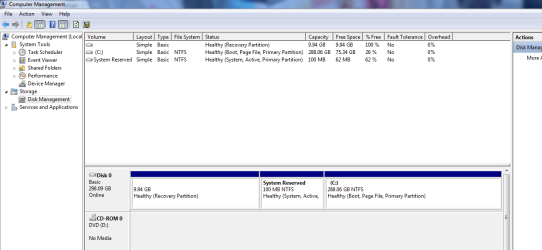
i have a 320 Gb HDD,there is a partition with no name which is nearly 10 Gb which i know has data and programs from clean install..
 

My Computer My Computer

At a glance

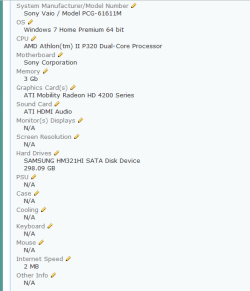
Windows 7 Home Premium 64 bitAMD Athlon(tm) II P320 Dual-Core Processor3 GbATI Mobility Radeon HD 4200 Series
Computer Manufacturer/Model Number
Sony Vaio / Model PCG-61611M
OS
Windows 7 Home Premium 64 bit
CPU
AMD Athlon(tm) II P320 Dual-Core Processor
Motherboard
Sony Corporation
Memory
3 Gb
Graphics Card(s)
ATI Mobility Radeon HD 4200 Series
Sound Card
ATI HDMI Audio
Hard Drives
SAMSUNG HM321HI SATA Disk Device
298.09 GB
Internet Speed
2 MB
Welcome to Windows Seven Forums.

Please post a screenshot of an expanded view of your drive layout in disk management.

http://www.sevenforums.com/tutorials/9733-screenshots-files-upload-post-seven-forums.html

In all probability the partition contains the manufacter's recovery image and as such, should not be touched. If the partition gets corrupted you'll be unable to reinstall Windows unless you have a set of recovery discs or a Windows DVD.

Have you created your recovery discs yet? If not, you should do before you do anything else.
 

My Computer My Computer

At a glance

Windows 7 Ultimate SP1 64-BitIntel Core i7 870 @ 2.93GHz8Gb Dual-Channel DDR3 @ 664MHznVidia GeForce GTX 460 1024MB dedicated RAM
Computer Manufacturer/Model Number
HP Pavilion Elite 495UK
OS
Windows 7 Ultimate SP1 64-Bit
CPU
Intel Core i7 870 @ 2.93GHz
Motherboard
MSI 2A9C (CPU1)
Memory
8Gb Dual-Channel DDR3 @ 664MHz
Graphics Card(s)
nVidia GeForce GTX 460 1024MB dedicated RAM
Sound Card
Realtek HD Audio
Monitor(s) Displays
HP2310i
Screen Resolution
1920 x 1080
Hard Drives
1x1954GB Hitachi HDS22020ALA 330 (RAID), 1x1954GB Hitachi External for backup and storage
PSU
460W
Case
HP Elite
Cooling
Air cooled
Keyboard
Logitech K750 solar-powered keyboard
Mouse
Logitech Wireless M180 mouse
Internet Speed
2Mb
Other Info
Pure Avanti Flow Internet Radio with iPod Dock, 64Gb iPod, HP USB Speakers, Sony MDR-V500 Headphones, Sony Vaio F-Series Laptop
I only wish to check it as i tried doing a clean install by hitting f10 at startup to access restore and it said ther was no execute option which i dont understand as i had done clean install that way before.
 

Attachments

  • disk mngmnt.PNG
    disk mngmnt.PNG
    27.1 KB · Views: 940

My Computer My Computer

At a glance

Windows 7 Home Premium 64 bitAMD Athlon(tm) II P320 Dual-Core Processor3 GbATI Mobility Radeon HD 4200 Series
Computer Manufacturer/Model Number
Sony Vaio / Model PCG-61611M
OS
Windows 7 Home Premium 64 bit
CPU
AMD Athlon(tm) II P320 Dual-Core Processor
Motherboard
Sony Corporation
Memory
3 Gb
Graphics Card(s)
ATI Mobility Radeon HD 4200 Series
Sound Card
ATI HDMI Audio
Hard Drives
SAMSUNG HM321HI SATA Disk Device
298.09 GB
Internet Speed
2 MB
Well, it's definitely your recovery partition, which when used recovers your system to its factory state.

Unless you've created a set of recovery discs you want to leave it well alone.

Have you checked your Start folder to see if there is an option to recover your system?
 

My Computer My Computer

At a glance

Windows 7 Ultimate SP1 64-BitIntel Core i7 870 @ 2.93GHz8Gb Dual-Channel DDR3 @ 664MHznVidia GeForce GTX 460 1024MB dedicated RAM
Computer Manufacturer/Model Number
HP Pavilion Elite 495UK
OS
Windows 7 Ultimate SP1 64-Bit
CPU
Intel Core i7 870 @ 2.93GHz
Motherboard
MSI 2A9C (CPU1)
Memory
8Gb Dual-Channel DDR3 @ 664MHz
Graphics Card(s)
nVidia GeForce GTX 460 1024MB dedicated RAM
Sound Card
Realtek HD Audio
Monitor(s) Displays
HP2310i
Screen Resolution
1920 x 1080
Hard Drives
1x1954GB Hitachi HDS22020ALA 330 (RAID), 1x1954GB Hitachi External for backup and storage
PSU
460W
Case
HP Elite
Cooling
Air cooled
Keyboard
Logitech K750 solar-powered keyboard
Mouse
Logitech Wireless M180 mouse
Internet Speed
2Mb
Other Info
Pure Avanti Flow Internet Radio with iPod Dock, 64Gb iPod, HP USB Speakers, Sony MDR-V500 Headphones, Sony Vaio F-Series Laptop
seavixen32 i have made a repair disk,and in start menu it says to re install i need a disk which i didn't before
 

My Computer My Computer

At a glance

Windows 7 Home Premium 64 bitAMD Athlon(tm) II P320 Dual-Core Processor3 GbATI Mobility Radeon HD 4200 Series
Computer Manufacturer/Model Number
Sony Vaio / Model PCG-61611M
OS
Windows 7 Home Premium 64 bit
CPU
AMD Athlon(tm) II P320 Dual-Core Processor
Motherboard
Sony Corporation
Memory
3 Gb
Graphics Card(s)
ATI Mobility Radeon HD 4200 Series
Sound Card
ATI HDMI Audio
Hard Drives
SAMSUNG HM321HI SATA Disk Device
298.09 GB
Internet Speed
2 MB
theog Soz it took me so long
 

Attachments

  • Capture.PNG
    Capture.PNG
    10.2 KB · Views: 95

My Computer My Computer

At a glance

Windows 7 Home Premium 64 bitAMD Athlon(tm) II P320 Dual-Core Processor3 GbATI Mobility Radeon HD 4200 Series
Computer Manufacturer/Model Number
Sony Vaio / Model PCG-61611M
OS
Windows 7 Home Premium 64 bit
CPU
AMD Athlon(tm) II P320 Dual-Core Processor
Motherboard
Sony Corporation
Memory
3 Gb
Graphics Card(s)
ATI Mobility Radeon HD 4200 Series
Sound Card
ATI HDMI Audio
Hard Drives
SAMSUNG HM321HI SATA Disk Device
298.09 GB
Internet Speed
2 MB
   Information
We always assume you have made your Recovery Disks using the OEM manufacturer's Recovery Media Creator app the first day you had your new PC.
& made the Startup Repair CD.
startup repair disc-create


Did you make the OEM manufacturer's Recovery Disks?

How to make Sony Recovery Disks:
View Document

How to use Sony Recovery:
View Document

How to use Sony Hardware Diagostics:
View Document

How to order Sony Recovery disks:
1.Go to http://servicesales.sel.sony.com.
2.Enter your computer's model number (for example, PCV-XXXX), and click List Parts and accessories.
3.Follow the online instructions to order the Recovery Media Kit.
If you are not able to access the Sony Direct Accessories and Parts Center Web site, contact a customer service representative at 1-800-488-7669.
 

My Computer My Computer

At a glance

ME/XP/Vista/Win7
OS
ME/XP/Vista/Win7
Download Partition Wizard mini Tool - see free program list.
Use "Explore partition" - as simple as that.

You can then Browse and see everything inside your hidden recovery partition.
 

My Computer My Computer

At a glance

Windows 7x64 Home Premium SP1Intel i7 2600kG.Skill Ripjaws (DDR3-1600) 2x4GBNvidia GeForce GTS 450; Intel HD Graphics 300...
Computer type
PC/Desktop
Computer Manufacturer/Model Number
Own build
OS
Windows 7x64 Home Premium SP1
CPU
Intel i7 2600k
Motherboard
ASUS P8Z68 Deluxe
Memory
G.Skill Ripjaws (DDR3-1600) 2x4GB
Graphics Card(s)
Nvidia GeForce GTS 450; Intel HD Graphics 3000(GT2+)
Monitor(s) Displays
Dell Ultrasharp IPS panel U2311H, Samsung SyncMaster P2350
Screen Resolution
1920x1080
Hard Drives
Samsung 850 Pro SSD 256GB, Samsung SSD 840 120GB, Seagates 1TB Barracuda ST31000528AS x2
PSU
Seasonic M12II 520W
Case
Lian Li Lancool PC-K60
Cooling
Case: 1x120mm, 3x140mm CPU: Hyper 212+
Keyboard
Logitech MK520 (wireless)
Mouse
Logitech MK520
Internet Speed
6-7 Mbps
Antivirus
Norton Security Premium, Malwarebytes on 2 (MSE on 3rd PC)
Browser
FireFox
Other Info
Audio: Logitech Z523 2.1
seavixen32 i have made a repair disk,and in start menu it says to re install i need a disk which i didn't before

A repair disc is not the same as a system recovery disc.

The repair disc creates a Windows 7 interface that gets you into the recovery environment and various repair options. It does not reinstall Windows. For that you need a Windows DVD or a set of recovery discs.
 

My Computer My Computer

At a glance

Windows 7 Ultimate SP1 64-BitIntel Core i7 870 @ 2.93GHz8Gb Dual-Channel DDR3 @ 664MHznVidia GeForce GTX 460 1024MB dedicated RAM
Computer Manufacturer/Model Number
HP Pavilion Elite 495UK
OS
Windows 7 Ultimate SP1 64-Bit
CPU
Intel Core i7 870 @ 2.93GHz
Motherboard
MSI 2A9C (CPU1)
Memory
8Gb Dual-Channel DDR3 @ 664MHz
Graphics Card(s)
nVidia GeForce GTX 460 1024MB dedicated RAM
Sound Card
Realtek HD Audio
Monitor(s) Displays
HP2310i
Screen Resolution
1920 x 1080
Hard Drives
1x1954GB Hitachi HDS22020ALA 330 (RAID), 1x1954GB Hitachi External for backup and storage
PSU
460W
Case
HP Elite
Cooling
Air cooled
Keyboard
Logitech K750 solar-powered keyboard
Mouse
Logitech Wireless M180 mouse
Internet Speed
2Mb
Other Info
Pure Avanti Flow Internet Radio with iPod Dock, 64Gb iPod, HP USB Speakers, Sony MDR-V500 Headphones, Sony Vaio F-Series Laptop
Buttnuggets,

Please read this real carefully and follow this procedure to update your System Specs. By following this procedure, then on any post of yours we only need to click on the "my system specs" at the bottom left of a post.

Update your SevenForums System Specs
User CP (3rd item in the top menu bar) |
Your Profile | Edit System Spec
(left-hand column)

To gather info, use
SIW or Speccy or System Info

Add the word laptop or desktop or netbook to the
“system manufacturer” block, for example,
Toshiba Satellite L305D notebook.

Provide full windows version info, for example:
MS Windows 7 Ultimate SP1 64-bit

Use the “Other Info” block for Optical Reader,
Mouse, touchpad, wifi adapter, speakers, monitor, etc

Scroll down and click on the SAVE CHANGES button.

==================================================
=========================================================

Now to unhide the partition:
Go to an elevated command prompt=run cmd.exe as administrator

enter following commands:
DISKPART --- run the diskpart program
LIST DISK ---- list the disks in system
SELECT DISK n ----n is number of disk with hidden volume
DETAIL DISK ----- to make sure you got the right one
LIST VOLUME ------lists the volumes in the system
SELECT VOLUME n ----n is the number of the hidden volume
DETAIL VOLUME ---- to make sure you got the right one
ATTRIBUTES VOLUME CLEAR HIDDEN ---clear the hidden attribute
EXIT --- exit from DiskPart
EXIT --- exit from command shell

Later if you want to hide the volume again then the command is:
ATTRIBUTES VOLUME SET HIDDEN


My Computer My Computer

At a glance

MS Windows 7 Ultimate SP1 64-bitAMD A10-4600M6.00 GB Dual-Channel DDR3 @ 798MHz (11-11-12-28)AMD Radeon HD 7660G
Computer Manufacturer/Model Number
Toshiba Satellite S875D-S7239 laptop
OS
MS Windows 7 Ultimate SP1 64-bit
CPU
AMD A10-4600M
Motherboard
AMD Pumori (Socket FT1)
Memory
6.00 GB Dual-Channel DDR3 @ 798MHz (11-11-12-28)
Graphics Card(s)
AMD Radeon HD 7660G
Sound Card
High Definition Audio Device
Monitor(s) Displays
Generic PnP Monitor (1600x900@60Hz)
Screen Resolution
1600x900@60Hz
Hard Drives
SSD 119GB Corsair CSSD-V128GB2 ATA Device
Keyboard
Standard PS/2 Keyboard
Mouse
HP Wireless Optical Mobile Mouse Model FHA-3410
Internet Speed
What the local pub, local coffee shop offers.
Other Info
Optical Drive:MATSHITA BD-CMB UJ160B ATA Device


Also have an Asus ha1002xp netbook with Win 7 Ultimate installed.
Back
Top