How do i activate keyboard shortcut

niel4575

New member
Local time
5:46 AM
Messages
4
The tittle pretty much says it all - i want to activate a keyboard shotcut at windows startup. The keyboard shotcut should point to a file on my computer.

So far i've tried to make a shortcut to a file on my computer and then assign a key combination to it. The problem is that the key combination somehow doesen't work if i restart the computer, so i have to recreate the shortcut everytime i close the computer.

So i hope that you can help me activate a keyboard shortcut at windows startup
 

My Computer

Computer type
Laptop
OS
Windows 7 Enterprise 64-bit
Why don't you start the program directly at startup? Just make a shortcut to the program and copy it to under:
Code:
%userprofile%\AppData\Roaming\Microsoft\Windows\Start Menu\Programs\Startup

Otherwise you would need a scripting software like AutoIT or AutoHotkey. Or perhaps TweakKey will help - Download KeyTweak - MajorGeeks.
 

My Computer

Computer type
PC/Desktop
Computer Manufacturer/Model Number
Custom Build
OS
Windows 7 Ultimate x64 SP1
CPU
AMD Phenom 2 1090T
Motherboard
Gigabyte GA-890FXA-UD5
Memory
2x8GB Kingston HyperX Fury Black 1600Mhz Unganged
Graphics Card(s)
MSI GTX 970 Gaming 4G
Sound Card
Realtek On-Board HD 7.1 Audio / Logitech G35
Monitor(s) Displays
3xAcer GD245HQ
Screen Resolution
1920x1080
Hard Drives
Samsung 850 Pro 512GB SSD - OS /
WD Caviar Black SATA 3 - 1 TBx2 - Dynamic RAID 0 /
WD Caviar Green SATA 2 - 640GBx2 - Dynamic RAID 0 /
WD Caviar Green SATA 2 - 640GB - Internal Backup /
Seagate Barracude SATA 3 - 3TB - External Backup/ Sync
PSU
HighPower 1000W
Case
Cooler Master HAF 932
Cooling
Noctua NH-D14
Keyboard
Logitech G19
Mouse
Logitech G500
Internet Speed
100/4 Mbit Cable (100GB quota)
Antivirus
ZoneAlarm Extreme Security / MBAM Pro / MBAE Free / SAS Free
Browser
IE 11 - Firefox - Chrome
Other Info
Logitech F710/ G27/ G940/ Z5500 // TrackIR 5 // Nvidia 3D Surround Vision
I should probably say that i don't want a document to open when Windows starts - i just want to activate a keyboard shortcut, that points to a document when Windows starts
 

My Computer

Computer type
Laptop
OS
Windows 7 Enterprise 64-bit

My Computer

Computer type
PC/Desktop
Computer Manufacturer/Model Number
Custom Build
OS
Windows 7 Ultimate x64 SP1
CPU
AMD Phenom 2 1090T
Motherboard
Gigabyte GA-890FXA-UD5
Memory
2x8GB Kingston HyperX Fury Black 1600Mhz Unganged
Graphics Card(s)
MSI GTX 970 Gaming 4G
Sound Card
Realtek On-Board HD 7.1 Audio / Logitech G35
Monitor(s) Displays
3xAcer GD245HQ
Screen Resolution
1920x1080
Hard Drives
Samsung 850 Pro 512GB SSD - OS /
WD Caviar Black SATA 3 - 1 TBx2 - Dynamic RAID 0 /
WD Caviar Green SATA 2 - 640GBx2 - Dynamic RAID 0 /
WD Caviar Green SATA 2 - 640GB - Internal Backup /
Seagate Barracude SATA 3 - 3TB - External Backup/ Sync
PSU
HighPower 1000W
Case
Cooler Master HAF 932
Cooling
Noctua NH-D14
Keyboard
Logitech G19
Mouse
Logitech G500
Internet Speed
100/4 Mbit Cable (100GB quota)
Antivirus
ZoneAlarm Extreme Security / MBAM Pro / MBAE Free / SAS Free
Browser
IE 11 - Firefox - Chrome
Other Info
Logitech F710/ G27/ G940/ Z5500 // TrackIR 5 // Nvidia 3D Surround Vision
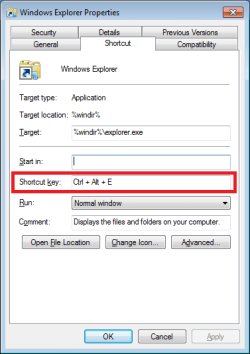
SHORTCUT-KEY.png

It is pretty hard to document this problem without posting a picture...
...or I guess that you could write a thousand words :-)

Yes, scripting tools like AutoIt and AHK will sort of do the same thing. But the Windows Native function should work. The shortcut key assignments should survive a reboot.
 

My Computer

Computer type
Laptop
Computer Manufacturer/Model Number
Employer provided Dell Latitude
OS
W7 Pro SP1 64bit
CPU
i7
Memory
8GB
Graphics Card(s)
Intel HD Graphics
Hard Drives
crappy SSD
Antivirus
Employer mandated Symantec Endpoint Protection
Browser
Pale Moon 64bit, IE11 64bit & Chrome 64bit
Ah, never knew that :) Learn something today, thanks for sharing UNI!
 

My Computer

Computer type
PC/Desktop
Computer Manufacturer/Model Number
Custom Build
OS
Windows 7 Ultimate x64 SP1
CPU
AMD Phenom 2 1090T
Motherboard
Gigabyte GA-890FXA-UD5
Memory
2x8GB Kingston HyperX Fury Black 1600Mhz Unganged
Graphics Card(s)
MSI GTX 970 Gaming 4G
Sound Card
Realtek On-Board HD 7.1 Audio / Logitech G35
Monitor(s) Displays
3xAcer GD245HQ
Screen Resolution
1920x1080
Hard Drives
Samsung 850 Pro 512GB SSD - OS /
WD Caviar Black SATA 3 - 1 TBx2 - Dynamic RAID 0 /
WD Caviar Green SATA 2 - 640GBx2 - Dynamic RAID 0 /
WD Caviar Green SATA 2 - 640GB - Internal Backup /
Seagate Barracude SATA 3 - 3TB - External Backup/ Sync
PSU
HighPower 1000W
Case
Cooler Master HAF 932
Cooling
Noctua NH-D14
Keyboard
Logitech G19
Mouse
Logitech G500
Internet Speed
100/4 Mbit Cable (100GB quota)
Antivirus
ZoneAlarm Extreme Security / MBAM Pro / MBAE Free / SAS Free
Browser
IE 11 - Firefox - Chrome
Other Info
Logitech F710/ G27/ G940/ Z5500 // TrackIR 5 // Nvidia 3D Surround Vision
View attachment 370722

It is pretty hard to document this problem without posting a picture...
...or I guess that you could write a thousand words :-)

Yes, scripting tools like AutoIt and AHK will sort of do the same thing. But the Windows Native function should work. The shortcut key assignments should survive a reboot.

Thats exactly what i've tried to do, but the key assignments doesn't survive a reboot, and that's why i want to somehow activate the shortcut keys at startup.

Do you know how to make a batch file that i could place in the start up folder, or just another scipt that doesn't reguire an installation of an extra program like AutoHotKey or AutoIT.
 

My Computer

Computer type
Laptop
OS
Windows 7 Enterprise 64-bit
Hmm, just tried it and the shortcut persisted after a restart. Used CTRL+ALT+S for Steam, no problems with it.
 

My Computer

Computer type
PC/Desktop
Computer Manufacturer/Model Number
Custom Build
OS
Windows 7 Ultimate x64 SP1
CPU
AMD Phenom 2 1090T
Motherboard
Gigabyte GA-890FXA-UD5
Memory
2x8GB Kingston HyperX Fury Black 1600Mhz Unganged
Graphics Card(s)
MSI GTX 970 Gaming 4G
Sound Card
Realtek On-Board HD 7.1 Audio / Logitech G35
Monitor(s) Displays
3xAcer GD245HQ
Screen Resolution
1920x1080
Hard Drives
Samsung 850 Pro 512GB SSD - OS /
WD Caviar Black SATA 3 - 1 TBx2 - Dynamic RAID 0 /
WD Caviar Green SATA 2 - 640GBx2 - Dynamic RAID 0 /
WD Caviar Green SATA 2 - 640GB - Internal Backup /
Seagate Barracude SATA 3 - 3TB - External Backup/ Sync
PSU
HighPower 1000W
Case
Cooler Master HAF 932
Cooling
Noctua NH-D14
Keyboard
Logitech G19
Mouse
Logitech G500
Internet Speed
100/4 Mbit Cable (100GB quota)
Antivirus
ZoneAlarm Extreme Security / MBAM Pro / MBAE Free / SAS Free
Browser
IE 11 - Firefox - Chrome
Other Info
Logitech F710/ G27/ G940/ Z5500 // TrackIR 5 // Nvidia 3D Surround Vision
Correct. It should work after a reboot. There is something wrong (or set wrong) that prevents this for the OP. You can find posts where other people had this problem too (but no solutions).
 

My Computer

Computer type
Laptop
Computer Manufacturer/Model Number
Employer provided Dell Latitude
OS
W7 Pro SP1 64bit
CPU
i7
Memory
8GB
Graphics Card(s)
Intel HD Graphics
Hard Drives
crappy SSD
Antivirus
Employer mandated Symantec Endpoint Protection
Browser
Pale Moon 64bit, IE11 64bit & Chrome 64bit
I tried two different shortcuts, the owner of one was my user account, whereas the other was System. They both persisted a restart.

Perhaps a security software is interfering? Also according to an old article I found, the shortcuts with custom keys should be in one of 4 places.
- user's Desktop
- allusers' Desktop
- user's Start Menu
- allusers' Start Menu
I wonder how valid the above info is today.
 

My Computer

Computer type
PC/Desktop
Computer Manufacturer/Model Number
Custom Build
OS
Windows 7 Ultimate x64 SP1
CPU
AMD Phenom 2 1090T
Motherboard
Gigabyte GA-890FXA-UD5
Memory
2x8GB Kingston HyperX Fury Black 1600Mhz Unganged
Graphics Card(s)
MSI GTX 970 Gaming 4G
Sound Card
Realtek On-Board HD 7.1 Audio / Logitech G35
Monitor(s) Displays
3xAcer GD245HQ
Screen Resolution
1920x1080
Hard Drives
Samsung 850 Pro 512GB SSD - OS /
WD Caviar Black SATA 3 - 1 TBx2 - Dynamic RAID 0 /
WD Caviar Green SATA 2 - 640GBx2 - Dynamic RAID 0 /
WD Caviar Green SATA 2 - 640GB - Internal Backup /
Seagate Barracude SATA 3 - 3TB - External Backup/ Sync
PSU
HighPower 1000W
Case
Cooler Master HAF 932
Cooling
Noctua NH-D14
Keyboard
Logitech G19
Mouse
Logitech G500
Internet Speed
100/4 Mbit Cable (100GB quota)
Antivirus
ZoneAlarm Extreme Security / MBAM Pro / MBAE Free / SAS Free
Browser
IE 11 - Firefox - Chrome
Other Info
Logitech F710/ G27/ G940/ Z5500 // TrackIR 5 // Nvidia 3D Surround Vision
I don't know much about coding, but I'm just thinking - when you set a key combination for a shortcut, you must be sending some kind of command out to Windows. And since the function is built in to Windows you almost have to able, to trigger that command or function (whatever it is) manually...

But as I said, I don't know much about coding or Windows internal workings, so maybe it's simply not possible :)
 

My Computer

Computer type
Laptop
OS
Windows 7 Enterprise 64-bit
There is very little info about this on Microsoft's websites or various forums.

As a user, you should only need to assign a key.

If, as in your case, the key assignment fails to work after restarting the computer, then we don't know of anything that the user can do to fix that. The workarounds are:
1) recreate the shortcut key assignments after each restart
2) use a 3rd party tool to do the same thing as Windows should.

Creating a new user profile should solve the problem. You could test that before moving your files to a new profile.

@GokAy,
Yes - those are the only places that shortcut files can reside and still use shortcut keys.
 

My Computer

Computer type
Laptop
Computer Manufacturer/Model Number
Employer provided Dell Latitude
OS
W7 Pro SP1 64bit
CPU
i7
Memory
8GB
Graphics Card(s)
Intel HD Graphics
Hard Drives
crappy SSD
Antivirus
Employer mandated Symantec Endpoint Protection
Browser
Pale Moon 64bit, IE11 64bit & Chrome 64bit
niel4575,
Follow these steps to backup any start menu user pinned items that you might have:
http://www.sevenforums.com/tutorials/212930-start-menu-backup-restore-pinned-items-windows-7-a.html


Follow the steps in this tutorial to remove any user pined items that you might have:
http://www.sevenforums.com/tutorials/899-start-menu-reset-pin-area.html

After you download and run the batch file from that tutorial...
...open any app by using a desktop or start menu shortcut
...restart the computer
...test any shortcut key.

If all of this fails to cure the problem, use option two in the first tutorial to restore any start menu user pinned items. And we will keep looking for a solution.


Here is what I think is happening:

1) The batch file in the 2nd tutorial deletes the "StartPage2" registry key.

2) Then kills/restarts explorer.

3) Restarting explorer rebuilds the deleted key - but only to its default state.

4) Opening any app using a desktop or start menu shortcut causes explorer to inventory all shortcuts in the 4 areas that GokAy mentioned here.

5) Restarting the computer causes explorer to shut down normally.

6) During a normal shut down, explorer seems to write the inventory of shortcut key info to the "StartPage2" registry key.


When a shortcut keys do not work after restart, there could be several causes...

...the permissions could be messed up on the "StartPage2" registry key
(the 2nd tutorial should cure that)

...something could be corrupting/preventing the shortcut inventory/storage process

...some security app is removing the info in the "StartPage2" registry key
(some tin foil hats use apps that prevent forensics on that key)
 

My Computer

Computer type
Laptop
Computer Manufacturer/Model Number
Employer provided Dell Latitude
OS
W7 Pro SP1 64bit
CPU
i7
Memory
8GB
Graphics Card(s)
Intel HD Graphics
Hard Drives
crappy SSD
Antivirus
Employer mandated Symantec Endpoint Protection
Browser
Pale Moon 64bit, IE11 64bit & Chrome 64bit
Back
Top