How do I add Printers in taskbar toolbar for quick acces

xuletzu

New member
Local time
5:27 AM
Messages
10
Hello,
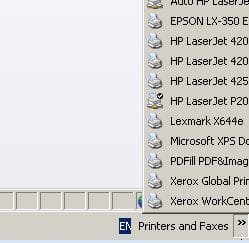
In Windows XP you can add a toolbar on taskbar with Printers Folder from Control Panel. Is there a way to add Printers folder in taskbar for quick access? I need quick access for printers to modify the default printer often.
 

My Computer My Computer

Computer type
PC/Desktop
Computer Manufacturer/Model Number
Custom build
OS
Windows 7 Ultimate x64
CPU
Intel Q8300
Motherboard
Asrock P45X3 Deluxe
Memory
Kingstone XMS
Graphics Card(s)
nVidia GTS 250
Hard Drives
Intel 520 SSD
WD Blue 1TB
Antivirus
Avast
Browser
IE
Last edited:

My Computer My Computer

Computer type
Laptop
Computer Manufacturer/Model Number
HP 2000-150CA Notebook
OS
Windows 7 Home Premium (x64) Service Pack 1 (build 7601)
CPU
Intel Pentium P6200 2.13 GHz
Motherboard
HP 3674 28.49 1066 MH / BIOS: HP F.34
Memory
4.00 GB
Graphics Card(s)
Intel HD Graphics
Sound Card
Multimedia HD
Monitor(s) Displays
15.3
Screen Resolution
1366X768
Hard Drives
Hitachi HTS545050B9A300 ATA
(500.11 GB)
Keyboard
Standard PS2
Mouse
Synaptics PS2 Port Touch Pad / Microsoft HID-compliant mouse
Internet Speed
100 Mbps
Antivirus
MSE
Browser
PaleMoon / Fire Fox
Other Info
Purchased 2011
Hi, in tutorial I don't have the way to insert a toolbar like in XP see attachment.
Thank you.
 

Attachments

  • printers.JPG
    printers.JPG
    17.3 KB · Views: 41

My Computer My Computer

Computer type
PC/Desktop
Computer Manufacturer/Model Number
Custom build
OS
Windows 7 Ultimate x64
CPU
Intel Q8300
Motherboard
Asrock P45X3 Deluxe
Memory
Kingstone XMS
Graphics Card(s)
nVidia GTS 250
Hard Drives
Intel 520 SSD
WD Blue 1TB
Antivirus
Avast
Browser
IE
Hello,
I request more help please
. Is there a way to create a toolbar in Win7 prof like in XP?
 

My Computer My Computer

Computer type
PC/Desktop
Computer Manufacturer/Model Number
Custom build
OS
Windows 7 Ultimate x64
CPU
Intel Q8300
Motherboard
Asrock P45X3 Deluxe
Memory
Kingstone XMS
Graphics Card(s)
nVidia GTS 250
Hard Drives
Intel 520 SSD
WD Blue 1TB
Antivirus
Avast
Browser
IE
Hello, anyone to help me with my problem?
 

My Computer My Computer

Computer type
PC/Desktop
Computer Manufacturer/Model Number
Custom build
OS
Windows 7 Ultimate x64
CPU
Intel Q8300
Motherboard
Asrock P45X3 Deluxe
Memory
Kingstone XMS
Graphics Card(s)
nVidia GTS 250
Hard Drives
Intel 520 SSD
WD Blue 1TB
Antivirus
Avast
Browser
IE
Right click Task Bar-Toolbars-New Toolbar
 

My Computer My Computer

Computer type
PC/Desktop
Computer Manufacturer/Model Number
Custom Build
OS
Windows 7 Ultimate x64 SP1
CPU
AMD Phenom 2 1090T
Motherboard
Gigabyte GA-890FXA-UD5
Memory
2x8GB Kingston HyperX Fury Black 1600Mhz Unganged
Graphics Card(s)
MSI GTX 970 Gaming 4G
Sound Card
Realtek On-Board HD 7.1 Audio / Logitech G35
Monitor(s) Displays
3xAcer GD245HQ
Screen Resolution
1920x1080
Hard Drives
Samsung 850 Pro 512GB SSD - OS /
WD Caviar Black SATA 3 - 1 TBx2 - Dynamic RAID 0 /
WD Caviar Green SATA 2 - 640GBx2 - Dynamic RAID 0 /
WD Caviar Green SATA 2 - 640GB - Internal Backup /
Seagate Barracude SATA 3 - 3TB - External Backup/ Sync
PSU
HighPower 1000W
Case
Cooler Master HAF 932
Cooling
Noctua NH-D14
Keyboard
Logitech G19
Mouse
Logitech G500
Internet Speed
100/4 Mbit Cable (100GB quota)
Antivirus
ZoneAlarm Extreme Security / MBAM Pro / MBAE Free / SAS Free
Browser
IE 11 - Firefox - Chrome
Other Info
Logitech F710/ G27/ G940/ Z5500 // TrackIR 5 // Nvidia 3D Surround Vision
Ok, in New Toolbar menu I only can select a folder and I did not find Control Panel like in XP to go to Printers&Faxes folder... (Devices&Printers for Win7)
 
Last edited:

My Computer My Computer

Computer type
PC/Desktop
Computer Manufacturer/Model Number
Custom build
OS
Windows 7 Ultimate x64
CPU
Intel Q8300
Motherboard
Asrock P45X3 Deluxe
Memory
Kingstone XMS
Graphics Card(s)
nVidia GTS 250
Hard Drives
Intel 520 SSD
WD Blue 1TB
Antivirus
Avast
Browser
IE
Here is a little workaround for you.
Go into Devices and Printers, right click the ones you wish in the toolbar - Create shortcut.
On Desktop, make a new folder with the toolbar name you wish to see
Move all shortcuts into the new folder. Move the folder to another place if you wish.
Rename the shortcuts and delete the "- shortcut" part (for visual reasons)
Now, create a new toolbar and point to this folder.

Right click the shortcuts in toolbar if left clicking doesn't get you where you want.

Hope this helps.
 

My Computer My Computer

Computer type
PC/Desktop
Computer Manufacturer/Model Number
Custom Build
OS
Windows 7 Ultimate x64 SP1
CPU
AMD Phenom 2 1090T
Motherboard
Gigabyte GA-890FXA-UD5
Memory
2x8GB Kingston HyperX Fury Black 1600Mhz Unganged
Graphics Card(s)
MSI GTX 970 Gaming 4G
Sound Card
Realtek On-Board HD 7.1 Audio / Logitech G35
Monitor(s) Displays
3xAcer GD245HQ
Screen Resolution
1920x1080
Hard Drives
Samsung 850 Pro 512GB SSD - OS /
WD Caviar Black SATA 3 - 1 TBx2 - Dynamic RAID 0 /
WD Caviar Green SATA 2 - 640GBx2 - Dynamic RAID 0 /
WD Caviar Green SATA 2 - 640GB - Internal Backup /
Seagate Barracude SATA 3 - 3TB - External Backup/ Sync
PSU
HighPower 1000W
Case
Cooler Master HAF 932
Cooling
Noctua NH-D14
Keyboard
Logitech G19
Mouse
Logitech G500
Internet Speed
100/4 Mbit Cable (100GB quota)
Antivirus
ZoneAlarm Extreme Security / MBAM Pro / MBAE Free / SAS Free
Browser
IE 11 - Firefox - Chrome
Other Info
Logitech F710/ G27/ G940/ Z5500 // TrackIR 5 // Nvidia 3D Surround Vision
Thanks this helps but still, in toolbar list of printers I cannot see what printer is set as default... Maybe someone still can help me.
Thank You!
 

My Computer My Computer

Computer type
PC/Desktop
Computer Manufacturer/Model Number
Custom build
OS
Windows 7 Ultimate x64
CPU
Intel Q8300
Motherboard
Asrock P45X3 Deluxe
Memory
Kingstone XMS
Graphics Card(s)
nVidia GTS 250
Hard Drives
Intel 520 SSD
WD Blue 1TB
Antivirus
Avast
Browser
IE

My Computer My Computer

Computer type
PC/Desktop
Computer Manufacturer/Model Number
Custom Build
OS
Windows 7 Ultimate x64 SP1
CPU
AMD Phenom 2 1090T
Motherboard
Gigabyte GA-890FXA-UD5
Memory
2x8GB Kingston HyperX Fury Black 1600Mhz Unganged
Graphics Card(s)
MSI GTX 970 Gaming 4G
Sound Card
Realtek On-Board HD 7.1 Audio / Logitech G35
Monitor(s) Displays
3xAcer GD245HQ
Screen Resolution
1920x1080
Hard Drives
Samsung 850 Pro 512GB SSD - OS /
WD Caviar Black SATA 3 - 1 TBx2 - Dynamic RAID 0 /
WD Caviar Green SATA 2 - 640GBx2 - Dynamic RAID 0 /
WD Caviar Green SATA 2 - 640GB - Internal Backup /
Seagate Barracude SATA 3 - 3TB - External Backup/ Sync
PSU
HighPower 1000W
Case
Cooler Master HAF 932
Cooling
Noctua NH-D14
Keyboard
Logitech G19
Mouse
Logitech G500
Internet Speed
100/4 Mbit Cable (100GB quota)
Antivirus
ZoneAlarm Extreme Security / MBAM Pro / MBAE Free / SAS Free
Browser
IE 11 - Firefox - Chrome
Other Info
Logitech F710/ G27/ G940/ Z5500 // TrackIR 5 // Nvidia 3D Surround Vision
This 3rd party software looks very nice, but is commercial freeware?
 

My Computer My Computer

Computer type
PC/Desktop
Computer Manufacturer/Model Number
Custom build
OS
Windows 7 Ultimate x64
CPU
Intel Q8300
Motherboard
Asrock P45X3 Deluxe
Memory
Kingstone XMS
Graphics Card(s)
nVidia GTS 250
Hard Drives
Intel 520 SSD
WD Blue 1TB
Antivirus
Avast
Browser
IE
There is both free and pro (paid) versions. I never used it and not sure about free version features/restrictions. You can install the free one and see if it works for you. I don't even have a printer :)
 
Last edited:

My Computer My Computer

Computer type
PC/Desktop
Computer Manufacturer/Model Number
Custom Build
OS
Windows 7 Ultimate x64 SP1
CPU
AMD Phenom 2 1090T
Motherboard
Gigabyte GA-890FXA-UD5
Memory
2x8GB Kingston HyperX Fury Black 1600Mhz Unganged
Graphics Card(s)
MSI GTX 970 Gaming 4G
Sound Card
Realtek On-Board HD 7.1 Audio / Logitech G35
Monitor(s) Displays
3xAcer GD245HQ
Screen Resolution
1920x1080
Hard Drives
Samsung 850 Pro 512GB SSD - OS /
WD Caviar Black SATA 3 - 1 TBx2 - Dynamic RAID 0 /
WD Caviar Green SATA 2 - 640GBx2 - Dynamic RAID 0 /
WD Caviar Green SATA 2 - 640GB - Internal Backup /
Seagate Barracude SATA 3 - 3TB - External Backup/ Sync
PSU
HighPower 1000W
Case
Cooler Master HAF 932
Cooling
Noctua NH-D14
Keyboard
Logitech G19
Mouse
Logitech G500
Internet Speed
100/4 Mbit Cable (100GB quota)
Antivirus
ZoneAlarm Extreme Security / MBAM Pro / MBAE Free / SAS Free
Browser
IE 11 - Firefox - Chrome
Other Info
Logitech F710/ G27/ G940/ Z5500 // TrackIR 5 // Nvidia 3D Surround Vision
Have a look at this free option - http://www.sevenforums.com/tutorials/6687-recycle-bin-pin-taskbar.html

You will need to modify the actual contents of the folder to contain shortcuts for the printers you require quick access to but this method may be used for any shortcuts that will not normally appear on the taskbar

Edit

If you right click on the printers item on the Devices and printers page there is a "Create Shortcut" option which will create shortcuts to all printers on the desktop - simply move the ones you require to the folder used for the new toolbar (see tutorial)
 

My Computers My Computers

System One System Two

  • Computer type
    PC/Desktop
    Computer Manufacturer/Model Number
    ChillBlast - Custom to my design
    OS
    Windows 11 Pro x64 [Latest Release and Release Preview]
    CPU
    Ryzen 9 5950X, 3.8 - 5.2 MHz
    Motherboard
    Asus Prime X570-Pro
    Memory
    64GB [2 x 32GB] DDR4 3200MHz
    Graphics Card(s)
    4GB NVIDIA GEFORCE GTX 1650 Ti
    Sound Card
    On-board SPDIF to 5.1 System + HDMI [5.1 system]
    Monitor(s) Displays
    32" UHD 32 Bit HDR Monitor + 43" UHD 4K 32Bit HDR TV
    Screen Resolution
    2 x 3840 x 2160 @60Hz
    Hard Drives
    1TB M2 SSD OS, 500GB Fast Access SSD, 2 x 8TB Data + Various Externals from 1TB to 4TB, 10TB NAS
    PSU
    NZXT C750 80 PLUS Gold 750W Modular PSU
    Case
    Workstation Case [Matt Black]
    Cooling
    NZXT Kraken X63 280mm CPU Cooler +2x Quiet Case fans
    Keyboard
    Logitech Wireless MX Keys & K400 + others
    Mouse
    Logitech Wireless MX Master 3S
    Internet Speed
    920 MB Down 50 MB Up
    Antivirus
    BitDefender Total Security Pro
    Browser
    Chrome (always run latest Non-Beta)
    Other Info
    Also run ...
    Laptop - Quad 8GB - Windows 10 Pro x64
    Nexus 7 Android tablet x2
    Samsung 10.2" tablet
    Blackview TAB 8 4G Android Tablet c/w Keyboard
    Wacom Intuos Pro Medium Pen Pad
    Wacom Intuos Pro Small Pen Pad
    Wacom Expresskeys Remote
    Loopdeck+ Graphics Controller
    Shuttle Pro v2 Control
  • Computer type
    Laptop
    System Manufacturer/Model Number
    Dell XPS 17 10750H
    OS
    Windows 11 Pro x64 Latest RP
    CPU
    Intel I7 10750H 5.0GHz
    Motherboard
    Dell XPS
    Memory
    32GB [2x16GB] DDR4 2933 MHz
    Graphics Card(s)
    nVidia GTX1650Ti 4 GB GDDR6
    Sound Card
    Stock [Realtek] 4 Speaker
    Monitor(s) Displays
    17" IPS UHD+ Infinity Edge Touchscreen
    Screen Resolution
    3840 x 2400
    Hard Drives
    2TB M2 NVMe, 4TB External + various 500GB & 1TB External NVMe (also have access to spinner HDD from
    PSU
    Stock
    Case
    Stock XPS Aluminium & Carbon Fibre
    Cooling
    Stock - Active Fan Control
    Keyboard
    Backlit + Various Logitech
    Mouse
    Stock Track Pad + Logitech MX Trackball
    Internet Speed
    72 MB Down 18MB Up
    Browser
    Chrome
    Other Info
    Also run ...
    Laptop - Quad 8GB - Windows 10 Pro x64
    Nexus 7 Android tablet x2
    10.2" tablet
    Sony Z3 Android Smartphone
    Wacom Intuos Pro Medium Pen Pad
    Wacom Intuos Pro Small Pen Pad
    Wacom Expresskeys Remote
    Loopdeck+ Graphics Controller
    Shuttle Pro v2 Control Pad
    10TB NAS
Back
Top