How do I Change OS Partition size

dan99t

New member
Local time
8:16 PM
Messages
30
Hi,

I have installed Windows 7 on a new SSD.
But the OS Partition size is too small. ( As shown in attachment )
I have lots of free space on an adjacent partition as shown.
How do I take some space from there and make OS Partition bigger.
I am not an expert so I will appreciate as much detailed instruction as possible.

Thank You
 

Attachments

  • Image.png
    Image.png
    7.6 KB · Views: 0

My Computer My Computer

OS
windows 7
rt click D and delete.

then rt click C and select extend
 

My Computers My Computers

System One System Two

  • Computer type
    PC/Desktop
    OS
    7 X64
    CPU
    i5 8400
    Motherboard
    gigabyte b365m ds3h
    Memory
    2x8gb 3200mhz
    Hard Drives
    various
    PSU
    pure power 11 400w cm
    Case
    Coolermaster
    Cooling
    cryorig m9i
  • Computer type
    PC/Desktop
    OS
    7x64
    CPU
    g5400
    Motherboard
    ga b365m ds3h
    Memory
    8gb ddr4 2400
    PSU
    xfx pro 450w
If I do that then C: becomes Huge partition by itself taking off the whole drive.. Then how do I make it to the size I want ?
 

My Computer My Computer

OS
windows 7
you enter the amount you want to extend.
 

My Computers My Computers

System One System Two

  • Computer type
    PC/Desktop
    OS
    7 X64
    CPU
    i5 8400
    Motherboard
    gigabyte b365m ds3h
    Memory
    2x8gb 3200mhz
    Hard Drives
    various
    PSU
    pure power 11 400w cm
    Case
    Coolermaster
    Cooling
    cryorig m9i
  • Computer type
    PC/Desktop
    OS
    7x64
    CPU
    g5400
    Motherboard
    ga b365m ds3h
    Memory
    8gb ddr4 2400
    PSU
    xfx pro 450w
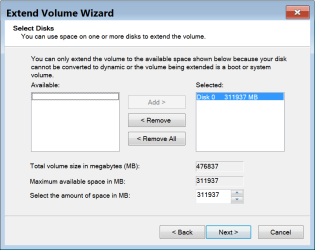
Here are two images.
My OS partition is 160GB.
I want to add 40GB to it.
What should I do in Image-2 ?

Thank You
 

Attachments

  • Img-1.png
    Img-1.png
    8.2 KB · Views: 0
  • Img-2.png
    Img-2.png
    16.4 KB · Views: 0

My Computer My Computer

OS
windows 7
Where it says "Select the amount of space in MB " it shows 311937 which is the available 304.63gb shown in MB (binary) .

So you change that to amount to 40960 you want to add. Then click next.

GB to MB Conversion Gigabytes to Megabytes Calculator


40 GB = 40960 MB (in binary) .
 

My Computers My Computers

System One System Two

  • Computer type
    PC/Desktop
    OS
    7 X64
    CPU
    i5 8400
    Motherboard
    gigabyte b365m ds3h
    Memory
    2x8gb 3200mhz
    Hard Drives
    various
    PSU
    pure power 11 400w cm
    Case
    Coolermaster
    Cooling
    cryorig m9i
  • Computer type
    PC/Desktop
    OS
    7x64
    CPU
    g5400
    Motherboard
    ga b365m ds3h
    Memory
    8gb ddr4 2400
    PSU
    xfx pro 450w
Thank you. It worked. Really appreciate everyone's help.
 

My Computer My Computer

OS
windows 7
:-)
 

My Computers My Computers

System One System Two

  • Computer type
    PC/Desktop
    OS
    7 X64
    CPU
    i5 8400
    Motherboard
    gigabyte b365m ds3h
    Memory
    2x8gb 3200mhz
    Hard Drives
    various
    PSU
    pure power 11 400w cm
    Case
    Coolermaster
    Cooling
    cryorig m9i
  • Computer type
    PC/Desktop
    OS
    7x64
    CPU
    g5400
    Motherboard
    ga b365m ds3h
    Memory
    8gb ddr4 2400
    PSU
    xfx pro 450w
Back
Top