How do I Change OS Partition size

dan99t

New member
Local time
11:00 PM
Messages
30
Hi,

I have installed Windows 7 on a new SSD.
But the OS Partition size is too small. ( As shown in attachment )
I have lots of free space on an adjacent partition as shown.
How do I take some space from there and make OS Partition bigger.
I am not an expert so I will appreciate as much detailed instruction as possible.

Thank You
 

Attachments

  • Image.png
    Image.png
    7.6 KB · Views: 0

My Computer My Computer

At a glance

windows 7
OS
windows 7
rt click D and delete.

then rt click C and select extend
 

My Computers My Computers

  • At a glance

    7 X64i5 84002x8gb 3200mhz
    Computer type
    PC/Desktop
    OS
    7 X64
    CPU
    i5 8400
    Motherboard
    gigabyte b365m ds3h
    Memory
    2x8gb 3200mhz
    Hard Drives
    various
    PSU
    pure power 11 400w cm
    Case
    Coolermaster
    Cooling
    cryorig m9i
  • At a glance

    7x64g54008gb ddr4 2400
    Computer type
    PC/Desktop
    OS
    7x64
    CPU
    g5400
    Motherboard
    ga b365m ds3h
    Memory
    8gb ddr4 2400
    PSU
    xfx pro 450w
If I do that then C: becomes Huge partition by itself taking off the whole drive.. Then how do I make it to the size I want ?
 

My Computer My Computer

At a glance

windows 7
OS
windows 7
you enter the amount you want to extend.
 

My Computers My Computers

  • At a glance

    7 X64i5 84002x8gb 3200mhz
    Computer type
    PC/Desktop
    OS
    7 X64
    CPU
    i5 8400
    Motherboard
    gigabyte b365m ds3h
    Memory
    2x8gb 3200mhz
    Hard Drives
    various
    PSU
    pure power 11 400w cm
    Case
    Coolermaster
    Cooling
    cryorig m9i
  • At a glance

    7x64g54008gb ddr4 2400
    Computer type
    PC/Desktop
    OS
    7x64
    CPU
    g5400
    Motherboard
    ga b365m ds3h
    Memory
    8gb ddr4 2400
    PSU
    xfx pro 450w
Here are two images.
My OS partition is 160GB.
I want to add 40GB to it.
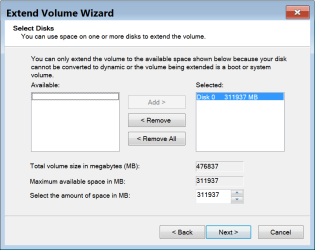
What should I do in Image-2 ?

Thank You
 

Attachments

  • Img-1.png
    Img-1.png
    8.2 KB · Views: 0
  • Img-2.png
    Img-2.png
    16.4 KB · Views: 0

My Computer My Computer

At a glance

windows 7
OS
windows 7
Where it says "Select the amount of space in MB " it shows 311937 which is the available 304.63gb shown in MB (binary) .

So you change that to amount to 40960 you want to add. Then click next.

GB to MB Conversion Gigabytes to Megabytes Calculator


40 GB = 40960 MB (in binary) .
 

My Computers My Computers

  • At a glance

    7 X64i5 84002x8gb 3200mhz
    Computer type
    PC/Desktop
    OS
    7 X64
    CPU
    i5 8400
    Motherboard
    gigabyte b365m ds3h
    Memory
    2x8gb 3200mhz
    Hard Drives
    various
    PSU
    pure power 11 400w cm
    Case
    Coolermaster
    Cooling
    cryorig m9i
  • At a glance

    7x64g54008gb ddr4 2400
    Computer type
    PC/Desktop
    OS
    7x64
    CPU
    g5400
    Motherboard
    ga b365m ds3h
    Memory
    8gb ddr4 2400
    PSU
    xfx pro 450w
Thank you. It worked. Really appreciate everyone's help.
 

My Computer My Computer

At a glance

windows 7
OS
windows 7
:-)
 

My Computers My Computers

  • At a glance

    7 X64i5 84002x8gb 3200mhz
    Computer type
    PC/Desktop
    OS
    7 X64
    CPU
    i5 8400
    Motherboard
    gigabyte b365m ds3h
    Memory
    2x8gb 3200mhz
    Hard Drives
    various
    PSU
    pure power 11 400w cm
    Case
    Coolermaster
    Cooling
    cryorig m9i
  • At a glance

    7x64g54008gb ddr4 2400
    Computer type
    PC/Desktop
    OS
    7x64
    CPU
    g5400
    Motherboard
    ga b365m ds3h
    Memory
    8gb ddr4 2400
    PSU
    xfx pro 450w
Back
Top