Solved How do I arrange for my web pages to open full screen?

Hombrex

New member
Local time
9:08 AM
Messages
9
When I open a web page for the first time it is always minimised..I reset it (zoom) to suit my needs and whenever I return to that page it is maximised..fine.
The thing is , I'm 71 and my eyes are not as good as they used to be. I find continually having to resize pages a bit of a drag. Is there a way of setting my PC/browser..(Firefox) to ensure web pages open at their maximum every time?
Thanks in advance.
 

My Computer My Computer

At a glance

Windows 7 home premium 64Acer Veriton bit2.40 gigahertz Intel Celeron G530Intel(R) HD Graphics [Display adapter]
Computer Manufacturer/Model Number
Acer Veriton X2610G
OS
Windows 7 home premium 64Acer Veriton bit
CPU
2.40 gigahertz Intel Celeron G530
Motherboard
Board: Acer Veriton X2610G
Graphics Card(s)
Intel(R) HD Graphics [Display adapter]
Sound Card
High Definition Audio Device (2x)
Monitor(s) Displays
Acer V223HQV [Monitor] (22.1"vis, s/n
Hard Drives
ST3500413AS [Hard drive] (500.11 GB) -- drive 0, s/n W2AA04E6, rev JC45, SMART
When I open a web page for the first time it is always minimised..I reset it (zoom) to suit my needs and whenever I return to that page it is maximised..fine.
The thing is , I'm 71 and my eyes are not as good as they used to be. I find continually having to resize pages a bit of a drag. Is there a way of setting my PC/browser..(Firefox) to ensure web pages open at their maximum every time?
Thanks in advance.

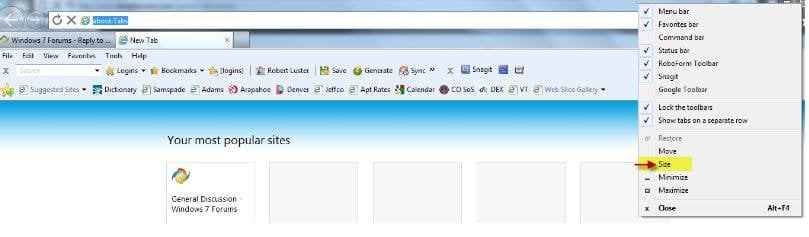
Open your browser and resize to your liking; right click the upper most portion of the window and select the "size" option from the drowndown menu. See attachment;

View attachment Size Selection.pdf
 

My Computer My Computer

At a glance

Windows 7 Professional x64Intel i5 quad processor16 GBRadeon HD 5770
Computer type
PC/Desktop
Computer Manufacturer/Model Number
Custom Built
OS
Windows 7 Professional x64
CPU
Intel i5 quad processor
Motherboard
DP67BG
Memory
16 GB
Graphics Card(s)
Radeon HD 5770
Sound Card
Realtek High Definition Audio
Monitor(s) Displays
Samsung SyncMaster
Screen Resolution
1920X1080
Hard Drives
WD 2TB (SATA Internal)
WD 1TB (USB External)
PSU
Corsair GS800
Case
Tower (Generic)
Cooling
3 Internal Fans
Keyboard
MS Wireless
Mouse
MS Optical Wired
Internet Speed
54 mbps
Antivirus
Emsisoft
Browser
IE-Version 9, Palemoon-Version 24.2.0
Here is a plug in for firefox NoSquint
 

My Computer My Computer

At a glance

MS Windows 7 Professional 64-bit SP1AMD FX(tm)-6100 Six-Core Processor Socket AM3...8.00 GB Dual-Channel DDR3 @ 802MHz (11-11-11-...NVIDIA GeForce GTX 560 Ti
Computer type
PC/Desktop
Computer Manufacturer/Model Number
Self Build
OS
MS Windows 7 Professional 64-bit SP1
CPU
AMD FX(tm)-6100 Six-Core Processor Socket AM3+ (942)
Motherboard
ASUSTeK COMPUTER INC. SABERTOOTH 990FX (AM3r2)
Memory
8.00 GB Dual-Channel DDR3 @ 802MHz (11-11-11-36) 1.5Volts
Graphics Card(s)
NVIDIA GeForce GTX 560 Ti
Sound Card
Onboard Realtek HD
Monitor(s) Displays
shimian (1920x1080@60Hz)
Screen Resolution
1920*1080
Hard Drives
OCZ-AGIL ITY3 SATA Disk Device 120GB
PSU
Corsair TX 750
Case
Corsair
Cooling
WaterCooled
Keyboard
Microsoft Wired
Mouse
Logitech USB Optical TiltWheel Mouse
Internet Speed
Realtek PCIe GBE Family Controller 20MB*1MB
Antivirus
Avast
Browser
Firefox
Other Info
150GB Internal Hard Drive for Backing Up Important Files -
Hauppauge Nova-DT Dual DVB-T Tuner Device (+IR) -
USB PC Camera with Mic (SN9C105)
Open your browser and resize to your liking; right click the upper most portion of the window and select the "size" option from the drowndown menu. See attachment;

View attachment 226205

Can't see "size" in my version (14.0.1) of Firefox. Exactly what do you mean by "upper most portion"?
 

My Computer My Computer

At a glance

Microsoft Windows 7 Home Premium 64-bit 7601 ...Intel(R) Core(TM) i7-3770 CPU @ 3.40GHz8.00 GBIntel(R) HD Graphics 4000
Computer type
PC/Desktop
OS
Microsoft Windows 7 Home Premium 64-bit 7601 Multiprocessor Free Service Pack 1
CPU
Intel(R) Core(TM) i7-3770 CPU @ 3.40GHz
Motherboard
ASUSTeK COMPUTER INC. P8H77-M
Memory
8.00 GB
Graphics Card(s)
Intel(R) HD Graphics 4000
Sound Card
On Board
Monitor(s) Displays
Dell 24"
Screen Resolution
1920 x 1080
Hard Drives
(1) INTEL SSDSC2CT180A3 ATA Device (2) ST500DM002-1BD142 ATA Device (3) WDC WD3200AAKS-75L9A0 ATA Device (4) Generic- Compact Flash USB Device (5) Generic- MS/MS-Pro USB Device (6) Generic- SD/MMC USB Device (7) Generic- SM/xD-Picture USB
PSU
500w Corsair
Case
Cooler Master
Cooling
3 Fans
Keyboard
Logitech MK300
Mouse
Logitech WOM
Internet Speed
75Mb
Antivirus
Norton 360
Browser
Firefox, Opera, IE
Open your browser and resize to your liking; right click the upper most portion of the window and select the "size" option from the drowndown menu. See attachment;

View attachment 226205

Can't see "size" in my version (14.0.1) of Firefox. Exactly what do you mean by "upper most portion"?

Probably an oversight, the attached pdf is a screengrab of IE.

@Sir George, screenshots in .jpg or .png can be attached directly in your posts.

Capture.JPG

http://www.sevenforums.com/tutorials/9733-screenshots-files-upload-post-seven-forums.html
 

My Computer My Computer

At a glance

Win 10 Pro x64Intel I5-2500K @3.3GHz16GB G.Skill Ripjaws X (4x4GB)EVGA GeForce 750 Ti SC 2GB
Computer type
PC/Desktop
Computer Manufacturer/Model Number
Self Built
OS
Win 10 Pro x64
CPU
Intel I5-2500K @3.3GHz
Motherboard
Asrock P67 Extreme4
Memory
16GB G.Skill Ripjaws X (4x4GB)
Graphics Card(s)
EVGA GeForce 750 Ti SC 2GB
Sound Card
ASUS Xonar DG 5.1 Channels 24-bit 96KHz PCI Interface Sound
Monitor(s) Displays
auria eq2367
Screen Resolution
1920 x 1080
Hard Drives
250GB Samsung 850 EVO SSD
1TB WD Blue
1TB Hitachi
PSU
SeaSonic X 650W 80 Plus Gold
Case
Corsair Obsidian 750D
Cooling
Corsair H60, Three 140mm case fans
Keyboard
Logitech Wireless Keyboard K520
Mouse
Logitech Wireless Mouse M310
Internet Speed
Wave Broadband ~ 100 dn 5 up
Antivirus
Windows Defender, Malwarebytes Premium
Browser
Edge, IE11, Chrome
Other Info
Laptop specs: HP g7-1365dx /
CPU: AMD A6-3420M APU with Radeon(tm) HD Graphics /
RAM: Crucial 8Gb (2x4Gb) /
SSD: Crucial M4-CT128M4SSD2 ATA Device/ FW 000F /
GFX: AMD Radeon HD 6520G /
OS: Windows 10 Pro x64
The "size" option is not available. neither is "maximise". But "minimise" is.?? Firefox 14.0.1
 

My Computer My Computer

At a glance

Windows 7 home premium 64Acer Veriton bit2.40 gigahertz Intel Celeron G530Intel(R) HD Graphics [Display adapter]
Computer Manufacturer/Model Number
Acer Veriton X2610G
OS
Windows 7 home premium 64Acer Veriton bit
CPU
2.40 gigahertz Intel Celeron G530
Motherboard
Board: Acer Veriton X2610G
Graphics Card(s)
Intel(R) HD Graphics [Display adapter]
Sound Card
High Definition Audio Device (2x)
Monitor(s) Displays
Acer V223HQV [Monitor] (22.1"vis, s/n
Hard Drives
ST3500413AS [Hard drive] (500.11 GB) -- drive 0, s/n W2AA04E6, rev JC45, SMART
Lets get back to the original problem.
Hombrex
Lets try the old fashioned method. Open Firefox then drag the bottom right corner and if necessary drag the whole window to fill the screen completely. Then close the browser by clicking the "X" at top right. Open the browser again and it should open full screen!
 

My Computer My Computer

At a glance

Microsoft Windows 7 Home Premium 64-bit 7601 ...Intel(R) Core(TM) i7-3770 CPU @ 3.40GHz8.00 GBIntel(R) HD Graphics 4000
Computer type
PC/Desktop
OS
Microsoft Windows 7 Home Premium 64-bit 7601 Multiprocessor Free Service Pack 1
CPU
Intel(R) Core(TM) i7-3770 CPU @ 3.40GHz
Motherboard
ASUSTeK COMPUTER INC. P8H77-M
Memory
8.00 GB
Graphics Card(s)
Intel(R) HD Graphics 4000
Sound Card
On Board
Monitor(s) Displays
Dell 24"
Screen Resolution
1920 x 1080
Hard Drives
(1) INTEL SSDSC2CT180A3 ATA Device (2) ST500DM002-1BD142 ATA Device (3) WDC WD3200AAKS-75L9A0 ATA Device (4) Generic- Compact Flash USB Device (5) Generic- MS/MS-Pro USB Device (6) Generic- SD/MMC USB Device (7) Generic- SM/xD-Picture USB
PSU
500w Corsair
Case
Cooler Master
Cooling
3 Fans
Keyboard
Logitech MK300
Mouse
Logitech WOM
Internet Speed
75Mb
Antivirus
Norton 360
Browser
Firefox, Opera, IE
Back
Top