Solved How to get web pages to open with Firefox?

brocks

New member
Member
Local time
10:50 PM
Messages
39
I've been using Windows 7 since it came out, and up to a month or so ago, whenever a program opened a web page for me, it opened in Firefox, my preferred browser.

For the last few weeks -- possibly since I installed SP1 for Win7 --- web pages now open in IE rather than Firefox.

I'm not talking about htm files that I open myself from Windows Explorer. I have set both htm and html files to open in Firefox, and they do. And I have Firefox set to check that it's the primary browser, and IE set to NOT check.

So pages opened from Windows Explorer work right, but when a web page is opened by a program, e.g. I click on a url in a PDF document, or in a program's "About" screen, the web page opens in IE. And it's only been doing that for the last month or so.

Did SP1 change something? Can anyone tell me what register entry or option I need to set to change it back? Thank you.
 

My Computer My Computer

At a glance

Win7-64
OS
Win7-64
IMO, that is a choice you cannot make as, in the software it is pre-defined to open in Internet Explorer.

You may try,(CAUTION: i have'nt tried this!) to uninstalling Internet Explorer.

YBL
 

My Computer My Computer

At a glance

Dual Booting Windows 7 64-Bit Ultimate Editio...AMD Phenom X4 9254gb DDR3 G.skill RipJawsATI Radeon HD 6770
Computer Manufacturer/Model Number
AMD _(Assembled)_
OS
Dual Booting Windows 7 64-Bit Ultimate Edition and Fedora 16.
CPU
AMD Phenom X4 925
Motherboard
MSI 785g-E53
Memory
4gb DDR3 G.skill RipJaws
Graphics Card(s)
ATI Radeon HD 6770
Sound Card
Realtek
Monitor(s) Displays
Dell IN2020M LED
Screen Resolution
1600*900 20"
Hard Drives
Seagate 500 Gibs
External 320 Gb Western Digital(Got Glitchy)
PSU
Cooler Master
Case
Cooler Master
Cooling
Cooler Master
Keyboard
Logitech K100
Mouse
Razor Death Adder v2 3500 dPi (Razer Goliathus Pad)
Internet Speed
Back to college Internet with Cyberroam X|
Hi,

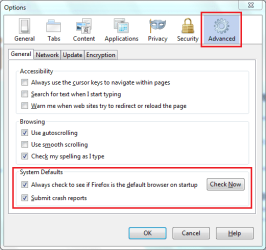
If you open up FireFox then click Tools > Options then in the Advanced tab make sure that it's set as your default browser. You can also click the Check Now button to perform an instant check, if not found as the default then it'll ask if you wish to use it as default.

Firefox Options.PNG


OS
 

My Computer My Computer

At a glance

Windows 7 Ultimate x64AMD Sempron Dual Core3GBNVIDIA GeForce 6150SE nForce 430
Computer Manufacturer/Model Number
Compaq Desktop
OS
Windows 7 Ultimate x64
CPU
AMD Sempron Dual Core
Memory
3GB
Graphics Card(s)
NVIDIA GeForce 6150SE nForce 430
Screen Resolution
1024x768
Hard Drives
150GB Sata
I was sure that was set in Firefox, but I guess the SP1 install unset it. Anyway, I changed it and it worked. Thanks a lot.
 

My Computer My Computer

At a glance

Win7-64
OS
Win7-64
I was sure that was set in Firefox, but I guess the SP1 install unset it. Anyway, I changed it and it worked. Thanks a lot.

You're welcome and please enjoy the rest of the forums :)
 

My Computer My Computer

At a glance

Windows 7 Ultimate x64AMD Sempron Dual Core3GBNVIDIA GeForce 6150SE nForce 430
Computer Manufacturer/Model Number
Compaq Desktop
OS
Windows 7 Ultimate x64
CPU
AMD Sempron Dual Core
Memory
3GB
Graphics Card(s)
NVIDIA GeForce 6150SE nForce 430
Screen Resolution
1024x768
Hard Drives
150GB Sata
Back
Top