Hoe do I get desktop icons to open full screen?

billberry12

New member
Member
VIP
Local time
5:11 AM
Messages
292
I finally learned somewhere on this forum how to have Internet explorer always open in fullscreen, and all my favorites open full screen when in IE. But, when I am at the desktop, and click on an icon, it does not open in full screen. I have to maximize it after it opens. I realize this is pretty nitpicking, but I want everything to open in full screen if possible. Ideas?
Thanks,
Bill
 

My Computer My Computer

At a glance

Windows 7 ProfessionalCore I58GB
Computer type
Laptop
Computer Manufacturer/Model Number
Dell Vostro 3750
OS
Windows 7 Professional
CPU
Core I5
Memory
8GB
Hard Drives
Seagate 600 240GB SSD
Antivirus
MSE
Browser
Chrome, IE, Firfox
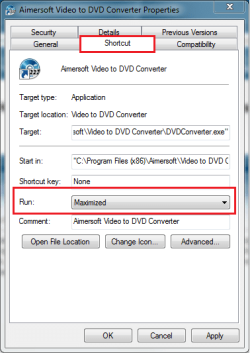
Right click the shortcut, choose Properties. Go to Shortcut tab, choose Run Maximized from drop down menu.

Notice that some applications have disabled the Maximize button, using a default window size. You can not maximize these apps.

Kari
 

Attachments

  • Run_Maximized.png
    Run_Maximized.png
    15.2 KB · Views: 61

My Computer My Computer

At a glance

Windows 10 Pro x64 EN-GB1.6 GHz Intel Core i7-720QM Processor6 GBATI Mobility Radeon HD 5850 Graphics
Computer type
Laptop
Computer Manufacturer/Model Number
HP ENVY 17-1150eg
OS
Windows 10 Pro x64 EN-GB
CPU
1.6 GHz Intel Core i7-720QM Processor
Memory
6 GB
Graphics Card(s)
ATI Mobility Radeon HD 5850 Graphics
Sound Card
Beats sound system with integrated subwoofer
Monitor(s) Displays
17" laptop display, 22" LED and 32" Full HD TV through HDMI
Screen Resolution
1600*900 (1), 1920*1080 (2&3)
Hard Drives
Internal: 2 x 500 GB SATA Hard Disk Drive 7200 rpm
External: 2TB for backups, 3TB USB3 network drive for media
Cooling
As Envy runs a bit warm, I have it on a Cooler Master pad
Keyboard
Logitech diNovo Media Desktop Laser (bluetooth)
Mouse
Logitech Performance Mouse MX
Internet Speed
50/10 Mbps VDSL
Antivirus
Windows Defender 4.3.9431.0
Browser
Maxthon 3.5.2., IE11
Thanks

Several had no shortcut tabs. I guess they are the ones you say can not be changed. All the ones that had a shortcut tab where on normal, and all let me change to maximized. Thanks for you help.
Bill:D
 

My Computer My Computer

At a glance

Windows 7 ProfessionalCore I58GB
Computer type
Laptop
Computer Manufacturer/Model Number
Dell Vostro 3750
OS
Windows 7 Professional
CPU
Core I5
Memory
8GB
Hard Drives
Seagate 600 240GB SSD
Antivirus
MSE
Browser
Chrome, IE, Firfox
A nice and easy tip for you:

On desktop, you can have two types of icons: shortcuts and application icons. An application icon don't have the shortcut tab in Properties.

If you want, you can create a shortcut for every application icon. Just right click the icon and choose Create Shortcut from context menu. You can then go to Properties of this new shortcut, and choose how you want it to open.

Kari
 

My Computer My Computer

At a glance

Windows 10 Pro x64 EN-GB1.6 GHz Intel Core i7-720QM Processor6 GBATI Mobility Radeon HD 5850 Graphics
Computer type
Laptop
Computer Manufacturer/Model Number
HP ENVY 17-1150eg
OS
Windows 10 Pro x64 EN-GB
CPU
1.6 GHz Intel Core i7-720QM Processor
Memory
6 GB
Graphics Card(s)
ATI Mobility Radeon HD 5850 Graphics
Sound Card
Beats sound system with integrated subwoofer
Monitor(s) Displays
17" laptop display, 22" LED and 32" Full HD TV through HDMI
Screen Resolution
1600*900 (1), 1920*1080 (2&3)
Hard Drives
Internal: 2 x 500 GB SATA Hard Disk Drive 7200 rpm
External: 2TB for backups, 3TB USB3 network drive for media
Cooling
As Envy runs a bit warm, I have it on a Cooler Master pad
Keyboard
Logitech diNovo Media Desktop Laser (bluetooth)
Mouse
Logitech Performance Mouse MX
Internet Speed
50/10 Mbps VDSL
Antivirus
Windows Defender 4.3.9431.0
Browser
Maxthon 3.5.2., IE11
Strange

All my application icons had the shortcut tab, so they are the ones I cound change to open maximized. Most of the shortcuts don't have the shortcut tab in properties.
 

My Computer My Computer

At a glance

Windows 7 ProfessionalCore I58GB
Computer type
Laptop
Computer Manufacturer/Model Number
Dell Vostro 3750
OS
Windows 7 Professional
CPU
Core I5
Memory
8GB
Hard Drives
Seagate 600 240GB SSD
Antivirus
MSE
Browser
Chrome, IE, Firfox
You need to open ie and on the maximized-minimized (square box) up in the right hand corner put it on minimized
than resize the window by dragging the corners to almost the full screen
than right click on the taskbar (ie) and closed
thats it :)
 
Last edited:

My Computer My Computer

At a glance

Windows 7 Ultimate x64
Computer type
PC/Desktop
OS
Windows 7 Ultimate x64
Back
Top