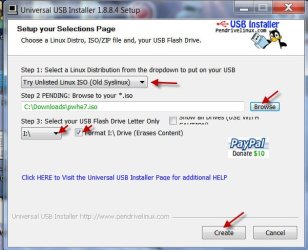
How do I boot Partition Wizard bootable cd from my USB?

iarehenry

New member
Local time
8:59 AM
Messages
14
Long story short: I was messing with my partitions and now my main OS partition is dynamic. I need to boot the bootable partition wizard.iso file from my usb to fix this problem. How do I go upon doing that? I could always burn it but I don't have any DVDs/CDs on me.
 

My Computer

Computer Manufacturer/Model Number
Micro-Star International/A6200-021US
OS
Windows 7 Ultimate 64-Bit
CPU
Intel(R) Core(TM) i5-430M @ 2.27GHZ
Memory
4GB DDR3
Graphics Card(s)
Intel(R) HD Graphics
Sound Card
Realtek High Definition Audio
Monitor(s) Displays
15.6"WXGA(Glare Type)
Screen Resolution
1366 x 768
Hard Drives
SATA 320GB
Where can I download the .iso file for it though? When I download it it just gives me a file not a rare file and I cannot mount it with the installer because it cannot find the .iso file. Where would you download the .iso file from?
 

My Computer

OS
Windows 7 Ultimate, Gentoo, Archlinux, HLFS, netBSD
Never mind. I figured out how.
 

My Computer

OS
Windows 7 Ultimate, Gentoo, Archlinux, HLFS, netBSD

My Computer

Computer type
PC/Desktop
Computer Manufacturer/Model Number
Skylake Special #666
OS
Windows 10 Pro x64
CPU
Intel Core i7 6700K
Motherboard
Asus Sabertooth Z170 Mark 1
Memory
GSkill TridentZ RGB 16GB 3600 16-16-16-36
Graphics Card(s)
EVGA GTX 980 Ti SC x2
Sound Card
Realtek High Definition
Monitor(s) Displays
AOC G2460PG
Screen Resolution
1920 x 1080 144Hz
Hard Drives
Samsung 860 Pro 256GB, Seagate Barracuda 4TB x2
PSU
EVGA 1000 P2, EVGA White Custom Braided Cables
Case
Corsair Vengeance C70 Gunmetal Black
Cooling
Corsair H100i v2, Corsair ML120 x2, Thermal Grizzly Kryonaut
Keyboard
Logitech G910 Orion Spectrum
Mouse
Logitech G700s
Internet Speed
Verizon Fios Quantum Gateway 75/75
Antivirus
Windows Defender, Malwarebytes Free 3.8.3
Browser
Chrome
Other Info
Corsair SP120 x4, LG Blu-ray Drive, Durabrand HT-395 100 Watt Dolby Digital Amp, Corsair H2100 Wireless 7.1 Headset
AddRAM :)

Windows 7 natively recognises ISO files and the Windows native image burner can also burn it to a disc.

The ISO files can however be associated with other programs too.

01-03-2013 18-24-59.jpg
 

My Computer

OS
Windows 7 Home Premium 32 bit
i am hving the same problem , when i am trying to create the bootable usb using "window 7 usb /dvd download tool " i am getting this msg "the selected file is not valid iso.please select a valid iso and try again."
while the partition wizard tht i have downloaded is fine. bt i cant find .iso file when i extract it.. so

what should i do now C0RE O5IVE
 

My Computer

Computer type
PC/Desktop
OS
window 7 64 bit
I may be on the wrong track and am curious but why does it have to be a bootable Partition Wizard??

Why not run the PW from the machine or is it totally wrecked or what??
 

My Computer

Computer type
PC/Desktop
Computer Manufacturer/Model Number
Own build (new) Desk1 / Asus ROG Win 7 / Desk2 1st build
OS
Desk1 7 Home Prem / Desk2 10 Pro / Main lap Asus ROG 10 Pro 2 laptop Toshiba 7 Pro Asus P2520 7 & 10
CPU
Desk1 i5 3750K / Laptop i7 GTX 860M / Desk2 i5 2500
Motherboard
Desk1 Asus P877-V / Desk2 Gigabyte H67 UD3H / Laptop ?
Memory
Desk1 8GB (1866) / Desk2 16GB (1333) / Laptop 8Gb DDR3
Graphics Card(s)
Desk 1& 2NVidia GTX 650 & Laptops on board Intel
Sound Card
Desk 1 & 2 -XONAR DG Realtek High Def audio Laptop
Monitor(s) Displays
Desk 1 Benq HD 2450 / Desk2 Philips 24" / Laptop 17.5"
Screen Resolution
1920x1080 D1 & D2 & Laptop 1
Hard Drives
Desk1 Samsung 120GB 830 SSD
Asus ROG 256GB 850 Pro SSD
Desk2 Samsung 840 256 SSD
Toshiba 120GB EVO
PSU
Desk 1 Corsair HX 1050/ Laptop ? / Desk 2 Corsair HX 650
Case
Desk 1 Cooler HAF XM ? Toshiba laptop / Desk2 Coolermaster
Cooling
Fans on all Desk1 -2 Desk2 - all Coolermasters 5 Laptop ?
Keyboard
Desk 1 MS Sidewinder X6 Desk 2 MS Sidewinder X 4
Mouse
Desk 1&2 - Gigabyte MS 900 gamer - laptop - Logitec wireless
Internet Speed
ADSL2+
Other Info
One other Desktop (tester) and spare Toshba laptop both with SSD's
Running Kaspersky 2016 ISS on all machines config'd identically
Logitec audio stereo systems on each machine (x3)
Canon MG5250MFC
Router/modem TP-Link running WPA2SK
Looks like Partition Wizard has hosed up their downloads. With version 7.6, when you selected Boot CD on the left of their home page, you ended up getting an ISO file. When you select that entry now (with v7.8) you get an .exe file -- which INSTALLS PW on your PC. To create a bootable USB, it looks now like you have to INSTALL PW on your PC and then use a menu option to create a CD/DVD/USB.
 

My Computer

Computer type
PC/Desktop
Computer Manufacturer/Model Number
Custom
OS
Win7 Pro 32-bit, Win8 Pro 32-bit
CPU
AMD Phenom II X6 1090T
Motherboard
Gigabyte
Memory
4GB ddr3 1300
Graphics Card(s)
AMD HD 4290 onboard
Sound Card
Builtin Realtek HD Audio
Monitor(s) Displays
Samsung 24" widescreen, LG 23" widescreen
Screen Resolution
1920x1200/1920x1080
Hard Drives
Kingston 256GB SSD
Keyboard
Logitech Illuminated Keyboard
Mouse
Logitech M705 wireless mouse
Antivirus
Norton Av 2013
Browser
IE v10
Looks like Partition Wizard has hosed up their downloads. With version 7.6, when you selected Boot CD on the left of their home page, you ended up getting an ISO file. When you select that entry now (with v7.8) you get an .exe file -- which INSTALLS PW on your PC. To create a bootable USB, it looks now like you have to INSTALL PW on your PC and then use a menu option to create a CD/DVD/USB.

When you download Bootable CD from this download page, you get the 42.7MB pwhe78.iso

Free download Magic Partition Manager Software, partition magic alternative, free partition magic, partition magic Windows 7 and server partition software - Partition Wizard Online
 

My Computer

OS
Windows 7 Home Premium 32 bit
Looks like Partition Wizard has hosed up their downloads. With version 7.6, when you selected Boot CD on the left of their home page, you ended up getting an ISO file. When you select that entry now (with v7.8) you get an .exe file -- which INSTALLS PW on your PC. To create a bootable USB, it looks now like you have to INSTALL PW on your PC and then use a menu option to create a CD/DVD/USB.

When you download Bootable CD from this download page, you get the 42.7MB pwhe78.iso

Free download Magic Partition Manager Software, partition magic alternative, free partition magic, partition magic Windows 7 and server partition software - Partition Wizard Online
Hate to butt in jumanji but I still don't see why one needs to boot into the Wizard?
 

My Computer

Computer type
PC/Desktop
Computer Manufacturer/Model Number
Own build (new) Desk1 / Asus ROG Win 7 / Desk2 1st build
OS
Desk1 7 Home Prem / Desk2 10 Pro / Main lap Asus ROG 10 Pro 2 laptop Toshiba 7 Pro Asus P2520 7 & 10
CPU
Desk1 i5 3750K / Laptop i7 GTX 860M / Desk2 i5 2500
Motherboard
Desk1 Asus P877-V / Desk2 Gigabyte H67 UD3H / Laptop ?
Memory
Desk1 8GB (1866) / Desk2 16GB (1333) / Laptop 8Gb DDR3
Graphics Card(s)
Desk 1& 2NVidia GTX 650 & Laptops on board Intel
Sound Card
Desk 1 & 2 -XONAR DG Realtek High Def audio Laptop
Monitor(s) Displays
Desk 1 Benq HD 2450 / Desk2 Philips 24" / Laptop 17.5"
Screen Resolution
1920x1080 D1 & D2 & Laptop 1
Hard Drives
Desk1 Samsung 120GB 830 SSD
Asus ROG 256GB 850 Pro SSD
Desk2 Samsung 840 256 SSD
Toshiba 120GB EVO
PSU
Desk 1 Corsair HX 1050/ Laptop ? / Desk 2 Corsair HX 650
Case
Desk 1 Cooler HAF XM ? Toshiba laptop / Desk2 Coolermaster
Cooling
Fans on all Desk1 -2 Desk2 - all Coolermasters 5 Laptop ?
Keyboard
Desk 1 MS Sidewinder X6 Desk 2 MS Sidewinder X 4
Mouse
Desk 1&2 - Gigabyte MS 900 gamer - laptop - Logitec wireless
Internet Speed
ADSL2+
Other Info
One other Desktop (tester) and spare Toshba laptop both with SSD's
Running Kaspersky 2016 ISS on all machines config'd identically
Logitec audio stereo systems on each machine (x3)
Canon MG5250MFC
Router/modem TP-Link running WPA2SK
:)

1. There are crazy people - the likes of jumanji - who wouldn't like to load their hard disks with "occasionally used" programs like PW. They would rather go an extra mile to download the latest version, create a bootable pen drive, get done with it and release the pen drive for other use.

2. Some people - again the likes of jumanji - can't stand the sight of a 100MB system reserved partition when installing Windows 7. The answer is to format the hard drive beforehand and install windows in an existing partition. (OK, I hear people saying that can be done even while installing it direct with Windows media, but then it is one too many instructions which my fragile memory fails.)

3. hmmm... there is another thread where an OP is desperately trying to format his external drive and Windows is refusing. jumanji butts in and says try formatting it with PW run from from a bootable CD/pen drive, keeping Windows out of the loop. Whether it succeeds or not, it gives jumanji a handle to increase his post count by one.:D

4.When the PC does not boot, one can run PW from a bootable CD/pen drive and try partition recovery/rewriting MBR

5. .........

6. .........

5, 6 and upto n deliberately kept blank, for others to chip in.:)
 

My Computer

OS
Windows 7 Home Premium 32 bit
None of the above will help the OP unless he/she has a Pro copy of PW. The current free versions of PW do not support the reconversion of dynamic partitions to basic partitions. For that you need either the Pro version (with which you can also create a USB stick directly) or the old PW4.2.2 which you can download from here - and that is an .iso.

And in answer to Jack's question: Whenever you want to manipulate any of the OS partitions, you have to do it from the 'ouside' (CD or stick). You cannot modify an OS partition whilst that OS is active. Just imagine you were to shift the OS to the left because there is some extra unallocated space whilst that same OS is looking for programs/processes on that partition.
 

My Computer

Computer Manufacturer/Model Number
HP, Dell, Gateway, Toshiba - 4 laptops and 2 desktops
OS
Vista, Windows7, Mint Mate, Zorin, Windows 8
CPU
from 1.6GHz Duo to i7
Monitor(s) Displays
2x HP w2207
Hard Drives
5x HDD, 7x SSD, 12x Externals
Keyboard
with trackball - no mices
Mouse
Trackball mice
Internet Speed
DSL 6000
:)

1. There are crazy people - the likes of jumanji - who wouldn't like to load their hard disks with "occasionally used" programs like PW. They would rather go an extra mile to download the latest version, create a bootable pen drive, get done with it and release the pen drive for other use.

2. Some people - again the likes of jumanji - can't stand the sight of a 100MB system reserved partition when installing Windows 7. The answer is to format the hard drive beforehand and install windows in an existing partition. (OK, I hear people saying that can be done even while installing it direct with Windows media, but then it is one too many instructions which my fragile memory fails.)

3. hmmm... there is another thread where an OP is desperately trying to format his external drive and Windows is refusing. jumanji butts in and says try formatting it with PW run from from a bootable CD/pen drive, keeping Windows out of the loop. Whether it succeeds or not, it gives jumanji a handle to increase his post count by one.:D

4.When the PC does not boot, one can run PW from a bootable CD/pen drive and try partition recovery/rewriting MBR

5. .........

6. .........

5, 6 and upto n deliberately kept blank, for others to chip in.:)
Got what you mean I just use it quite a bit really for wiping - it seems to be a tad quicker than clean all and the surface test which I haven't seen (or noticed) on the Seatools etc etc plus it is only a tad over 46MB. I do take the point 4 though that would be handy and as I have so many sticks lying around I wouldn't bother even redoing it.

The formatting of the external seems odd cos I do it all the time with PW in fact I found a nice little Samsung Spinpoint inside a new Imation external that I formatted just yesterday with PW
to use for a trial of 8
 

My Computer

Computer type
PC/Desktop
Computer Manufacturer/Model Number
Own build (new) Desk1 / Asus ROG Win 7 / Desk2 1st build
OS
Desk1 7 Home Prem / Desk2 10 Pro / Main lap Asus ROG 10 Pro 2 laptop Toshiba 7 Pro Asus P2520 7 & 10
CPU
Desk1 i5 3750K / Laptop i7 GTX 860M / Desk2 i5 2500
Motherboard
Desk1 Asus P877-V / Desk2 Gigabyte H67 UD3H / Laptop ?
Memory
Desk1 8GB (1866) / Desk2 16GB (1333) / Laptop 8Gb DDR3
Graphics Card(s)
Desk 1& 2NVidia GTX 650 & Laptops on board Intel
Sound Card
Desk 1 & 2 -XONAR DG Realtek High Def audio Laptop
Monitor(s) Displays
Desk 1 Benq HD 2450 / Desk2 Philips 24" / Laptop 17.5"
Screen Resolution
1920x1080 D1 & D2 & Laptop 1
Hard Drives
Desk1 Samsung 120GB 830 SSD
Asus ROG 256GB 850 Pro SSD
Desk2 Samsung 840 256 SSD
Toshiba 120GB EVO
PSU
Desk 1 Corsair HX 1050/ Laptop ? / Desk 2 Corsair HX 650
Case
Desk 1 Cooler HAF XM ? Toshiba laptop / Desk2 Coolermaster
Cooling
Fans on all Desk1 -2 Desk2 - all Coolermasters 5 Laptop ?
Keyboard
Desk 1 MS Sidewinder X6 Desk 2 MS Sidewinder X 4
Mouse
Desk 1&2 - Gigabyte MS 900 gamer - laptop - Logitec wireless
Internet Speed
ADSL2+
Other Info
One other Desktop (tester) and spare Toshba laptop both with SSD's
Running Kaspersky 2016 ISS on all machines config'd identically
Logitec audio stereo systems on each machine (x3)
Canon MG5250MFC
Router/modem TP-Link running WPA2SK
Back
Top