How do I change default installation location for Google Chrome?

b0bl335wa993r

Newbie
Local time
11:19 PM
Messages
101
I've looked up on google to find some people advising to use Junctions to trick it into believing it's installing into current user directory. When I had it earlier, I found some s*it load of .exe in the Roaming folders. I guess they are for the silent updates chrome does in the background. But I'm afraid of the ads that came on the top in Gmail when I signed into the browser. It scans hell of a lot information from browsing habits and history.
 

My Computer

Computer type
Laptop
Computer Manufacturer/Model Number
Acer 5733Z
OS
Windows 7 Professional 32bit
CPU
P6200 @ 2.13GHz
Memory
2043 MB
Graphics Card(s)
Intel HD graphics
Hard Drives
C: Total - 49899 MB; D: Total - 149999; E: Total - 149999 MB; F: Total - 123107 MB;
Antivirus
Microsoft Security Essentials, ESET NOD 32
Browser
Mozilla
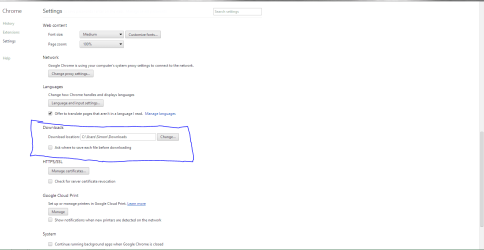
I dont really know what you mean by installation becouse you do not really install from chrome. But if you are looking for how to change download location i will show you:

1:
Go into settings:
Step 1 eng.PNG

2:
click on show advanced settings:
Step 2 eng.PNG

3:
Choose where you want it to save to:
Step 3 eng.PNG
 

My Computer

Computer type
PC/Desktop
Computer Manufacturer/Model Number
Custom Built
OS
Windows 10 64Bit
CPU
Intel i7 6700K Cooled by Noctua NH-U14S
Motherboard
ASUS Z170 Pro Gaming
Memory
16GB 2133MHZ DDR4 Corsair
Graphics Card(s)
ASUS Direct CUII OC GTX 660
Sound Card
Supreme FX (On-Board)
Monitor(s) Displays
1: 24" Asus 144hz 2: 21.5" Benq 3: 20" Hp 2009m
Screen Resolution
1:1920x1080 2:1920x1080 3:1600:900
Hard Drives
Primary/OS: Samsung 850 EVO SSD 250GB
Secondary/Main: Seagate 1TB SSHD 3.5"
Media/Backups: WD Green 2TB HDD 3.5"
PSU
Corsair RM 650W
Case
Fractal Design R4
Cooling
2 140mm Noctua NF-A14 ULN, Noctua NH-U14S Cpu cooler
Keyboard
Corsair K70 RGB
Mouse
ROCCAT Kone XTD
Internet Speed
100 Mbit/s Download 100MBit/s Upload
Antivirus
F-Secure SAFE
Browser
Chrome, Firefox
Other Info
I hope hanging up your harddrives in rubber-bands for noise reasons isn't too harmful for the drives :S, but eh, rather silence than lasting drives.. :|
I dont really know what you mean by installation becouse you do not really install from chrome. But if you are looking for how to change download location i will show you:
No, I ain't talking about the default download location of chrome. I'm talking about the directory into which Google chrome installs for default. It installs into program files folder.
 

My Computer

Computer type
Laptop
Computer Manufacturer/Model Number
Acer 5733Z
OS
Windows 7 Professional 32bit
CPU
P6200 @ 2.13GHz
Memory
2043 MB
Graphics Card(s)
Intel HD graphics
Hard Drives
C: Total - 49899 MB; D: Total - 149999; E: Total - 149999 MB; F: Total - 123107 MB;
Antivirus
Microsoft Security Essentials, ESET NOD 32
Browser
Mozilla
Does Chrome even give the option to change the location ?

I don`t think it did/does. :huh:

Why would you want to change it from C: ?
 

My Computer

Computer type
PC/Desktop
Computer Manufacturer/Model Number
Skylake Special #666
OS
Windows 10 Pro x64
CPU
Intel Core i7 6700K
Motherboard
Asus Sabertooth Z170 Mark 1
Memory
GSkill TridentZ RGB 16GB 3600 16-16-16-36
Graphics Card(s)
EVGA GTX 980 Ti SC x2
Sound Card
Realtek High Definition
Monitor(s) Displays
AOC G2460PG
Screen Resolution
1920 x 1080 144Hz
Hard Drives
Samsung 860 Pro 256GB, Seagate Barracuda 4TB x2
PSU
EVGA 1000 P2, EVGA White Custom Braided Cables
Case
Corsair Vengeance C70 Gunmetal Black
Cooling
Corsair H100i v2, Corsair ML120 x2, Thermal Grizzly Kryonaut
Keyboard
Logitech G910 Orion Spectrum
Mouse
Logitech G700s
Internet Speed
Verizon Fios Quantum Gateway 75/75
Antivirus
Windows Defender, Malwarebytes Free 3.8.3
Browser
Chrome
Other Info
Corsair SP120 x4, LG Blu-ray Drive, Durabrand HT-395 100 Watt Dolby Digital Amp, Corsair H2100 Wireless 7.1 Headset
Does Chrome even give the option to change the location ?

I don`t think it did/does. :huh:

Why would you want to change it from C: ?
No it doesn't allow us to change the loacation of installation for sure. I tried with around 10 versions new and old but I didn't find any option to change the installation path. I found some 30-40 .exe files in the google roaming and app data in which some of them run every other time I start my google chrome. I think they are related with update issue that occurs silently in background, I found some ads in the gmail exactly related to the keywords I type and work around. This made me uninstall it immediately. :zip:
 

My Computer

Computer type
Laptop
Computer Manufacturer/Model Number
Acer 5733Z
OS
Windows 7 Professional 32bit
CPU
P6200 @ 2.13GHz
Memory
2043 MB
Graphics Card(s)
Intel HD graphics
Hard Drives
C: Total - 49899 MB; D: Total - 149999; E: Total - 149999 MB; F: Total - 123107 MB;
Antivirus
Microsoft Security Essentials, ESET NOD 32
Browser
Mozilla
Back
Top