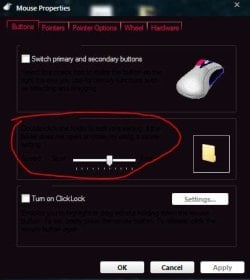
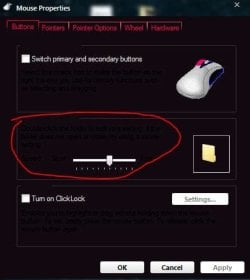
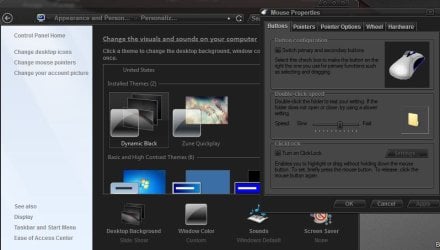
How do I change font color inside e.g. properties box? (img attached)

digvoo

Banned
Local time
5:22 AM
Messages
18
Location
Belgrade, Serbia

Attachments

  • Capture.JPG
    Capture.JPG
    25.8 KB · Views: 16

My Computer My Computer

At a glance

Windows 7 Ultimate x64Intel Core i5-2400 [email protected]DDR3 4GB(2x2)GeForce GTX 550 Ti
Computer Manufacturer/Model Number
LG?
OS
Windows 7 Ultimate x64
CPU
Intel Core i5-2400 [email protected]
Motherboard
iH67 MSI H67MA-E35(B3)
Memory
DDR3 4GB(2x2)
Graphics Card(s)
GeForce GTX 550 Ti
Sound Card
Integrated 7.1
Monitor(s) Displays
ASUS
Hard Drives
Disc: 1TB SATA 3
DVD: Multi Writer 22XDVD/12xDVD-RAM/2MB
Cooling
500W
Is this a third party custom theme? If so post a link to it and I will look at it and let you know.
Jerry
 

My Computer My Computer

At a glance

Win 7 Pro x64 / Win 10 ProIntel(R) Core(TM) i7-3630QM CPU @ 2.40GHz12 GB(1) Intel(R) HD Graphics 4000 (2) NVIDIA GeFo...
Computer type
Laptop
Computer Manufacturer/Model Number
Sager NP9170
OS
Win 7 Pro x64 / Win 10 Pro
CPU
Intel(R) Core(TM) i7-3630QM CPU @ 2.40GHz
Motherboard
CLEVO P170EM
Memory
12 GB
Graphics Card(s)
(1) Intel(R) HD Graphics 4000 (2) NVIDIA GeForce GTX 675M
Sound Card
(1) Realtek High Definition Audio (2) Intel(R) Display Aud
Monitor(s) Displays
17.3
Screen Resolution
1920x1080
Hard Drives
(1) Samsung 860 EVO 500GB(OS) (1) Samsung 860 EVO 500GB(Data)
Keyboard
Backlite
Antivirus
MSE, Malwarebytes Pro
Browser
Firefox
Other Info
DESKTOP: Custom-built.
OS: Win 10 Pro x64.
CASE: Rosewill R5.
CPU: Intel I5 4670K CPU @ 3.40GHz.
CPU COOLER: Cool Master Hyper 212 EVO.
MOTHERBOARD: Asus Z87-A.
MEMORY: Kingston HyperX 2x4 GB.
GPU: Nvidia Geforce 650 TI.
PSU: Corsair TX750.
DRIVES: (1) Samsung 840 120 GB SSD (2) Western Digital blue 500 GB 7200 RPM.

My Computer My Computer

At a glance

Windows 7 Ultimate x64Intel Core i5-2400 [email protected]DDR3 4GB(2x2)GeForce GTX 550 Ti
Computer Manufacturer/Model Number
LG?
OS
Windows 7 Ultimate x64
CPU
Intel Core i5-2400 [email protected]
Motherboard
iH67 MSI H67MA-E35(B3)
Memory
DDR3 4GB(2x2)
Graphics Card(s)
GeForce GTX 550 Ti
Sound Card
Integrated 7.1
Monitor(s) Displays
ASUS
Hard Drives
Disc: 1TB SATA 3
DVD: Multi Writer 22XDVD/12xDVD-RAM/2MB
Cooling
500W
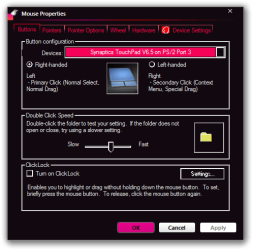
I looked at that youtube page and follow the link to this page Zune QuickPlay for Win7 by ~giannisgx89 on deviantART is this the theme you installed? If so you have something else going on, here is what I get from that same property window.
Mouse Properties.png

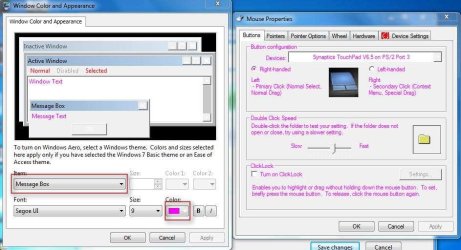
And I also tried on the default arrow theme and I was able to change that property window text color here look at screenshot.
Capture.JPG
Jerry
 

My Computer My Computer

At a glance

Win 7 Pro x64 / Win 10 ProIntel(R) Core(TM) i7-3630QM CPU @ 2.40GHz12 GB(1) Intel(R) HD Graphics 4000 (2) NVIDIA GeFo...
Computer type
Laptop
Computer Manufacturer/Model Number
Sager NP9170
OS
Win 7 Pro x64 / Win 10 Pro
CPU
Intel(R) Core(TM) i7-3630QM CPU @ 2.40GHz
Motherboard
CLEVO P170EM
Memory
12 GB
Graphics Card(s)
(1) Intel(R) HD Graphics 4000 (2) NVIDIA GeForce GTX 675M
Sound Card
(1) Realtek High Definition Audio (2) Intel(R) Display Aud
Monitor(s) Displays
17.3
Screen Resolution
1920x1080
Hard Drives
(1) Samsung 860 EVO 500GB(OS) (1) Samsung 860 EVO 500GB(Data)
Keyboard
Backlite
Antivirus
MSE, Malwarebytes Pro
Browser
Firefox
Other Info
DESKTOP: Custom-built.
OS: Win 10 Pro x64.
CASE: Rosewill R5.
CPU: Intel I5 4670K CPU @ 3.40GHz.
CPU COOLER: Cool Master Hyper 212 EVO.
MOTHERBOARD: Asus Z87-A.
MEMORY: Kingston HyperX 2x4 GB.
GPU: Nvidia Geforce 650 TI.
PSU: Corsair TX750.
DRIVES: (1) Samsung 840 120 GB SSD (2) Western Digital blue 500 GB 7200 RPM.
Yeah, that's the one.
I did that, but font color is the same even with another (default) theme. Take a look:
 

Attachments

  • Capture2.JPG
    Capture2.JPG
    67.9 KB · Views: 16

My Computer My Computer

At a glance

Windows 7 Ultimate x64Intel Core i5-2400 [email protected]DDR3 4GB(2x2)GeForce GTX 550 Ti
Computer Manufacturer/Model Number
LG?
OS
Windows 7 Ultimate x64
CPU
Intel Core i5-2400 [email protected]
Motherboard
iH67 MSI H67MA-E35(B3)
Memory
DDR3 4GB(2x2)
Graphics Card(s)
GeForce GTX 550 Ti
Sound Card
Integrated 7.1
Monitor(s) Displays
ASUS
Hard Drives
Disc: 1TB SATA 3
DVD: Multi Writer 22XDVD/12xDVD-RAM/2MB
Cooling
500W
I see you get a transparent border on your property window and mine is solid, have you made any changes to that theme?
p.JPGMouse Properties.png


Here is the image for the top frame.
DWMWindow_FrameTop_ActiveImage.png

Jerry
 

My Computer My Computer

At a glance

Win 7 Pro x64 / Win 10 ProIntel(R) Core(TM) i7-3630QM CPU @ 2.40GHz12 GB(1) Intel(R) HD Graphics 4000 (2) NVIDIA GeFo...
Computer type
Laptop
Computer Manufacturer/Model Number
Sager NP9170
OS
Win 7 Pro x64 / Win 10 Pro
CPU
Intel(R) Core(TM) i7-3630QM CPU @ 2.40GHz
Motherboard
CLEVO P170EM
Memory
12 GB
Graphics Card(s)
(1) Intel(R) HD Graphics 4000 (2) NVIDIA GeForce GTX 675M
Sound Card
(1) Realtek High Definition Audio (2) Intel(R) Display Aud
Monitor(s) Displays
17.3
Screen Resolution
1920x1080
Hard Drives
(1) Samsung 860 EVO 500GB(OS) (1) Samsung 860 EVO 500GB(Data)
Keyboard
Backlite
Antivirus
MSE, Malwarebytes Pro
Browser
Firefox
Other Info
DESKTOP: Custom-built.
OS: Win 10 Pro x64.
CASE: Rosewill R5.
CPU: Intel I5 4670K CPU @ 3.40GHz.
CPU COOLER: Cool Master Hyper 212 EVO.
MOTHERBOARD: Asus Z87-A.
MEMORY: Kingston HyperX 2x4 GB.
GPU: Nvidia Geforce 650 TI.
PSU: Corsair TX750.
DRIVES: (1) Samsung 840 120 GB SSD (2) Western Digital blue 500 GB 7200 RPM.
Yes I did. :)
 

My Computer My Computer

At a glance

Windows 7 Ultimate x64Intel Core i5-2400 [email protected]DDR3 4GB(2x2)GeForce GTX 550 Ti
Computer Manufacturer/Model Number
LG?
OS
Windows 7 Ultimate x64
CPU
Intel Core i5-2400 [email protected]
Motherboard
iH67 MSI H67MA-E35(B3)
Memory
DDR3 4GB(2x2)
Graphics Card(s)
GeForce GTX 550 Ti
Sound Card
Integrated 7.1
Monitor(s) Displays
ASUS
Hard Drives
Disc: 1TB SATA 3
DVD: Multi Writer 22XDVD/12xDVD-RAM/2MB
Cooling
500W
What changes did you make and how did you do it.
Jerry
 

My Computer My Computer

At a glance

Win 7 Pro x64 / Win 10 ProIntel(R) Core(TM) i7-3630QM CPU @ 2.40GHz12 GB(1) Intel(R) HD Graphics 4000 (2) NVIDIA GeFo...
Computer type
Laptop
Computer Manufacturer/Model Number
Sager NP9170
OS
Win 7 Pro x64 / Win 10 Pro
CPU
Intel(R) Core(TM) i7-3630QM CPU @ 2.40GHz
Motherboard
CLEVO P170EM
Memory
12 GB
Graphics Card(s)
(1) Intel(R) HD Graphics 4000 (2) NVIDIA GeForce GTX 675M
Sound Card
(1) Realtek High Definition Audio (2) Intel(R) Display Aud
Monitor(s) Displays
17.3
Screen Resolution
1920x1080
Hard Drives
(1) Samsung 860 EVO 500GB(OS) (1) Samsung 860 EVO 500GB(Data)
Keyboard
Backlite
Antivirus
MSE, Malwarebytes Pro
Browser
Firefox
Other Info
DESKTOP: Custom-built.
OS: Win 10 Pro x64.
CASE: Rosewill R5.
CPU: Intel I5 4670K CPU @ 3.40GHz.
CPU COOLER: Cool Master Hyper 212 EVO.
MOTHERBOARD: Asus Z87-A.
MEMORY: Kingston HyperX 2x4 GB.
GPU: Nvidia Geforce 650 TI.
PSU: Corsair TX750.
DRIVES: (1) Samsung 840 120 GB SSD (2) Western Digital blue 500 GB 7200 RPM.
In "Control Panel\Appearance and Personalization\Personalization\Window Color and Appearance" I enabled transparency, maybe changed Color intensity a little and that's all.

I can do the "theme installation" again from the beginning, but I'm not sure if that's gonna help.

edit: And is there some easy way to bring all to default state? Is changing to theme I previously used a way to do it?
 
Last edited:

My Computer My Computer

At a glance

Windows 7 Ultimate x64Intel Core i5-2400 [email protected]DDR3 4GB(2x2)GeForce GTX 550 Ti
Computer Manufacturer/Model Number
LG?
OS
Windows 7 Ultimate x64
CPU
Intel Core i5-2400 [email protected]
Motherboard
iH67 MSI H67MA-E35(B3)
Memory
DDR3 4GB(2x2)
Graphics Card(s)
GeForce GTX 550 Ti
Sound Card
Integrated 7.1
Monitor(s) Displays
ASUS
Hard Drives
Disc: 1TB SATA 3
DVD: Multi Writer 22XDVD/12xDVD-RAM/2MB
Cooling
500W
I would switch to the default Aero theme and then log off and then log on(you need to do this or you cannot delete the theme folder) and go to C:\Windows\Resources\Themes and delete the Zune Quickplay theme folder and the Zune Quickplay.theme file and re-downloaded and install the theme folder and the .theme file again.
Jerry
 

My Computer My Computer

At a glance

Win 7 Pro x64 / Win 10 ProIntel(R) Core(TM) i7-3630QM CPU @ 2.40GHz12 GB(1) Intel(R) HD Graphics 4000 (2) NVIDIA GeFo...
Computer type
Laptop
Computer Manufacturer/Model Number
Sager NP9170
OS
Win 7 Pro x64 / Win 10 Pro
CPU
Intel(R) Core(TM) i7-3630QM CPU @ 2.40GHz
Motherboard
CLEVO P170EM
Memory
12 GB
Graphics Card(s)
(1) Intel(R) HD Graphics 4000 (2) NVIDIA GeForce GTX 675M
Sound Card
(1) Realtek High Definition Audio (2) Intel(R) Display Aud
Monitor(s) Displays
17.3
Screen Resolution
1920x1080
Hard Drives
(1) Samsung 860 EVO 500GB(OS) (1) Samsung 860 EVO 500GB(Data)
Keyboard
Backlite
Antivirus
MSE, Malwarebytes Pro
Browser
Firefox
Other Info
DESKTOP: Custom-built.
OS: Win 10 Pro x64.
CASE: Rosewill R5.
CPU: Intel I5 4670K CPU @ 3.40GHz.
CPU COOLER: Cool Master Hyper 212 EVO.
MOTHERBOARD: Asus Z87-A.
MEMORY: Kingston HyperX 2x4 GB.
GPU: Nvidia Geforce 650 TI.
PSU: Corsair TX750.
DRIVES: (1) Samsung 840 120 GB SSD (2) Western Digital blue 500 GB 7200 RPM.
Ok, I'll do that and let you know if that solves the problem.
 

My Computer My Computer

At a glance

Windows 7 Ultimate x64Intel Core i5-2400 [email protected]DDR3 4GB(2x2)GeForce GTX 550 Ti
Computer Manufacturer/Model Number
LG?
OS
Windows 7 Ultimate x64
CPU
Intel Core i5-2400 [email protected]
Motherboard
iH67 MSI H67MA-E35(B3)
Memory
DDR3 4GB(2x2)
Graphics Card(s)
GeForce GTX 550 Ti
Sound Card
Integrated 7.1
Monitor(s) Displays
ASUS
Hard Drives
Disc: 1TB SATA 3
DVD: Multi Writer 22XDVD/12xDVD-RAM/2MB
Cooling
500W
Did that, but problem is still there.
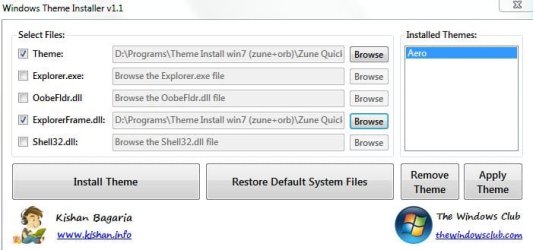
When I installed the theme and applied it, there was red info at the bottom of program (see attachment). I restarted PC after it.
*I can't change font color in message box even if I'm using Aero default theme.
Here are the steps of re-installing:
 

Attachments

  • Capture.JPG
    Capture.JPG
    41 KB · Views: 7
  • Capture2.JPG
    Capture2.JPG
    41.2 KB · Views: 6
  • Capture3.JPG
    Capture3.JPG
    40.7 KB · Views: 9

My Computer My Computer

At a glance

Windows 7 Ultimate x64Intel Core i5-2400 [email protected]DDR3 4GB(2x2)GeForce GTX 550 Ti
Computer Manufacturer/Model Number
LG?
OS
Windows 7 Ultimate x64
CPU
Intel Core i5-2400 [email protected]
Motherboard
iH67 MSI H67MA-E35(B3)
Memory
DDR3 4GB(2x2)
Graphics Card(s)
GeForce GTX 550 Ti
Sound Card
Integrated 7.1
Monitor(s) Displays
ASUS
Hard Drives
Disc: 1TB SATA 3
DVD: Multi Writer 22XDVD/12xDVD-RAM/2MB
Cooling
500W
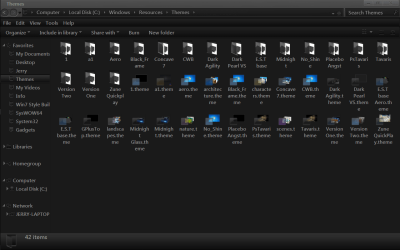
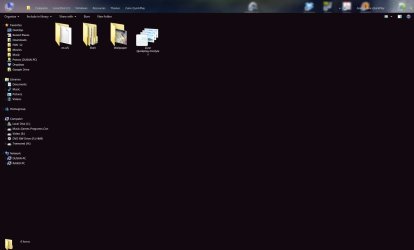
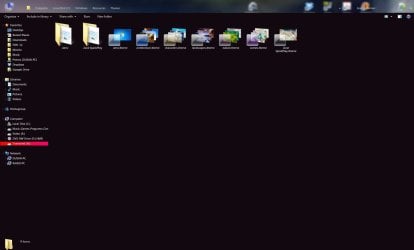
Goto C:\Windows\Resources\Themes and maximize the window and post a screenshot, also open up the Zune Quickplay folder and post a screenshot of it to. Here are two examples of what I would like you to take screenshots of.
Jerry
Themes.pngZune Quickplay.png
 

My Computer My Computer

At a glance

Win 7 Pro x64 / Win 10 ProIntel(R) Core(TM) i7-3630QM CPU @ 2.40GHz12 GB(1) Intel(R) HD Graphics 4000 (2) NVIDIA GeFo...
Computer type
Laptop
Computer Manufacturer/Model Number
Sager NP9170
OS
Win 7 Pro x64 / Win 10 Pro
CPU
Intel(R) Core(TM) i7-3630QM CPU @ 2.40GHz
Motherboard
CLEVO P170EM
Memory
12 GB
Graphics Card(s)
(1) Intel(R) HD Graphics 4000 (2) NVIDIA GeForce GTX 675M
Sound Card
(1) Realtek High Definition Audio (2) Intel(R) Display Aud
Monitor(s) Displays
17.3
Screen Resolution
1920x1080
Hard Drives
(1) Samsung 860 EVO 500GB(OS) (1) Samsung 860 EVO 500GB(Data)
Keyboard
Backlite
Antivirus
MSE, Malwarebytes Pro
Browser
Firefox
Other Info
DESKTOP: Custom-built.
OS: Win 10 Pro x64.
CASE: Rosewill R5.
CPU: Intel I5 4670K CPU @ 3.40GHz.
CPU COOLER: Cool Master Hyper 212 EVO.
MOTHERBOARD: Asus Z87-A.
MEMORY: Kingston HyperX 2x4 GB.
GPU: Nvidia Geforce 650 TI.
PSU: Corsair TX750.
DRIVES: (1) Samsung 840 120 GB SSD (2) Western Digital blue 500 GB 7200 RPM.
Here are the screenshots:
 

Attachments

  • Capture2.JPG
    Capture2.JPG
    47.6 KB · Views: 5
  • Capture.JPG
    Capture.JPG
    58.2 KB · Views: 8
Last edited:

My Computer My Computer

At a glance

Windows 7 Ultimate x64Intel Core i5-2400 [email protected]DDR3 4GB(2x2)GeForce GTX 550 Ti
Computer Manufacturer/Model Number
LG?
OS
Windows 7 Ultimate x64
CPU
Intel Core i5-2400 [email protected]
Motherboard
iH67 MSI H67MA-E35(B3)
Memory
DDR3 4GB(2x2)
Graphics Card(s)
GeForce GTX 550 Ti
Sound Card
Integrated 7.1
Monitor(s) Displays
ASUS
Hard Drives
Disc: 1TB SATA 3
DVD: Multi Writer 22XDVD/12xDVD-RAM/2MB
Cooling
500W
Everything looks fine from the 2 screenshots.
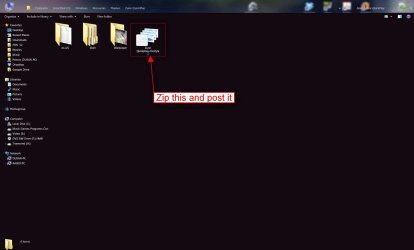
Zip up a copy of the Zune Quickplay.msstyles I have highlighted in red and posted here so I can look at it.
Jerry
Capture2.JPG
 

My Computer My Computer

At a glance

Win 7 Pro x64 / Win 10 ProIntel(R) Core(TM) i7-3630QM CPU @ 2.40GHz12 GB(1) Intel(R) HD Graphics 4000 (2) NVIDIA GeFo...
Computer type
Laptop
Computer Manufacturer/Model Number
Sager NP9170
OS
Win 7 Pro x64 / Win 10 Pro
CPU
Intel(R) Core(TM) i7-3630QM CPU @ 2.40GHz
Motherboard
CLEVO P170EM
Memory
12 GB
Graphics Card(s)
(1) Intel(R) HD Graphics 4000 (2) NVIDIA GeForce GTX 675M
Sound Card
(1) Realtek High Definition Audio (2) Intel(R) Display Aud
Monitor(s) Displays
17.3
Screen Resolution
1920x1080
Hard Drives
(1) Samsung 860 EVO 500GB(OS) (1) Samsung 860 EVO 500GB(Data)
Keyboard
Backlite
Antivirus
MSE, Malwarebytes Pro
Browser
Firefox
Other Info
DESKTOP: Custom-built.
OS: Win 10 Pro x64.
CASE: Rosewill R5.
CPU: Intel I5 4670K CPU @ 3.40GHz.
CPU COOLER: Cool Master Hyper 212 EVO.
MOTHERBOARD: Asus Z87-A.
MEMORY: Kingston HyperX 2x4 GB.
GPU: Nvidia Geforce 650 TI.
PSU: Corsair TX750.
DRIVES: (1) Samsung 840 120 GB SSD (2) Western Digital blue 500 GB 7200 RPM.
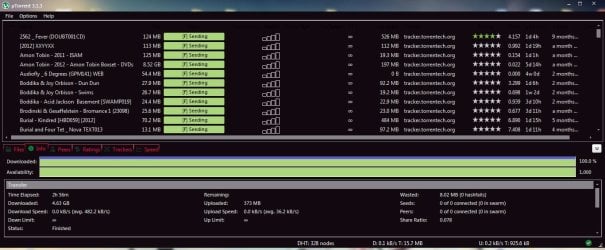
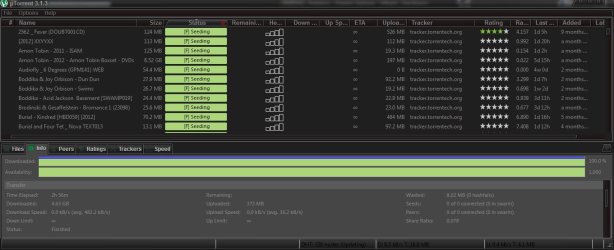
Zune Quickplay.rar and preview of uTorrent (I can't see details columns). Other programs are affected too..I mean, I'll change the theme but that's not the point.:D
 

Attachments

My Computer My Computer

At a glance

Windows 7 Ultimate x64Intel Core i5-2400 [email protected]DDR3 4GB(2x2)GeForce GTX 550 Ti
Computer Manufacturer/Model Number
LG?
OS
Windows 7 Ultimate x64
CPU
Intel Core i5-2400 [email protected]
Motherboard
iH67 MSI H67MA-E35(B3)
Memory
DDR3 4GB(2x2)
Graphics Card(s)
GeForce GTX 550 Ti
Sound Card
Integrated 7.1
Monitor(s) Displays
ASUS
Hard Drives
Disc: 1TB SATA 3
DVD: Multi Writer 22XDVD/12xDVD-RAM/2MB
Cooling
500W
The Zune Quickplay.msstyles looks okay.
Let's try something here download this theme Browsing Windows 7 Utilities on deviantART

Dynamic Black.png

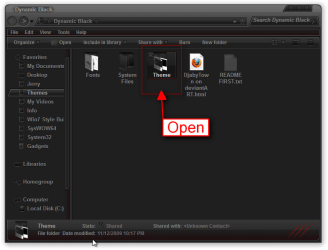
put the 2, 1 theme folder and 1 .theme file in C:\Windows\Resources\Themes do not use that tool/app you have that you used to install the last theme do this manually,
Theme.png

then go to Personalization and start that theme and post a screenshot of what it looks like.
Jerry
 

My Computer My Computer

At a glance

Win 7 Pro x64 / Win 10 ProIntel(R) Core(TM) i7-3630QM CPU @ 2.40GHz12 GB(1) Intel(R) HD Graphics 4000 (2) NVIDIA GeFo...
Computer type
Laptop
Computer Manufacturer/Model Number
Sager NP9170
OS
Win 7 Pro x64 / Win 10 Pro
CPU
Intel(R) Core(TM) i7-3630QM CPU @ 2.40GHz
Motherboard
CLEVO P170EM
Memory
12 GB
Graphics Card(s)
(1) Intel(R) HD Graphics 4000 (2) NVIDIA GeForce GTX 675M
Sound Card
(1) Realtek High Definition Audio (2) Intel(R) Display Aud
Monitor(s) Displays
17.3
Screen Resolution
1920x1080
Hard Drives
(1) Samsung 860 EVO 500GB(OS) (1) Samsung 860 EVO 500GB(Data)
Keyboard
Backlite
Antivirus
MSE, Malwarebytes Pro
Browser
Firefox
Other Info
DESKTOP: Custom-built.
OS: Win 10 Pro x64.
CASE: Rosewill R5.
CPU: Intel I5 4670K CPU @ 3.40GHz.
CPU COOLER: Cool Master Hyper 212 EVO.
MOTHERBOARD: Asus Z87-A.
MEMORY: Kingston HyperX 2x4 GB.
GPU: Nvidia Geforce 650 TI.
PSU: Corsair TX750.
DRIVES: (1) Samsung 840 120 GB SSD (2) Western Digital blue 500 GB 7200 RPM.
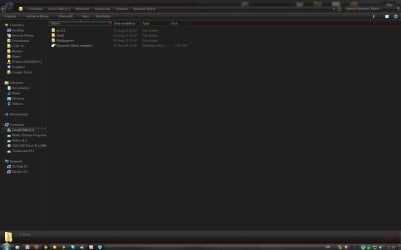
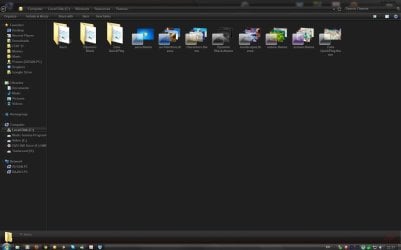
Ok, here are the screenshots:
*btw, pretty neat theme

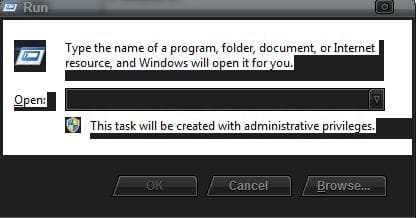
edit: I added one more capture of "run". Does it look same like yours?
 

Attachments

  • uTorrentCapture.JPG
    uTorrentCapture.JPG
    95.1 KB · Views: 6
  • Capture3.JPG
    Capture3.JPG
    65.2 KB · Views: 4
  • Capture2.JPG
    Capture2.JPG
    78.9 KB · Views: 4
  • Capture.JPG
    Capture.JPG
    64.7 KB · Views: 4
  • RunCapture.JPG
    RunCapture.JPG
    20.9 KB · Views: 6
Last edited:

My Computer My Computer

At a glance

Windows 7 Ultimate x64Intel Core i5-2400 [email protected]DDR3 4GB(2x2)GeForce GTX 550 Ti
Computer Manufacturer/Model Number
LG?
OS
Windows 7 Ultimate x64
CPU
Intel Core i5-2400 [email protected]
Motherboard
iH67 MSI H67MA-E35(B3)
Memory
DDR3 4GB(2x2)
Graphics Card(s)
GeForce GTX 550 Ti
Sound Card
Integrated 7.1
Monitor(s) Displays
ASUS
Hard Drives
Disc: 1TB SATA 3
DVD: Multi Writer 22XDVD/12xDVD-RAM/2MB
Cooling
500W
That's good it looks like it installed correctly, my run box looks the same as yours with this theme.
That means something's going wrong when you install the other theme.
Do Option 2 of this tutorial http://www.sevenforums.com/tutorials/1538-sfc-scannow-command-system-file-checker.html it will not harm any data or programs you have installed it will try to find and repair corrupt system files, If you have changed any of the system files like explorerframe.dll or use the program to change your start button they will revert back to the default also the files that were patched with Universal Theme Patcher will also revert back to the default you will need to re-patch after running sfc /scannow.
Then manually put the Zune Quickplay theme folder and the Zune Quickplay.theme file in C:\Windows\Resources\Themes (be sure to delete the old ones first, remember to switch to the default Aero theme and logoff and logon first).
Jerry
 

My Computer My Computer

At a glance

Win 7 Pro x64 / Win 10 ProIntel(R) Core(TM) i7-3630QM CPU @ 2.40GHz12 GB(1) Intel(R) HD Graphics 4000 (2) NVIDIA GeFo...
Computer type
Laptop
Computer Manufacturer/Model Number
Sager NP9170
OS
Win 7 Pro x64 / Win 10 Pro
CPU
Intel(R) Core(TM) i7-3630QM CPU @ 2.40GHz
Motherboard
CLEVO P170EM
Memory
12 GB
Graphics Card(s)
(1) Intel(R) HD Graphics 4000 (2) NVIDIA GeForce GTX 675M
Sound Card
(1) Realtek High Definition Audio (2) Intel(R) Display Aud
Monitor(s) Displays
17.3
Screen Resolution
1920x1080
Hard Drives
(1) Samsung 860 EVO 500GB(OS) (1) Samsung 860 EVO 500GB(Data)
Keyboard
Backlite
Antivirus
MSE, Malwarebytes Pro
Browser
Firefox
Other Info
DESKTOP: Custom-built.
OS: Win 10 Pro x64.
CASE: Rosewill R5.
CPU: Intel I5 4670K CPU @ 3.40GHz.
CPU COOLER: Cool Master Hyper 212 EVO.
MOTHERBOARD: Asus Z87-A.
MEMORY: Kingston HyperX 2x4 GB.
GPU: Nvidia Geforce 650 TI.
PSU: Corsair TX750.
DRIVES: (1) Samsung 840 120 GB SSD (2) Western Digital blue 500 GB 7200 RPM.
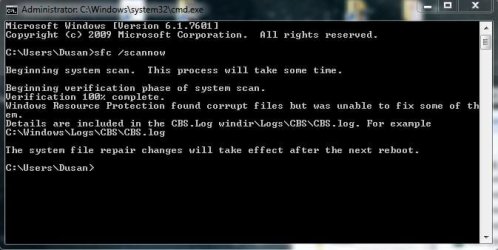
I did the sfc /scannow twice and the message I got is in screenshot. I also attached logs. First one is before, and second after restart.
Should I go to OPTION THREE now?
Or maybe do that manually step now?
 

Attachments

  • Capture.JPG
    Capture.JPG
    37 KB · Views: 6

My Computer My Computer

At a glance

Windows 7 Ultimate x64Intel Core i5-2400 [email protected]DDR3 4GB(2x2)GeForce GTX 550 Ti
Computer Manufacturer/Model Number
LG?
OS
Windows 7 Ultimate x64
CPU
Intel Core i5-2400 [email protected]
Motherboard
iH67 MSI H67MA-E35(B3)
Memory
DDR3 4GB(2x2)
Graphics Card(s)
GeForce GTX 550 Ti
Sound Card
Integrated 7.1
Monitor(s) Displays
ASUS
Hard Drives
Disc: 1TB SATA 3
DVD: Multi Writer 22XDVD/12xDVD-RAM/2MB
Cooling
500W
Back
Top