How do I change my mouse functions for multiple screens?

cami

New member
Local time
7:14 PM
Messages
2
I've managed to set up an extra screen, but I can't get the mouse to leave one screen on the side I want. For example my new screen is set up on the left side of my laptop screen. When I move my mouse across the screen to the screen on the left I have to move my mouse to the right to bring it onto the screen instead of just moving it over to the left. It's a small problem, but it's driving me insane. How can I fix this?

Windows 7 Home Premium SP1 64-bit
HP Pavilion dv6
 

My Computer My Computer

OS
Utah
Hello cami, and welcome to Sevenforums!

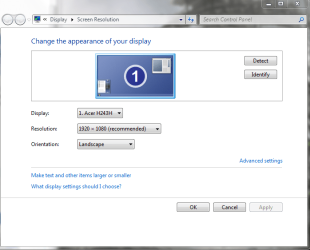
To move the display to correctly position itself according to your layout, RIGHT-click your desktop and click "screen resolution". You should see 2 monitors labeled 1 and 2. Simply click and hold one of the monitors and drag it to the opposite side of the other monitor. Here is what the screen should look like, except that I only have a single monitor where you should have two:
Capture.PNG

:info: Remember, windows can only guess as to which side of your main monitor that you place your secondary monitor; it is up to you to position it in the correct manner. Just ask if you need more help!
 

My Computer My Computer

Computer type
PC/Desktop
Computer Manufacturer/Model Number
Custom Asus Build
OS
Microsoft Windows 8.1 Pro 64-bit
CPU
Intel(R) Core(TM) i3-4130 CPU @ 3.40GHz
Motherboard
B85M-E
Memory
8.00 GB
Graphics Card(s)
None
Sound Card
Realtek High Definition Audio
Monitor(s) Displays
Asus 23.6" Monitor
Screen Resolution
1920 x 1080 x 32 bits (4294967296 colors) @ 60 Hz
Hard Drives
INTEL SSDSC2BW180A4
Samsung SSD 840 PRO Series
PSU
Seasonic S12II-380Bronze
Case
Lian Li
Cooling
Fan, Passive
Keyboard
Logitech K120
Mouse
Microsoft Touch Mouse
Internet Speed
4ms Ping, 19.0 Mbps Download, 19.0 Mbps Upload
Antivirus
Eset Endpoint
Browser
Internet Explorer, Chrome
Back
Top