Solved How do I change this Icon!?

Mystic5hadow

New member
Local time
7:58 PM
Messages
8
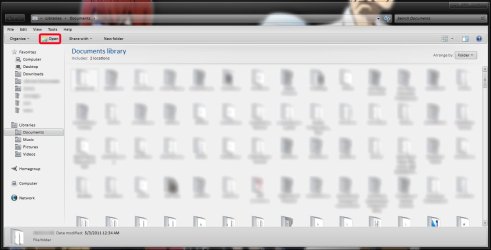
I'm having issues changing an Icon, I've changed what appears to be the Icon in question in Imagered.dll and I would have changed it in Shell32.dll if it was there (or if I could find it if it is there, but I didn't see it.)

I can't seem to find where this icon is or how to change it. Anybody know where it could be if it isn't in Shell32 and/or Imageres.dll (well, it was in Imageres.dll, but I changed it. It's changed for everything else but this for some reason.)

I've recreated my Iconcache.db and I cleared my thumbnails in Disk Cleanup, so I'm pretty sure that isn't the issue here.

Anyways, if you know, thanks for the help!

Attached is the image showing my problem.

Oh, also, second question! Why is it in the menu when I right-click>save as.., my modified icons don't show up for everything, just some? Do they grab their icons from Shell32.dll or something? I haven't changed anything in Shell32, that's what makes me think they do. But I could be wrong.
 

Attachments
  • Icon Change Help.jpg
    Icon Change Help.jpg
    75.9 KB · Views: 39

My Computer

OS
Windows 7 Ultimate x64
CPU
Intel Core i7 2600K @ 5GHz
Motherboard
ASUS P8P67-PRO B3
Memory
4 GB Kingston HyperX DDR3 at 800MHz 9-9-9-27
Graphics Card(s)
GigaByte GeForce GTX 470 - EVGA GeForce GTX 260
Monitor(s) Displays
3 x Viewsonic VA2226w
Hard Drives
1 - 120GB OCZ Agility 3 SSD
1 - 750GB HDD
1 - 2TB HDD
2 - 1TB HDD's
PSU
Corsair HX1000
Case
Corsair 800D
Cooling
XSPC Rasa 750 RX360 WC Loop
Hi Mystic5hadow

Firstly what icon is it can you give me the id number from the imageres.dll.Also you are using a x64 system so you will also have to change the same icon in SysWOW64 as well as system 32 in the c:\windows folder.

What method have you used to change the icon.Which program?

Danny
 

My Computer

Computer Manufacturer/Model Number
acer aspire 5935g
OS
Windows 7 Home Premium x64 SP1
CPU
intel(R)core(TM)2 duo CPU T6600 @ 2.20GHz
Motherboard
intel gm45/gm47 revision 07
Memory
3 gb ddr3
Graphics Card(s)
ati radeon hd4570/512mb
Monitor(s) Displays
lop156wh2-tle1 15.3 flat
Screen Resolution
1366x768
Hard Drives
OCZ-Agility3 60gig ssd
320gig external hdd
500gig external hdd
Mouse
Optical
Internet Speed
30Mbps Down/30Mbps Up
Hi Danny, it appears to be Icon #1023 in Imageres.dll
To change my icons, I use IcoFX to make them, then I use Resource Hacker to place them into the appropriate .dll file.

I did not know I need to change the imageres.dll in SysWOW64, maybe that is my issue. Can I just copy over the Imageres.dll from System32 into SysWOW64? Or do I need to manually edit the icons all over again? If so, is there maybe a better program for doing so that could make things a little easier/quicker? Resource Hacker is kind of slow and annoying to use.
 

My Computer

OS
Windows 7 Ultimate x64
CPU
Intel Core i7 2600K @ 5GHz
Motherboard
ASUS P8P67-PRO B3
Memory
4 GB Kingston HyperX DDR3 at 800MHz 9-9-9-27
Graphics Card(s)
GigaByte GeForce GTX 470 - EVGA GeForce GTX 260
Monitor(s) Displays
3 x Viewsonic VA2226w
Hard Drives
1 - 120GB OCZ Agility 3 SSD
1 - 750GB HDD
1 - 2TB HDD
2 - 1TB HDD's
PSU
Corsair HX1000
Case
Corsair 800D
Cooling
XSPC Rasa 750 RX360 WC Loop
Ok thats this icon - Capture.PNG

That is located in both System32 and SysWOW64.Do not copy them over they are different files.

Firstly you should back up these 2 locations before you do anything else so you have somewhere to go if you make an error.

1) You need to take ownership of the imageres.dll in both locations system32 and SysWOW64 and give your admin acc full control - http://www.sevenforums.com/tutorials/1911-take-ownership-shortcut.html

2) Copy the 2 files(do one at a time) to your desktop.

3) Use resource hacker to replace the icon with your new one.

4) Rename the origional files something like imageresBAK.dll (for backup purposes)

5) Then cut and paste the altered imageres.dll from your desktop into their respecive folders system32 and SysWOW64, and reboot.

The imageres.dll in SysWOW64 is much the same as in System 32 but not identical.The icon number will be the same though.

I hope this makes sense to you its easier to do than explain.

Make sure you run resource hacker as an administrator.

Danny
 
Last edited:

My Computer

Computer Manufacturer/Model Number
acer aspire 5935g
OS
Windows 7 Home Premium x64 SP1
CPU
intel(R)core(TM)2 duo CPU T6600 @ 2.20GHz
Motherboard
intel gm45/gm47 revision 07
Memory
3 gb ddr3
Graphics Card(s)
ati radeon hd4570/512mb
Monitor(s) Displays
lop156wh2-tle1 15.3 flat
Screen Resolution
1366x768
Hard Drives
OCZ-Agility3 60gig ssd
320gig external hdd
500gig external hdd
Mouse
Optical
Internet Speed
30Mbps Down/30Mbps Up
Sounds good! I'll try replacing the icons in SysWOW64's Imageres.dll file and see if that fixes things, if it doesn't, I'll post back here to let you know and see if we can come up with anything else.

As for backing up files, I already did that. I have a fear of severely screwing things up so I'm always sure to backup files a few times for redundancies sake just in case. So I'm safe on that.

Thanks for the help!
 

My Computer

OS
Windows 7 Ultimate x64
CPU
Intel Core i7 2600K @ 5GHz
Motherboard
ASUS P8P67-PRO B3
Memory
4 GB Kingston HyperX DDR3 at 800MHz 9-9-9-27
Graphics Card(s)
GigaByte GeForce GTX 470 - EVGA GeForce GTX 260
Monitor(s) Displays
3 x Viewsonic VA2226w
Hard Drives
1 - 120GB OCZ Agility 3 SSD
1 - 750GB HDD
1 - 2TB HDD
2 - 1TB HDD's
PSU
Corsair HX1000
Case
Corsair 800D
Cooling
XSPC Rasa 750 RX360 WC Loop
No harm in having backups

Let us know how it goes

Danny
 

My Computer

Computer Manufacturer/Model Number
acer aspire 5935g
OS
Windows 7 Home Premium x64 SP1
CPU
intel(R)core(TM)2 duo CPU T6600 @ 2.20GHz
Motherboard
intel gm45/gm47 revision 07
Memory
3 gb ddr3
Graphics Card(s)
ati radeon hd4570/512mb
Monitor(s) Displays
lop156wh2-tle1 15.3 flat
Screen Resolution
1366x768
Hard Drives
OCZ-Agility3 60gig ssd
320gig external hdd
500gig external hdd
Mouse
Optical
Internet Speed
30Mbps Down/30Mbps Up
Alright, so, changing the Imageres.dll in SysWOW64 seems to fix my second questions problem, but I still get the same little icon beside the "open" option when I select a folder.

How is this possible if I've changed that icon in both 32 and 64 Imageres.dll files? Where else could it be grabbing this icon from? It's not in Shell32.dll.
 

My Computer

OS
Windows 7 Ultimate x64
CPU
Intel Core i7 2600K @ 5GHz
Motherboard
ASUS P8P67-PRO B3
Memory
4 GB Kingston HyperX DDR3 at 800MHz 9-9-9-27
Graphics Card(s)
GigaByte GeForce GTX 470 - EVGA GeForce GTX 260
Monitor(s) Displays
3 x Viewsonic VA2226w
Hard Drives
1 - 120GB OCZ Agility 3 SSD
1 - 750GB HDD
1 - 2TB HDD
2 - 1TB HDD's
PSU
Corsair HX1000
Case
Corsair 800D
Cooling
XSPC Rasa 750 RX360 WC Loop
Ok thats good news.

As for the small open icon I can honestly say ive never noticed but mine is the same I have changed the same icons as you and my explorer icon in that menu bar is default too.Im not 100% sure where that icon is or even if it can be changed. Let me have a look and ill get back to you if I find it.

Danny
 

My Computer

Computer Manufacturer/Model Number
acer aspire 5935g
OS
Windows 7 Home Premium x64 SP1
CPU
intel(R)core(TM)2 duo CPU T6600 @ 2.20GHz
Motherboard
intel gm45/gm47 revision 07
Memory
3 gb ddr3
Graphics Card(s)
ati radeon hd4570/512mb
Monitor(s) Displays
lop156wh2-tle1 15.3 flat
Screen Resolution
1366x768
Hard Drives
OCZ-Agility3 60gig ssd
320gig external hdd
500gig external hdd
Mouse
Optical
Internet Speed
30Mbps Down/30Mbps Up
Alright, thanks!

I'm sure it's got to be somewhere. Hopefully that somewhere isn't too hard, or impossible, to find.
 

My Computer

OS
Windows 7 Ultimate x64
CPU
Intel Core i7 2600K @ 5GHz
Motherboard
ASUS P8P67-PRO B3
Memory
4 GB Kingston HyperX DDR3 at 800MHz 9-9-9-27
Graphics Card(s)
GigaByte GeForce GTX 470 - EVGA GeForce GTX 260
Monitor(s) Displays
3 x Viewsonic VA2226w
Hard Drives
1 - 120GB OCZ Agility 3 SSD
1 - 750GB HDD
1 - 2TB HDD
2 - 1TB HDD's
PSU
Corsair HX1000
Case
Corsair 800D
Cooling
XSPC Rasa 750 RX360 WC Loop
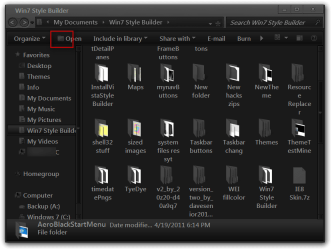
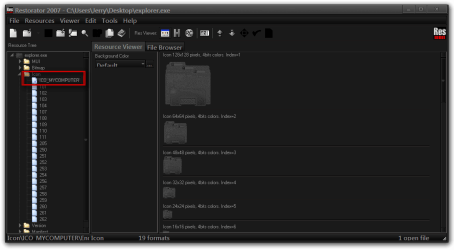
You will find it in C/Windows/explorer.exe
it is a icon named ICO_MYCOMPUTER.ico I just changed it the other day.
Jerry
Win7 Style Builder.png
Restorator 2007 - CUsersJerryDesktopexplorer.exe.png
 

My Computer

Computer type
Laptop
Computer Manufacturer/Model Number
Sager NP9170
OS
Win 7 Pro x64 / Win 10 Pro
CPU
Intel(R) Core(TM) i7-3630QM CPU @ 2.40GHz
Motherboard
CLEVO P170EM
Memory
12 GB
Graphics Card(s)
(1) Intel(R) HD Graphics 4000 (2) NVIDIA GeForce GTX 675M
Sound Card
(1) Realtek High Definition Audio (2) Intel(R) Display Aud
Monitor(s) Displays
17.3
Screen Resolution
1920x1080
Hard Drives
(1) Samsung 860 EVO 500GB(OS) (1) Samsung 860 EVO 500GB(Data)
Keyboard
Backlite
Antivirus
MSE, Malwarebytes Pro
Browser
Firefox
Other Info
DESKTOP: Custom-built.
OS: Win 10 Pro x64.
CASE: Rosewill R5.
CPU: Intel I5 4670K CPU @ 3.40GHz.
CPU COOLER: Cool Master Hyper 212 EVO.
MOTHERBOARD: Asus Z87-A.
MEMORY: Kingston HyperX 2x4 GB.
GPU: Nvidia Geforce 650 TI.
PSU: Corsair TX750.
DRIVES: (1) Samsung 840 120 GB SSD (2) Western Digital blue 500 GB 7200 RPM.
Thanks Jerry :) is it the same process to change it using Resource Hacker.

Danny
 

My Computer

Computer Manufacturer/Model Number
acer aspire 5935g
OS
Windows 7 Home Premium x64 SP1
CPU
intel(R)core(TM)2 duo CPU T6600 @ 2.20GHz
Motherboard
intel gm45/gm47 revision 07
Memory
3 gb ddr3
Graphics Card(s)
ati radeon hd4570/512mb
Monitor(s) Displays
lop156wh2-tle1 15.3 flat
Screen Resolution
1366x768
Hard Drives
OCZ-Agility3 60gig ssd
320gig external hdd
500gig external hdd
Mouse
Optical
Internet Speed
30Mbps Down/30Mbps Up
Awesome! That did the trick! Thank you so much Bongo!
I never would have guessed it would be in Explorer.exe.

May I ask, how did you end up figuring that out?
 

My Computer

OS
Windows 7 Ultimate x64
CPU
Intel Core i7 2600K @ 5GHz
Motherboard
ASUS P8P67-PRO B3
Memory
4 GB Kingston HyperX DDR3 at 800MHz 9-9-9-27
Graphics Card(s)
GigaByte GeForce GTX 470 - EVGA GeForce GTX 260
Monitor(s) Displays
3 x Viewsonic VA2226w
Hard Drives
1 - 120GB OCZ Agility 3 SSD
1 - 750GB HDD
1 - 2TB HDD
2 - 1TB HDD's
PSU
Corsair HX1000
Case
Corsair 800D
Cooling
XSPC Rasa 750 RX360 WC Loop
Wow, it just occurred to me that that icon changes based on what kind of file you have selected, thus, of course a folder would open with explorer.exe! Dang, I should have thought of that! Ah well, thanks again!
 

My Computer

OS
Windows 7 Ultimate x64
CPU
Intel Core i7 2600K @ 5GHz
Motherboard
ASUS P8P67-PRO B3
Memory
4 GB Kingston HyperX DDR3 at 800MHz 9-9-9-27
Graphics Card(s)
GigaByte GeForce GTX 470 - EVGA GeForce GTX 260
Monitor(s) Displays
3 x Viewsonic VA2226w
Hard Drives
1 - 120GB OCZ Agility 3 SSD
1 - 750GB HDD
1 - 2TB HDD
2 - 1TB HDD's
PSU
Corsair HX1000
Case
Corsair 800D
Cooling
XSPC Rasa 750 RX360 WC Loop
Thanks Jerry :) is it the same process to change it using Resource Hacker.

Danny
I am guessing it is I am using Restorator 2007 It should be the same process.


Awesome! That did the trick! Thank you so much Bongo!
I never would have guessed it would be in Explorer.exe.

May I ask, how did you end up figuring that out?
I had changed the color of all the icons in the imageres.dll and shell32.dll and it did not change so it was my next guess and it worked.
Jerry
 

My Computer

Computer type
Laptop
Computer Manufacturer/Model Number
Sager NP9170
OS
Win 7 Pro x64 / Win 10 Pro
CPU
Intel(R) Core(TM) i7-3630QM CPU @ 2.40GHz
Motherboard
CLEVO P170EM
Memory
12 GB
Graphics Card(s)
(1) Intel(R) HD Graphics 4000 (2) NVIDIA GeForce GTX 675M
Sound Card
(1) Realtek High Definition Audio (2) Intel(R) Display Aud
Monitor(s) Displays
17.3
Screen Resolution
1920x1080
Hard Drives
(1) Samsung 860 EVO 500GB(OS) (1) Samsung 860 EVO 500GB(Data)
Keyboard
Backlite
Antivirus
MSE, Malwarebytes Pro
Browser
Firefox
Other Info
DESKTOP: Custom-built.
OS: Win 10 Pro x64.
CASE: Rosewill R5.
CPU: Intel I5 4670K CPU @ 3.40GHz.
CPU COOLER: Cool Master Hyper 212 EVO.
MOTHERBOARD: Asus Z87-A.
MEMORY: Kingston HyperX 2x4 GB.
GPU: Nvidia Geforce 650 TI.
PSU: Corsair TX750.
DRIVES: (1) Samsung 840 120 GB SSD (2) Western Digital blue 500 GB 7200 RPM.
Wow, it just occurred to me that that icon changes based on what kind of file you have selected, thus, of course a folder would open with explorer.exe! Dang, I should have thought of that! Ah well, thanks again!
That is how I figured it out to in most cases that works
but I found one exception and it was when you click on texts file it shows a Notepad icon so I thought it would be the notepad.exe in C/Windows/notepad.exe but it wasn't it was in C/Windows/system32/notepad.exe and if you have 64-bit its in and both system32 & SysWOW
Jerry
 

My Computer

Computer type
Laptop
Computer Manufacturer/Model Number
Sager NP9170
OS
Win 7 Pro x64 / Win 10 Pro
CPU
Intel(R) Core(TM) i7-3630QM CPU @ 2.40GHz
Motherboard
CLEVO P170EM
Memory
12 GB
Graphics Card(s)
(1) Intel(R) HD Graphics 4000 (2) NVIDIA GeForce GTX 675M
Sound Card
(1) Realtek High Definition Audio (2) Intel(R) Display Aud
Monitor(s) Displays
17.3
Screen Resolution
1920x1080
Hard Drives
(1) Samsung 860 EVO 500GB(OS) (1) Samsung 860 EVO 500GB(Data)
Keyboard
Backlite
Antivirus
MSE, Malwarebytes Pro
Browser
Firefox
Other Info
DESKTOP: Custom-built.
OS: Win 10 Pro x64.
CASE: Rosewill R5.
CPU: Intel I5 4670K CPU @ 3.40GHz.
CPU COOLER: Cool Master Hyper 212 EVO.
MOTHERBOARD: Asus Z87-A.
MEMORY: Kingston HyperX 2x4 GB.
GPU: Nvidia Geforce 650 TI.
PSU: Corsair TX750.
DRIVES: (1) Samsung 840 120 GB SSD (2) Western Digital blue 500 GB 7200 RPM.
Back
Top