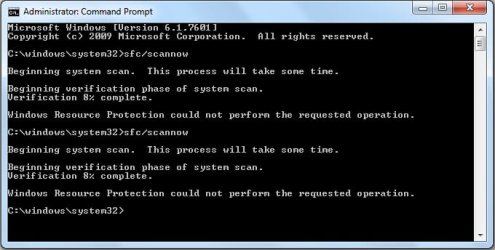
what are these all about? in my sfc details..
2012-01-31 23:26:36, Info CSI 00000009 [SR] Verifying 100 (0x0000000000000064) components
2012-01-31 23:26:36, Info CSI 0000000a [SR] Beginning Verify and Repair transaction
2012-01-31 23:26:40, Info CSI 0000000c [SR] Verify complete
2012-01-31 23:26:40, Info CSI 0000000d [SR] Verifying 100 (0x0000000000000064) components
2012-01-31 23:26:40, Info CSI 0000000e [SR] Beginning Verify and Repair transaction
2012-01-31 23:26:44, Info CSI 00000010 [SR] Verify complete
2012-01-31 23:26:44, Info CSI 00000011 [SR] Verifying 100 (0x0000000000000064) components
2012-01-31 23:26:44, Info CSI 00000012 [SR] Beginning Verify and Repair transaction
2012-01-31 23:26:52, Info CSI 00000014 [SR] Verify complete
2012-01-31 23:26:53, Info CSI 00000015 [SR] Verifying 100 (0x0000000000000064) components
2012-01-31 23:26:53, Info CSI 00000016 [SR] Beginning Verify and Repair transaction
2012-01-31 23:26:58, Info CSI 00000018 [SR] Verify complete
2012-01-31 23:26:59, Info CSI 00000019 [SR] Verifying 100 (0x0000000000000064) components
2012-01-31 23:26:59, Info CSI 0000001a [SR] Beginning Verify and Repair transaction
2012-01-31 23:27:03, Info CSI 0000001c [SR] Verify complete
2012-01-31 23:27:03, Info CSI 0000001d [SR] Verifying 100 (0x0000000000000064) components
2012-01-31 23:27:03, Info CSI 0000001e [SR] Beginning Verify and Repair transaction
2012-01-31 23:27:11, Info CSI 00000020 [SR] Verify complete
2012-01-31 23:27:12, Info CSI 00000021 [SR] Verifying 100 (0x0000000000000064) components
2012-01-31 23:27:12, Info CSI 00000022 [SR] Beginning Verify and Repair transaction
2012-01-31 23:27:16, Info CSI 00000024 [SR] Verify complete
2012-01-31 23:27:17, Info CSI 00000025 [SR] Verifying 100 (0x0000000000000064) components
2012-01-31 23:27:17, Info CSI 00000026 [SR] Beginning Verify and Repair transaction
2012-01-31 23:27:20, Info CSI 00000028 [SR] Verify complete
2012-01-31 23:27:21, Info CSI 00000029 [SR] Verifying 100 (0x0000000000000064) components
2012-01-31 23:27:21, Info CSI 0000002a [SR] Beginning Verify and Repair transaction
2012-01-31 23:27:29, Info CSI 0000002d [SR] Verify complete
2012-01-31 23:27:29, Info CSI 0000002e [SR] Verifying 100 (0x0000000000000064) components
2012-01-31 23:27:29, Info CSI 0000002f [SR] Beginning Verify and Repair transaction
2012-01-31 23:27:39, Info CSI 00000034 [SR] Verify complete
2012-01-31 23:27:39, Info CSI 00000035 [SR] Verifying 100 (0x0000000000000064) components
2012-01-31 23:27:39, Info CSI 00000036 [SR] Beginning Verify and Repair transaction
2012-01-31 23:27:40, Info CSI 00000037 [SR] Cannot repair member file [l:30{15}]"winload.exe.mui" of Microsoft-Windows-BootEnvironment-OS-Loader.Resources, Version = 6.1.7600.16385, pA = PROCESSOR_ARCHITECTURE_AMD64 (9), Culture = [l:10{5}]"en-US", VersionScope = 1 nonSxS, PublicKeyToken = {l:8 b:31bf3856ad364e35}, Type neutral, TypeName neutral, PublicKey neutral in the store, file cannot be checked
2012-01-31 23:27:40, Info CSI 00000038 [SR] Cannot repair member file [l:34{17}]"winresume.exe.mui" of Microsoft-Windows-BootEnvironment-OS-Loader.Resources, Version = 6.1.7600.16385, pA = PROCESSOR_ARCHITECTURE_AMD64 (9), Culture = [l:10{5}]"en-US", VersionScope = 1 nonSxS, PublicKeyToken = {l:8 b:31bf3856ad364e35}, Type neutral, TypeName neutral, PublicKey neutral in the store, file cannot be checked
2012-01-31 23:27:40, Info CSI 00000039 [SR] Cannot repair member file [l:22{11}]"winload.exe" of Microsoft-Windows-BootEnvironment-OS-Loader, Version = 6.1.7601.17556, pA = PROCESSOR_ARCHITECTURE_AMD64 (9), Culture neutral, VersionScope = 1 nonSxS, PublicKeyToken = {l:8 b:31bf3856ad364e35}, Type neutral, TypeName neutral, PublicKey neutral in the store, file cannot be checked
2012-01-31 23:27:41, Info CSI 0000003a [SR] Cannot repair member file [l:26{13}]"winresume.exe" of Microsoft-Windows-BootEnvironment-OS-Loader, Version = 6.1.7601.17556, pA = PROCESSOR_ARCHITECTURE_AMD64 (9), Culture neutral, VersionScope = 1 nonSxS, PublicKeyToken = {l:8 b:31bf3856ad364e35}, Type neutral, TypeName neutral, PublicKey neutral in the store, file cannot be checked
2012-01-31 23:27:43, Info CSI 0000003b [SR] Cannot repair member file [l:22{11}]"bootres.dll" of Microsoft-Windows-BootRes, Version = 6.1.7601.17514, pA = PROCESSOR_ARCHITECTURE_AMD64 (9), Culture neutral, VersionScope = 1 nonSxS, PublicKeyToken = {l:8 b:31bf3856ad364e35}, Type neutral, TypeName neutral, PublicKey neutral in the store, file cannot be checked
2012-01-31 23:29:07, Info CSI 00000041 [SR] Verifying 100 (0x0000000000000064) components
2012-01-31 23:29:07, Info CSI 00000042 [SR] Beginning Verify and Repair transaction
2012-01-31 23:29:07, Info CSI 00000044 [SR] Verify complete
2012-01-31 23:29:08, Info CSI 00000045 [SR] Verifying 100 (0x0000000000000064) components
2012-01-31 23:29:08, Info CSI 00000046 [SR] Beginning Verify and Repair transaction
2012-01-31 23:29:08, Info CSI 00000048 [SR] Verify complete
2012-01-31 23:29:09, Info CSI 00000049 [SR] Verifying 100 (0x0000000000000064) components
2012-01-31 23:29:09, Info CSI 0000004a [SR] Beginning Verify and Repair transaction
2012-01-31 23:29:11, Info CSI 0000004c [SR] Verify complete
2012-01-31 23:29:12, Info CSI 0000004d [SR] Verifying 100 (0x0000000000000064) components
2012-01-31 23:29:12, Info CSI 0000004e [SR] Beginning Verify and Repair transaction
2012-01-31 23:29:13, Info CSI 00000050 [SR] Verify complete
2012-01-31 23:29:13, Info CSI 00000051 [SR] Verifying 100 (0x0000000000000064) components
2012-01-31 23:29:13, Info CSI 00000052 [SR] Beginning Verify and Repair transaction
2012-01-31 23:29:15, Info CSI 00000054 [SR] Verify complete
2012-01-31 23:29:15, Info CSI 00000055 [SR] Verifying 100 (0x0000000000000064) components
2012-01-31 23:29:15, Info CSI 00000056 [SR] Beginning Verify and Repair transaction
2012-01-31 23:29:17, Info CSI 00000058 [SR] Verify complete
2012-01-31 23:29:17, Info CSI 00000059 [SR] Verifying 100 (0x0000000000000064) components
2012-01-31 23:29:17, Info CSI 0000005a [SR] Beginning Verify and Repair transaction
2012-01-31 23:29:19, Info CSI 0000005c [SR] Verify complete
2012-01-31 23:29:19, Info CSI 0000005d [SR] Verifying 100 (0x0000000000000064) components
2012-01-31 23:29:19, Info CSI 0000005e [SR] Beginning Verify and Repair transaction
2012-01-31 23:29:20, Info CSI 00000060 [SR] Verify complete
2012-01-31 23:29:21, Info CSI 00000061 [SR] Verifying 100 (0x0000000000000064) components
2012-01-31 23:29:21, Info CSI 00000062 [SR] Beginning Verify and Repair transaction
2012-01-31 23:29:24, Info CSI 00000065 [SR] Verify complete
2012-01-31 23:29:24, Info CSI 00000066 [SR] Verifying 100 (0x0000000000000064) components
2012-01-31 23:29:24, Info CSI 00000067 [SR] Beginning Verify and Repair transaction
2012-01-31 23:29:28, Info CSI 0000006c [SR] Verify complete
2012-01-31 23:29:29, Info CSI 0000006d [SR] Verifying 100 (0x0000000000000064) components
2012-01-31 23:29:29, Info CSI 0000006e [SR] Beginning Verify and Repair transaction
2012-01-31 23:29:29, Info CSI 0000006f [SR] Cannot repair member file [l:30{15}]"winload.exe.mui" of Microsoft-Windows-BootEnvironment-OS-Loader.Resources, Version = 6.1.7600.16385, pA = PROCESSOR_ARCHITECTURE_AMD64 (9), Culture = [l:10{5}]"en-US", VersionScope = 1 nonSxS, PublicKeyToken = {l:8 b:31bf3856ad364e35}, Type neutral, TypeName neutral, PublicKey neutral in the store, file cannot be checked
2012-01-31 23:29:29, Info CSI 00000070 [SR] Cannot repair member file [l:34{17}]"winresume.exe.mui" of Microsoft-Windows-BootEnvironment-OS-Loader.Resources, Version = 6.1.7600.16385, pA = PROCESSOR_ARCHITECTURE_AMD64 (9), Culture = [l:10{5}]"en-US", VersionScope = 1 nonSxS, PublicKeyToken = {l:8 b:31bf3856ad364e35}, Type neutral, TypeName neutral, PublicKey neutral in the store, file cannot be checked
2012-01-31 23:29:29, Info CSI 00000071 [SR] Cannot repair member file [l:22{11}]"winload.exe" of Microsoft-Windows-BootEnvironment-OS-Loader, Version = 6.1.7601.17556, pA = PROCESSOR_ARCHITECTURE_AMD64 (9), Culture neutral, VersionScope = 1 nonSxS, PublicKeyToken = {l:8 b:31bf3856ad364e35}, Type neutral, TypeName neutral, PublicKey neutral in the store, file cannot be checked
2012-01-31 23:29:29, Info CSI 00000072 [SR] Cannot repair member file [l:26{13}]"winresume.exe" of Microsoft-Windows-BootEnvironment-OS-Loader, Version = 6.1.7601.17556, pA = PROCESSOR_ARCHITECTURE_AMD64 (9), Culture neutral, VersionScope = 1 nonSxS, PublicKeyToken = {l:8 b:31bf3856ad364e35}, Type neutral, TypeName neutral, PublicKey neutral in the store, file cannot be checked
2012-01-31 23:29:30, Info CSI 00000073 [SR] Cannot repair member file [l:22{11}]"bootres.dll" of Microsoft-Windows-BootRes, Version = 6.1.7601.17514, pA = PROCESSOR_ARCHITECTURE_AMD64 (9), Culture neutral, VersionScope = 1 nonSxS, PublicKeyToken = {l:8 b:31bf3856ad364e35}, Type neutral, TypeName neutral, PublicKey neutral in the store, file cannot be checked
2012-01-31 23:38:11, Info CSI 00000079 [SR] Verifying 100 (0x0000000000000064) components
2012-01-31 23:38:11, Info CSI 0000007a [SR] Beginning Verify and Repair transaction
2012-01-31 23:38:12, Info CSI 0000007c [SR] Verify complete
2012-01-31 23:38:12, Info CSI 0000007d [SR] Verifying 100 (0x0000000000000064) components
2012-01-31 23:38:12, Info CSI 0000007e [SR] Beginning Verify and Repair transaction
2012-01-31 23:38:13, Info CSI 00000080 [SR] Verify complete
2012-01-31 23:38:13, Info CSI 00000081 [SR] Verifying 100 (0x0000000000000064) components
2012-01-31 23:38:13, Info CSI 00000082 [SR] Beginning Verify and Repair transaction
2012-01-31 23:38:16, Info CSI 00000084 [SR] Verify complete
2012-01-31 23:38:16, Info CSI 00000085 [SR] Verifying 100 (0x0000000000000064) components
2012-01-31 23:38:16, Info CSI 00000086 [SR] Beginning Verify and Repair transaction
2012-01-31 23:38:18, Info CSI 00000088 [SR] Verify complete
2012-01-31 23:38:18, Info CSI 00000089 [SR] Verifying 100 (0x0000000000000064) components
2012-01-31 23:38:18, Info CSI 0000008a [SR] Beginning Verify and Repair transaction
2012-01-31 23:38:19, Info CSI 0000008c [SR] Verify complete
2012-01-31 23:38:20, Info CSI 0000008d [SR] Verifying 100 (0x0000000000000064) components
2012-01-31 23:38:20, Info CSI 0000008e [SR] Beginning Verify and Repair transaction
2012-01-31 23:38:22, Info CSI 00000090 [SR] Verify complete
2012-01-31 23:38:23, Info CSI 00000091 [SR] Verifying 100 (0x0000000000000064) components
2012-01-31 23:38:23, Info CSI 00000092 [SR] Beginning Verify and Repair transaction
2012-01-31 23:38:24, Info CSI 00000094 [SR] Verify complete
2012-01-31 23:38:24, Info CSI 00000095 [SR] Verifying 100 (0x0000000000000064) components
2012-01-31 23:38:24, Info CSI 00000096 [SR] Beginning Verify and Repair transaction
2012-01-31 23:38:26, Info CSI 00000098 [SR] Verify complete
2012-01-31 23:38:26, Info CSI 00000099 [SR] Verifying 100 (0x0000000000000064) components
2012-01-31 23:38:26, Info CSI 0000009a [SR] Beginning Verify and Repair transaction
2012-01-31 23:38:29, Info CSI 0000009d [SR] Verify complete
2012-01-31 23:38:29, Info CSI 0000009e [SR] Verifying 100 (0x0000000000000064) components
2012-01-31 23:38:29, Info CSI 0000009f [SR] Beginning Verify and Repair transaction
2012-01-31 23:38:33, Info CSI 000000a4 [SR] Verify complete
2012-01-31 23:38:34, Info CSI 000000a5 [SR] Verifying 100 (0x0000000000000064) components
2012-01-31 23:38:34, Info CSI 000000a6 [SR] Beginning Verify and Repair transaction
2012-01-31 23:38:34, Info CSI 000000a7 [SR] Cannot repair member file [l:30{15}]"winload.exe.mui" of Microsoft-Windows-BootEnvironment-OS-Loader.Resources, Version = 6.1.7600.16385, pA = PROCESSOR_ARCHITECTURE_AMD64 (9), Culture = [l:10{5}]"en-US", VersionScope = 1 nonSxS, PublicKeyToken = {l:8 b:31bf3856ad364e35}, Type neutral, TypeName neutral, PublicKey neutral in the store, file cannot be checked
2012-01-31 23:38:34, Info CSI 000000a8 [SR] Cannot repair member file [l:34{17}]"winresume.exe.mui" of Microsoft-Windows-BootEnvironment-OS-Loader.Resources, Version = 6.1.7600.16385, pA = PROCESSOR_ARCHITECTURE_AMD64 (9), Culture = [l:10{5}]"en-US", VersionScope = 1 nonSxS, PublicKeyToken = {l:8 b:31bf3856ad364e35}, Type neutral, TypeName neutral, PublicKey neutral in the store, file cannot be checked
2012-01-31 23:38:34, Info CSI 000000a9 [SR] Cannot repair member file [l:22{11}]"winload.exe" of Microsoft-Windows-BootEnvironment-OS-Loader, Version = 6.1.7601.17556, pA = PROCESSOR_ARCHITECTURE_AMD64 (9), Culture neutral, VersionScope = 1 nonSxS, PublicKeyToken = {l:8 b:31bf3856ad364e35}, Type neutral, TypeName neutral, PublicKey neutral in the store, file cannot be checked
2012-01-31 23:38:34, Info CSI 000000aa [SR] Cannot repair member file [l:26{13}]"winresume.exe" of Microsoft-Windows-BootEnvironment-OS-Loader, Version = 6.1.7601.17556, pA = PROCESSOR_ARCHITECTURE_AMD64 (9), Culture neutral, VersionScope = 1 nonSxS, PublicKeyToken = {l:8 b:31bf3856ad364e35}, Type neutral, TypeName neutral, PublicKey neutral in the store, file cannot be checked
2012-01-31 23:38:34, Info CSI 000000ab [SR] Cannot repair member file [l:22{11}]"bootres.dll" of Microsoft-Windows-BootRes, Version = 6.1.7601.17514, pA = PROCESSOR_ARCHITECTURE_AMD64 (9), Culture neutral, VersionScope = 1 nonSxS, PublicKeyToken = {l:8 b:31bf3856ad364e35}, Type neutral, TypeName neutral, PublicKey neutral in the store, file cannot be checked