Solved How do I delete wscsvc.dll & wscsvc.dll.mui

CSSlemaker

New member
Local time
4:16 AM
Messages
5
Either McAfee security suite (when it was installed) or Dell replaced the Microsoft wscsvc functions with their own. However, they left a total of six copies of wscsvc.dll and wscsvc.dll.mui in various locations. They simply replaced the \Windows\system32\ and the restore copies by files of the same name but empty (zero bytes). I tried to delete them, with administrator privileges, but the system says I need permission from the Trusted Installer function. How can I do this? I have deleted the corresponding autostart entry, but it would be nice to delete the clutter. Can I? Thanks.
 

My Computer My Computer

At a glance

Windows 7 Pro 64-bitXeon E3-1200 v38 GB?
Computer type
PC/Desktop
Computer Manufacturer/Model Number
Dell
OS
Windows 7 Pro 64-bit
CPU
Xeon E3-1200 v3
Motherboard
?
Memory
8 GB
Graphics Card(s)
?
Hard Drives
SATA 2 TB?
Antivirus
McAfee Security Suite
Browser
IE 11
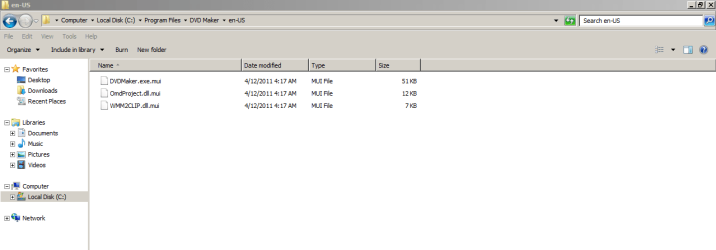
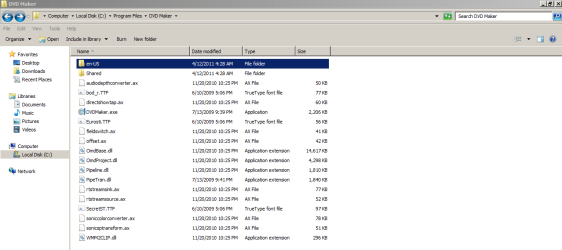
I really hate to tell you this, but it sounds like this happened.

dll_mui.PNG

dll_mui2.PNG

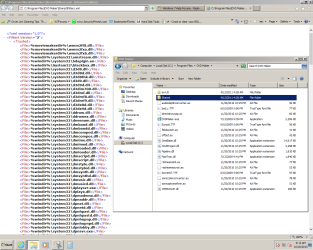
dll_mui3.PNG
 

My Computer My Computer

At a glance

Windows 7 Pro 64 bitAthlon II X2 B248 GBIntegrated Radeon HD4200
Computer type
PC/Desktop
Computer Manufacturer/Model Number
HP Pro 6005 SFF refurbished by Joy
OS
Windows 7 Pro 64 bit
CPU
Athlon II X2 B24
Motherboard
HP 3047-h
Memory
8 GB
Graphics Card(s)
Integrated Radeon HD4200
Hard Drives
GB0750C8047
Seagate Barracuda 7200.9 250GB
Browser
IE 11

My Computer My Computer

At a glance

Windows 10 Pro x64AMD Ryzen 5 1600 @ [email protected]G.Skill Flare X 16GB (2x8GB) DDR4-2400 @ 2666MHzSapphire Radeon Vega 56 NITRO+
Computer type
PC/Desktop
Computer Manufacturer/Model Number
me!
OS
Windows 10 Pro x64
CPU
AMD Ryzen 5 1600 @ [email protected]
Motherboard
ASUS B350 PRIME-PLUS
Memory
G.Skill Flare X 16GB (2x8GB) DDR4-2400 @ 2666MHz
Graphics Card(s)
Sapphire Radeon Vega 56 NITRO+
Sound Card
None
Monitor(s) Displays
ASUS VG248QZ
Screen Resolution
1920x1080
Hard Drives
Samsung 850 EVO 250GB*, 1TB Seagate Constellation ES, 2x Samsung 840 250GB in RAID0*

*Thanks ICIT2LOL for supplying me with all of these drives!
PSU
Corsair VS550
Case
Corsair Crystal 460X
Cooling
AMD Wraith Spire
Keyboard
Ducky Shine 6 w/ MX Browns and PBT keycaps
Mouse
Xtrfy M1-Ice
Internet Speed
100MBit/s down, 20MBit/s up
Antivirus
Bitdefender
Browser
Google Chrome
A little infromation.

(wscsvc) = Windows Security Center service and I believe it is protected but they can get infected.
 

My Computer My Computer

At a glance

Windows 10 Pro. 64/ version 1709 Windows 7 Pr...Intel i7-6800K @ 4.3Corsair Platinum 16 gig @2400EVGA GTX 1070 OC
Computer type
PC/Desktop
Computer Manufacturer/Model Number
Home made Desktop
OS
Windows 10 Pro. 64/ version 1709 Windows 7 Pro/64
CPU
Intel i7-6800K @ 4.3
Motherboard
ASUS X-99 Deluxe II
Memory
Corsair Platinum 16 gig @2400
Graphics Card(s)
EVGA GTX 1070 OC
Monitor(s) Displays
Asus 27" LED LCD/VE278Q
Screen Resolution
1920-1080 or 1280-720 HDMI
Hard Drives
INTEL SSD 730-240 Gb Sata 3.0/
PSU
EVGA Platium 1200W
Case
Phanteks Luxe Tempered Glass 8 fans/ one radiator
Cooling
XSPC/ Water Cooled CPU
Keyboard
Das 4 Professional
Mouse
Logitech M705/MX Anywhere 2-S
Internet Speed
100 mbits
Antivirus
Microsoft Security Essentials/ Malwarebytes Premium 3.0/ SAS
Browser
I.E. 11 default/Firefox/ ISP Time Warner Cable/Spectrum
Other Info
LG BluRay Burner/
Sound system-KLipsch-THX/
Icy Dock ssd Hot Swap bays.
Those services are not replaced or removed.
When windows identifies a 3rd party AV it automatically dissables them, so that they can be used again after the 3rd party AV is uninstalled.

DO NOT EVEN TRY to uninstall them.

Roy
 

My Computer My Computer

At a glance

W7 home premium 32bit/W7HP 64bit/w10 tp insid...E5300 dual core3gbNvidia Geforce 7100 Nforce 630i
Computer type
PC/Desktop
Computer Manufacturer/Model Number
medionl/Aspire 6930G/acer x55a
OS
W7 home premium 32bit/W7HP 64bit/w10 tp insider ring
CPU
E5300 dual core
Motherboard
medion MS7366
Memory
3gb
Graphics Card(s)
Nvidia Geforce 7100 Nforce 630i
Monitor(s) Displays
avixc
Internet Speed
n (isp resticted to 72)
Antivirus
mse/pands
Browser
palemoon
Other Info
Belkin Fd7050 n USB using Railink RT2870 drivers, more upto date

My Computer My Computer

At a glance

Windows 7 Pro 64-bitXeon E3-1200 v38 GB?
Computer type
PC/Desktop
Computer Manufacturer/Model Number
Dell
OS
Windows 7 Pro 64-bit
CPU
Xeon E3-1200 v3
Motherboard
?
Memory
8 GB
Graphics Card(s)
?
Hard Drives
SATA 2 TB?
Antivirus
McAfee Security Suite
Browser
IE 11
Hi CSS,
You havnt really got a problem UG is way over the top.
As i said those services are just dissabled, and are not going to give you a problem.

Roy
 

My Computer My Computer

At a glance

W7 home premium 32bit/W7HP 64bit/w10 tp insid...E5300 dual core3gbNvidia Geforce 7100 Nforce 630i
Computer type
PC/Desktop
Computer Manufacturer/Model Number
medionl/Aspire 6930G/acer x55a
OS
W7 home premium 32bit/W7HP 64bit/w10 tp insider ring
CPU
E5300 dual core
Motherboard
medion MS7366
Memory
3gb
Graphics Card(s)
Nvidia Geforce 7100 Nforce 630i
Monitor(s) Displays
avixc
Internet Speed
n (isp resticted to 72)
Antivirus
mse/pands
Browser
palemoon
Other Info
Belkin Fd7050 n USB using Railink RT2870 drivers, more upto date
Hey there! Run sfc /scannow and chkdsk /f /r.
Install the latest updates from Windows Update.

Do the exact same steps for chkdsk /f /r but instead of typing in sfc /scannow type chkdsk /f /r.
http://www.sevenforums.com/tutorials/1538-sfc-scannow-command-system-file-checker.html

Thanks Laith, but I'm afraid I don't understand your 2nd paragraph. I will run chkdsk /f /r (I've done so before but never found any situations requiring repair). Also, I have run sfc, both the repair option (if I recall correctly, it blew up with a BSOD) and the check only option. The latter option produced a HUGE log file and I have no idea how to filter it or search for entries indicating an error. I did find entries for the wscsvc.dll files and they failed the hash-total check. That tells me nothing of interest however - I knew the files are not the original correct files because they are null - zero bytes! Incidentally, if you know how to search the sfc log file for the error entries, I would be very thankful if you could explain how to do that. Thanks again.
 

My Computer My Computer

At a glance

Windows 7 Pro 64-bitXeon E3-1200 v38 GB?
Computer type
PC/Desktop
Computer Manufacturer/Model Number
Dell
OS
Windows 7 Pro 64-bit
CPU
Xeon E3-1200 v3
Motherboard
?
Memory
8 GB
Graphics Card(s)
?
Hard Drives
SATA 2 TB?
Antivirus
McAfee Security Suite
Browser
IE 11
Hi Roy (Torchwood) and thanks for your reply. I suspect that there is a way to delete these files - after all, at some past time, some process did at least replace them with dummy null files. Also, these dummy files had not been disabled - the system did try to start them during a reboot and it was the resulting error entries in the system event log that attracted my attention. But I have now disabled them and, as long as they don't cause any other problems, I'll just live with the clutter.

Incidentally, there is a Microsoft Windows article headed "What Happened to Windows Security Center in Windows 7?" The article states that Windows Security Center was "replaced" by the Action Center in Windows 7. But opening Action Center and looking under "Maintenance", what I see is a link to - guess what - wscsvc.dll - and it doesn't work (of course not, the file is null).

One final remark: In case you are not familiar with it, there is a Microsoft utility, Autoruns, which finds all services and other functions which start automatically. Thanks again. CSS
 

My Computer My Computer

At a glance

Windows 7 Pro 64-bitXeon E3-1200 v38 GB?
Computer type
PC/Desktop
Computer Manufacturer/Model Number
Dell
OS
Windows 7 Pro 64-bit
CPU
Xeon E3-1200 v3
Motherboard
?
Memory
8 GB
Graphics Card(s)
?
Hard Drives
SATA 2 TB?
Antivirus
McAfee Security Suite
Browser
IE 11
Hi CSS,
Theres also a tutorial in this forum to remove it,
BUT if at any time you remove your 3rd party AV, MSE will kick back in automatically.

Roy
 

My Computer My Computer

At a glance

W7 home premium 32bit/W7HP 64bit/w10 tp insid...E5300 dual core3gbNvidia Geforce 7100 Nforce 630i
Computer type
PC/Desktop
Computer Manufacturer/Model Number
medionl/Aspire 6930G/acer x55a
OS
W7 home premium 32bit/W7HP 64bit/w10 tp insider ring
CPU
E5300 dual core
Motherboard
medion MS7366
Memory
3gb
Graphics Card(s)
Nvidia Geforce 7100 Nforce 630i
Monitor(s) Displays
avixc
Internet Speed
n (isp resticted to 72)
Antivirus
mse/pands
Browser
palemoon
Other Info
Belkin Fd7050 n USB using Railink RT2870 drivers, more upto date
Hi Roy - Sorry, but what do "AV" and "MSE" mean? Sorta looks like "AV" refers to a service or other function required by a 3rd-party application, one which must be loaded automatically. But "MSE"?
CSS
 

My Computer My Computer

At a glance

Windows 7 Pro 64-bitXeon E3-1200 v38 GB?
Computer type
PC/Desktop
Computer Manufacturer/Model Number
Dell
OS
Windows 7 Pro 64-bit
CPU
Xeon E3-1200 v3
Motherboard
?
Memory
8 GB
Graphics Card(s)
?
Hard Drives
SATA 2 TB?
Antivirus
McAfee Security Suite
Browser
IE 11
AV=Anti Virus

MSE=Microsoft Security Essentials.
 

My Computer My Computer

At a glance

Windows 10 Pro. 64/ version 1709 Windows 7 Pr...Intel i7-6800K @ 4.3Corsair Platinum 16 gig @2400EVGA GTX 1070 OC
Computer type
PC/Desktop
Computer Manufacturer/Model Number
Home made Desktop
OS
Windows 10 Pro. 64/ version 1709 Windows 7 Pro/64
CPU
Intel i7-6800K @ 4.3
Motherboard
ASUS X-99 Deluxe II
Memory
Corsair Platinum 16 gig @2400
Graphics Card(s)
EVGA GTX 1070 OC
Monitor(s) Displays
Asus 27" LED LCD/VE278Q
Screen Resolution
1920-1080 or 1280-720 HDMI
Hard Drives
INTEL SSD 730-240 Gb Sata 3.0/
PSU
EVGA Platium 1200W
Case
Phanteks Luxe Tempered Glass 8 fans/ one radiator
Cooling
XSPC/ Water Cooled CPU
Keyboard
Das 4 Professional
Mouse
Logitech M705/MX Anywhere 2-S
Internet Speed
100 mbits
Antivirus
Microsoft Security Essentials/ Malwarebytes Premium 3.0/ SAS
Browser
I.E. 11 default/Firefox/ ISP Time Warner Cable/Spectrum
Other Info
LG BluRay Burner/
Sound system-KLipsch-THX/
Icy Dock ssd Hot Swap bays.
Thanks UG, but either the referenced material is way over my head (quite likely), or I'm missing important antecedent material, because I fail to see the relevance to my question. Take care - CSS
Hi CSS,
You havnt really got a problem UG is way over the top.
As i said those services are just dissabled, and are not going to give you a problem.

Roy

Sorry for being unclear...if you and someone with a known-clean machine navigate the path shown in my images, I think you'll find that they are markedly different.

For instance, I have all Sharing turned off. Why are there extensive XML documents in that folder?

I think it's because the hidden, unwipeable XP Virtual Machine on my C: partition, which is my PC's "SYSTEM", put them there. But I don't know for sure, so I'd hoped someone would do a little investigating to help me and others with this problem. I'm certainly no security expert - just the curious type.

I have null folders and files all over the place after a recent Windows 7 Genuine Validation. During that a notification came up that Microsoft had done a repair to clean up and prevent "an exploit". Then my Windows 7 came up genuine, and updates could be installed.

I'm going to follow Laith's advice on Scannow, though it found no problems previously. Maybe it will after the exploit repair.
 

My Computer My Computer

At a glance

Windows 7 Pro 64 bitAthlon II X2 B248 GBIntegrated Radeon HD4200
Computer type
PC/Desktop
Computer Manufacturer/Model Number
HP Pro 6005 SFF refurbished by Joy
OS
Windows 7 Pro 64 bit
CPU
Athlon II X2 B24
Motherboard
HP 3047-h
Memory
8 GB
Graphics Card(s)
Integrated Radeon HD4200
Hard Drives
GB0750C8047
Seagate Barracuda 7200.9 250GB
Browser
IE 11
Back
Top