Solved How do I display the current time in the Task Scheduler?

bobland

Not a Power User
Power User
Local time
3:22 AM
Messages
247
Location
Boise
I'd like the Task Scheduler to display the current time when a task begins. Something like:
"This task is beginning at {CURRENT_TIME}"
"This task has completed at {CURRENT_TIME}"

Thanks,
Burt
 

My Computer My Computer

At a glance

Windows 7 Professional SP1 64 bit RetailIntel i7-4790K2 x 4GB G.Skill RipJaws 13800MSI GTX 970 Gaming
Computer type
PC/Desktop
Computer Manufacturer/Model Number
Crafted by Hand
OS
Windows 7 Professional SP1 64 bit Retail
CPU
Intel i7-4790K
Motherboard
ASRock Z97 Extreme6
Memory
2 x 4GB G.Skill RipJaws 13800
Graphics Card(s)
MSI GTX 970 Gaming
Sound Card
Focusrite Scarlett 2i2
Monitor(s) Displays
BenQ 3200
Screen Resolution
1440p
Hard Drives
Corsair 250GB SSD
WD RED 2 TB SATA
WD 500GB Green SATA
WD 1TB Black SATA x2
PSU
Corsair CMPSU 750TX
Case
Cooler Master 932 HAF
Cooling
Noctua NH-D14
Keyboard
Roccat Ryos MK
Mouse
Roccat Kone XTD
Internet Speed
20 Mb - CenturyLink
Antivirus
Security Essentials
Browser
FireFox Latest
Other Info
Moving to Windows 10
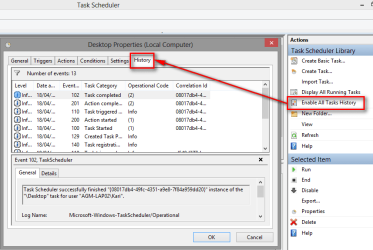
By default the task history is disabled. You can toggle History Enabled / Disabled in Actions pane on the right. You need to enable it to get the History tab for each task to show detailed task history.

2013-04-18_181647.png

Kari
 

My Computer My Computer

At a glance

Windows 10 Pro x64 EN-GB1.6 GHz Intel Core i7-720QM Processor6 GBATI Mobility Radeon HD 5850 Graphics
Computer type
Laptop
Computer Manufacturer/Model Number
HP ENVY 17-1150eg
OS
Windows 10 Pro x64 EN-GB
CPU
1.6 GHz Intel Core i7-720QM Processor
Memory
6 GB
Graphics Card(s)
ATI Mobility Radeon HD 5850 Graphics
Sound Card
Beats sound system with integrated subwoofer
Monitor(s) Displays
17" laptop display, 22" LED and 32" Full HD TV through HDMI
Screen Resolution
1600*900 (1), 1920*1080 (2&3)
Hard Drives
Internal: 2 x 500 GB SATA Hard Disk Drive 7200 rpm
External: 2TB for backups, 3TB USB3 network drive for media
Cooling
As Envy runs a bit warm, I have it on a Cooler Master pad
Keyboard
Logitech diNovo Media Desktop Laser (bluetooth)
Mouse
Logitech Performance Mouse MX
Internet Speed
50/10 Mbps VDSL
Antivirus
Windows Defender 4.3.9431.0
Browser
Maxthon 3.5.2., IE11
OK. I've enabled History. I'll check it again tomorrow. This would be much batter then fiddling with a message display.

Thanks for this tip!
 

My Computer My Computer

At a glance

Windows 7 Professional SP1 64 bit RetailIntel i7-4790K2 x 4GB G.Skill RipJaws 13800MSI GTX 970 Gaming
Computer type
PC/Desktop
Computer Manufacturer/Model Number
Crafted by Hand
OS
Windows 7 Professional SP1 64 bit Retail
CPU
Intel i7-4790K
Motherboard
ASRock Z97 Extreme6
Memory
2 x 4GB G.Skill RipJaws 13800
Graphics Card(s)
MSI GTX 970 Gaming
Sound Card
Focusrite Scarlett 2i2
Monitor(s) Displays
BenQ 3200
Screen Resolution
1440p
Hard Drives
Corsair 250GB SSD
WD RED 2 TB SATA
WD 500GB Green SATA
WD 1TB Black SATA x2
PSU
Corsair CMPSU 750TX
Case
Cooler Master 932 HAF
Cooling
Noctua NH-D14
Keyboard
Roccat Ryos MK
Mouse
Roccat Kone XTD
Internet Speed
20 Mb - CenturyLink
Antivirus
Security Essentials
Browser
FireFox Latest
Other Info
Moving to Windows 10
You are welcome.

The task history is a feature I like very much. You do not need it often but when you need, all information is there.
 

My Computer My Computer

At a glance

Windows 10 Pro x64 EN-GB1.6 GHz Intel Core i7-720QM Processor6 GBATI Mobility Radeon HD 5850 Graphics
Computer type
Laptop
Computer Manufacturer/Model Number
HP ENVY 17-1150eg
OS
Windows 10 Pro x64 EN-GB
CPU
1.6 GHz Intel Core i7-720QM Processor
Memory
6 GB
Graphics Card(s)
ATI Mobility Radeon HD 5850 Graphics
Sound Card
Beats sound system with integrated subwoofer
Monitor(s) Displays
17" laptop display, 22" LED and 32" Full HD TV through HDMI
Screen Resolution
1600*900 (1), 1920*1080 (2&3)
Hard Drives
Internal: 2 x 500 GB SATA Hard Disk Drive 7200 rpm
External: 2TB for backups, 3TB USB3 network drive for media
Cooling
As Envy runs a bit warm, I have it on a Cooler Master pad
Keyboard
Logitech diNovo Media Desktop Laser (bluetooth)
Mouse
Logitech Performance Mouse MX
Internet Speed
50/10 Mbps VDSL
Antivirus
Windows Defender 4.3.9431.0
Browser
Maxthon 3.5.2., IE11
Back
Top