Task Scheduler Corrupt?

Bruce Kluger

New member
Local time
2:47 PM
Messages
8
I bought a new computer (two months old) that runs Windows 7 Professional (64-bit), and, after customizing it a bit to suit my needs, I'm now having a bit of trouble with the Task Scheduler. I do NOT get error messages when I open it; and, according to the Task Status list (in the middle pane), it SAYS it's performing the tasks successfully. And I even see the hard drive's little red light blinking when a scheduled task is being performed. But I can't be sure the tasks are really being performed -- b/c the one I care about the most (the automatic creation of System Restore Points) doesn't seem to be working: When I run the System Restore GUI, none of the new System Restore Points allegedly "created successfully" by the Task Scheduler are listed -- just the ones I'd made manually. I downloaded a (great) 3rd-party Restore Point creator that does this task for me automatically, but I'd still like to get to the root of my Task Scheduler problem. Among its errors:

1) When I click on Display All Running Tasks in the far right pane of Task Scheduler, I get the message, "Task Scheduler service is not available. Task Scheduler will attempt to reconnect to it."

2) When I click on certain individual tasks in the Task Scheduler Library (far left pane), I often get a blank screen in the middle pane, where the detailed data should be.

I've tried numerous solutions proposed online, including deleting certain files lists in the registry. On my computer, the key at:
HKEY_LOCAL_MACHINE\SOFTWARE\Microsoft\Windows
NT\CurrentVersion\Schedule\TaskCache\Tasks
lists 94 Tasks (!)...
and the key at
HKEY_LOCAL_MACHINE\SOFTWARE\Microsoft\Windows
NT\CurrentVersion\Schedule\TaskCache\Tree
lists 23 tree files.
But none of my attempted "fixes" corrects the problem.

I've read about five dozen online tech board entrees about this, and still can't figure it out; and I've been on the phone with Microsoft three times, and they, too, are clueless about it. Meantime, I don't have any System Restore Points from before the problem began. Ordinarily, I'd just reinstall Task Scheduler from a distribution disk -- or from my wife's computer, which also runs Windows 7 Professional -- but Task Scheduler isn't a stand-alone file that can be copied -- it's a "snap-in" for the Microsoft Management Console (MMC). So I don't know how to replace it.

Finally -- if it's any clue -- the problem seemed to have started around the time I installed Microsoft Security Essentials (which I have since removed), which was also the time I backed up my entire computer onto an external drive.


So...any suggestions/responses to the above?
 

My Computer

Computer type
PC/Desktop
OS
Winodws 7 Professional 64 bit

My Computer

Computer type
PC/Desktop
Computer Manufacturer/Model Number
Custom Built
OS
Windows 10 Pro x64, Windows 8.1 Pro x64, Windows 7 Ultimate x64 SP1,
CPU
INTEL i9-7920X LGA 2066
Motherboard
Gigabyte X299-WU8 F3
Memory
64 GB (4 X 16 GB) G-Skill V Series DDR4 3200 Quad Channel
Graphics Card(s)
EVGA GTX 1060 SC 3 GB
Sound Card
Realtek Onboard ALC1220
Monitor(s) Displays
2 x Samsung S27E310
Screen Resolution
1920x1080
Hard Drives
Samsung 2 x 970 EVO Plus 500 GB NVMe
1 x 6TB WD 6003FZBX SATA
1 x 6TB WD 60EFRX SATA
12 x 3TB WD 30EFRX SATA
PSU
Seasonic X-1050
Case
Thermaltake Armor+
Cooling
Corsair H80i V2 Liquid AOI Cooler
Keyboard
Logitech G510s
Mouse
Logitech MX Master 2S
Internet Speed
200 Mb/s
Antivirus
ESET NOD32 13.1
Browser
EDGE (Dev, Canary, Beta), Chrome
Other Info
ASUS RT-AC68U router
Malwarebytes 4.0.4
Thanks anyway, pbcopter. As I mentioned, I already have a third-party Restore Point creator. I'm just trying to resolve the problem with my Task Scheduler.
 

My Computer

Computer type
PC/Desktop
OS
Winodws 7 Professional 64 bit

My Computer

Computer type
PC/Desktop
Computer Manufacturer/Model Number
Custom Build
OS
Windows 7 Home Premium 32-Bit - Build 7600 SP1
CPU
Intel Core i3-2120 3.30Ghz
Motherboard
Asus P8Z68-V LX Intel Z68 Socket H2 ATX
Memory
Kingston 4 GB DDR3 1333 mhz
Graphics Card(s)
AMD Radeon HD6670
Sound Card
Sound Blaster Audigy SE 24-Bit
Monitor(s) Displays
Asus VE228
Screen Resolution
1440 X 900
Hard Drives
OCZ Vertex 3 120 GB Sata 3 SSD ==
Kingston SH103/S3 120 G Hyper X 120 GB SSD ==
Western Digital 500 GB Caviar Green 7200 RPM ==
PSU
Corsair CX600M == 600 Watt
Case
NZXT Apollo - Silver with Clear Side Panel
Cooling
Three 120 mm Fans
Keyboard
Microsoft Natural 4000
Mouse
Microsoft Custom Optical 3000
Internet Speed
AT&T Fiber Optic Wireless Network
Antivirus
Microsoft Security Essentials
Browser
Chrome
Other Info
120 mm Blue LED Fan -- Three Blue LED Lazer Light Sticks
Thanks, pbcopter. Followed the directions to a tee. I even ran a point manually from Task Scheduler and watched the PC's red light blinking as it allegedly created the restore point. Then I closed the Scheduler and reopened it, and it said that the task had completely successfully. But when I opened the system restore GU, no new point was listed.
 

My Computer

Computer type
PC/Desktop
OS
Winodws 7 Professional 64 bit

My Computer

Computer type
PC/Desktop
Computer Manufacturer/Model Number
home built
OS
Multi-Boot W7_Pro_x64 W8.1_Pro_x64 W10_Pro_x64 +Linux_VMs +Chromium_VM
CPU
AMD Athlon II x4 620
Motherboard
Gigabyte GA-MA785G-UD3H
Memory
6GB GSkill DDR2 800
Graphics Card(s)
AMD 4670 GPU + AMD 4200 IGP
Sound Card
on board Realtek ALC889A
Monitor(s) Displays
RCA 40" LCD TV, Insignia 32" LCD TV, HP 15" LCD monitor
Screen Resolution
1680 x 1050
Hard Drives
OCZ Vertex 3 120GB,
Samsung F3 1TB (3),
Several others - WD, Seagate, Hitachi, ...
PSU
Corsair 500 W
Case
Rosewill mid tower
Cooling
CM 90mm rifle
Keyboard
Gyration wireless, Logitech wireless, Dell USB wired
Mouse
Gyration wireless, Logitech wireless, V7 USB wired
Internet Speed
Spectrum - 100Mbps D / 10Mbps U
Antivirus
Avast, MBAM3, EMET, WinPatrol
Browser
Pale Moon, Firefox, IE
Other Info
2 multi-boot PC's
Mainly HTPC/Office/Gen purpose (no gaming).
Trendnet USB KVM.
LG DVD burner/Blue Ray Player.
Tray system for removable SATA backup drives.

Not currently OCd, under-volted.
I use Hybrid sleep, rarely re-boot or shutdown.

Hauppauge HD-PVR, Avermedia PCIe TV Tuner, Hauppauge PCI TV Tuner.
Thanks, David. I did as you said -- no errors listed in history tab.
 

My Computer

Computer type
PC/Desktop
OS
Winodws 7 Professional 64 bit
Did you run a SFC - System File Check ?
If you did, were any errors found ?

In post #1 you stated
Finally -- if it's any clue -- the problem seemed to have started around the time I installed Microsoft Security Essentials (which I have since removed), which was also the time I backed up my entire computer onto an external drive.
Does that mean you have a System Backup Image from before this problem started ?
If so, can you restore that System Image ?
Also, are you running any real-time Anti-Virus program now ?

In post #1 you stated
and, after customizing it a bit to suit my needs, I'm now having a bit of trouble with the Task Scheduler.
Can you explain what that means ?
i.e.
Did you change the default settings for Win 7 services ???
Did you run some 3rd party system optimizers, registry cleaners, ... ???

In post #7 you stated
Thanks, David. I did as you said -- no errors listed in history tab.
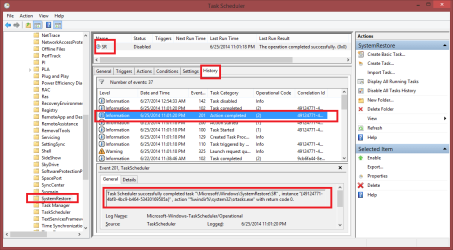
In your Task History tab, does it show the task action completed successfully ?
My screen print example below is from Win 8.1, but I expect Win7 would be similar.
TSHSP02.PNG
 

My Computer

Computer type
PC/Desktop
Computer Manufacturer/Model Number
home built
OS
Multi-Boot W7_Pro_x64 W8.1_Pro_x64 W10_Pro_x64 +Linux_VMs +Chromium_VM
CPU
AMD Athlon II x4 620
Motherboard
Gigabyte GA-MA785G-UD3H
Memory
6GB GSkill DDR2 800
Graphics Card(s)
AMD 4670 GPU + AMD 4200 IGP
Sound Card
on board Realtek ALC889A
Monitor(s) Displays
RCA 40" LCD TV, Insignia 32" LCD TV, HP 15" LCD monitor
Screen Resolution
1680 x 1050
Hard Drives
OCZ Vertex 3 120GB,
Samsung F3 1TB (3),
Several others - WD, Seagate, Hitachi, ...
PSU
Corsair 500 W
Case
Rosewill mid tower
Cooling
CM 90mm rifle
Keyboard
Gyration wireless, Logitech wireless, Dell USB wired
Mouse
Gyration wireless, Logitech wireless, V7 USB wired
Internet Speed
Spectrum - 100Mbps D / 10Mbps U
Antivirus
Avast, MBAM3, EMET, WinPatrol
Browser
Pale Moon, Firefox, IE
Other Info
2 multi-boot PC's
Mainly HTPC/Office/Gen purpose (no gaming).
Trendnet USB KVM.
LG DVD burner/Blue Ray Player.
Tray system for removable SATA backup drives.

Not currently OCd, under-volted.
I use Hybrid sleep, rarely re-boot or shutdown.

Hauppauge HD-PVR, Avermedia PCIe TV Tuner, Hauppauge PCI TV Tuner.
David --

1) I suppose I could restore the system image, but I'm not familiar enough with a system image restoration process to know how much it would change on my current computer. I've made a lot of adjustments since then (and added new programs, menu entries, etc.) and I'd be worried that I'd be causing more changes than I want.
2) I erred in my earlier comment -- I have indeed resintalled Microsoft Secutiry Essentials, which is running now. I also run Spybot and Malwarebytes regularly.
3) Most of my cumstomization is in Windows' appearance. I've installed Classic Shell (which replicates the look of Windows XP menus and folders), and deactivated some Windows 7 elements that I don't like so much (Aero, transparent/animated folders, etc.) They look nice but eat RAM and slow things down. And, no, I didn't change Windows' default services, though I have read that some antivirus programs (even some by Microsoft) change service settings on their own frequently.
4) Yes, that's the task history pane that I get, too. And, yes, the message says that the restore points were made successfully. However, the system restore GUI shows none of these new restore points -- which is the main reason I posted this message in the first place.
 

My Computer

Computer type
PC/Desktop
OS
Winodws 7 Professional 64 bit
lt seems to me you are causing yourself more trouble than is needed. You have a third-party program that is doing the job.
 

My Computer

Computer type
PC/Desktop
Computer Manufacturer/Model Number
Custom Build
OS
Windows 7 Home Premium 32-Bit - Build 7600 SP1
CPU
Intel Core i3-2120 3.30Ghz
Motherboard
Asus P8Z68-V LX Intel Z68 Socket H2 ATX
Memory
Kingston 4 GB DDR3 1333 mhz
Graphics Card(s)
AMD Radeon HD6670
Sound Card
Sound Blaster Audigy SE 24-Bit
Monitor(s) Displays
Asus VE228
Screen Resolution
1440 X 900
Hard Drives
OCZ Vertex 3 120 GB Sata 3 SSD ==
Kingston SH103/S3 120 G Hyper X 120 GB SSD ==
Western Digital 500 GB Caviar Green 7200 RPM ==
PSU
Corsair CX600M == 600 Watt
Case
NZXT Apollo - Silver with Clear Side Panel
Cooling
Three 120 mm Fans
Keyboard
Microsoft Natural 4000
Mouse
Microsoft Custom Optical 3000
Internet Speed
AT&T Fiber Optic Wireless Network
Antivirus
Microsoft Security Essentials
Browser
Chrome
Other Info
120 mm Blue LED Fan -- Three Blue LED Lazer Light Sticks
I suggested SFC because it sounds like more than just the SR Task is having problems.
From post #1
1) When I click on Display All Running Tasks in the far right pane of Task Scheduler, I get the message, "Task Scheduler service is not available. Task Scheduler will attempt to reconnect to it."

2) When I click on certain individual tasks in the Task Scheduler Library (far left pane), I often get a blank screen in the middle pane, where the detailed data should be.
To me, that seems like a "system issue"... beyond the SR Task problem that the OP is most concerned with.

If it was my system, I would run SFC, restore a Backup Image, do a Startup Repair, ... all the way to re-installing Windows if that's what it takes to fix the problem ...

Maybe I'm too nitpicky :p
 

My Computer

Computer type
PC/Desktop
Computer Manufacturer/Model Number
home built
OS
Multi-Boot W7_Pro_x64 W8.1_Pro_x64 W10_Pro_x64 +Linux_VMs +Chromium_VM
CPU
AMD Athlon II x4 620
Motherboard
Gigabyte GA-MA785G-UD3H
Memory
6GB GSkill DDR2 800
Graphics Card(s)
AMD 4670 GPU + AMD 4200 IGP
Sound Card
on board Realtek ALC889A
Monitor(s) Displays
RCA 40" LCD TV, Insignia 32" LCD TV, HP 15" LCD monitor
Screen Resolution
1680 x 1050
Hard Drives
OCZ Vertex 3 120GB,
Samsung F3 1TB (3),
Several others - WD, Seagate, Hitachi, ...
PSU
Corsair 500 W
Case
Rosewill mid tower
Cooling
CM 90mm rifle
Keyboard
Gyration wireless, Logitech wireless, Dell USB wired
Mouse
Gyration wireless, Logitech wireless, V7 USB wired
Internet Speed
Spectrum - 100Mbps D / 10Mbps U
Antivirus
Avast, MBAM3, EMET, WinPatrol
Browser
Pale Moon, Firefox, IE
Other Info
2 multi-boot PC's
Mainly HTPC/Office/Gen purpose (no gaming).
Trendnet USB KVM.
LG DVD burner/Blue Ray Player.
Tray system for removable SATA backup drives.

Not currently OCd, under-volted.
I use Hybrid sleep, rarely re-boot or shutdown.

Hauppauge HD-PVR, Avermedia PCIe TV Tuner, Hauppauge PCI TV Tuner.
I hear you, David. I'm nitpicky too. I'm also beginnig to think the error is systemic. Not big or disruptive, but enough to annoy me. I've read a few things that said it may have to do with my user permissions -- but user permission stuff always confuses me.
 

My Computer

Computer type
PC/Desktop
OS
Winodws 7 Professional 64 bit
Back
Top