Solved How do i Enable Action Center/Settings ?! (Complicated)

rpav77

New member
Local time
10:47 AM
Messages
29
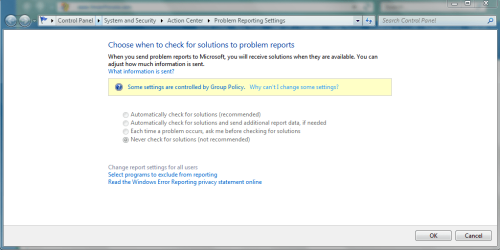
I've seen many posts on how to disable action center and settings but have no help on how to enable it...! I have a Win 7 Ultimate and a couple of months back, my action center got turned off and the ability to change settings was grayed out too!
I checked first if it was an issue with some new program conflict but found none...

I checked the Group policy for clues but apparently many of the settings related to it are in order as far as my extent of its knowledge goes. Also the service related are active like the security module and action reporting service in the services are all in order too !!!

I have MS Essentials installed so i doubt its a problem with the antivirus.
Any help is appreciated.

I have uploaded the pic and group policy txt file. Please ask if any additional info is needed.
 

Attachments
My Computer My Computer

Computer Manufacturer/Model Number
Dell Inspiron 580s
OS
Windows 7 Ultimate x64 SP 1
CPU
Core i3 CPU 530 @2.93 GHz
Memory
4 gb DDR3
Graphics Card(s)
512 MB Nvidia Geforce 310
Sound Card
Nvidia/Realtek
Monitor(s) Displays
1
Hard Drives
320 GB

My Computer My Computer

OS
XP / Win7 x64 Pro
CPU
Intel Quad-Core Q9450 @ 3.2GHz
Motherboard
Asus P5-E
Memory
2x2GB GSkill DDR2
Graphics Card(s)
NVIDIA GeForce 8600 GTS (EVGA)
Monitor(s) Displays
Dell 2408WFP
Screen Resolution
1920x1200
Hello Rpav,

In group policy (gpedit.msc), go to both locations below to make sure that you do not have the Disable Windows Error Reporting setting set to Enabled. It needs to be set to Not configured for both. If it is, then toggle the one at the Computer location to Enable, apply it, then set it back to Not configured and apply it.

Computer Configuration\Administrative Templates\Windows Components\Windows Error Reporting

User Configuration\Administrative Templates\Windows Components\Windows Error Reporting

Hope this helps,
Shawn
 

My Computer My Computer

Computer type
PC/Desktop
Computer Manufacturer/Model Number
Self built custom
OS
64-bit Windows 11 Pro for Workstations
CPU
Intel i7-8700K OC'd to 5 GHz
Motherboard
ASUS ROG Maximus XI Formula Z390
Memory
64 GB (4x16GB) G.SKILL TridentZ RGB DDR4 3600 MHz
Graphics Card(s)
ASUS ROG-STRIX-GTX1080TI-O11G-GAMING
Sound Card
Integrated
Monitor(s) Displays
2 x Samsung Odyssey G7 27"
Screen Resolution
2560x1440
Hard Drives
1TB Samsung 990 PRO M.2,
4TB Samsung 990 PRO PRO M.2,
TerraMaster F8 SSD Plus NAS
PSU
Seasonic Prime Titanium 850W
Case
Thermaltake Core P3
Cooling
Corsair Hydro H115i
Keyboard
Logitech wireless K800
Mouse
Logitech MX Master 4
Internet Speed
2 Gb/s Download and 100 Mb/s Upload
Antivirus
Malwarebyte Anti-Malware Premium
Browser
Google Chrome
Other Info
Logitech Z625 speaker system,
Logitech BRIO 4K Pro webcam,
HP Color LaserJet Pro MFP M477fdn,
APC SMART-UPS RT 1000 XL - SURT1000XLI,
Galaxy S23 Plus phone
Hello Rpav,

In group policy (gpedit.msc), go to both locations below to make sure that you do not have the Disable Windows Error Reporting setting set to Enabled. It needs to be set to Not configured for both. If it is, then toggle the one at the Computer location to Enable, apply it, then set it back to Not configured and apply it.

Computer Configuration\Administrative Templates\Windows Components\Windows Error Reporting

User Configuration\Administrative Templates\Windows Components\Windows Error Reporting

Hope this helps,
Shawn


I tried that already,its set to disabled. I've even tried using the system Admin account thats enabled only in safe mode but no luck!!! :(
 

My Computer My Computer

Computer Manufacturer/Model Number
Dell Inspiron 580s
OS
Windows 7 Ultimate x64 SP 1
CPU
Core i3 CPU 530 @2.93 GHz
Memory
4 gb DDR3
Graphics Card(s)
512 MB Nvidia Geforce 310
Sound Card
Nvidia/Realtek
Monitor(s) Displays
1
Hard Drives
320 GB

Yup,I tried those sites but i'm clueless as all seem to be in order.
And sorry about the text files,i'll try again later.
Also, another thing I've got now is i can somehow force enable it by tweaking the group policy deep and services but it somehow switches off the next restart of the machine.So i'm guessing that some program or value may be clashing with its functioning?
 

My Computer My Computer

Computer Manufacturer/Model Number
Dell Inspiron 580s
OS
Windows 7 Ultimate x64 SP 1
CPU
Core i3 CPU 530 @2.93 GHz
Memory
4 gb DDR3
Graphics Card(s)
512 MB Nvidia Geforce 310
Sound Card
Nvidia/Realtek
Monitor(s) Displays
1
Hard Drives
320 GB
Hello Rpav,

In group policy (gpedit.msc), go to both locations below to make sure that you do not have the Disable Windows Error Reporting setting set to Enabled. It needs to be set to Not configured for both. If it is, then toggle the one at the Computer location to Enable, apply it, then set it back to Not configured and apply it.

Computer Configuration\Administrative Templates\Windows Components\Windows Error Reporting

User Configuration\Administrative Templates\Windows Components\Windows Error Reporting

Hope this helps,
Shawn


I tried that already,its set to disabled. I've even tried using the system Admin account thats enabled only in safe mode but no luck!!! :(

It needs to be set to Not Configured instead.
 

My Computer My Computer

Computer type
PC/Desktop
Computer Manufacturer/Model Number
Self built custom
OS
64-bit Windows 11 Pro for Workstations
CPU
Intel i7-8700K OC'd to 5 GHz
Motherboard
ASUS ROG Maximus XI Formula Z390
Memory
64 GB (4x16GB) G.SKILL TridentZ RGB DDR4 3600 MHz
Graphics Card(s)
ASUS ROG-STRIX-GTX1080TI-O11G-GAMING
Sound Card
Integrated
Monitor(s) Displays
2 x Samsung Odyssey G7 27"
Screen Resolution
2560x1440
Hard Drives
1TB Samsung 990 PRO M.2,
4TB Samsung 990 PRO PRO M.2,
TerraMaster F8 SSD Plus NAS
PSU
Seasonic Prime Titanium 850W
Case
Thermaltake Core P3
Cooling
Corsair Hydro H115i
Keyboard
Logitech wireless K800
Mouse
Logitech MX Master 4
Internet Speed
2 Gb/s Download and 100 Mb/s Upload
Antivirus
Malwarebyte Anti-Malware Premium
Browser
Google Chrome
Other Info
Logitech Z625 speaker system,
Logitech BRIO 4K Pro webcam,
HP Color LaserJet Pro MFP M477fdn,
APC SMART-UPS RT 1000 XL - SURT1000XLI,
Galaxy S23 Plus phone
Hello Rpav,

In group policy (gpedit.msc), go to both locations below to make sure that you do not have the Disable Windows Error Reporting setting set to Enabled. It needs to be set to Not configured for both. If it is, then toggle the one at the Computer location to Enable, apply it, then set it back to Not configured and apply it.

Computer Configuration\Administrative Templates\Windows Components\Windows Error Reporting

User Configuration\Administrative Templates\Windows Components\Windows Error Reporting

Hope this helps,
Shawn


I tried that already,its set to disabled. I've even tried using the system Admin account thats enabled only in safe mode but no luck!!! :(

It needs to be set to Not Configured instead.


It IS set to not configured...
 

My Computer My Computer

Computer Manufacturer/Model Number
Dell Inspiron 580s
OS
Windows 7 Ultimate x64 SP 1
CPU
Core i3 CPU 530 @2.93 GHz
Memory
4 gb DDR3
Graphics Card(s)
512 MB Nvidia Geforce 310
Sound Card
Nvidia/Realtek
Monitor(s) Displays
1
Hard Drives
320 GB
Sorry, but I was going by what you posted above with: "I tried that already,its set to disabled."

If this has just recently happened, then you could do a system restore using a restore point dated before this happened to undo it.


My Computer My Computer

Computer type
PC/Desktop
Computer Manufacturer/Model Number
Self built custom
OS
64-bit Windows 11 Pro for Workstations
CPU
Intel i7-8700K OC'd to 5 GHz
Motherboard
ASUS ROG Maximus XI Formula Z390
Memory
64 GB (4x16GB) G.SKILL TridentZ RGB DDR4 3600 MHz
Graphics Card(s)
ASUS ROG-STRIX-GTX1080TI-O11G-GAMING
Sound Card
Integrated
Monitor(s) Displays
2 x Samsung Odyssey G7 27"
Screen Resolution
2560x1440
Hard Drives
1TB Samsung 990 PRO M.2,
4TB Samsung 990 PRO PRO M.2,
TerraMaster F8 SSD Plus NAS
PSU
Seasonic Prime Titanium 850W
Case
Thermaltake Core P3
Cooling
Corsair Hydro H115i
Keyboard
Logitech wireless K800
Mouse
Logitech MX Master 4
Internet Speed
2 Gb/s Download and 100 Mb/s Upload
Antivirus
Malwarebyte Anti-Malware Premium
Browser
Google Chrome
Other Info
Logitech Z625 speaker system,
Logitech BRIO 4K Pro webcam,
HP Color LaserJet Pro MFP M477fdn,
APC SMART-UPS RT 1000 XL - SURT1000XLI,
Galaxy S23 Plus phone
Sorry, but I was going by what you posted above with: "I tried that already,its set to disabled."

If this has just recently happened, then you could do a system restore using a restore point dated before this happened to undo it.


Ahh..my bad!

The System restore doesn't work , i already tried that!!!
Do you need me to upload my registry backup....?
 

My Computer My Computer

Computer Manufacturer/Model Number
Dell Inspiron 580s
OS
Windows 7 Ultimate x64 SP 1
CPU
Core i3 CPU 530 @2.93 GHz
Memory
4 gb DDR3
Graphics Card(s)
512 MB Nvidia Geforce 310
Sound Card
Nvidia/Realtek
Monitor(s) Displays
1
Hard Drives
320 GB
Rpav,

Yeah, go ahead and export the two registry keys below at these locations, and upload them. I'll take a look to see what entry may be the cause. :)

HKEY_LOCAL_MACHINE\SOFTWARE\Policies\Microsoft\Windows\Windows Error Reporting

HKEY_CURRENT_USER\Software\Policies\Microsoft\Windows\Windows Error Reporting
 

My Computer My Computer

Computer type
PC/Desktop
Computer Manufacturer/Model Number
Self built custom
OS
64-bit Windows 11 Pro for Workstations
CPU
Intel i7-8700K OC'd to 5 GHz
Motherboard
ASUS ROG Maximus XI Formula Z390
Memory
64 GB (4x16GB) G.SKILL TridentZ RGB DDR4 3600 MHz
Graphics Card(s)
ASUS ROG-STRIX-GTX1080TI-O11G-GAMING
Sound Card
Integrated
Monitor(s) Displays
2 x Samsung Odyssey G7 27"
Screen Resolution
2560x1440
Hard Drives
1TB Samsung 990 PRO M.2,
4TB Samsung 990 PRO PRO M.2,
TerraMaster F8 SSD Plus NAS
PSU
Seasonic Prime Titanium 850W
Case
Thermaltake Core P3
Cooling
Corsair Hydro H115i
Keyboard
Logitech wireless K800
Mouse
Logitech MX Master 4
Internet Speed
2 Gb/s Download and 100 Mb/s Upload
Antivirus
Malwarebyte Anti-Malware Premium
Browser
Google Chrome
Other Info
Logitech Z625 speaker system,
Logitech BRIO 4K Pro webcam,
HP Color LaserJet Pro MFP M477fdn,
APC SMART-UPS RT 1000 XL - SURT1000XLI,
Galaxy S23 Plus phone
Rpav,

Yeah, go ahead and export the two registry keys below at these locations, and upload them. I'll take a look to see what entry may be the cause. :)

HKEY_LOCAL_MACHINE\SOFTWARE\Policies\Microsoft\Windows\Windows Error Reporting

HKEY_CURRENT_USER\Software\Policies\Microsoft\Windows\Windows Error Reporting

OK, hope this is it...
 

Attachments

My Computer My Computer

Computer Manufacturer/Model Number
Dell Inspiron 580s
OS
Windows 7 Ultimate x64 SP 1
CPU
Core i3 CPU 530 @2.93 GHz
Memory
4 gb DDR3
Graphics Card(s)
512 MB Nvidia Geforce 310
Sound Card
Nvidia/Realtek
Monitor(s) Displays
1
Hard Drives
320 GB
Yep, you had it set to be disabled. If you like the REG file I created below will restore the default Windows Error Reporting policies. After merging it, restart the computer to apply. You should then be able to hopefully open that window without it being completely grayed out like that.
 

Attachments

Last edited:

My Computer My Computer

Computer type
PC/Desktop
Computer Manufacturer/Model Number
Self built custom
OS
64-bit Windows 11 Pro for Workstations
CPU
Intel i7-8700K OC'd to 5 GHz
Motherboard
ASUS ROG Maximus XI Formula Z390
Memory
64 GB (4x16GB) G.SKILL TridentZ RGB DDR4 3600 MHz
Graphics Card(s)
ASUS ROG-STRIX-GTX1080TI-O11G-GAMING
Sound Card
Integrated
Monitor(s) Displays
2 x Samsung Odyssey G7 27"
Screen Resolution
2560x1440
Hard Drives
1TB Samsung 990 PRO M.2,
4TB Samsung 990 PRO PRO M.2,
TerraMaster F8 SSD Plus NAS
PSU
Seasonic Prime Titanium 850W
Case
Thermaltake Core P3
Cooling
Corsair Hydro H115i
Keyboard
Logitech wireless K800
Mouse
Logitech MX Master 4
Internet Speed
2 Gb/s Download and 100 Mb/s Upload
Antivirus
Malwarebyte Anti-Malware Premium
Browser
Google Chrome
Other Info
Logitech Z625 speaker system,
Logitech BRIO 4K Pro webcam,
HP Color LaserJet Pro MFP M477fdn,
APC SMART-UPS RT 1000 XL - SURT1000XLI,
Galaxy S23 Plus phone
Rpav,

Yeah, go ahead and export the two registry keys below at these locations, and upload them. I'll take a look to see what entry may be the cause. :)

HKEY_LOCAL_MACHINE\SOFTWARE\Policies\Microsoft\Windows\Windows Error Reporting

HKEY_CURRENT_USER\Software\Policies\Microsoft\Windows\Windows Error Reporting

I tried the same using group policy too...the disable part came up earlier but the problem is it keeps disabling after every restart!!! Even after i merged your registry entry !

Its the same with group policy! It seems to disable after every restart!Is it MS Essentials?
Now i'm doubtful!
 

My Computer My Computer

Computer Manufacturer/Model Number
Dell Inspiron 580s
OS
Windows 7 Ultimate x64 SP 1
CPU
Core i3 CPU 530 @2.93 GHz
Memory
4 gb DDR3
Graphics Card(s)
512 MB Nvidia Geforce 310
Sound Card
Nvidia/Realtek
Monitor(s) Displays
1
Hard Drives
320 GB
Ok, I have updated the REG file above to include more registry locations to reset to default to see if that may help stop it from being disabled afterwards. After merging the REG file, restart to fully apply. :)
 

My Computer My Computer

Computer type
PC/Desktop
Computer Manufacturer/Model Number
Self built custom
OS
64-bit Windows 11 Pro for Workstations
CPU
Intel i7-8700K OC'd to 5 GHz
Motherboard
ASUS ROG Maximus XI Formula Z390
Memory
64 GB (4x16GB) G.SKILL TridentZ RGB DDR4 3600 MHz
Graphics Card(s)
ASUS ROG-STRIX-GTX1080TI-O11G-GAMING
Sound Card
Integrated
Monitor(s) Displays
2 x Samsung Odyssey G7 27"
Screen Resolution
2560x1440
Hard Drives
1TB Samsung 990 PRO M.2,
4TB Samsung 990 PRO PRO M.2,
TerraMaster F8 SSD Plus NAS
PSU
Seasonic Prime Titanium 850W
Case
Thermaltake Core P3
Cooling
Corsair Hydro H115i
Keyboard
Logitech wireless K800
Mouse
Logitech MX Master 4
Internet Speed
2 Gb/s Download and 100 Mb/s Upload
Antivirus
Malwarebyte Anti-Malware Premium
Browser
Google Chrome
Other Info
Logitech Z625 speaker system,
Logitech BRIO 4K Pro webcam,
HP Color LaserJet Pro MFP M477fdn,
APC SMART-UPS RT 1000 XL - SURT1000XLI,
Galaxy S23 Plus phone
Ok, I have updated the REG file above to include more registry locations to reset to default to see if that may help stop it from being disabled afterwards. After merging the REG file, restart to fully apply. :)

Ok thanks ...will update the status of the new effect shortly...
 

My Computer My Computer

Computer Manufacturer/Model Number
Dell Inspiron 580s
OS
Windows 7 Ultimate x64 SP 1
CPU
Core i3 CPU 530 @2.93 GHz
Memory
4 gb DDR3
Graphics Card(s)
512 MB Nvidia Geforce 310
Sound Card
Nvidia/Realtek
Monitor(s) Displays
1
Hard Drives
320 GB
Ok, I have updated the REG file above to include more registry locations to reset to default to see if that may help stop it from being disabled afterwards. After merging the REG file, restart to fully apply. :)

Nope...The updated registry merge didn't work...the same still!!! :(
 

Attachments

  • action.PNG
    action.PNG
    8.9 KB · Views: 23

My Computer My Computer

Computer Manufacturer/Model Number
Dell Inspiron 580s
OS
Windows 7 Ultimate x64 SP 1
CPU
Core i3 CPU 530 @2.93 GHz
Memory
4 gb DDR3
Graphics Card(s)
512 MB Nvidia Geforce 310
Sound Card
Nvidia/Realtek
Monitor(s) Displays
1
Hard Drives
320 GB
I'm afraid that I'm stumped as well now. :(
 

My Computer My Computer

Computer type
PC/Desktop
Computer Manufacturer/Model Number
Self built custom
OS
64-bit Windows 11 Pro for Workstations
CPU
Intel i7-8700K OC'd to 5 GHz
Motherboard
ASUS ROG Maximus XI Formula Z390
Memory
64 GB (4x16GB) G.SKILL TridentZ RGB DDR4 3600 MHz
Graphics Card(s)
ASUS ROG-STRIX-GTX1080TI-O11G-GAMING
Sound Card
Integrated
Monitor(s) Displays
2 x Samsung Odyssey G7 27"
Screen Resolution
2560x1440
Hard Drives
1TB Samsung 990 PRO M.2,
4TB Samsung 990 PRO PRO M.2,
TerraMaster F8 SSD Plus NAS
PSU
Seasonic Prime Titanium 850W
Case
Thermaltake Core P3
Cooling
Corsair Hydro H115i
Keyboard
Logitech wireless K800
Mouse
Logitech MX Master 4
Internet Speed
2 Gb/s Download and 100 Mb/s Upload
Antivirus
Malwarebyte Anti-Malware Premium
Browser
Google Chrome
Other Info
Logitech Z625 speaker system,
Logitech BRIO 4K Pro webcam,
HP Color LaserJet Pro MFP M477fdn,
APC SMART-UPS RT 1000 XL - SURT1000XLI,
Galaxy S23 Plus phone
Is this a work computer or something that is part of a domain?
 

My Computer My Computer

OS
XP / Win7 x64 Pro
CPU
Intel Quad-Core Q9450 @ 3.2GHz
Motherboard
Asus P5-E
Memory
2x2GB GSkill DDR2
Graphics Card(s)
NVIDIA GeForce 8600 GTS (EVGA)
Monitor(s) Displays
Dell 2408WFP
Screen Resolution
1920x1200

My Computer My Computer

Computer Manufacturer/Model Number
Dell Inspiron 580s
OS
Windows 7 Ultimate x64 SP 1
CPU
Core i3 CPU 530 @2.93 GHz
Memory
4 gb DDR3
Graphics Card(s)
512 MB Nvidia Geforce 310
Sound Card
Nvidia/Realtek
Monitor(s) Displays
1
Hard Drives
320 GB
I'm afraid that I'm stumped as well now. :(

:( well... I guess i'll have to keep merging the registry file you gave me after every restart for now! I'm still clueless on what program may me disabling it!!! :confused:
 

My Computer My Computer

Computer Manufacturer/Model Number
Dell Inspiron 580s
OS
Windows 7 Ultimate x64 SP 1
CPU
Core i3 CPU 530 @2.93 GHz
Memory
4 gb DDR3
Graphics Card(s)
512 MB Nvidia Geforce 310
Sound Card
Nvidia/Realtek
Monitor(s) Displays
1
Hard Drives
320 GB
Back
Top