
How Do I fix a broken SD Card Slot

lopploio

New member
Member
Local time
9:27 PM
Messages
70
On my sister's computer which is a Dell Inspiron 560 it has an SD Card Slot. The SD Card Slot stopped working a while ago and I was trying to help her fix it. The drive letter for it is S: and it says please insert a card. The reader itself is lighting up saying that there is a card in there. If i go into disk management it says the drive is formatted as RAW but it was formatted at fat32. I tried reformatting but that didn't work. The card works in her camcorder and other SD card slots. I also tried multiple cards. Any ideas for a fix or why it could be doing this? Any help would be appreciated.
 

Attachments
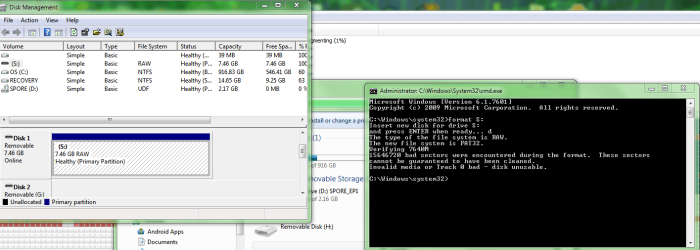
  • SD Card Attempted Format.PNG
    SD Card Attempted Format.PNG
    52.6 KB · Views: 12

My Computer My Computer

OS
Windows 7 Home Premium 64 bit
I would have a check in device manager to see if the device is operating correctly and no caution marks are showing
 

My Computer My Computer

Computer type
PC/Desktop
Computer Manufacturer/Model Number
Pauly Special
OS
Win7 Ultimate X64
CPU
Intel i5 3570K
Motherboard
Gigabyte Z77X-DS3H
Memory
8GB DDR3 1600
Graphics Card(s)
Onboard
Sound Card
Onboard
Screen Resolution
1280x1024
Hard Drives
Samsung 840 Evo SSD (OS)
1TB Spinner (Data)
PSU
800W Arctic
Case
Cooler Master
Cooling
3x120mm Fans
Keyboard
MS Wireless
Mouse
MS Wireless
Internet Speed
20M
I checked there and it says this device is functioning properly.
 

My Computer My Computer

OS
Windows 7 Home Premium 64 bit
Back
Top