How do I fix Windows 7 OS

sezz

New member
Local time
6:35 AM
Messages
17
My laptop kept freezing, then crashed completely. When I restarted it, it said insert boot disc.
I then bought hbcd which came with no instructions. I ran the disc and it booted the hbcd menu, I was browsing through the list of program names, and tried going into all of the recovery tools but nothing would work and kept coming up with Error.
I googled forums looking for answers, with no such luck :(
I went into mini Linux then got extremely confused..
I am at my wits end, and have come here to try get some help from someone which would be much appreciated!!!

thanks in advance. :)
 

My Computer

Computer type
Laptop
Computer Manufacturer/Model Number
Acer Aspire V5-571P
OS
Windows 8.1 64-bit OS
CPU
CPU @ 1.90GHz 1.90GHz
Motherboard
Unknown
Memory
4096 MB, PC3-10600 DDR3 SDRAM SO-DIMM
Monitor(s) Displays
15.6 inch 16:9, 1366 x 768 pixel, AU OPTRONICS , TN LED
Screen Resolution
1366 x 768 pixel
Hard Drives
500GB Conventional hard drive
Keyboard
Chiclet
Antivirus
none
Browser
Chrome
Hello sezz. Welcome to the forum.

It sounds like your hard drive has gone offline.
Do you know how to get into your BIOS settings?
 

My Computer

Computer type
PC/Desktop
Computer Manufacturer/Model Number
Home Built - Jan 2013
OS
Windows 7 64 Bit Home Premium SP1
CPU
i7-3820
Motherboard
Asus P9X79-PRO - Bios 4608
Memory
GSkill F3-14900CL9Q - 16GB
Graphics Card(s)
EVGA GeForce GTX660 - Driver 352.86
Sound Card
On board Realtek ALC898
Monitor(s) Displays
Acer S271HL
Screen Resolution
1920 x 1080
Hard Drives
#1- Samsung 840 Pro Series
#2- Western Digital WD1002FAEX Sata3 Black
#3- Western Digital WD1002FAEX Sata3 Black
PSU
Corsair CMPSU-850TX-V2 - 850 watt (by Seasonic)
Case
Corsair Obsidian 550D
Cooling
Standard 3 120mm case fans, Cooler Master Hyper 212 EVO
Keyboard
MS KC-0405
Mouse
Intellimouse 5-button
Internet Speed
56 Mbits/Sec (on a good day)
Antivirus
Avast & Malwarebytes
Browser
Firefox
Other Info
Asus DVD - DRW-24B1ST 24X
Hi.. thanks for the reply!

Is that when you press F2 to get into the setup? :confused:
 

My Computer

Computer type
Laptop
Computer Manufacturer/Model Number
Acer Aspire V5-571P
OS
Windows 8.1 64-bit OS
CPU
CPU @ 1.90GHz 1.90GHz
Motherboard
Unknown
Memory
4096 MB, PC3-10600 DDR3 SDRAM SO-DIMM
Monitor(s) Displays
15.6 inch 16:9, 1366 x 768 pixel, AU OPTRONICS , TN LED
Screen Resolution
1366 x 768 pixel
Hard Drives
500GB Conventional hard drive
Keyboard
Chiclet
Antivirus
none
Browser
Chrome
Yes.
Do that and look for any Settings that show the SATA list of drives and see if you can see the hard drive listed there.
The system needs to be able to connect to and "see" the drive before we can do anything else.

Please resist the urge to change any settings while in there now.
 

My Computer

Computer type
PC/Desktop
Computer Manufacturer/Model Number
Home Built - Jan 2013
OS
Windows 7 64 Bit Home Premium SP1
CPU
i7-3820
Motherboard
Asus P9X79-PRO - Bios 4608
Memory
GSkill F3-14900CL9Q - 16GB
Graphics Card(s)
EVGA GeForce GTX660 - Driver 352.86
Sound Card
On board Realtek ALC898
Monitor(s) Displays
Acer S271HL
Screen Resolution
1920 x 1080
Hard Drives
#1- Samsung 840 Pro Series
#2- Western Digital WD1002FAEX Sata3 Black
#3- Western Digital WD1002FAEX Sata3 Black
PSU
Corsair CMPSU-850TX-V2 - 850 watt (by Seasonic)
Case
Corsair Obsidian 550D
Cooling
Standard 3 120mm case fans, Cooler Master Hyper 212 EVO
Keyboard
MS KC-0405
Mouse
Intellimouse 5-button
Internet Speed
56 Mbits/Sec (on a good day)
Antivirus
Avast & Malwarebytes
Browser
Firefox
Other Info
Asus DVD - DRW-24B1ST 24X
In main it shows SATA Mode: [AHCI Mode]
which comes up with change class ID? with options to change to IDE mode. They're the only two.

In information it says the HDD model name is: none .. Is that normal?
 

My Computer

Computer type
Laptop
Computer Manufacturer/Model Number
Acer Aspire V5-571P
OS
Windows 8.1 64-bit OS
CPU
CPU @ 1.90GHz 1.90GHz
Motherboard
Unknown
Memory
4096 MB, PC3-10600 DDR3 SDRAM SO-DIMM
Monitor(s) Displays
15.6 inch 16:9, 1366 x 768 pixel, AU OPTRONICS , TN LED
Screen Resolution
1366 x 768 pixel
Hard Drives
500GB Conventional hard drive
Keyboard
Chiclet
Antivirus
none
Browser
Chrome
No. Not normal. HDD model name should show something.

Unfortunately there are 2 possibilities:

  • Your Hard Drive died.
  • Your hard drive has be come disconnected.
Have you dropped or bumped the laptop recently?
How old is it?
 

My Computer

Computer type
PC/Desktop
Computer Manufacturer/Model Number
Home Built - Jan 2013
OS
Windows 7 64 Bit Home Premium SP1
CPU
i7-3820
Motherboard
Asus P9X79-PRO - Bios 4608
Memory
GSkill F3-14900CL9Q - 16GB
Graphics Card(s)
EVGA GeForce GTX660 - Driver 352.86
Sound Card
On board Realtek ALC898
Monitor(s) Displays
Acer S271HL
Screen Resolution
1920 x 1080
Hard Drives
#1- Samsung 840 Pro Series
#2- Western Digital WD1002FAEX Sata3 Black
#3- Western Digital WD1002FAEX Sata3 Black
PSU
Corsair CMPSU-850TX-V2 - 850 watt (by Seasonic)
Case
Corsair Obsidian 550D
Cooling
Standard 3 120mm case fans, Cooler Master Hyper 212 EVO
Keyboard
MS KC-0405
Mouse
Intellimouse 5-button
Internet Speed
56 Mbits/Sec (on a good day)
Antivirus
Avast & Malwarebytes
Browser
Firefox
Other Info
Asus DVD - DRW-24B1ST 24X
Could have died!! :shock: oh my.

It is around 3 years old..
Once it had crashed, and I needed the boot disk I had left it for a while so it may have been bumped around quite a bit since then.
What would be the best course of action in either case?
 

My Computer

Computer type
Laptop
Computer Manufacturer/Model Number
Acer Aspire V5-571P
OS
Windows 8.1 64-bit OS
CPU
CPU @ 1.90GHz 1.90GHz
Motherboard
Unknown
Memory
4096 MB, PC3-10600 DDR3 SDRAM SO-DIMM
Monitor(s) Displays
15.6 inch 16:9, 1366 x 768 pixel, AU OPTRONICS , TN LED
Screen Resolution
1366 x 768 pixel
Hard Drives
500GB Conventional hard drive
Keyboard
Chiclet
Antivirus
none
Browser
Chrome
Are you comfortable opening up the laptop (to get to the hard drive)?
 

My Computer

Computer type
PC/Desktop
Computer Manufacturer/Model Number
Home Built - Jan 2013
OS
Windows 7 64 Bit Home Premium SP1
CPU
i7-3820
Motherboard
Asus P9X79-PRO - Bios 4608
Memory
GSkill F3-14900CL9Q - 16GB
Graphics Card(s)
EVGA GeForce GTX660 - Driver 352.86
Sound Card
On board Realtek ALC898
Monitor(s) Displays
Acer S271HL
Screen Resolution
1920 x 1080
Hard Drives
#1- Samsung 840 Pro Series
#2- Western Digital WD1002FAEX Sata3 Black
#3- Western Digital WD1002FAEX Sata3 Black
PSU
Corsair CMPSU-850TX-V2 - 850 watt (by Seasonic)
Case
Corsair Obsidian 550D
Cooling
Standard 3 120mm case fans, Cooler Master Hyper 212 EVO
Keyboard
MS KC-0405
Mouse
Intellimouse 5-button
Internet Speed
56 Mbits/Sec (on a good day)
Antivirus
Avast & Malwarebytes
Browser
Firefox
Other Info
Asus DVD - DRW-24B1ST 24X
Yep, I can do that now..

When it's opened up, how do I tell that it is connected properly? (I've never seen the inside before, lol.)
 

My Computer

Computer type
Laptop
Computer Manufacturer/Model Number
Acer Aspire V5-571P
OS
Windows 8.1 64-bit OS
CPU
CPU @ 1.90GHz 1.90GHz
Motherboard
Unknown
Memory
4096 MB, PC3-10600 DDR3 SDRAM SO-DIMM
Monitor(s) Displays
15.6 inch 16:9, 1366 x 768 pixel, AU OPTRONICS , TN LED
Screen Resolution
1366 x 768 pixel
Hard Drives
500GB Conventional hard drive
Keyboard
Chiclet
Antivirus
none
Browser
Chrome
OK, but first double check and be sure the HDD is not showing in BIOS.
On either the 'Information' Tab or the 'Main' Tab it will list the available drives. Under "HDD Model Name" and "HDD Serial Number" there should be info.
Your DVD drive should be listed also. If it is not then that is an important piece of info and could change things.

Your Hard Disk is a simple 2.5 inch drive with either normal or custom SATA connectors on one end.
You want to remove the cover plate and inspect the setup. Some drives just snap in place, other are held in by 2 screws. Check carefully.
Regardless of how it is secured you will release it and lift up on the end opposite of the SATA connector. You will use an up and out motion. Do not use excessive force.
Look at the contacts for any obvious signs of damage, corrosion, or grit - blow out any dust - and then just reattach it, close everything up, and test it. (Re-seating the hard drive).

If it was shaken loose and was just not making good contact that will fix it.
 

My Computer

Computer type
PC/Desktop
Computer Manufacturer/Model Number
Home Built - Jan 2013
OS
Windows 7 64 Bit Home Premium SP1
CPU
i7-3820
Motherboard
Asus P9X79-PRO - Bios 4608
Memory
GSkill F3-14900CL9Q - 16GB
Graphics Card(s)
EVGA GeForce GTX660 - Driver 352.86
Sound Card
On board Realtek ALC898
Monitor(s) Displays
Acer S271HL
Screen Resolution
1920 x 1080
Hard Drives
#1- Samsung 840 Pro Series
#2- Western Digital WD1002FAEX Sata3 Black
#3- Western Digital WD1002FAEX Sata3 Black
PSU
Corsair CMPSU-850TX-V2 - 850 watt (by Seasonic)
Case
Corsair Obsidian 550D
Cooling
Standard 3 120mm case fans, Cooler Master Hyper 212 EVO
Keyboard
MS KC-0405
Mouse
Intellimouse 5-button
Internet Speed
56 Mbits/Sec (on a good day)
Antivirus
Avast & Malwarebytes
Browser
Firefox
Other Info
Asus DVD - DRW-24B1ST 24X
Information shows:

HDD Model Name: None
HDD Serial number : (Blank)
ATAPI Model name: Optiarc DVD RW AD-7585H

Should I continue with opening it up?
 

My Computer

Computer type
Laptop
Computer Manufacturer/Model Number
Acer Aspire V5-571P
OS
Windows 8.1 64-bit OS
CPU
CPU @ 1.90GHz 1.90GHz
Motherboard
Unknown
Memory
4096 MB, PC3-10600 DDR3 SDRAM SO-DIMM
Monitor(s) Displays
15.6 inch 16:9, 1366 x 768 pixel, AU OPTRONICS , TN LED
Screen Resolution
1366 x 768 pixel
Hard Drives
500GB Conventional hard drive
Keyboard
Chiclet
Antivirus
none
Browser
Chrome
Hello!

If you can open the laptop and get your hard disk, have a look at the back. If it has plastic connector, it is a SATA model. If it has pins, it is an older type mobile IDE model. In the first case you can connect it to either another laptop or PC, the latter is preferable. In the second case you need an adaptor from mobile IDE to standard IDE so you can connect it to a PC (provided it supports IDE drives). In either case you can use an adapter to USB to connect it as an external drive, but for faster recovery Internal Connection is preferable.

Assuming you connect it to your PC, there are several cases:

1) The PC freezes at startup. The disk is dead and you need special recovery services from a dedicated data recovery company. This is way too expensive and only recommended for vital data. Else forget it!

2) The PC boots successfully and loads Windows (from its own disk, not from laptop's).

Then we have two subcases:

i) Windows recognise the disk, but it doesn't appear in My Computer. This means that you data are all there (well, most of it) but the partirion table is corrupted and Windows cannot acceess them as usual. Here comes the DVD you bought. Reboot the PC, start from the DVD and select an appropriate recovery tool to extract your data. It will take over an hour to search the whole disk and discover your data, but it's worth it, be patient. Of course these data should be copied to another disk, so make sure you have enough empty space on PC's disk or connect a USB disk before rebooting.

ii) Windows recognise the disk and it appears in My Computer properly! You can directly Access your data from Windows Explorer and take a backup. Keep in mind that some folders (usually these in user folder) may be locked. To access them you must take ownership and change security settings (ask us if you need instructions). Once you get full Access, you can Copy all your data. Of course in any case only user data can be backup. All programs should be reinstalled to the new disk.

Tip: If you have subcase ii and you are sure your data are OK (but the disk nevertheless has a problem), you can try cloning the entire disk in the new disk and see if it loads Windows properly. In this case, you may have to update some programs and you are ready. Otherwise, take a manual backup as above.

I hope that helps.
 

My Computer

Computer type
PC/Desktop
Computer Manufacturer/Model Number
custom
OS
Windows 7 Ultimate 64-bit (now 11 24H2)
CPU
Intel Core-i3 3770 3.5GHz
Motherboard
Asus P8H61
Memory
16GB DDR3 1600Mhz
Graphics Card(s)
nVidia Geforce RTX 3050
Sound Card
Realtek HD audio
Monitor(s) Displays
Sony 19" LCD TV via VGA
Screen Resolution
1440x900
Hard Drives
WD 1TB SATA III SSD
PSU
unknown
Case
unknown
Cooling
Intel's provided with CPU
Antivirus
Windows Defender (Windows 11)
Browser
Microsoft Edge
Other Info
Previously Windows 7 Ultimate, now Windows 11 24H2
Yes. The SATA controller looks like it is working fine. We are back to the hard drive.
 

My Computer

Computer type
PC/Desktop
Computer Manufacturer/Model Number
Home Built - Jan 2013
OS
Windows 7 64 Bit Home Premium SP1
CPU
i7-3820
Motherboard
Asus P9X79-PRO - Bios 4608
Memory
GSkill F3-14900CL9Q - 16GB
Graphics Card(s)
EVGA GeForce GTX660 - Driver 352.86
Sound Card
On board Realtek ALC898
Monitor(s) Displays
Acer S271HL
Screen Resolution
1920 x 1080
Hard Drives
#1- Samsung 840 Pro Series
#2- Western Digital WD1002FAEX Sata3 Black
#3- Western Digital WD1002FAEX Sata3 Black
PSU
Corsair CMPSU-850TX-V2 - 850 watt (by Seasonic)
Case
Corsair Obsidian 550D
Cooling
Standard 3 120mm case fans, Cooler Master Hyper 212 EVO
Keyboard
MS KC-0405
Mouse
Intellimouse 5-button
Internet Speed
56 Mbits/Sec (on a good day)
Antivirus
Avast & Malwarebytes
Browser
Firefox
Other Info
Asus DVD - DRW-24B1ST 24X
That's why I recommended testing in another computer. To exclude any other problems and make sure it is the disk.
 

My Computer

Computer type
PC/Desktop
Computer Manufacturer/Model Number
custom
OS
Windows 7 Ultimate 64-bit (now 11 24H2)
CPU
Intel Core-i3 3770 3.5GHz
Motherboard
Asus P8H61
Memory
16GB DDR3 1600Mhz
Graphics Card(s)
nVidia Geforce RTX 3050
Sound Card
Realtek HD audio
Monitor(s) Displays
Sony 19" LCD TV via VGA
Screen Resolution
1440x900
Hard Drives
WD 1TB SATA III SSD
PSU
unknown
Case
unknown
Cooling
Intel's provided with CPU
Antivirus
Windows Defender (Windows 11)
Browser
Microsoft Edge
Other Info
Previously Windows 7 Ultimate, now Windows 11 24H2
Yes you are correct, but let the OP do the first test first.
 

My Computer

Computer type
PC/Desktop
Computer Manufacturer/Model Number
Home Built - Jan 2013
OS
Windows 7 64 Bit Home Premium SP1
CPU
i7-3820
Motherboard
Asus P9X79-PRO - Bios 4608
Memory
GSkill F3-14900CL9Q - 16GB
Graphics Card(s)
EVGA GeForce GTX660 - Driver 352.86
Sound Card
On board Realtek ALC898
Monitor(s) Displays
Acer S271HL
Screen Resolution
1920 x 1080
Hard Drives
#1- Samsung 840 Pro Series
#2- Western Digital WD1002FAEX Sata3 Black
#3- Western Digital WD1002FAEX Sata3 Black
PSU
Corsair CMPSU-850TX-V2 - 850 watt (by Seasonic)
Case
Corsair Obsidian 550D
Cooling
Standard 3 120mm case fans, Cooler Master Hyper 212 EVO
Keyboard
MS KC-0405
Mouse
Intellimouse 5-button
Internet Speed
56 Mbits/Sec (on a good day)
Antivirus
Avast & Malwarebytes
Browser
Firefox
Other Info
Asus DVD - DRW-24B1ST 24X
I removed the hard drive, and there are no signs of any visible damage.
I've put everything back together, and gone back to the settings and the information is still the same as before ..
I'm guessing that's not a good thing.
 

My Computer

Computer type
Laptop
Computer Manufacturer/Model Number
Acer Aspire V5-571P
OS
Windows 8.1 64-bit OS
CPU
CPU @ 1.90GHz 1.90GHz
Motherboard
Unknown
Memory
4096 MB, PC3-10600 DDR3 SDRAM SO-DIMM
Monitor(s) Displays
15.6 inch 16:9, 1366 x 768 pixel, AU OPTRONICS , TN LED
Screen Resolution
1366 x 768 pixel
Hard Drives
500GB Conventional hard drive
Keyboard
Chiclet
Antivirus
none
Browser
Chrome
Also, regarding connecting it to another computer..

I do have another laptop, (the one I'm using now to talk to you)
If I were to test it in another computer, would I simply just open it up, switch hard drives & test it that way?
 

My Computer

Computer type
Laptop
Computer Manufacturer/Model Number
Acer Aspire V5-571P
OS
Windows 8.1 64-bit OS
CPU
CPU @ 1.90GHz 1.90GHz
Motherboard
Unknown
Memory
4096 MB, PC3-10600 DDR3 SDRAM SO-DIMM
Monitor(s) Displays
15.6 inch 16:9, 1366 x 768 pixel, AU OPTRONICS , TN LED
Screen Resolution
1366 x 768 pixel
Hard Drives
500GB Conventional hard drive
Keyboard
Chiclet
Antivirus
none
Browser
Chrome
I removed the hard drive, and there are no signs of any visible damage.
I've put everything back together, and gone back to the settings and the information is still the same as before ..
I'm guessing that's not a good thing.

No.

So now the next thing to do is what spapakons suggested. Remove the hard drive and test it in a desktop PC.

If the hard drive has an interface plate so it can transition from the Standard SATA connectors to whatever it needs to connect to the laptop's motherboard, then you can remove that transition and connect the drive directly to the PC.
If it has a proprietary interface then you will need a conversion connector.

All you want to see at this point is if, when connected directly to a desktop computer, the hard drive is recognized (alive). If it is then we can discuss options, if it isn't then your options are limited.

If you do not have access to a desktop computer you can bring it to a repair shop, or look into connectors that will allow you to test it on a laptop, but the laptop route has complications.

If you want to go one direction more than another let us know.
 

My Computer

Computer type
PC/Desktop
Computer Manufacturer/Model Number
Home Built - Jan 2013
OS
Windows 7 64 Bit Home Premium SP1
CPU
i7-3820
Motherboard
Asus P9X79-PRO - Bios 4608
Memory
GSkill F3-14900CL9Q - 16GB
Graphics Card(s)
EVGA GeForce GTX660 - Driver 352.86
Sound Card
On board Realtek ALC898
Monitor(s) Displays
Acer S271HL
Screen Resolution
1920 x 1080
Hard Drives
#1- Samsung 840 Pro Series
#2- Western Digital WD1002FAEX Sata3 Black
#3- Western Digital WD1002FAEX Sata3 Black
PSU
Corsair CMPSU-850TX-V2 - 850 watt (by Seasonic)
Case
Corsair Obsidian 550D
Cooling
Standard 3 120mm case fans, Cooler Master Hyper 212 EVO
Keyboard
MS KC-0405
Mouse
Intellimouse 5-button
Internet Speed
56 Mbits/Sec (on a good day)
Antivirus
Avast & Malwarebytes
Browser
Firefox
Other Info
Asus DVD - DRW-24B1ST 24X
Also, regarding connecting it to another computer..

I do have another laptop, (the one I'm using now to talk to you)
If I were to test it in another computer, would I simply just open it up, switch hard drives & test it that way?

Yes, if you can get it to 'fit' with the connectors you can install it, go into the BIOS, and see if it shows up.
Do not expect it to start Windows. It won't.

The direct connection to desktop PC eliminates that SATA to Laptop connector as a possible point of failure.
 

My Computer

Computer type
PC/Desktop
Computer Manufacturer/Model Number
Home Built - Jan 2013
OS
Windows 7 64 Bit Home Premium SP1
CPU
i7-3820
Motherboard
Asus P9X79-PRO - Bios 4608
Memory
GSkill F3-14900CL9Q - 16GB
Graphics Card(s)
EVGA GeForce GTX660 - Driver 352.86
Sound Card
On board Realtek ALC898
Monitor(s) Displays
Acer S271HL
Screen Resolution
1920 x 1080
Hard Drives
#1- Samsung 840 Pro Series
#2- Western Digital WD1002FAEX Sata3 Black
#3- Western Digital WD1002FAEX Sata3 Black
PSU
Corsair CMPSU-850TX-V2 - 850 watt (by Seasonic)
Case
Corsair Obsidian 550D
Cooling
Standard 3 120mm case fans, Cooler Master Hyper 212 EVO
Keyboard
MS KC-0405
Mouse
Intellimouse 5-button
Internet Speed
56 Mbits/Sec (on a good day)
Antivirus
Avast & Malwarebytes
Browser
Firefox
Other Info
Asus DVD - DRW-24B1ST 24X
Okay..
Well, I do not have access to a desktop unfortunately.

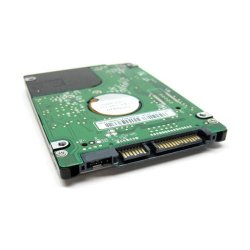
The hard drive is like the picture I have attached, which is a standard SATA Hard drive yeah?
So, I need to purchase the appropriate converter cable, so I can test it. If I am understanding correct, I would plug into my laptop using the cable and see if it is recognised or not.. :huh:
 

Attachments

  • 8330XL-262.jpg
    8330XL-262.jpg
    16.2 KB · Views: 10

My Computer

Computer type
Laptop
Computer Manufacturer/Model Number
Acer Aspire V5-571P
OS
Windows 8.1 64-bit OS
CPU
CPU @ 1.90GHz 1.90GHz
Motherboard
Unknown
Memory
4096 MB, PC3-10600 DDR3 SDRAM SO-DIMM
Monitor(s) Displays
15.6 inch 16:9, 1366 x 768 pixel, AU OPTRONICS , TN LED
Screen Resolution
1366 x 768 pixel
Hard Drives
500GB Conventional hard drive
Keyboard
Chiclet
Antivirus
none
Browser
Chrome
Back
Top