How Do I Get Download Folder Back in Favorites Under Windows Explorer

huskerkirk

New member
Local time
7:36 PM
Messages
1
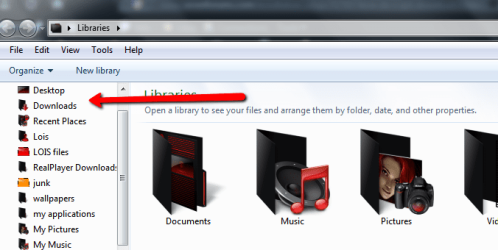
When I open Windows Explorer, there is not a Download Folder under the Favorites. There are the other two folders (Desktop and Recent Places) but not Download. I think I may have mistakenly deleted that folder. How do I get that Download Folder back so that it is part of the Favorites?

Thank You
 

My Computer My Computer

At a glance

Windows 7 Home Premium 64-bit
Computer Manufacturer/Model Number
Dell XPS 720
OS
Windows 7 Home Premium 64-bit
when you say explorer do you mean here...

2012-02-04_2045.png

if so open your users folder from the start menu, and drag the downloads folder over to the favorites in the open window ,
it will create a link for you, thats it, its simple.
 

My Computer My Computer

At a glance

Microsoft Windows 7 Home Premium 64-bit 7600IIx4 amd athelon 635 processor2x2gbati radeon HD 5450
Computer Manufacturer/Model Number
Hewlett packard/p6512uk
OS
Microsoft Windows 7 Home Premium 64-bit 7600
CPU
IIx4 amd athelon 635 processor
Motherboard
FOXCONN 2AA9
Memory
2x2gb
Graphics Card(s)
ati radeon HD 5450
Sound Card
(1) Realtek High Definition Audio (2) AMD High Definition
Monitor(s) Displays
samsung lcd tv 32"
Screen Resolution
1360x 768
Hard Drives
(1) WDC WD10 01FAES-60Z2A0 SATA Disk Device (2) Maxtor OneTouch USB Device (3) ST310003 33AS USB Device (4) WD My Book 1111 USB Device
PSU
?
Cooling
air!
Keyboard
wireless hp
Mouse
wireless Hp,optical
Internet Speed
1.10mb/s
Antivirus
MSE
Browser
Firefox
Hi Huskerkirk and welcome to Seven Forums.

You can just click on the folder and drag it to favorites.


You beat me to it Boobah.
 
Last edited:

My Computer My Computer

At a glance

Microsoft Windows 7 Home Premium 64-bit Servi...Intel(R) Core(TM) i3 CPU M 330 @ 2.13GHz8 GB DDR3Intel(R) HD Graphics
Computer type
Laptop
Computer Manufacturer/Model Number
Hewlett-Packard/G62-107SA Notebook
OS
Microsoft Windows 7 Home Premium 64-bit Service Pack 1
CPU
Intel(R) Core(TM) i3 CPU M 330 @ 2.13GHz
Motherboard
Hewlett-Packard 1425
Memory
8 GB DDR3
Graphics Card(s)
Intel(R) HD Graphics
Sound Card
Realtek High Definition Audio
Monitor(s) Displays
Builtin
Screen Resolution
1366 x 768 x 32 bits (4294967296 colors) @ 60 Hz
Hard Drives
250 GB SATA Hard Disk Drive 7200 rpm
2TB Seagate GoFlex USB 2 Drive
1TB Iomega Prestige USB 2 Drive
1.5TB Iomega Prestige USB 2 Drive (Samsung)
2TB WD MyBook Live NAS.
Mouse
Logitech Anywhere MX
Internet Speed
152 Mbs download 10 Mbs upload
Antivirus
Norton 360
Browser
Chrome
For anyone else you can also open the users folder on your C drive and select the computer name user (cause there are lots of users for some reason). In that folder you will find the Downloads folder. Draging the folder will say you are moving it but if you dump it in favorites it will make a shortcut.
 

My Computer My Computer

At a glance

windows 7 rc
OS
windows 7 rc
I have a Windows 7. I tried to drag the users/name/Downloads folder and drop to the Favorites but it won't allow me to do so. What works for me is to click the Downloads folder to highlight and click the "Include in library" on the top bar. In the drop down menu, click "Create new library" and the Downloads appears in the Libraries folder.
 

My Computer My Computer

At a glance

Windows 7 Home Premium
Computer type
PC/Desktop
Computer Manufacturer/Model Number
HP
OS
Windows 7 Home Premium
navigate to the folder u want to add
right click the fave - choose add current
 

My Computer My Computer

At a glance

Windows 7 x64bit
Computer type
PC/Desktop
OS
Windows 7 x64bit
Browser
Chrome
Back
Top