
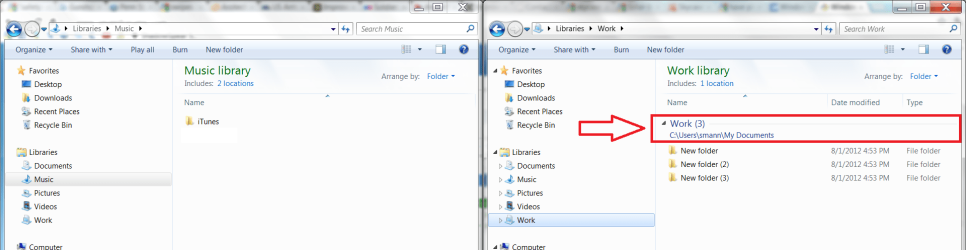
So I decided to make a new library for work called "Work" and I was going to put all of my stuff for my job in that library instead of having it in the Documents library like I have had for awhile now. However, whenever you create a new library and add a folder to it, there is a drop down menu for each folder in the library that allows you to expand and condense that particular folder which would come in handy for libraries with many folders but not for libraries with only a couple of folders. I would like to get rid of this drop down menu. I have attached a pic with my Music library next to my Work library and highlighted the drop down menu thing that I would like to get rid of.
Also, if you modify any of the existing 4 libraries then this drop down menu appears as well and the only way to get it to go away is to go into the libraries properties and click restore defaults and then ok and then go back to the properties and do the same thing again. I don't need the public folders in the libraries as they are not used but if I delete them from the library list then this drop down menu appears. I could just delete them completely from the computer if all else fails. Sorry this is a long explanation and it probably has been answered elsewhere but I couldn't find a solution. I'd like to know how to get rid of that annoying drop down menu.
Thanks for the help!
Also, if you modify any of the existing 4 libraries then this drop down menu appears as well and the only way to get it to go away is to go into the libraries properties and click restore defaults and then ok and then go back to the properties and do the same thing again. I don't need the public folders in the libraries as they are not used but if I delete them from the library list then this drop down menu appears. I could just delete them completely from the computer if all else fails. Sorry this is a long explanation and it probably has been answered elsewhere but I couldn't find a solution. I'd like to know how to get rid of that annoying drop down menu.
Thanks for the help!
Attachments
My Computer
At a glance
Windows 7 Professional x64
- OS
- Windows 7 Professional x64


