how do I increase my volume even more?

Leimone

New member
Member
Local time
6:34 PM
Messages
91
I have WMP, and the sound there is maxed out and the computer sound (the bottom right corner) thingy is maxed out.
Is there any program that could increase it even more?
 

My Computer My Computer

OS
Win7 Ultimate x64
CPU
Intel Core i7 2600K 3,4GHz
Motherboard
Asus P8Z68-V Pro
Memory
Corsair 8GB (2x4096MB) CL9 1600Mhz XMS3
Graphics Card(s)
GK PCIe EVGA GF GTX 670 FTW
Monitor(s) Displays
Philips PHI32PFL3614
Screen Resolution
1920 x 1080
Hard Drives
Corsair SSD Force 3 Series 120GB
1TB Western Digital Caviar Black
PSU
XFX XXX Edition 750W
Case
Corsair Graphite 600T Svart
Cooling
Arctic Cooling Freezer 7 Pro rev.2
Internet Speed
100MB
Answer is No.... buy powered speaker set...
 

My Computer My Computer

Computer type
Laptop
Computer Manufacturer/Model Number
HP 17-ak0xx, dv7 3173nr
OS
Win7 Home Premium x64 W10Pro&Home
CPU
A12 9720p 4+8 TurionII M520
Motherboard
HP 3839
Memory
6GB 8GB
Graphics Card(s)
R7
Monitor(s) Displays
24" sa550
Screen Resolution
1600x900 1920x1080
Mouse
Logitechx2
Internet Speed
120Mb/s down 12up
Click Start and type (without quotes) "Adjust system volume." Then click on the item. Is the level at the top? If not, move it there by dragging it with the cursor.
 

My Computer My Computer

Computer type
PC/Desktop
Computer Manufacturer/Model Number
Dell Studio XPS 8100, Dell XPS 15 laptop
OS
Windows 10 Home, 64 bit
CPU
Intel Core i7 860 @ 2.8 GHz
Motherboard
Dell 0T568R (CPU1)
Memory
8.0 GB Dual Channel DDR3 @ 664 MHz (9-9-9-24)
Graphics Card(s)
nVidia GeForce GTS 240
Sound Card
M-Audio Delta Audiophile 2496
Monitor(s) Displays
Dell 2407WFP
Screen Resolution
1920x1200
Hard Drives
977 GB Western Digital WDC WD1001FAES-75W7A0 (SCSI)
Antivirus
Windows Defender, MalwareBytes Anti-Malware, AdwCleaner
Browser
Firefox, occasionally IE and Edge
Other Info
Mozilla Firefox, Mozilla Thunderbird. Western Digital Passport 250 GB external HD, two Mushkin Enhanced Mulholland 32GB USB flash drives, AKG K240 Studio headphones, Asus AC-1900 dual band wireless router.
Buy (better) powered speakers or an amp to increase volume.
 

My Computer My Computer

Computer Manufacturer/Model Number
Pugh Technologies
OS
W7 Professional x64
CPU
AMD Athlon II X3 445 Rana 3.10 GHz
Motherboard
MSI 870A-G54
Memory
PNY XLR DDR3 1600 4x2GB
Graphics Card(s)
NVIDIA GeForce GTS 450 (fermi) 1GB GDDR5
Sound Card
Realtek ALC892 onboard
Monitor(s) Displays
ASUS VE205t, Viewsonic VX2035WM
Screen Resolution
1600x900, 1600x1050
Hard Drives
977GB Hitachi Hitachi HDS721010CLA332
244GB Western Digital WDC WD2500AAJS-65B4A0
488GB Western Digital WDC WD5000AAJS-00A8B0
488GB Western Digital WDC WD5000AAKS-00UU3A0
PSU
Antec EarthWatts EA650 650W
Case
ThermalTake Armor A90 Mid Tower
Cooling
3x 120mm in, 1x 120mm & 200mm out, self built hydro-cooler
Keyboard
Logitec 55
Mouse
Razer Deathadder
Internet Speed
20 Mbps D/L, 9 Mbps U/L
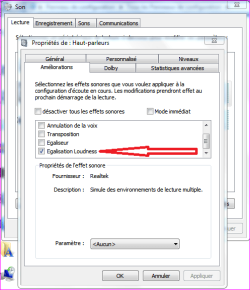
If you have a Realtek chipset you might want to investigate what enhancements are running.

You CAN increase volume using the Realtek equalizer by bringing all frequency sliders up an equal amount (30%), not ideal but it can give you a volume boost.

Also, if you have the "Loudness Equalization" enabled it will actually lower high output volume (as well as raise lower input volume).

Try it with Loudness Equalization both enabled and disabled.

Ap
 
Last edited:

My Computer My Computer

Computer Manufacturer/Model Number
Assembled in my workshop
OS
Windows 7 Home Premium
CPU
Intel Core 2 Duo @ 3.00gHz
Motherboard
Gigabyte GA-P35-S3G
Memory
4 GB
Graphics Card(s)
ATI Radeon HD 2600 XT
Sound Card
RME 24/96 Card, Realtek Internal Audio PreSonus FireStudio
Monitor(s) Displays
Acer 1917 (x2)
Screen Resolution
1280 x 1024 on both monitors
Hard Drives
Three 250GB Seagate SATA Barracuda 7200rpm
PSU
Rosewill 500-watt
Case
Rosewill mid-tower
Cooling
Noctua NH-U9B (CPU), PwrSupply fan + single large case Fan
Keyboard
Macally w/2/USB ports.
Mouse
Trackman Wheel
Other Info
Event 20/20 bas studio monitors, Yamaha sub.
Rackmount Korg/Roland/Yamaha synthesizers,
Cubase MIDI/audio recording. Sony Soundforge audio/mastering software. CD Architect Mastering. RME & Presonus audio interfaces.
As Aphelion said it already, you might want to go in Control Panel=>Sound=>Speakers=>Properties=>...(see screenshot)

Works just fine when my external speakers are not plugged in.
 

Attachments

  • Capture.PNG
    Capture.PNG
    24.3 KB · Views: 1,955
Last edited:

My Computer My Computer

Computer type
PC/Desktop
Computer Manufacturer/Model Number
Custom Build
OS
Windows 7 Professional SP1 - x64 [Non-UEFI Boot]
CPU
Ivy Bridge Core i5 3570K (Delidded)
Motherboard
Asus P8Z77-V LE PLUS
Memory
G.Skill "Ares" DDR3 PC3-12800 - 1600MHz (16Gb)
Graphics Card(s)
Asus Dual-RX480-O4G
Sound Card
Creative Sound Blaster Z w/5.1 sound system
Monitor(s) Displays
Asus IPS 23"
Screen Resolution
16/9
Hard Drives
Internal:
500Go Sata 6Gb/s (x2)
500Go Sata 3Gb/s (x2)
SSD 60Go Sata 6Gb/s
PSU
In Win C 900W Series 80+ Platinum
Case
Thermaltake Chaser A71
Cooling
Custom Water Cooling Loop
Keyboard
Cooler Master QuickFire XTi
Mouse
Razer Imperator 2012 (4G)
Antivirus
MSE
Browser
IE 11.0.xxx Rtm
Other Info
"Raid0" with Intel Smart Response Technology (HDD/SSD)
try SRS it might help
 

My Computer My Computer

OS
Windows 7 Professional x64
CPU
E8400
Motherboard
Asus P5Q PRO
Graphics Card(s)
XFX 5770
Monitor(s) Displays
Samsung SM2233
Screen Resolution
1080p
Hard Drives
Seagate 2x1 TB
PSU
TX 750
Case
CM 922
Wohoo, thanks guys

"Loudness Equalization" enabled helped out a lot, now I have to keep volume at 8% instead of 100%

WMP and windows in general had a low volume for some reason, so I was looking for something to boost overall system volume simmilar to the way VLC has something that helps boost speaker volume but now I don't have to. :D
 

My Computer My Computer

Computer Manufacturer/Model Number
HP Z400 Workstation , Acer Aspire E700
OS
32bit(Windows 7 & Ubuntu 10.10 , Windows 7 & Windows XP)
CPU
2.8GHz Intel Xeon W3530 , 2.40GHz Intel Core2 Quad
Motherboard
Acer FG965M, HP 0B4C D
Memory
3GB EEC , 4 GB
Graphics Card(s)
NVIDIA QuadroFX 380 , Radeon X1650
Sound Card
Realtek High Definition Audio
Monitor(s) Displays
HP 2009m x2
Screen Resolution
1600x900
Hard Drives
HDS728080PLA380 [Hard drive] (82.35 GB) -- drive 1, s/n PFDB20S5T56VTJ, rev PF2OA60A, SMART Status: Healthy

SAMSUNG HD160JJ/P [Hard drive] (160.00 GB) -- drive 3, s/n S0DFJ1NLB53172, rev ZM100-34, SMART Status: Healthy

ST3500320AS [Hard drive]
Case
IBM EServer XSeries 205
found it

Hi

right click taskbars volume icon, and go playback devise, speaker, properties, emhancments

and make sure the " disable all sound effects" has a tick in it

worked for me with acer 7738g and realtec drivers

sorry for posting on an old thread but this works well and wanted to share
 

My Computer My Computer

OS
windows 95
Try ffdshow audio decoder standard with windows media player classic. Make sure you install it during the setup. Play around with ffdshow settings- (tick the volume box)(can be found in the system tray when the music is playing in media player). Only thing that helped me
 

My Computer My Computer

Computer Manufacturer/Model Number
MSI
OS
Windows 7 Ultimate x32
CPU
Intel Core 2 Quad Q9400 @ 2.66GHz
Motherboard
MSI
Memory
2048MB
Graphics Card(s)
NVIDIA GeForce GTX 275
Monitor(s) Displays
Generic PnP Monitor
Hard Drives
2x HDD Drives (ATA Devices) 140GB and 368GB
Cooling
Fans
Heck yeah

I found the answer and I am proud. Go to Configure Speakers, and choose Surround 7.1. ENJOY! :cool:
 

My Computer My Computer

OS
Windows 7 Ultimate 32-bit
Back
Top