How do I install new drivers after installing Windows 7 7

Spirit of Iron

New member
Local time
9:34 AM
Messages
7
I have an Acer 5715z notebook and going to upgrading it to Windows 7 and how do you install drivers to the computer once I load my new OS?
 

My Computer My Computer

Computer Manufacturer/Model Number
Acer
OS
Windows Vista Home Premium 32-bit
CPU
Intel Pentium T2370 @ 1.73GHz Merom 65nm Technology
Motherboard
Acer Acadia (uPGA-478)
Memory
3.00 GB Dual-Channel DDR2 @ 265MHz (4-4-4-12)
Graphics Card(s)
Intel [Mobile Intel(R) 965 Express Chipset] x2
Sound Card
Realtek High Definition Audio
Monitor(s) Displays
Generic PnP Monitor (1280x800@60Hz)
Screen Resolution
1280x800
Hard Drives
156GB Seagate ST9160821AS ATA Device (SATA)
Internet Speed
40 mbps
There are several ways:

1) You have an Acer oem machine with vista, so there may or may not be win7 drivers available. Look up the acer support page for your model and download the win7 drivers if they are available. Of course this can be done after upgrading too.

2) If only vista drivers are available, you can use those but in addition you can locate generic drivers for well known devices such as Realtek high def audio (thats the sound card you have). Your machine has somewhat older hardware such as the 965 express onboard gfx, I think no drivers were released for this one after 2009, you can look up intel's support page for this.

3) Device drivers are also offered through windows update or just go to the device manager, right click on the device then click update. But windows database drivers may not be updated.

4) If you have the .exe file for the driver, just double click to install, if its zipped extract to a local folder first then run the setup file.

5) A nifty thing you can do is to backup existing installed drivers using a tool like Double driver. After upgrading to win7, you can restore any of he backed up drivers if no updated driver is available. Will save you some bandwidth if you're on a limited connection.

6) All installed drivers are saved in he location "C:\Windows\System32\DriverStore\FileRepository", so one can also backup this folder, then point the devices in device manager to it.

 

My Computer My Computer

Computer Manufacturer/Model Number
Too many to describe...
OS
Windows 7 x64 pro/ Windows 7 x86 Pro/ XP SP3 x86
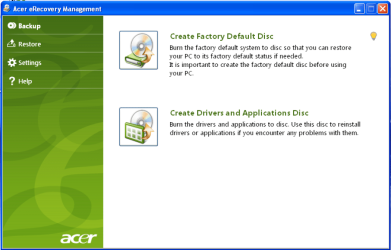
When you made the Acer Recovery Disks, did you also make the Drivers disk.

Acer001.PNG
 

My Computer My Computer

OS
ME/XP/Vista/Win7
Thank you both for the advice!
 

My Computer My Computer

Computer Manufacturer/Model Number
Acer
OS
Windows Vista Home Premium 32-bit
CPU
Intel Pentium T2370 @ 1.73GHz Merom 65nm Technology
Motherboard
Acer Acadia (uPGA-478)
Memory
3.00 GB Dual-Channel DDR2 @ 265MHz (4-4-4-12)
Graphics Card(s)
Intel [Mobile Intel(R) 965 Express Chipset] x2
Sound Card
Realtek High Definition Audio
Monitor(s) Displays
Generic PnP Monitor (1280x800@60Hz)
Screen Resolution
1280x800
Hard Drives
156GB Seagate ST9160821AS ATA Device (SATA)
Internet Speed
40 mbps
Oh I forgot to mention, I checked my manufacturers website for support drivers. They have some some options for some drivers for my system but they only seem to have stuff for things I will get additional once I upgrade and they have drivers for that and they only have options for the x32 bit version of my system but I'm going to getting a x64 bit. Should I just go for the x32 bit for the drivers or go on to x64 bit or it wouldn't matter?
 
Last edited:

My Computer My Computer

Computer Manufacturer/Model Number
Acer
OS
Windows Vista Home Premium 32-bit
CPU
Intel Pentium T2370 @ 1.73GHz Merom 65nm Technology
Motherboard
Acer Acadia (uPGA-478)
Memory
3.00 GB Dual-Channel DDR2 @ 265MHz (4-4-4-12)
Graphics Card(s)
Intel [Mobile Intel(R) 965 Express Chipset] x2
Sound Card
Realtek High Definition Audio
Monitor(s) Displays
Generic PnP Monitor (1280x800@60Hz)
Screen Resolution
1280x800
Hard Drives
156GB Seagate ST9160821AS ATA Device (SATA)
Internet Speed
40 mbps
I've just checked, and whilst there is nothing listed for W7 64-bit, there is for Vista 64-bit. You can try to see if those drivers work, alternatively try the hardware manufacturer's websites (Intel, Realtek, Bison, Chicony, Suyin, Broadcom) to see if they have suitable W7 drivers.

Unfortunately, the English user manual seems to be missing from their site. There is a French one, but my French is virtually non-existant.
 

My Computer My Computer

Computer type
PC/Desktop
Computer Manufacturer/Model Number
Dwarf Dwf/11/2012 r09/2013
OS
Windows 8.1 Pro RTM x64
CPU
Intel Core-i5-3570K 4-core @ 3.4GHz (Ivy Bridge) (OC 4.4GHz)
Motherboard
ASRock Z77 Extreme4-M
Memory
4 x 4GB DDR3-1600 Corsair Vengeance CMZ8GX3M2A1600C9B (16GB)
Graphics Card(s)
MSI GeForce GTX770 Gaming OC 2GB
Sound Card
Realtek High Definition on board solution (ALC 898)
Monitor(s) Displays
ViewSonic VA1912w Widescreen (VGA)
Screen Resolution
1440x900
Hard Drives
OCZ Agility 3 SSD 120GB SATA III x2 (RAID 0)
Samsung HD501LJ 500GB SATA II x2
Hitachi HDS721010CLA332 1TB SATA II
Iomega 1.5TB Ext USB 2.0
WD 2.0TB Ext USB 3.0
PSU
XFX Pro Series 850W Semi-Modular
Case
Gigabyte IF233
Cooling
1 x 120mm Front Inlet 1 x 120mm Rear Exhaust
Keyboard
Microsoft Comfort Curve Keyboard 3000 (USB)
Mouse
Microsoft Comfort Mouse 3000 for Business (USB)
Internet Speed
NetGear DG834Gv3 ADSL Modem/Router (Ethernet) ~4.0 Mb/s (O2)
Antivirus
Avast! 8.0.1497
Browser
IE 11
Other Info
Optical Drive: HL-DT-ST BD-RE BH10LS30 SATA Bluray
Lexmark S305 Printer/Scanner/Copier (USB)
WEI Score: 8.1/8.1/8.5/8.5/8.25
Asus Eee PC 1011PX Netbook (Windows 7 x86 Starter)
Back
Top