How do I install Windows 7 on a GPT disk with UEFI enabled in my bios?

Vineet Garg, Win 10 fast boot has nothing to do with win 7 install. Once you install Win 7 with dual boot, yes, Win 7 fast boot must be disabled. But, as I understood, OP hasn't install Win 7 as UEFI-GPT.

Ten20, Just to clarify:
- Did you succeed in creating a Win 7 USB installation disk? Where you able to boot it as UEFI?
 

My Computers My Computers

  • At a glance

    Windows 7 HP 64i5 6600K - 800MHz to 4200MHz4+4G GSkill DDR4 3000IG - Intel 530
    Computer type
    PC/Desktop
    Computer Manufacturer/Model Number
    custom build
    OS
    Windows 7 HP 64
    CPU
    i5 6600K - 800MHz to 4200MHz
    Motherboard
    GA-Z170-HD3P
    Memory
    4+4G GSkill DDR4 3000
    Graphics Card(s)
    IG - Intel 530
    Monitor(s) Displays
    Samsung 226BW
    Screen Resolution
    1680x1050
    Hard Drives
    (1) -1 SM951 – 128GB M.2 AHCI PCIe SSD drive for Windows 7 and Lubuntu
    (2) -1 WD SATA 3 - 1T for Data
    (3) -1 WD SATA 3 - 1T for backup
    PSU
    Thermaltake 450W TR2 gold
    Keyboard
    Old and good Chicony mechanical keyboard
    Mouse
    Logitech mX performance - 9 buttons (had to disable some)
    Internet Speed
    500Mb/s
    Browser
    Firefox 64
    Other Info
    TinyWall firewall
  • At a glance

    Windows 7 Proi7-4500U 800MHz to 3.0GHz(4+4)G DDR3 1600IG intel 4400 + NVIDIA GeForce GT 745M
    Computer type
    Laptop
    System Manufacturer/Model Number
    Asus Q550LF
    OS
    Windows 7 Pro
    CPU
    i7-4500U 800MHz to 3.0GHz
    Motherboard
    Asus Q550LF
    Memory
    (4+4)G DDR3 1600
    Graphics Card(s)
    IG intel 4400 + NVIDIA GeForce GT 745M
    Sound Card
    Realtek
    Monitor(s) Displays
    LG Display LP156WF4-SPH1
    Screen Resolution
    1920 x 1080
    Hard Drives
    BX500 120G SSD for Windows and programs +
    1T HDD for data
    Internet Speed
    500 Mb/s
    Browser
    Firefox
    Other Info
    TinyWall firewall
Vineet Garg, Win 10 fast boot has nothing to do with win 7 install. Once you install Win 7 with dual boot, yes, Win 7 fast boot must be disabled. But, as I understood, OP hasn't install Win 7 as UEFI-GPT.

Ten20, Just to clarify:
- Did you succeed in creating a Win 7 USB installation disk? Where you able to boot it as UEFI?

I managed to create the UEFI installation disk, but I couldn't boot from it. (Got stuck on Starting Windows)
 

My Computer My Computer

At a glance

Windows 10 Pro x64Processor Intel(R) Core(TM) i7-9700K CPU @ 3....16gb Corsair Vengeance ProGeForce GTX 1660 TI
Computer type
PC/Desktop
Computer Manufacturer/Model Number
custom build
OS
Windows 10 Pro x64
CPU
Processor Intel(R) Core(TM) i7-9700K CPU @ 3.60GHz, 3600 Mhz
Motherboard
Z390 Aorus Pro Wifi
Memory
16gb Corsair Vengeance Pro
Graphics Card(s)
GeForce GTX 1660 TI
Case
Cooler Master MB500
Browser
Google Chrome
I managed to create the UEFI installation disk, but I couldn't boot from it. (Got stuck on Starting Windows)

Can you be more precise on Starting Windows? When you boot the disk? After copy files and restarting?
Witch Win 7 installation disk you have? I can send you a M$ link to download a iso file.
 

My Computers My Computers

  • At a glance

    Windows 7 HP 64i5 6600K - 800MHz to 4200MHz4+4G GSkill DDR4 3000IG - Intel 530
    Computer type
    PC/Desktop
    Computer Manufacturer/Model Number
    custom build
    OS
    Windows 7 HP 64
    CPU
    i5 6600K - 800MHz to 4200MHz
    Motherboard
    GA-Z170-HD3P
    Memory
    4+4G GSkill DDR4 3000
    Graphics Card(s)
    IG - Intel 530
    Monitor(s) Displays
    Samsung 226BW
    Screen Resolution
    1680x1050
    Hard Drives
    (1) -1 SM951 – 128GB M.2 AHCI PCIe SSD drive for Windows 7 and Lubuntu
    (2) -1 WD SATA 3 - 1T for Data
    (3) -1 WD SATA 3 - 1T for backup
    PSU
    Thermaltake 450W TR2 gold
    Keyboard
    Old and good Chicony mechanical keyboard
    Mouse
    Logitech mX performance - 9 buttons (had to disable some)
    Internet Speed
    500Mb/s
    Browser
    Firefox 64
    Other Info
    TinyWall firewall
  • At a glance

    Windows 7 Proi7-4500U 800MHz to 3.0GHz(4+4)G DDR3 1600IG intel 4400 + NVIDIA GeForce GT 745M
    Computer type
    Laptop
    System Manufacturer/Model Number
    Asus Q550LF
    OS
    Windows 7 Pro
    CPU
    i7-4500U 800MHz to 3.0GHz
    Motherboard
    Asus Q550LF
    Memory
    (4+4)G DDR3 1600
    Graphics Card(s)
    IG intel 4400 + NVIDIA GeForce GT 745M
    Sound Card
    Realtek
    Monitor(s) Displays
    LG Display LP156WF4-SPH1
    Screen Resolution
    1920 x 1080
    Hard Drives
    BX500 120G SSD for Windows and programs +
    1T HDD for data
    Internet Speed
    500 Mb/s
    Browser
    Firefox
    Other Info
    TinyWall firewall
Hi All,
Greets,

Ten20 :

1.

If you don't disconnect / Power off Disk 0 & proceed for win 7 installation on disk 1, you will be writing Win 7 boot material on Windows 10 disk ( Disk 0 ). It means that your win 7 disk ( Disk 1) will not boot independently. Your win 7 will always look for disk 0 to boot. It means if you detach Disk 0, you will not be able to boot into win 7. And if something happens to your win 10 disk, there are chances that you will not be able to boot into win 7 as well ( depending on the corruption )!
So,
Detach / turn off Disk 0 & then only go for Win 7 installation on Disk 1. It will make sure that all the boot material for win 7 is placed on Disk 1 only.
( In your case, you need a few steps before proceeding with win 7 installation on Disk 1!)

2.

That's not true. Your BIOS is good enough to carry both UEFI & MBR at the same time but certainly not on the same disk! ;) . Only the boot preference will come into play & that will be clear with a look on One Time Boot Menu Entries.
But...
Your BIOS is also good enough to carry both win 7 & win 10 in GPT. So, why to think about MBR ?

3. Power Options : Strange!

Are you logged in as Admin ? Just have a look on your snap & the one in tutorial, So much stuff / settings are missing !?

View attachment 409669

View attachment 409670

4.

Your BIOS is all good!

Windows 7 is not a full UEFI OS. The UEFI and Legacy setting should open the back door support for booting into a pure UEFI + GPT : Win 7 Installation Media!.
Now you would not hang at graphical startup in win 7 installation media.

Let's see how far we get. Shall we go ?

(i) Turn on the BIOS setting & save it : UEFI and Legacy.

(ii) Make sure you can boot & work well in windows 10.

(iii) Try to boot into your Win 7 UEFI + GPT Installation Media. ( I would suggest using Rufus & USB 2.0 port )

Notes :

*We need not detach or power off any disk for / during this test.
**We are not going to make any installation right now.
***I would suggest using Rufus to make a pure UEFI Installation Media. In some ways, the made UEFI + GPT media is compatible with Legacy as well but we need to check pure UEFI. Otherwise it will always boot well in Legacy under this setting & the test is of no use!
****I would suggest use of untouched M$ Win 7 SP1 ISO.
***I would suggest use of USB 2.0 Port because Win 7 does not support USB 3.0 ports Out Of The Box.

5. What BIOS say when you try to select single option of UEFI & single option of Legacy. Does it allow enabling both at the same time ? In one BIOS, It was not saying clearly whether both can be enabled but there was option to enable both at the same time. That BIOS was not saying anything but it was UEFI First & Legacy Second!
This would be another setting to try if 4 ( above ) is not working.

Let me know.

Thanks & Regards. ...

It didn't work. I booted the USB, it booted in UEFI mode with some UEFI:NTFS bootloader thing, loaded files, and just got stuck at Starting Windows again, the same way it did in Pure UEFI mode.
 

My Computer My Computer

At a glance

Windows 10 Pro x64Processor Intel(R) Core(TM) i7-9700K CPU @ 3....16gb Corsair Vengeance ProGeForce GTX 1660 TI
Computer type
PC/Desktop
Computer Manufacturer/Model Number
custom build
OS
Windows 10 Pro x64
CPU
Processor Intel(R) Core(TM) i7-9700K CPU @ 3.60GHz, 3600 Mhz
Motherboard
Z390 Aorus Pro Wifi
Memory
16gb Corsair Vengeance Pro
Graphics Card(s)
GeForce GTX 1660 TI
Case
Cooler Master MB500
Browser
Google Chrome
Megahertz07 : Sir,
Greets,
You are quite right. Win 7 installation has nothing to do with Fast Startup but thereafter it may be problematic & I don't think we are very far from installing win 7 as UEFI + GPT .;)

Ten20 :
1. Check The Notes section in my last post & strictly follow it.
2. Did you turn on UEFI & Legacy setting ?
3. Did you use Rufus to create UEFI + GPT media. There you have to choose UEFI, GPT & FAT 32.
4. When you try to boot into UEFI Installation Media, Take care that you detach all other removable disks & drives.

Thanks & Regards. ...
 
Last edited:

My Computer My Computer

At a glance

Windows 7 Ultimate x32 With Sp1 + Vista Ultim...Intel Mobile Core 2 Duo T5750 @ 2.00GHz Merom...2.00GB Dual-Channel DDR2 @ 332MHz (5-5-5-15)Mobile Intel(R) 965 Express Chipset Family
Computer type
Laptop
Computer Manufacturer/Model Number
hp compaq presario c795VU notebook pc
OS
Windows 7 Ultimate x32 With Sp1 + Vista Ultimate x32 with Sp1 & Sp2 !!
CPU
Intel Mobile Core 2 Duo T5750 @ 2.00GHz Merom 65nm Technolog
Motherboard
Hewlett-Packard 30D9 (CPU)
Memory
2.00GB Dual-Channel DDR2 @ 332MHz (5-5-5-15)
Graphics Card(s)
Mobile Intel(R) 965 Express Chipset Family
Sound Card
High Definition Audio Device
Monitor(s) Displays
LP154WX4-TLCB on Mobile Intel 965 Express Chipset Family
Screen Resolution
1280x800 @ 60Hz
Hard Drives
149GB Western Digital WDC WD1600BEVS-60VAT0 ATA Device (SATA)
Keyboard
Standard 101/102-Key or Microsoft Natural PS/2 Key + HP QLB
Mouse
ALPS pointing device
Antivirus
Kaspersky AV 2017(Win 7) & AVG AntiVirus Free 2016 (VISTA)
Browser
google chrome
Megahertz07 : Sir,
Greets,
You are quite right. Win 7 installation has nothing to do with Fast Startup but thereafter it may be problematic & I don't think we are very far from installing win 7 as UEFI + GPT .;)

Ten20 :
1. Check The Notes section in my last post & strictly follow it.
2. Did you turn on UEFI & Legacy setting ?
3. Did you use Rufus to create UEFI + GPT media. There you have to choose UEFI, GPT & FAT 32.
4. When you try to boot into UEFI Installation Media, Take care that you detach all other removable disks & drives.

Thanks & Regards. ...

1. I did do that.

2. I did do that.

3. I did use Rufus, but the ISO was too big to format it as Fat32. I tried splitting the install.wim but even if I do all the pieces always add up to the original size.

4. You told me that we weren't deactivating or taking out any drives. If you mean like usb sticks, I only had the installation usb in.
 

My Computer My Computer

At a glance

Windows 10 Pro x64Processor Intel(R) Core(TM) i7-9700K CPU @ 3....16gb Corsair Vengeance ProGeForce GTX 1660 TI
Computer type
PC/Desktop
Computer Manufacturer/Model Number
custom build
OS
Windows 10 Pro x64
CPU
Processor Intel(R) Core(TM) i7-9700K CPU @ 3.60GHz, 3600 Mhz
Motherboard
Z390 Aorus Pro Wifi
Memory
16gb Corsair Vengeance Pro
Graphics Card(s)
GeForce GTX 1660 TI
Case
Cooler Master MB500
Browser
Google Chrome
Ten20 :

1.
I did use Rufus, but the ISO was too big to format it as Fat32.
I see potential problems here!
(i) What it means is you are not using an untouched M$ win 7 sp 1 ISO! You can download one here : TechBench by WZT (v4.1.1) ( You need not any product key to make the download there)
(ii) Rufus denying to format the drive in FAT32 because one extracted file is above 4GB & your pen drive is 3.69 GB only! Definite problem with the installation media!

2. So, Installation media is the problem! It is possible that you don't even need to switch to UEFI & Legacy setting & pure UEFI does it for you but it depends! First you should try proper UEFI+GPT+FAT32 media with pure UEFI.

3.
You told me that we weren't deactivating or taking out any drives. If you mean like usb sticks, I only had the installation usb in.
I mean removable disks to be detached : Pen drives , SD Cards, External USB harddisks, CD/DVDs.

Let me know.

Thanks & Regards. ...
 

My Computer My Computer

At a glance

Windows 7 Ultimate x32 With Sp1 + Vista Ultim...Intel Mobile Core 2 Duo T5750 @ 2.00GHz Merom...2.00GB Dual-Channel DDR2 @ 332MHz (5-5-5-15)Mobile Intel(R) 965 Express Chipset Family
Computer type
Laptop
Computer Manufacturer/Model Number
hp compaq presario c795VU notebook pc
OS
Windows 7 Ultimate x32 With Sp1 + Vista Ultimate x32 with Sp1 & Sp2 !!
CPU
Intel Mobile Core 2 Duo T5750 @ 2.00GHz Merom 65nm Technolog
Motherboard
Hewlett-Packard 30D9 (CPU)
Memory
2.00GB Dual-Channel DDR2 @ 332MHz (5-5-5-15)
Graphics Card(s)
Mobile Intel(R) 965 Express Chipset Family
Sound Card
High Definition Audio Device
Monitor(s) Displays
LP154WX4-TLCB on Mobile Intel 965 Express Chipset Family
Screen Resolution
1280x800 @ 60Hz
Hard Drives
149GB Western Digital WDC WD1600BEVS-60VAT0 ATA Device (SATA)
Keyboard
Standard 101/102-Key or Microsoft Natural PS/2 Key + HP QLB
Mouse
ALPS pointing device
Antivirus
Kaspersky AV 2017(Win 7) & AVG AntiVirus Free 2016 (VISTA)
Browser
google chrome
(i) What it means is you are not using an untouched M$ win 7 sp 1 ISO! You can download one here : TechBench by WZT (v4.1.1) ( You need not any product key to make the download there)

Win7 isos files no longer available there.

Let me know if you need one.


3. I did use Rufus, but the ISO was too big to format it as Fat32. I tried splitting the install.wim but even if I do all the pieces always add up to the original size.

What does that mean? Rufus extracts the contents of the iso file onto usb. The size of the iso itself is not relevant. As long as none of the extracted files exceeds the single file limit of 4gb it should be fine. You can have as many split wim files up to 3.99gb as you like.
 

My Computers My Computers

  • At a glance

    7 X64i5 84002x8gb 3200mhz
    Computer type
    PC/Desktop
    OS
    7 X64
    CPU
    i5 8400
    Motherboard
    gigabyte b365m ds3h
    Memory
    2x8gb 3200mhz
    Hard Drives
    various
    PSU
    pure power 11 400w cm
    Case
    Coolermaster
    Cooling
    cryorig m9i
  • At a glance

    7x64g54008gb ddr4 2400
    Computer type
    PC/Desktop
    OS
    7x64
    CPU
    g5400
    Motherboard
    ga b365m ds3h
    Memory
    8gb ddr4 2400
    PSU
    xfx pro 450w

My Computer My Computer

At a glance

Windows 7 Ultimate x32 With Sp1 + Vista Ultim...Intel Mobile Core 2 Duo T5750 @ 2.00GHz Merom...2.00GB Dual-Channel DDR2 @ 332MHz (5-5-5-15)Mobile Intel(R) 965 Express Chipset Family
Computer type
Laptop
Computer Manufacturer/Model Number
hp compaq presario c795VU notebook pc
OS
Windows 7 Ultimate x32 With Sp1 + Vista Ultimate x32 with Sp1 & Sp2 !!
CPU
Intel Mobile Core 2 Duo T5750 @ 2.00GHz Merom 65nm Technolog
Motherboard
Hewlett-Packard 30D9 (CPU)
Memory
2.00GB Dual-Channel DDR2 @ 332MHz (5-5-5-15)
Graphics Card(s)
Mobile Intel(R) 965 Express Chipset Family
Sound Card
High Definition Audio Device
Monitor(s) Displays
LP154WX4-TLCB on Mobile Intel 965 Express Chipset Family
Screen Resolution
1280x800 @ 60Hz
Hard Drives
149GB Western Digital WDC WD1600BEVS-60VAT0 ATA Device (SATA)
Keyboard
Standard 101/102-Key or Microsoft Natural PS/2 Key + HP QLB
Mouse
ALPS pointing device
Antivirus
Kaspersky AV 2017(Win 7) & AVG AntiVirus Free 2016 (VISTA)
Browser
google chrome
To boot as UEFI you MUST format the USB flash disk as Fat32. The USB flash disk doesn't need to be GPT. It can be regular MBR.

If the install.wim is bigger than 4G, you won't be able to copy it to the USB flash disk (Fat32 limitation)
Let's start from a original M$ iso.
Download the iso from here Win7_HomePrem_SP1_English_x64.iso
Link expire: 10/15/2019 1:20:46 PM UTC=GMT

To install as any other than Home Premium, see below.

- Format the USB flash disk as Fat32.
- Under Win 10, mount the iso and extract all files and folders to the USB flash disk.
- On the USB flash disk add the boot folder under the Efi folder (See post 19)
- On the USB flash disk go to \sources and delete ei.cfg file. This will make the installation disk with all options (Home, HP, Pro and Ultimate). During installation it will ask witch version to install.

Once installed, set Windows Update to manual under Services and "Never check " on WU page.
After installing all needed drivers, download and run UpdatePack7R2
Simplix is a single file (750MB) that contain all updates since Win 7 released up to date. It has all security and non security updates without the trash (telemetry and tracking). Very good.
Then run WU manually to find updates for Office etc and decide witch one to install.
 

My Computers My Computers

  • At a glance

    Windows 7 HP 64i5 6600K - 800MHz to 4200MHz4+4G GSkill DDR4 3000IG - Intel 530
    Computer type
    PC/Desktop
    Computer Manufacturer/Model Number
    custom build
    OS
    Windows 7 HP 64
    CPU
    i5 6600K - 800MHz to 4200MHz
    Motherboard
    GA-Z170-HD3P
    Memory
    4+4G GSkill DDR4 3000
    Graphics Card(s)
    IG - Intel 530
    Monitor(s) Displays
    Samsung 226BW
    Screen Resolution
    1680x1050
    Hard Drives
    (1) -1 SM951 – 128GB M.2 AHCI PCIe SSD drive for Windows 7 and Lubuntu
    (2) -1 WD SATA 3 - 1T for Data
    (3) -1 WD SATA 3 - 1T for backup
    PSU
    Thermaltake 450W TR2 gold
    Keyboard
    Old and good Chicony mechanical keyboard
    Mouse
    Logitech mX performance - 9 buttons (had to disable some)
    Internet Speed
    500Mb/s
    Browser
    Firefox 64
    Other Info
    TinyWall firewall
  • At a glance

    Windows 7 Proi7-4500U 800MHz to 3.0GHz(4+4)G DDR3 1600IG intel 4400 + NVIDIA GeForce GT 745M
    Computer type
    Laptop
    System Manufacturer/Model Number
    Asus Q550LF
    OS
    Windows 7 Pro
    CPU
    i7-4500U 800MHz to 3.0GHz
    Motherboard
    Asus Q550LF
    Memory
    (4+4)G DDR3 1600
    Graphics Card(s)
    IG intel 4400 + NVIDIA GeForce GT 745M
    Sound Card
    Realtek
    Monitor(s) Displays
    LG Display LP156WF4-SPH1
    Screen Resolution
    1920 x 1080
    Hard Drives
    BX500 120G SSD for Windows and programs +
    1T HDD for data
    Internet Speed
    500 Mb/s
    Browser
    Firefox
    Other Info
    TinyWall firewall
Ten2O, did you succeed installing Win 7 as UEFI-GPT?
 

My Computers My Computers

  • At a glance

    Windows 7 HP 64i5 6600K - 800MHz to 4200MHz4+4G GSkill DDR4 3000IG - Intel 530
    Computer type
    PC/Desktop
    Computer Manufacturer/Model Number
    custom build
    OS
    Windows 7 HP 64
    CPU
    i5 6600K - 800MHz to 4200MHz
    Motherboard
    GA-Z170-HD3P
    Memory
    4+4G GSkill DDR4 3000
    Graphics Card(s)
    IG - Intel 530
    Monitor(s) Displays
    Samsung 226BW
    Screen Resolution
    1680x1050
    Hard Drives
    (1) -1 SM951 – 128GB M.2 AHCI PCIe SSD drive for Windows 7 and Lubuntu
    (2) -1 WD SATA 3 - 1T for Data
    (3) -1 WD SATA 3 - 1T for backup
    PSU
    Thermaltake 450W TR2 gold
    Keyboard
    Old and good Chicony mechanical keyboard
    Mouse
    Logitech mX performance - 9 buttons (had to disable some)
    Internet Speed
    500Mb/s
    Browser
    Firefox 64
    Other Info
    TinyWall firewall
  • At a glance

    Windows 7 Proi7-4500U 800MHz to 3.0GHz(4+4)G DDR3 1600IG intel 4400 + NVIDIA GeForce GT 745M
    Computer type
    Laptop
    System Manufacturer/Model Number
    Asus Q550LF
    OS
    Windows 7 Pro
    CPU
    i7-4500U 800MHz to 3.0GHz
    Motherboard
    Asus Q550LF
    Memory
    (4+4)G DDR3 1600
    Graphics Card(s)
    IG intel 4400 + NVIDIA GeForce GT 745M
    Sound Card
    Realtek
    Monitor(s) Displays
    LG Display LP156WF4-SPH1
    Screen Resolution
    1920 x 1080
    Hard Drives
    BX500 120G SSD for Windows and programs +
    1T HDD for data
    Internet Speed
    500 Mb/s
    Browser
    Firefox
    Other Info
    TinyWall firewall

My Computer My Computer

At a glance

Windows 10 Pro x64Processor Intel(R) Core(TM) i7-9700K CPU @ 3....16gb Corsair Vengeance ProGeForce GTX 1660 TI
Computer type
PC/Desktop
Computer Manufacturer/Model Number
custom build
OS
Windows 10 Pro x64
CPU
Processor Intel(R) Core(TM) i7-9700K CPU @ 3.60GHz, 3600 Mhz
Motherboard
Z390 Aorus Pro Wifi
Memory
16gb Corsair Vengeance Pro
Graphics Card(s)
GeForce GTX 1660 TI
Case
Cooler Master MB500
Browser
Google Chrome
Windows 7 can be installed on pure UEFI (no CSM), but you need to remove standard vga driver from it. You will get black screen during de installation. You will have to integrate drivers for your videocard into the installation so that you will have video output at the end of the installation, otherwise you'll still get black screen. This is the most difficult part because nowadays you have videocards with no driver for win7,such as intel uhd 620/630, but luckily sometimes (also for uhd 620/630) you can use modified drivers. Keep in mind that a modified driver loses it's signature and such a nonsigned driver won't be loaded during the installation of windows. Therefore you might need to create a custom certificate and sign the modified driver with it and the import it into the registry of the installation to make it work.

Using information from various discussions and discoveries of other users, I created a step by step guide for my Acer Spin 5 laptop: Guide - How to install Windows 7 x64 on Acer Spin 5 laptop | NotebookReview

You can also check my discussion with another user who managed to make it work on his Acer Nitro laptop: windows 7 install issues - Boot from USB / Boot anywhere - reboot.pro

Depending on your cpu and/or integrated video card (uhd 620/630), you can use 2 drivers:
1) for uhd 620 and some 630 make it yourself using the guide provided in the 2 topics.
2) for some uhd 630 for which the previous driver fails, use this driver as is directly (without modofying anything), you might however only need to sign it with your custom certificate as in the guide: Forum - RE: Win 7 x64 Coffee Like UHD 630 Video driver - 2

Good luck!

LE: You can use my slimmed version of win7 x64 to test, it installs very fast. Includes all updates until March 2019: Win7SP1IE11x64Mar2019_Lite.iso - Google Drive
 
Last edited:

My Computer My Computer

At a glance

Windows 7 Ultimate SP1 x86 & x64 with all upd...
OS
Windows 7 Ultimate SP1 x86 & x64 with all updates until March 2019 (Lite version created myself)
Ten2O, did you succeed installing Win 7 as UEFI-GPT?

I put the USB in, went to the boot menu, and tried to boot from it, but it just booted it from legacy and gave me an infinite flashing white _ in the top left corner.
 

My Computer My Computer

At a glance

Windows 10 Pro x64Processor Intel(R) Core(TM) i7-9700K CPU @ 3....16gb Corsair Vengeance ProGeForce GTX 1660 TI
Computer type
PC/Desktop
Computer Manufacturer/Model Number
custom build
OS
Windows 10 Pro x64
CPU
Processor Intel(R) Core(TM) i7-9700K CPU @ 3.60GHz, 3600 Mhz
Motherboard
Z390 Aorus Pro Wifi
Memory
16gb Corsair Vengeance Pro
Graphics Card(s)
GeForce GTX 1660 TI
Case
Cooler Master MB500
Browser
Google Chrome
You need to install windows 7 using dism and wim file, everything running from an win10 uefi running from an usb stick. Then you have to remove legacy vga, which will give you black screen during the installation and you only get video IF you have the videodriver slipstreamed into the installation.

If you don't disable vga you get loop with orb or video artifacts and freeze. If you don't slipstream the video driver you will get black screen forever.

What cpu and video card do you have?

Below an extract for you from my guide about how to do everything EXCEPT the video driver. Remember you need two usb sticks for this or copy all the necesarry files on the same stick with bootable win10pe:


I) Preparing the bootable Mini Windows 10 UEFI USB.

A) For this, you need an USB stick that will get formated to GPT format (you will lose all current data on it) so that it will boot on UEFI.

B) Download "Medicat Mini Windows 10 NAKED" ISO from here: mini.windows.10.NAKED.iso - Google Drive

C) Download "ISO2Disc" application from here: 410 Gone and install it.

D) Insert the USB stick, check which drive letter it gets, then run "ISO2Disc", browse for the "Medicat Mini Windows 10 NAKED" ISO file, then select "Burn fo USB Flash Drive", verify that the correct drive letter of the USB stick and the size is correctly chosen, if not, choose the correct USB, then select "Partition Style" as "GPT" and click "Start Burn".


II) Preparing the Windows 7 installation files on a second USB stick/external HDD/secondary HDD on the target computer

A) Extract the Windows 7 x64 "install.wim" from any Windows 7 x64 ISO of your choice.

1) Use any ISO file viewer and open any Windows 7 x64 ISO of your choice.

2) Extract "install.wim" from the "sources" folder within the ISO file to the second USB stick/external HDD/secondary HDD on the target computer.


B) Download "Unlocker" application from here: 410 Gone and copy it to the second USB stick/external HDD/secondary HDD on the target computer.


C) Copy the "bootmgfw.efi" to the second USB stick/external HDD/secondary HDD on the target computer.

1) If you have access to a Windows 10 installation, you find the file here "C:\Windows\Boot\EFI\bootmgfw.efi".

2) If you don't have access to a Windows 10 installation, you have to extract "sources\install.wim" from the ISO image of any Windows 10 installation kit, then open the "install.wim" with 7-Zip and you will find the file here: "\1\Windows\Boot\EFI\bootmgfw.efi".


III) Installing Windows 7 x64 procedure on the target computer

A) Boot the target computer from the created bootable Mini Windows 10 UEFI USB.

B) Partition the install HDD/SSD using diskpart from an elevated (run as administrator) "Command Prompt" window, remember to backup all data first, this will delete everything, using the following commands (where N is your choice for the install HDD/SSD, be careful when choosing):
list disk
select disk N
clean
convert gpt
create partition efi size=100
format quick fs=fat32
assign letter="S"
create partition primary
format quick fs=ntfs
assign letter="W"
exit

C) Let's assume that your second USB stick/external HDD/secondary HDD on the target computer (where you have already copied all the necessary files) has the "Z" drive letter, so just replace the "Z" drive letter in all the following commands with the one of your particular case.


D) Install Windows 7 x64 using DISM and apply EFI boot partition from the installation

1) Apply the "install.wim" image from your second USB stick/external HDD/secondary HDD on the target computer to the "W" partition you created earlier, using the following command entered in an elevated (Run as administrator) "Command prompt" window:
DISM.exe /Apply-Image /ImageFile:Z:\install.wim /Index:1 /ApplyDir:W:\

2) After the process is completed, apply EFI boot partition from the installation, using the following command entered in an elevated (Run as administrator) "Command prompt" window:
BCDboot.exe W:\Windows /s S:


E) Install the modified and signed Intel UHD driver from your second USB stick/external HDD/secondary HDD on the target computer to the "W" partition you created earlier, using the following command entered in an elevated (Run as administrator) "Command prompt" window:
dism /Image:W:\ /Add-Driver /Driver:Z:\Intel /Recurse /forceunsigned

F) Disable the legacy vga (which is incompatible with UEFI) from the registry of the installed Windows 7 from the "W" partition you created earlier, using the following commands entered line by line in an elevated (Run as administrator) "Command prompt" window:
set Services=HKLM\loaded_SYSTEM\ControlSet001\Services
reg.exe load HKLM\loaded_SYSTEM W:\Windows\system32\config\system
reg.exe add "%Services%\Vga" /f /t REG_DWORD /v "Start" /d 4
reg.exe add "%Services%\VgaSave" /f /t REG_DWORD /v "Start" /d 4
reg.exe unload HKLM\loaded_SYSTEM


G) Delete legacy vga driver file (which is incomaptible with UEFI) completely from the installed Windows 7 from the "W" partition you created earlier

1) Install "Unlocker" by running "Unlocker1.9.2.exe" from your second USB stick/external HDD/secondary HDD on the target computer.

2) Using "Windows Explorer", go to "W:\Windows\system32\driver" and look for "vga.sys", right-click on it, and choose "Unlocker". A window appears and under "No action" menu, choose "Delete" and then click "OK". Check manually that the file is deleted. You have to use this method, because you can't normally delete "vga.sys" due to security permissions of the installation.


H) Using "Windows Explorer", copy "bootmgfw.efi" from your second USB stick/external HDD/secondary HDD on the target computer to the following path: "S:\EFI\Microsoft\Boot", overwriting the already existing file.

I) Disable legacy vga (which is incompatible with UEFI) from the EFI boot, using the following commands entered line by line in an elevated (Run as administrator) "Command prompt" window:
bcdedit /store "s:\efi\microsoft\boot\bcd" /set {default} bootlog yes
bcdedit /store "s:\efi\microsoft\boot\bcd" /set {default} bootstatuspolicy IgnoreAllFailures
bcdedit /store "s:\efi\microsoft\boot\bcd" /set {default} novesa on
bcdedit /store "s:\efi\microsoft\boot\bcd" /set {default} quietboot on

 

My Computer My Computer

At a glance

Windows 7 Ultimate SP1 x86 & x64 with all upd...
OS
Windows 7 Ultimate SP1 x86 & x64 with all updates until March 2019 (Lite version created myself)
Ten20 : Greets,

1. I assume that now you have the untouched M$ Win 7 SP 1 ISO.

2. I will suggest to prepare the UEFI+GPT Installation media afresh with
Rufus - Create bootable USB drives the easy way

Rufus will format the pen drive. So, if there is any important data on the pen drive, copy it to a safe place.

(i) Insert the pen drive.
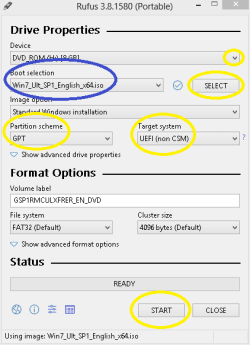
(ii) Launch Rufus & follow the Image & instructions :

Capture.PNG

(iii) Select the pen drive in the Device menu.
(iv) Click SELECT, browse to the win 7 sp1 iso and double click it.

If the win 7 SP 1 Iso is selected, It will show under Boot selection ( Marked as blue in the Image ).

Please don't get confused by the win 7 edition's name appeared in the Image. Just make sure the win 7 is mentioned there some way!

(v) Choose Partition scheme as GPT & Target system as UEFI.

( it may pick them automatically but make sure the two are selected as GPT & UEFI! )

(vi) need not change any thing else.
(vii) press START & be patient till it shows as READY.
(viii) close the Rufus window. it's done!

3. I will suggest to not to make any installation right now. Just try to boot into the UEFI+GPT installation media & Check whether you go ahead of Start windows.

At first, just try to boot into it with UEFI enabled in the BIOS.
If it hangs at Start from there, switch to UEFI & Legacy setting in BIOS & try to boot in it again.


Let me know.

Thanks & Regards. ...
 
Last edited:

My Computer My Computer

At a glance

Windows 7 Ultimate x32 With Sp1 + Vista Ultim...Intel Mobile Core 2 Duo T5750 @ 2.00GHz Merom...2.00GB Dual-Channel DDR2 @ 332MHz (5-5-5-15)Mobile Intel(R) 965 Express Chipset Family
Computer type
Laptop
Computer Manufacturer/Model Number
hp compaq presario c795VU notebook pc
OS
Windows 7 Ultimate x32 With Sp1 + Vista Ultimate x32 with Sp1 & Sp2 !!
CPU
Intel Mobile Core 2 Duo T5750 @ 2.00GHz Merom 65nm Technolog
Motherboard
Hewlett-Packard 30D9 (CPU)
Memory
2.00GB Dual-Channel DDR2 @ 332MHz (5-5-5-15)
Graphics Card(s)
Mobile Intel(R) 965 Express Chipset Family
Sound Card
High Definition Audio Device
Monitor(s) Displays
LP154WX4-TLCB on Mobile Intel 965 Express Chipset Family
Screen Resolution
1280x800 @ 60Hz
Hard Drives
149GB Western Digital WDC WD1600BEVS-60VAT0 ATA Device (SATA)
Keyboard
Standard 101/102-Key or Microsoft Natural PS/2 Key + HP QLB
Mouse
ALPS pointing device
Antivirus
Kaspersky AV 2017(Win 7) & AVG AntiVirus Free 2016 (VISTA)
Browser
google chrome
I put the USB in, went to the boot menu, and tried to boot from it, but it just booted it from legacy and gave me an infinite flashing white _ in the top left corner.

Did you follow the instructions on post#30, specially the boot folder?
 

My Computers My Computers

  • At a glance

    Windows 7 HP 64i5 6600K - 800MHz to 4200MHz4+4G GSkill DDR4 3000IG - Intel 530
    Computer type
    PC/Desktop
    Computer Manufacturer/Model Number
    custom build
    OS
    Windows 7 HP 64
    CPU
    i5 6600K - 800MHz to 4200MHz
    Motherboard
    GA-Z170-HD3P
    Memory
    4+4G GSkill DDR4 3000
    Graphics Card(s)
    IG - Intel 530
    Monitor(s) Displays
    Samsung 226BW
    Screen Resolution
    1680x1050
    Hard Drives
    (1) -1 SM951 – 128GB M.2 AHCI PCIe SSD drive for Windows 7 and Lubuntu
    (2) -1 WD SATA 3 - 1T for Data
    (3) -1 WD SATA 3 - 1T for backup
    PSU
    Thermaltake 450W TR2 gold
    Keyboard
    Old and good Chicony mechanical keyboard
    Mouse
    Logitech mX performance - 9 buttons (had to disable some)
    Internet Speed
    500Mb/s
    Browser
    Firefox 64
    Other Info
    TinyWall firewall
  • At a glance

    Windows 7 Proi7-4500U 800MHz to 3.0GHz(4+4)G DDR3 1600IG intel 4400 + NVIDIA GeForce GT 745M
    Computer type
    Laptop
    System Manufacturer/Model Number
    Asus Q550LF
    OS
    Windows 7 Pro
    CPU
    i7-4500U 800MHz to 3.0GHz
    Motherboard
    Asus Q550LF
    Memory
    (4+4)G DDR3 1600
    Graphics Card(s)
    IG intel 4400 + NVIDIA GeForce GT 745M
    Sound Card
    Realtek
    Monitor(s) Displays
    LG Display LP156WF4-SPH1
    Screen Resolution
    1920 x 1080
    Hard Drives
    BX500 120G SSD for Windows and programs +
    1T HDD for data
    Internet Speed
    500 Mb/s
    Browser
    Firefox
    Other Info
    TinyWall firewall
I can't find a Windows 7 Ultimate/Enterprise ISO with under 4 gb. Do they not exist?
 

My Computer My Computer

At a glance

Windows 10 Pro x64Processor Intel(R) Core(TM) i7-9700K CPU @ 3....16gb Corsair Vengeance ProGeForce GTX 1660 TI
Computer type
PC/Desktop
Computer Manufacturer/Model Number
custom build
OS
Windows 10 Pro x64
CPU
Processor Intel(R) Core(TM) i7-9700K CPU @ 3.60GHz, 3600 Mhz
Motherboard
Z390 Aorus Pro Wifi
Memory
16gb Corsair Vengeance Pro
Graphics Card(s)
GeForce GTX 1660 TI
Case
Cooler Master MB500
Browser
Google Chrome
All installation disks has all versions (Home, HP,Pro and Ultimate)
On your USB installation drive, go to sources\ei.cfg and rename it.
During installation it will ask what version you want to install (of course you must have the Key version)
 

My Computers My Computers

  • At a glance

    Windows 7 HP 64i5 6600K - 800MHz to 4200MHz4+4G GSkill DDR4 3000IG - Intel 530
    Computer type
    PC/Desktop
    Computer Manufacturer/Model Number
    custom build
    OS
    Windows 7 HP 64
    CPU
    i5 6600K - 800MHz to 4200MHz
    Motherboard
    GA-Z170-HD3P
    Memory
    4+4G GSkill DDR4 3000
    Graphics Card(s)
    IG - Intel 530
    Monitor(s) Displays
    Samsung 226BW
    Screen Resolution
    1680x1050
    Hard Drives
    (1) -1 SM951 – 128GB M.2 AHCI PCIe SSD drive for Windows 7 and Lubuntu
    (2) -1 WD SATA 3 - 1T for Data
    (3) -1 WD SATA 3 - 1T for backup
    PSU
    Thermaltake 450W TR2 gold
    Keyboard
    Old and good Chicony mechanical keyboard
    Mouse
    Logitech mX performance - 9 buttons (had to disable some)
    Internet Speed
    500Mb/s
    Browser
    Firefox 64
    Other Info
    TinyWall firewall
  • At a glance

    Windows 7 Proi7-4500U 800MHz to 3.0GHz(4+4)G DDR3 1600IG intel 4400 + NVIDIA GeForce GT 745M
    Computer type
    Laptop
    System Manufacturer/Model Number
    Asus Q550LF
    OS
    Windows 7 Pro
    CPU
    i7-4500U 800MHz to 3.0GHz
    Motherboard
    Asus Q550LF
    Memory
    (4+4)G DDR3 1600
    Graphics Card(s)
    IG intel 4400 + NVIDIA GeForce GT 745M
    Sound Card
    Realtek
    Monitor(s) Displays
    LG Display LP156WF4-SPH1
    Screen Resolution
    1920 x 1080
    Hard Drives
    BX500 120G SSD for Windows and programs +
    1T HDD for data
    Internet Speed
    500 Mb/s
    Browser
    Firefox
    Other Info
    TinyWall firewall
Hi All,
Greets,

Ten20 :

1.
I can't find a Windows 7 Ultimate/Enterprise ISO with under 4 gb. Do they not exist?

One is here : Direct Download Link: Ultimate SP1 x64

2. This version will support Ultimate by default but if you need other versions, you have to open up them as mentioned by Megahertz07 Sir.

All installation disks has all versions (Home, HP,Pro and Ultimate)
On your USB installation drive, go to sources\ei.cfg and rename it.
During installation it will ask what version you want to install
OR
If you tell the required version Pro, HP, etc.,, we can directly provide you the link for that version.

( Don't go for Installation right now! )

Let us know.

Thanks & Regards. ...
 
Last edited:

My Computer My Computer

At a glance

Windows 7 Ultimate x32 With Sp1 + Vista Ultim...Intel Mobile Core 2 Duo T5750 @ 2.00GHz Merom...2.00GB Dual-Channel DDR2 @ 332MHz (5-5-5-15)Mobile Intel(R) 965 Express Chipset Family
Computer type
Laptop
Computer Manufacturer/Model Number
hp compaq presario c795VU notebook pc
OS
Windows 7 Ultimate x32 With Sp1 + Vista Ultimate x32 with Sp1 & Sp2 !!
CPU
Intel Mobile Core 2 Duo T5750 @ 2.00GHz Merom 65nm Technolog
Motherboard
Hewlett-Packard 30D9 (CPU)
Memory
2.00GB Dual-Channel DDR2 @ 332MHz (5-5-5-15)
Graphics Card(s)
Mobile Intel(R) 965 Express Chipset Family
Sound Card
High Definition Audio Device
Monitor(s) Displays
LP154WX4-TLCB on Mobile Intel 965 Express Chipset Family
Screen Resolution
1280x800 @ 60Hz
Hard Drives
149GB Western Digital WDC WD1600BEVS-60VAT0 ATA Device (SATA)
Keyboard
Standard 101/102-Key or Microsoft Natural PS/2 Key + HP QLB
Mouse
ALPS pointing device
Antivirus
Kaspersky AV 2017(Win 7) & AVG AntiVirus Free 2016 (VISTA)
Browser
google chrome
Back
Top