how do I locate explorer bar ?

Dobby

New member
Local time
2:42 AM
Messages
3
Hi
Im in the process of completing my european computer driving license (ECDL).
Activity six is directing me to:
1.Within the ECDL portfolio folder (My documents), create a sub folder for each of the 7 modules.
2. Go to View and select Explorer Bar and then from here select folders.


My problem is that when I go to view there is no option for explorer bar and I have no idea where to find it ?
The only bar option is status bar .

My goal is to show my hierarchy of folders in the left hand panel, displaying the contents of a folder in the main part of the window and create a screen print of my folder as evidence of my ability to manage folders.
Dull, I know , but necessary for the course !
 

My Computer

OS
Windows 7 64 bit
Hello Dobby and welcome to Seven Forums.

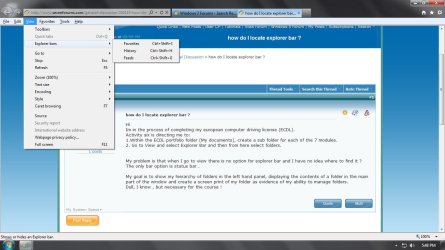
You have a strange situation. When I open View from IE9 the Explorer bars are definitely there. But I do not see any option to select Folders and I do not see anything pertaining to the Status bar (unless I right-click on an empty space next to where the tabs are.)

explorer bar.jpg

What version of Internet Explorer is the ECDL referencing?
 

My Computer

Computer type
Laptop
Computer Manufacturer/Model Number
Sony Vaio VPCEB47GM Laptop
OS
Win 7 Pro 64-bit
CPU
Intel i5 2.4 Ghz
Memory
8GB DDR3
Graphics Card(s)
Intel HD 3000
Sound Card
IDT High Definition
Monitor(s) Displays
15.6 WGXA Anti-Glare LED
Screen Resolution
1280x800
Hard Drives
640Gb 7200rpm
Antivirus
MSE
Browser
Opera (primary) with IE9 backup
Hi
Thank you for replying.
My Explorer bar appears when browsing the internet, but ECDL are requesting I select it whilst viewing my folders in My documents. It doesnt appear there?
If this is all obvious, then please excuse my poor IT knowledge ! I have no idea which version they are referencing, but where variations exist they are supposed to offer us guidence.
 

My Computer

OS
Windows 7 64 bit
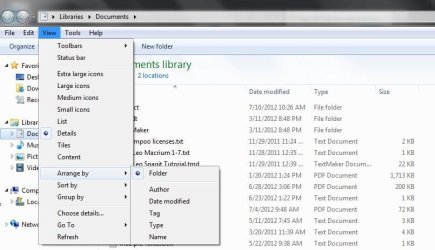
I'm asking other Forum members for assistance. I think I understand what you're trying to accomplish but I'm not seeing the Explorer bar, either.

documents.JPG

I'm wondering if changing some of the various parameters like using List or Tiles instead of Details, or using a different Arrange By or Sort by, etc would make a difference. Probably not but it seems strange the Explorer bar wouldn't show up if the ECDL says it's supposed to.
 

My Computer

Computer type
Laptop
Computer Manufacturer/Model Number
Sony Vaio VPCEB47GM Laptop
OS
Win 7 Pro 64-bit
CPU
Intel i5 2.4 Ghz
Memory
8GB DDR3
Graphics Card(s)
Intel HD 3000
Sound Card
IDT High Definition
Monitor(s) Displays
15.6 WGXA Anti-Glare LED
Screen Resolution
1280x800
Hard Drives
640Gb 7200rpm
Antivirus
MSE
Browser
Opera (primary) with IE9 backup
Thanks Guys

How do I locate the Explorer window option when viewing My Documents?

All assistance is very welcome as the ECDL mentor is on leave.
I have tried the "arrange by / sort by" but cant make that work. I probably should move on to a different task and revisit this one later but its bugging me now !
 

My Computer

OS
Windows 7 64 bit
is it possible that its a vista thing, as the ecdl may be assuming that its vista being used or even xp.
this is just a guess.
when i click explorer bar i only have three things i can select, groove folder sync, research and discuss.
only the groove folder sync shows anything in the sidebar that opens when groove is selected.
all very odd and fortunately explorer bar is not something i use
 

My Computer

Computer Manufacturer/Model Number
Hewlett packard/p6512uk
OS
Microsoft Windows 7 Home Premium 64-bit 7600
CPU
IIx4 amd athelon 635 processor
Motherboard
FOXCONN 2AA9
Memory
2x2gb
Graphics Card(s)
ati radeon HD 5450
Sound Card
(1) Realtek High Definition Audio (2) AMD High Definition
Monitor(s) Displays
samsung lcd tv 32"
Screen Resolution
1360x 768
Hard Drives
(1) WDC WD10 01FAES-60Z2A0 SATA Disk Device (2) Maxtor OneTouch USB Device (3) ST310003 33AS USB Device (4) WD My Book 1111 USB Device
PSU
?
Cooling
air!
Keyboard
wireless hp
Mouse
wireless Hp,optical
Internet Speed
1.10mb/s
Antivirus
MSE
Browser
Firefox
My problem is that when I go to view there is no option for explorer bar and I have no idea where to find it ?
The only bar option is status bar
That's because they are quoting from Windows XP where it does appear and you are using Win 7!
To replicate it near enough in Windows 7 Try setting the Classic mode through rt. click desktop then "Personalize" Then Go to My Computer, Tools, Folder options, View and check Show full path in address bar" You will see this only works in Classic View.
 
Last edited:

My Computer

Computer type
PC/Desktop
OS
Microsoft Windows 7 Home Premium 64-bit 7601 Multiprocessor Free Service Pack 1
CPU
Intel(R) Core(TM) i7-3770 CPU @ 3.40GHz
Motherboard
ASUSTeK COMPUTER INC. P8H77-M
Memory
8.00 GB
Graphics Card(s)
Intel(R) HD Graphics 4000
Sound Card
On Board
Monitor(s) Displays
Dell 24"
Screen Resolution
1920 x 1080
Hard Drives
(1) INTEL SSDSC2CT180A3 ATA Device (2) ST500DM002-1BD142 ATA Device (3) WDC WD3200AAKS-75L9A0 ATA Device (4) Generic- Compact Flash USB Device (5) Generic- MS/MS-Pro USB Device (6) Generic- SD/MMC USB Device (7) Generic- SM/xD-Picture USB
PSU
500w Corsair
Case
Cooler Master
Cooling
3 Fans
Keyboard
Logitech MK300
Mouse
Logitech WOM
Internet Speed
75Mb
Antivirus
Norton 360
Browser
Firefox, Opera, IE
Hi
Im in the process of completing my european computer driving license (ECDL).
Activity six is directing me to:
1.Within the ECDL portfolio folder (My documents), create a sub folder for each of the 7 modules.
2. Go to View and select Explorer Bar and then from here select folders.


My problem is that when I go to view there is no option for explorer bar and I have no idea where to find it ?
The only bar option is status bar .

My goal is to show my hierarchy of folders in the left hand panel, displaying the contents of a folder in the main part of the window and create a screen print of my folder as evidence of my ability to manage folders.
Dull, I know , but necessary for the course !

I think they are still using XP terminology -
What you are after is the default layout - if you click
Organize > Layout > Navigation pane so that it's ticked
Organize > Layout > Details pane so that it's ticked
 

My Computer

Computer type
Laptop
Computer Manufacturer/Model Number
Asus K52F or Lenovo B51-80
OS
Win 7 x64 Home Premium (and x86 VirtualBox VM)/Win10
CPU
i3 370M/i7 6500U
Motherboard
Asus/Lenovo
Memory
8GB - finally :)/8GB
Graphics Card(s)
it's an i3, dude!/dual Intel&nVidia
Sound Card
onboard
Monitor(s) Displays
15.6" built-in
Screen Resolution
1366x768/1920x1080
Hard Drives
750GB Seagate internal
Sundry external drives attached to other computers on the local network
1TB SSD on the Lenovo
PSU
n/a
Internet Speed
as much as I can get - usually on a dongle/phone, so <1MB/s
Antivirus
MSE/Defender
Browser
IE11/12/Edge/Chrome/FF(if I must)
Sorry NoelDP, I edited my post above and it now looks as if i hijcked your post. It took me awhile to do the edit as i had to open up my old XP machine to get my facts right.
Apologies again!
 

My Computer

Computer type
PC/Desktop
OS
Microsoft Windows 7 Home Premium 64-bit 7601 Multiprocessor Free Service Pack 1
CPU
Intel(R) Core(TM) i7-3770 CPU @ 3.40GHz
Motherboard
ASUSTeK COMPUTER INC. P8H77-M
Memory
8.00 GB
Graphics Card(s)
Intel(R) HD Graphics 4000
Sound Card
On Board
Monitor(s) Displays
Dell 24"
Screen Resolution
1920 x 1080
Hard Drives
(1) INTEL SSDSC2CT180A3 ATA Device (2) ST500DM002-1BD142 ATA Device (3) WDC WD3200AAKS-75L9A0 ATA Device (4) Generic- Compact Flash USB Device (5) Generic- MS/MS-Pro USB Device (6) Generic- SD/MMC USB Device (7) Generic- SM/xD-Picture USB
PSU
500w Corsair
Case
Cooler Master
Cooling
3 Fans
Keyboard
Logitech MK300
Mouse
Logitech WOM
Internet Speed
75Mb
Antivirus
Norton 360
Browser
Firefox, Opera, IE
How do I locate the Explorer window option when viewing My Documents?

You are in the Explorer window when you open Documents, couldn't be anywhere else.

Now choose the option I posted above under Organize:

Capture.PNGclick to enlarge
 
Sorry NoelDP, I edited my post above and it now looks as if i hijcked your post. It took me awhile to do the edit as i had to open up my old XP machine to get my facts right.
Apologies again!
dont worry about it john , i guessed first it may be vista or xp that ecdl were using :p
 

My Computer

Computer Manufacturer/Model Number
Hewlett packard/p6512uk
OS
Microsoft Windows 7 Home Premium 64-bit 7600
CPU
IIx4 amd athelon 635 processor
Motherboard
FOXCONN 2AA9
Memory
2x2gb
Graphics Card(s)
ati radeon HD 5450
Sound Card
(1) Realtek High Definition Audio (2) AMD High Definition
Monitor(s) Displays
samsung lcd tv 32"
Screen Resolution
1360x 768
Hard Drives
(1) WDC WD10 01FAES-60Z2A0 SATA Disk Device (2) Maxtor OneTouch USB Device (3) ST310003 33AS USB Device (4) WD My Book 1111 USB Device
PSU
?
Cooling
air!
Keyboard
wireless hp
Mouse
wireless Hp,optical
Internet Speed
1.10mb/s
Antivirus
MSE
Browser
Firefox
Back
Top