How do I move a System Reserved partition to another disk

Mobius981

New member
Local time
11:40 PM
Messages
3
I'm trying to move a System Reserved partition from Disk 1 (failing) to Disk 2.

I recently had to purchase a new hard drive after receiving a "S.M.A.R.T. bad backup and replace" message upon bootup. However, I've been unable to get rid of my failing hard drive (Disk 1) because of the System Reserved partition (or I at least believe that may be the problem). If I physically disconnect Disk 1 I get a "BOOTMGR is missing" message, regardless of the BIOS boot order.

Long story short:
I want to retire my failing hard drive (Disk 1) and have only Disk 0 and my new hard drive (Disk 2) installed in my computer.

If possible, I would like a step by step procedure (I'm quite the layman in this area).
I've also already copied all the data I wish to keep from Disk 1 -> 2.

Thank you for your time.

Note: I don't usually post on forums, be gentle. :D
 

My Computer My Computer

Computer type
PC/Desktop
Computer Manufacturer/Model Number
Custom build
OS
Windows 7 Ultimate x64
CPU
Intel Core i7 920 Quad Core Processor LGA1366 2.66GHZ
Motherboard
ASUS Rampage II Extreme ATX LGA1366 X58 DDR3 3PCI-E16 2PCI-E
Memory
Corsair XMS3 TR3X6G1333C9 4GB DDR3 3X2GB DDR3-1333 CL 9-9-9-
Graphics Card(s)
GeForce GTX 280 1GB 512-bit GDDR3
Sound Card
ASUS Xonar DX 7.1 Channel PCI-E Sound Card 24BIT
Monitor(s) Displays
Samsung SH-S223Q/BEBD TruDirect 22X DVD+R/-R Lightscribe DV
Screen Resolution
1920x1080
Hard Drives
-Seagate Barracuda 7200.11 750GB SATA2 7200RPM 32MB Cache NCQ 3.5IN Hard Drive OEM
-Seagate Barracuda 7200.12 1TB SATA2 3.5IN 8.5MS 7200RPM 32MB Hard Drive OEM
-Western Digital Green 1TB SATA3 6GB/S Intellipower 64MB Cache 3.5in Internal Hard Dri
PSU
Coolermaster 1250W Real Power Pro ATX12V V2.2 24PIN 80PLUS U
Case
Antec Twelve Hundred Mid Tower Gamer Case 1200 ATX 12 Drive
Hello and welcome Mobius mate first some system specs would be good
http://www.sevenforums.com/tutorials/180324-system-info-see-your-system-specs.html

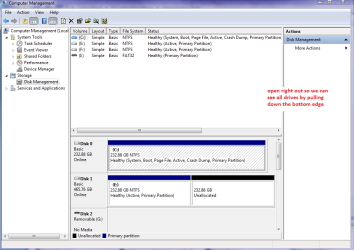
A screen shot of the disk management would also help too. http://www.sevenforums.com/tutorials/9733-screenshots-files-upload-post-seven-forums.html

Start > Control Panel > Administrative Tools > Computer Management > Disk Management > take a shot of that screen I use the snipping tool but you can use whatever means you like.
http://www.sevenforums.com/tutorials/9733-screenshots-files-upload-post-seven-forums.html
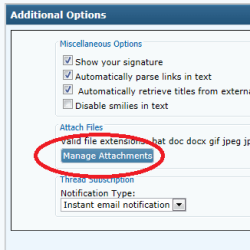
I keep it on the taskbar (Start > type snip > right click on the blue reference and > Pin to taskbar) Save the snips to pictures or desktop doesn't really matter somewhere you can find them easy when you snip it's easy to delete afterwards anyway. The you go down under the message box to Manage attachments > Browse > click on the snip or pic > Upload when it is uploaded you post back your reply:)
 

Attachments

  • MANAGE.PNG
    MANAGE.PNG
    6.3 KB · Views: 21
  • DISK1.PNG
    DISK1.PNG
    30.6 KB · Views: 0

My Computer My Computer

Computer type
PC/Desktop
Computer Manufacturer/Model Number
Own build (new) Desk1 / Asus ROG Win 7 / Desk2 1st build
OS
Desk1 7 Home Prem / Desk2 10 Pro / Main lap Asus ROG 10 Pro 2 laptop Toshiba 7 Pro Asus P2520 7 & 10
CPU
Desk1 i5 3750K / Laptop i7 GTX 860M / Desk2 i5 2500
Motherboard
Desk1 Asus P877-V / Desk2 Gigabyte H67 UD3H / Laptop ?
Memory
Desk1 8GB (1866) / Desk2 16GB (1333) / Laptop 8Gb DDR3
Graphics Card(s)
Desk 1& 2NVidia GTX 650 & Laptops on board Intel
Sound Card
Desk 1 & 2 -XONAR DG Realtek High Def audio Laptop
Monitor(s) Displays
Desk 1 Benq HD 2450 / Desk2 Philips 24" / Laptop 17.5"
Screen Resolution
1920x1080 D1 & D2 & Laptop 1
Hard Drives
Desk1 Samsung 120GB 830 SSD
Asus ROG 256GB 850 Pro SSD
Desk2 Samsung 840 256 SSD
Toshiba 120GB EVO
PSU
Desk 1 Corsair HX 1050/ Laptop ? / Desk 2 Corsair HX 650
Case
Desk 1 Cooler HAF XM ? Toshiba laptop / Desk2 Coolermaster
Cooling
Fans on all Desk1 -2 Desk2 - all Coolermasters 5 Laptop ?
Keyboard
Desk 1 MS Sidewinder X6 Desk 2 MS Sidewinder X 4
Mouse
Desk 1&2 - Gigabyte MS 900 gamer - laptop - Logitec wireless
Internet Speed
ADSL2+
Other Info
One other Desktop (tester) and spare Toshba laptop both with SSD's
Running Kaspersky 2016 ISS on all machines config'd identically
Logitec audio stereo systems on each machine (x3)
Canon MG5250MFC
Router/modem TP-Link running WPA2SK
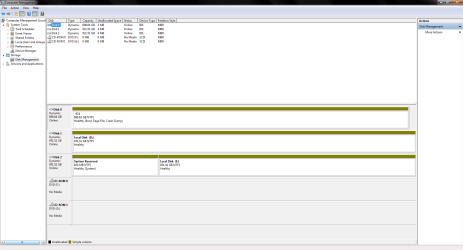
I've updated my system specs and have attached a couple snips (I forgot to press upload during my initial post).

Computer Management 1.0.PNG

Computer Management 2.0.PNG

Thank you for your response and assistance.
 

My Computer My Computer

Computer type
PC/Desktop
Computer Manufacturer/Model Number
Custom build
OS
Windows 7 Ultimate x64
CPU
Intel Core i7 920 Quad Core Processor LGA1366 2.66GHZ
Motherboard
ASUS Rampage II Extreme ATX LGA1366 X58 DDR3 3PCI-E16 2PCI-E
Memory
Corsair XMS3 TR3X6G1333C9 4GB DDR3 3X2GB DDR3-1333 CL 9-9-9-
Graphics Card(s)
GeForce GTX 280 1GB 512-bit GDDR3
Sound Card
ASUS Xonar DX 7.1 Channel PCI-E Sound Card 24BIT
Monitor(s) Displays
Samsung SH-S223Q/BEBD TruDirect 22X DVD+R/-R Lightscribe DV
Screen Resolution
1920x1080
Hard Drives
-Seagate Barracuda 7200.11 750GB SATA2 7200RPM 32MB Cache NCQ 3.5IN Hard Drive OEM
-Seagate Barracuda 7200.12 1TB SATA2 3.5IN 8.5MS 7200RPM 32MB Hard Drive OEM
-Western Digital Green 1TB SATA3 6GB/S Intellipower 64MB Cache 3.5in Internal Hard Dri
PSU
Coolermaster 1250W Real Power Pro ATX12V V2.2 24PIN 80PLUS U
Case
Antec Twelve Hundred Mid Tower Gamer Case 1200 ATX 12 Drive
Now I thought you said you were trying to change disk 1?? the system reserved is on disk 2 so just run it by us again what it is you want to do.
In all reality the 100MB partition on disk 2 is a drop in the ocean I don't see why you need to move it or do anything with it to be honest.

Disk 0 is your boot disk in any case so it begs the question - if there is nothing on that disk / drive (2) then why not just wipe it and format and have a ready to go empty drive??
 

My Computer My Computer

Computer type
PC/Desktop
Computer Manufacturer/Model Number
Own build (new) Desk1 / Asus ROG Win 7 / Desk2 1st build
OS
Desk1 7 Home Prem / Desk2 10 Pro / Main lap Asus ROG 10 Pro 2 laptop Toshiba 7 Pro Asus P2520 7 & 10
CPU
Desk1 i5 3750K / Laptop i7 GTX 860M / Desk2 i5 2500
Motherboard
Desk1 Asus P877-V / Desk2 Gigabyte H67 UD3H / Laptop ?
Memory
Desk1 8GB (1866) / Desk2 16GB (1333) / Laptop 8Gb DDR3
Graphics Card(s)
Desk 1& 2NVidia GTX 650 & Laptops on board Intel
Sound Card
Desk 1 & 2 -XONAR DG Realtek High Def audio Laptop
Monitor(s) Displays
Desk 1 Benq HD 2450 / Desk2 Philips 24" / Laptop 17.5"
Screen Resolution
1920x1080 D1 & D2 & Laptop 1
Hard Drives
Desk1 Samsung 120GB 830 SSD
Asus ROG 256GB 850 Pro SSD
Desk2 Samsung 840 256 SSD
Toshiba 120GB EVO
PSU
Desk 1 Corsair HX 1050/ Laptop ? / Desk 2 Corsair HX 650
Case
Desk 1 Cooler HAF XM ? Toshiba laptop / Desk2 Coolermaster
Cooling
Fans on all Desk1 -2 Desk2 - all Coolermasters 5 Laptop ?
Keyboard
Desk 1 MS Sidewinder X6 Desk 2 MS Sidewinder X 4
Mouse
Desk 1&2 - Gigabyte MS 900 gamer - laptop - Logitec wireless
Internet Speed
ADSL2+
Other Info
One other Desktop (tester) and spare Toshba laptop both with SSD's
Running Kaspersky 2016 ISS on all machines config'd identically
Logitec audio stereo systems on each machine (x3)
Canon MG5250MFC
Router/modem TP-Link running WPA2SK
I see all drivers are Dynamic; Why?
 

My Computer My Computer

Computer type
PC/Desktop
Computer Manufacturer/Model Number
Home made Desktop
OS
Windows 10 Pro. 64/ version 1709 Windows 7 Pro/64
CPU
Intel i7-6800K @ 4.3
Motherboard
ASUS X-99 Deluxe II
Memory
Corsair Platinum 16 gig @2400
Graphics Card(s)
EVGA GTX 1070 OC
Monitor(s) Displays
Asus 27" LED LCD/VE278Q
Screen Resolution
1920-1080 or 1280-720 HDMI
Hard Drives
INTEL SSD 730-240 Gb Sata 3.0/
PSU
EVGA Platium 1200W
Case
Phanteks Luxe Tempered Glass 8 fans/ one radiator
Cooling
XSPC/ Water Cooled CPU
Keyboard
Das 4 Professional
Mouse
Logitech M705/MX Anywhere 2-S
Internet Speed
100 mbits
Antivirus
Microsoft Security Essentials/ Malwarebytes Premium 3.0/ SAS
Browser
I.E. 11 default/Firefox/ ISP Time Warner Cable/Spectrum
Other Info
LG BluRay Burner/
Sound system-KLipsch-THX/
Icy Dock ssd Hot Swap bays.
I may have reversed the order of the cables while physically reattaching it (was initially disk 1).
My apologies for the error.

What I want to do is remove the hard drive with drive E on it. However, whenever I try and remove my failing hard drive (disk 2 now) I get a BOOTMGR missing message while booting. So I want to move the System Reserved partition to C or D drive.
 

My Computer My Computer

Computer type
PC/Desktop
Computer Manufacturer/Model Number
Custom build
OS
Windows 7 Ultimate x64
CPU
Intel Core i7 920 Quad Core Processor LGA1366 2.66GHZ
Motherboard
ASUS Rampage II Extreme ATX LGA1366 X58 DDR3 3PCI-E16 2PCI-E
Memory
Corsair XMS3 TR3X6G1333C9 4GB DDR3 3X2GB DDR3-1333 CL 9-9-9-
Graphics Card(s)
GeForce GTX 280 1GB 512-bit GDDR3
Sound Card
ASUS Xonar DX 7.1 Channel PCI-E Sound Card 24BIT
Monitor(s) Displays
Samsung SH-S223Q/BEBD TruDirect 22X DVD+R/-R Lightscribe DV
Screen Resolution
1920x1080
Hard Drives
-Seagate Barracuda 7200.11 750GB SATA2 7200RPM 32MB Cache NCQ 3.5IN Hard Drive OEM
-Seagate Barracuda 7200.12 1TB SATA2 3.5IN 8.5MS 7200RPM 32MB Hard Drive OEM
-Western Digital Green 1TB SATA3 6GB/S Intellipower 64MB Cache 3.5in Internal Hard Dri
PSU
Coolermaster 1250W Real Power Pro ATX12V V2.2 24PIN 80PLUS U
Case
Antec Twelve Hundred Mid Tower Gamer Case 1200 ATX 12 Drive
Back
Top