One of the things I've always done in Windows is create my own folder in the Start Menu and keep my most frequent links there (excuse the blackened areas, it's a matter of privacy):

It grew out of the collection of links I had on my desktop, and I've grown accustomized to this habbit and find it very useful. I know I can use a third party software to bring back the Clasic Menu in Windows 7 but I want to give the New Menu a chance and see if I can get it to fit my needs.
After some tweaking, I managed to slim it down to this:

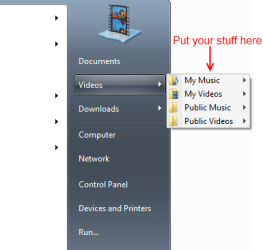
Which I find even more useful than the Classic Start Menu since I have direct access to pretty much everything I use. Now, what I'd like is to take advantage of that empty space above "All Programs" and fill it with my links and subfolders.
I can put a link there but I how do I create a subfolder there -- one that will expand on hover or on click?
It grew out of the collection of links I had on my desktop, and I've grown accustomized to this habbit and find it very useful. I know I can use a third party software to bring back the Clasic Menu in Windows 7 but I want to give the New Menu a chance and see if I can get it to fit my needs.
After some tweaking, I managed to slim it down to this:
Which I find even more useful than the Classic Start Menu since I have direct access to pretty much everything I use. Now, what I'd like is to take advantage of that empty space above "All Programs" and fill it with my links and subfolders.
I can put a link there but I how do I create a subfolder there -- one that will expand on hover or on click?
Last edited:
My Computer
At a glance
Windows 7 Ultimate
- OS
- Windows 7 Ultimate