How do I recover a lost Partition?

kofiward

New member
Local time
12:04 PM
Messages
2
Location
Ellicott City Maryland
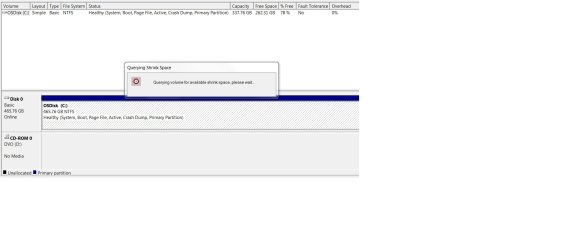
I tried shrinking my Windows 7 64-bit OS volume by 128GB to make room for a new partition and lost it in the process. My harddisk capacity should be 465.76 but now shows 337.76 GB.

I have an attached document with a screenshot of what it shows in device manager. I have downloaded the free versions of Partition Wizard 9.0 and Power Data Recovery 6.8 but I cant seem to be able to restore the lost sectors.

Can anyone direct me on how to recover this partition?

Thank you.
 

Attachments

My Computer My Computer

At a glance

Windows 7 64 bitIntel Core i7-4800Q CPU 2.70GHz8.00 GBIntel HD Graphics 4600
Computer type
PC/Desktop
Computer Manufacturer/Model Number
HP
OS
Windows 7 64 bit
CPU
Intel Core i7-4800Q CPU 2.70GHz
Memory
8.00 GB
Graphics Card(s)
Intel HD Graphics 4600
Hard Drives
HGST HTS725050A7E6300 SCSI Device
Antivirus
McAfee, Symantec PKI Client
Browser
Internet Explorer 9
The only way I see to get the space back is to first Shrink the C: partition then create a new partition in the resultant unallocated space. I've found that by deleting a partition any data in it is usually lost. That's different from inadvertently formatting a partition which sometimes can be recovered.
 

My Computer My Computer

At a glance

Windows 7 Ultimate 64-bit, Windows 8.1 64-bit...
Computer type
PC/Desktop
Computer Manufacturer/Model Number
Customs, Dell, Gateway, HP, Toshiba, Acer, ASUS
OS
Windows 7 Ultimate 64-bit, Windows 8.1 64-bit, Mac OS X 10.10, Linux Mint 17, Windows 10 Pro TP
Keyboard
Microsoft
Mouse
Microsoft
I think you meant the other way round.

Formatting a partition makes recovering data from it very difficult.

A deleted partition can usually be recovered.
 

My Computers My Computers

  • At a glance

    7 X64i5 84002x8gb 3200mhz
    Computer type
    PC/Desktop
    OS
    7 X64
    CPU
    i5 8400
    Motherboard
    gigabyte b365m ds3h
    Memory
    2x8gb 3200mhz
    Hard Drives
    various
    PSU
    pure power 11 400w cm
    Case
    Coolermaster
    Cooling
    cryorig m9i
  • At a glance

    7x64g54008gb ddr4 2400
    Computer type
    PC/Desktop
    OS
    7x64
    CPU
    g5400
    Motherboard
    ga b365m ds3h
    Memory
    8gb ddr4 2400
    PSU
    xfx pro 450w
I tried shrinking my Windows 7 64-bit OS volume by 128GB to make room for a new partition...
Doing a thorough cleanup and defrag beforehand and only from within Win7 is important.

I have downloaded the free versions of Partition Wizard 9.0 and Power Data Recovery 6.8...
Very bad idea. No two partitioners ever doing things exactly alike, and that makes them incompatible within a Win7 system that already does things poorly in its own ways. You best bet at the moment might be to use a third-party partitioner to re-resize that partition to its fullest and to then try a Win7 recovery. If that works, do a thorough cleanup and defrag from within Win7, then reboot and tell Win7 to reduce its size and add a new partition in the available space.
 

My Computer My Computer

At a glance

Win7 Ultimate x64
OS
Win7 Ultimate x64
If I had this issue the first thing I would do is create a System Backup Image.
I would use Macrium free and create the image on a removable HD (USB, eSata, ... whatever you have available).
Continuing on making changes without a backup can lead to more problems.
 

My Computer My Computer

At a glance

Multi-Boot W7_Pro_x64 W8.1_Pro_x64 W10_Pro_x6...AMD Athlon II x4 6206GB GSkill DDR2 800AMD 4670 GPU + AMD 4200 IGP
Computer type
PC/Desktop
Computer Manufacturer/Model Number
home built
OS
Multi-Boot W7_Pro_x64 W8.1_Pro_x64 W10_Pro_x64 +Linux_VMs +Chromium_VM
CPU
AMD Athlon II x4 620
Motherboard
Gigabyte GA-MA785G-UD3H
Memory
6GB GSkill DDR2 800
Graphics Card(s)
AMD 4670 GPU + AMD 4200 IGP
Sound Card
on board Realtek ALC889A
Monitor(s) Displays
RCA 40" LCD TV, Insignia 32" LCD TV, HP 15" LCD monitor
Screen Resolution
1680 x 1050
Hard Drives
OCZ Vertex 3 120GB,
Samsung F3 1TB (3),
Several others - WD, Seagate, Hitachi, ...
PSU
Corsair 500 W
Case
Rosewill mid tower
Cooling
CM 90mm rifle
Keyboard
Gyration wireless, Logitech wireless, Dell USB wired
Mouse
Gyration wireless, Logitech wireless, V7 USB wired
Internet Speed
Spectrum - 100Mbps D / 10Mbps U
Antivirus
Avast, MBAM3, EMET, WinPatrol
Browser
Pale Moon, Firefox, IE
Other Info
2 multi-boot PC's
Mainly HTPC/Office/Gen purpose (no gaming).
Trendnet USB KVM.
LG DVD burner/Blue Ray Player.
Tray system for removable SATA backup drives.

Not currently OCd, under-volted.
I use Hybrid sleep, rarely re-boot or shutdown.

Hauppauge HD-PVR, Avermedia PCIe TV Tuner, Hauppauge PCI TV Tuner.
What do you mean you lost the partition? What were you using to shrink or Resize it? Disk Mgmt will not fail unless you interrupt power, while all others can and will fail except Partition Wizard boot disk.

If it failed during shrink then the data is likely lost, though you can browse in to see if you see it using Copy & Paste - in Windows Recovery Console.

I don't know what it is you attached using Word. It says Device Manager. If you want to help us better then take a picture of the Partition Wizard boot disk drive map showing all listings and attach it correctly following Screenshots and Files - Upload and Post in Seven Forums - Windows 7 Forums
 
1. You have an HP Desktop. Have you made the recovery disk/s you are supposed to create and keep immediately after setting up your PC for the first time? Yes/No

2. As suggested by DavidE create a system image backup just in case things get awry during the repair process now. The image should be stored on an external storage deice. Whatever imaging software you use you must also create a Recover/Restore disk to enable restoring the image by booting into it.

3. Please capture the screen using Windows Snipping Tool as jpg and upload the screenshots. http://www.sevenforums.com/tutorials/9733-screenshots-files-upload-post-seven-forums.html

4. From your description I presume that your system still boots into Windows but shows as 337.76GB. That would mean that a 128GB partition/ volume has indeed been created but not visible right now.

5. Please post a screenshot of Windows Disk Management as it is now http://www.sevenforums.com/tutorials/274797-disk-management-post-screen-capture-image.html
(Please read through deligently and adhere to all the points mentioned therein to post a full screenshot without any truncation and loss of information.)

6. Also post a screenshot of how your drive appears in Partition Wizard. ( The first screen after you launch the application)

Edit: Greg beat me exposing my slow typing - compounded by jet lag due to which I wake up at 3 o'clock in the morning.:D
 

My Computer My Computer

At a glance

Windows 7 Home Premium 32 bit
OS
Windows 7 Home Premium 32 bit
Recovering space after running Windows Shrink

1. You have an HP Desktop. Have you made the recovery disk/s you are supposed to create and keep immediately after setting up your PC for the first time? Yes/No

2. As suggested by DavidE create a system image backup just in case things get awry during the repair process now. The image should be stored on an external storage deice. Whatever imaging software you use you must also create a Recover/Restore disk to enable restoring the image by booting into it.

3. Please capture the screen using Windows Snipping Tool as jpg and upload the screenshots. http://www.sevenforums.com/tutorials/9733-screenshots-files-upload-post-seven-forums.html

4. From your description I presume that your system still boots into Windows but shows as 337.76GB. That would mean that a 128GB partition/ volume has indeed been created but not visible right now.

5. Please post a screenshot of Windows Disk Management as it is now http://www.sevenforums.com/tutorials/274797-disk-management-post-screen-capture-image.html
(Please read through deligently and adhere to all the points mentioned therein to post a full screenshot without any truncation and loss of information.)

6. Also post a screenshot of how your drive appears in Partition Wizard. ( The first screen after you launch the application)

Edit: Greg beat me exposing my slow typing - compounded by jet lag due to which I wake up at 3 o'clock in the morning.:D

Hi Jumanji:

I have an HP ProBook and currently in the process of creating a system image backup and a quick restore disk as suggested.
My system still boots without a problem into Windows but shows a capacity of 337.76GB out of 456.76GB with 262.31GBof free space.
This does indicate somehow that the 128GB partition was created but for whatever reason is not visible in Disk Management.
Will be posting screenshots of how drives appear as seen in Partition Wizard and Disk Management shortly. Thanks again for your assistance in helping to resolve this issue.
 

Attachments

  • DiskManagement20150526.jpg
    DiskManagement20150526.jpg
    61.7 KB · Views: 6
  • ParttitionWizard.jpg
    ParttitionWizard.jpg
    71.4 KB · Views: 4
Last edited:

My Computer My Computer

At a glance

Windows 7 64 bitIntel Core i7-4800Q CPU 2.70GHz8.00 GBIntel HD Graphics 4600
Computer type
PC/Desktop
Computer Manufacturer/Model Number
HP
OS
Windows 7 64 bit
CPU
Intel Core i7-4800Q CPU 2.70GHz
Memory
8.00 GB
Graphics Card(s)
Intel HD Graphics 4600
Hard Drives
HGST HTS725050A7E6300 SCSI Device
Antivirus
McAfee, Symantec PKI Client
Browser
Internet Explorer 9
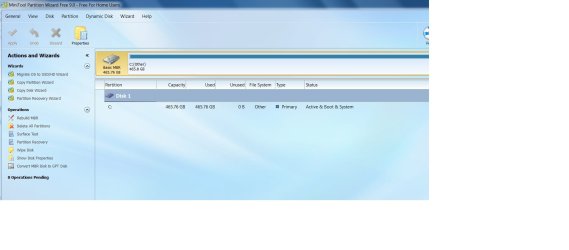
Looks like something is wrong.

Shouldn't be showing as all used in PW.
 

My Computers My Computers

  • At a glance

    7 X64i5 84002x8gb 3200mhz
    Computer type
    PC/Desktop
    OS
    7 X64
    CPU
    i5 8400
    Motherboard
    gigabyte b365m ds3h
    Memory
    2x8gb 3200mhz
    Hard Drives
    various
    PSU
    pure power 11 400w cm
    Case
    Coolermaster
    Cooling
    cryorig m9i
  • At a glance

    7x64g54008gb ddr4 2400
    Computer type
    PC/Desktop
    OS
    7x64
    CPU
    g5400
    Motherboard
    ga b365m ds3h
    Memory
    8gb ddr4 2400
    PSU
    xfx pro 450w
I would only accept PW as determinative using the boot disk. It's Windows app can be as wrong as Disk Mgmt.

Can we see a camera snap of Partition Wizard boot disk, burned to CD using Windows Image Burner then booted and maximized showing all listings?

Also can we see a screenshot of the Properties of C drive, especially the pie chart. Rightclick C drive to select Properties.
 
Last edited:
Looks like something is wrong.

Shouldn't be showing as all used in PW.

Definitely something is/has gone wrong. What is it? Look at the File System. It is "Others" and not NTFS.(in PW)

How did it happen? That has to be demystified.

Anyway let us wait for PW run on boot disk as greg suggested.
 
Last edited:

My Computer My Computer

At a glance

Windows 7 Home Premium 32 bit
OS
Windows 7 Home Premium 32 bit
Back
Top