how do I recover data from a non responsive hard drive?

Thanks jumanji - I think I was part of the problem by not giving Canuck enough information/direction. I know at one point I was thinking about a different thread when I posted "You've done this before" referencing a PW scan :o

I agree, it looks pretty good. I would suggest that the active flag be removed from the first part.

Canuck, you're almost there - again :) My apologies for any delays caused by my lack of focus.
jumanji is as cautious as I am but he's quicker. ;)

I'll watch you get to the finish line.

Bill
.
 

My Computer My Computer

At a glance

x64 (6.3.9600) Win8.1 Pro & soon dual boot x6...AMD A6-3420M APU with Radeon(tm) HD Graphics6.00 GBAMD Radeon(TM) HD 6520G
Computer type
Laptop
Computer Manufacturer/Model Number
HP Pavilion dv6-6c10us
OS
x64 (6.3.9600) Win8.1 Pro & soon dual boot x64 (6.1.7601) Win7_SP1 HomePrem
CPU
AMD A6-3420M APU with Radeon(tm) HD Graphics
Motherboard
Hewlett-Packard 1805
Memory
6.00 GB
Graphics Card(s)
AMD Radeon(TM) HD 6520G
Sound Card
(1) AMD High Definition Audio Device (2) IDT High Definiti
Monitor(s) Displays
HP W2072a 20" LCD (1600 x 900) @ 60 Hz
Screen Resolution
1366 x 768 x 32 bits (4294967296 colors) @ 60 Hz
Hard Drives
ST640LM0 00 HM641JI SATA Disk Device
Keyboard
Logitech k520 wireless KB
Mouse
Logitech m320 wireless mouse (bundled with KB)
Internet Speed
15/5 | 54 MB Wireless 'n'
Antivirus
Realtime: Defender or Avast | On-demand: Malwarebytes, ESET
Browser
IE 11 on Win8, IE 10 on win 7
Other Info
Media: [Gimp, Audacity, VLC] || Comm: [WEmail 2012, Skype] || Productivity: [OpenOffice,| Textpad] || Utils: [Sysinternals, cCleaner, Speccy, Defraggler]
Yes the active flag in the first partition has to be removed first. I think I had stated that before after viewing the screenshot of Disk Management.Definitely we are losing track because of involvement in many threads .:D
 

My Computer My Computer

At a glance

Windows 7 Home Premium 32 bit
OS
Windows 7 Home Premium 32 bit
Having said that, the opening screen of PW, does show all partitions in tact. So partition table has not been lost and so PW will not write the partition table since it is already present.

So when Canuck comes back, we shall ask him to cancel quick scan, go to main screen and remove the active flag from the first partition and apply.

The other partitions which lie in the extended are raw. Will those turn good when active flag is removed? Let us see.

If it does not rebuild MBR in Partition Wizard.

I think quite an workout lies ahead.
 

My Computer My Computer

At a glance

Windows 7 Home Premium 32 bit
OS
Windows 7 Home Premium 32 bit
:thumbsup::thumbsup:

I'll review the thread again and stay focused for a good workout.
 

My Computer My Computer

At a glance

x64 (6.3.9600) Win8.1 Pro & soon dual boot x6...AMD A6-3420M APU with Radeon(tm) HD Graphics6.00 GBAMD Radeon(TM) HD 6520G
Computer type
Laptop
Computer Manufacturer/Model Number
HP Pavilion dv6-6c10us
OS
x64 (6.3.9600) Win8.1 Pro & soon dual boot x64 (6.1.7601) Win7_SP1 HomePrem
CPU
AMD A6-3420M APU with Radeon(tm) HD Graphics
Motherboard
Hewlett-Packard 1805
Memory
6.00 GB
Graphics Card(s)
AMD Radeon(TM) HD 6520G
Sound Card
(1) AMD High Definition Audio Device (2) IDT High Definiti
Monitor(s) Displays
HP W2072a 20" LCD (1600 x 900) @ 60 Hz
Screen Resolution
1366 x 768 x 32 bits (4294967296 colors) @ 60 Hz
Hard Drives
ST640LM0 00 HM641JI SATA Disk Device
Keyboard
Logitech k520 wireless KB
Mouse
Logitech m320 wireless mouse (bundled with KB)
Internet Speed
15/5 | 54 MB Wireless 'n'
Antivirus
Realtime: Defender or Avast | On-demand: Malwarebytes, ESET
Browser
IE 11 on Win8, IE 10 on win 7
Other Info
Media: [Gimp, Audacity, VLC] || Comm: [WEmail 2012, Skype] || Productivity: [OpenOffice,| Textpad] || Utils: [Sysinternals, cCleaner, Speccy, Defraggler]
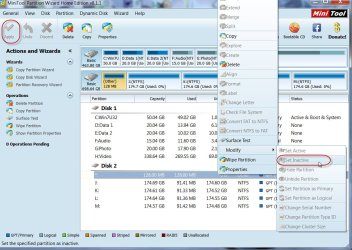
Instructions to Canuk67: Whenever you see this

1. Boot into Partition Wizard.

2. On the main screen, right click on the first 48.3GB partition in Disk 2 > Modify > Set Inactive ( Excercise care. Do not do anything on Disk 1 , which is your System drive.)

3. Check it shows in Pending operations in the left Pane.

4. Go to the Top Menu Bar and click on Apply.

When the operation completes, close PW and reboot.

I think your computer will boot fast now.

If that is achieved, we will do any further actions on your computer. You can keep aside the PW bootable pen drive.

The screenshot below just for illustration: Take only what matters.

19-06-2014 08-55-15.jpg
 

My Computer My Computer

At a glance

Windows 7 Home Premium 32 bit
OS
Windows 7 Home Premium 32 bit
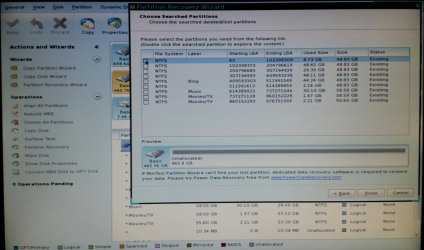
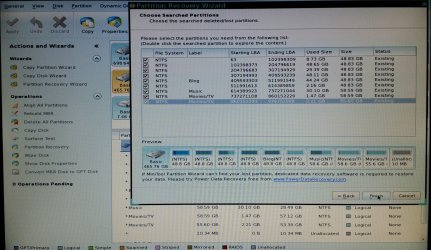
okay, I'll try this now, but first I will post the screen caps from my last attempt, just in case it gives any info that might be useful....


Instructions to Canuk67: Whenever you see this

1. Boot into Partition Wizard.

2. On the main screen, right click on the first 48.3GB partition in Disk 2 > Modify > Set Inactive ( Excercise care. Do not do anything on Disk 1 , which is your System drive.)

3. Check it shows in Pending operations in the left Pane.

4. Go to the Top Menu Bar and click on Apply.

When the operation completes, close PW and reboot.

I think your computer will boot fast now.

If that is achieved, we will do any further actions on your computer. You can keep aside the PW bootable pen drive.

The screenshot below just for illustration: Take only what matters.

View attachment 322358
 

My Computer My Computer

At a glance

Windows 7 Home Premium 32 bitIntel(R) Core(TM)2 Duo CPU E6750 @ 2.66GHz4.00 GB with 3.25 GB available(1) Radeon X1950 Series (Microsoft Corporatio...
OS
Windows 7 Home Premium 32 bit
CPU
Intel(R) Core(TM)2 Duo CPU E6750 @ 2.66GHz
Motherboard
ASUSTeK Computer INC. P5E
Memory
4.00 GB with 3.25 GB available
Graphics Card(s)
(1) Radeon X1950 Series (Microsoft Corporation - WDDM) (
Sound Card
High Definition Audio Device
Hard Drives
(1) WDC WD7501AALS-00J7B0 ATA Device
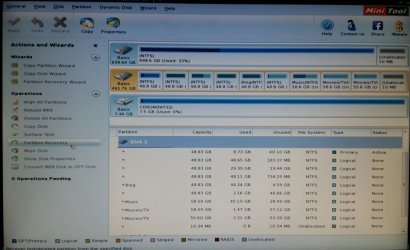
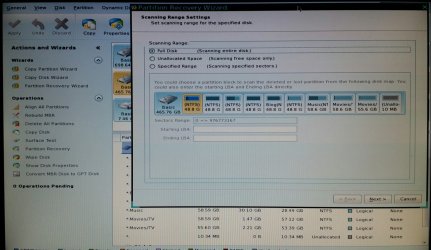
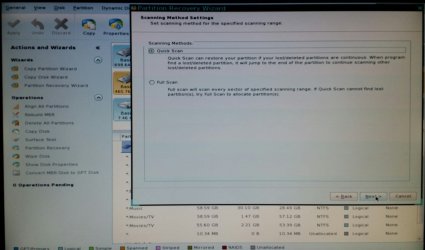
here are my screen caps, step by step, BEFORE right clicking on the first partition in my second drive and making it inactive.
 

Attachments

  • npw7.jpg
    npw7.jpg
    168.7 KB · Views: 1
  • npw6.jpg
    npw6.jpg
    206.8 KB · Views: 1
  • npw5.jpg
    npw5.jpg
    118.8 KB · Views: 1
  • npw4.jpg
    npw4.jpg
    160 KB · Views: 1

My Computer My Computer

At a glance

Windows 7 Home Premium 32 bitIntel(R) Core(TM)2 Duo CPU E6750 @ 2.66GHz4.00 GB with 3.25 GB available(1) Radeon X1950 Series (Microsoft Corporatio...
OS
Windows 7 Home Premium 32 bit
CPU
Intel(R) Core(TM)2 Duo CPU E6750 @ 2.66GHz
Motherboard
ASUSTeK Computer INC. P5E
Memory
4.00 GB with 3.25 GB available
Graphics Card(s)
(1) Radeon X1950 Series (Microsoft Corporation - WDDM) (
Sound Card
High Definition Audio Device
Hard Drives
(1) WDC WD7501AALS-00J7B0 ATA Device
continued....
 

Attachments

  • npw3.jpg
    npw3.jpg
    253.4 KB · Views: 1
  • npw2.jpg
    npw2.jpg
    146.8 KB · Views: 1
  • npw1.jpg
    npw1.jpg
    206.7 KB · Views: 2

My Computer My Computer

At a glance

Windows 7 Home Premium 32 bitIntel(R) Core(TM)2 Duo CPU E6750 @ 2.66GHz4.00 GB with 3.25 GB available(1) Radeon X1950 Series (Microsoft Corporatio...
OS
Windows 7 Home Premium 32 bit
CPU
Intel(R) Core(TM)2 Duo CPU E6750 @ 2.66GHz
Motherboard
ASUSTeK Computer INC. P5E
Memory
4.00 GB with 3.25 GB available
Graphics Card(s)
(1) Radeon X1950 Series (Microsoft Corporation - WDDM) (
Sound Card
High Definition Audio Device
Hard Drives
(1) WDC WD7501AALS-00J7B0 ATA Device
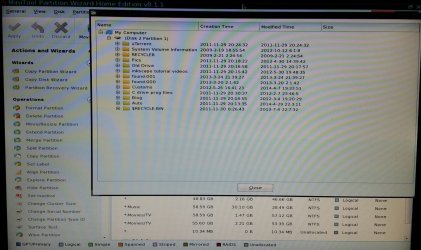
I can access what's in my dead drive as seen in the last cap, however, some of the folders have names that I did not give them, or are folders that I did not create and don't recognize...
 

My Computer My Computer

At a glance

Windows 7 Home Premium 32 bitIntel(R) Core(TM)2 Duo CPU E6750 @ 2.66GHz4.00 GB with 3.25 GB available(1) Radeon X1950 Series (Microsoft Corporatio...
OS
Windows 7 Home Premium 32 bit
CPU
Intel(R) Core(TM)2 Duo CPU E6750 @ 2.66GHz
Motherboard
ASUSTeK Computer INC. P5E
Memory
4.00 GB with 3.25 GB available
Graphics Card(s)
(1) Radeon X1950 Series (Microsoft Corporation - WDDM) (
Sound Card
High Definition Audio Device
Hard Drives
(1) WDC WD7501AALS-00J7B0 ATA Device
Not to worry. We know that all your data is there. Some of those folders are System folders which you normally do not see and some left by check disk.
 

My Computer My Computer

At a glance

Windows 7 Home Premium 32 bit
OS
Windows 7 Home Premium 32 bit
okay, that first partition is inactive. But obviously, it didn't have any effect on boot times.
 

My Computer My Computer

At a glance

Windows 7 Home Premium 32 bitIntel(R) Core(TM)2 Duo CPU E6750 @ 2.66GHz4.00 GB with 3.25 GB available(1) Radeon X1950 Series (Microsoft Corporatio...
OS
Windows 7 Home Premium 32 bit
CPU
Intel(R) Core(TM)2 Duo CPU E6750 @ 2.66GHz
Motherboard
ASUSTeK Computer INC. P5E
Memory
4.00 GB with 3.25 GB available
Graphics Card(s)
(1) Radeon X1950 Series (Microsoft Corporation - WDDM) (
Sound Card
High Definition Audio Device
Hard Drives
(1) WDC WD7501AALS-00J7B0 ATA Device
OK, Now you are in Windows. Is in't it?

Now run PW in Windows. Does it come up fast?
 

My Computer My Computer

At a glance

Windows 7 Home Premium 32 bit
OS
Windows 7 Home Premium 32 bit

My Computer My Computer

At a glance

Windows 7 Home Premium 32 bitIntel(R) Core(TM)2 Duo CPU E6750 @ 2.66GHz4.00 GB with 3.25 GB available(1) Radeon X1950 Series (Microsoft Corporatio...
OS
Windows 7 Home Premium 32 bit
CPU
Intel(R) Core(TM)2 Duo CPU E6750 @ 2.66GHz
Motherboard
ASUSTeK Computer INC. P5E
Memory
4.00 GB with 3.25 GB available
Graphics Card(s)
(1) Radeon X1950 Series (Microsoft Corporation - WDDM) (
Sound Card
High Definition Audio Device
Hard Drives
(1) WDC WD7501AALS-00J7B0 ATA Device
Partition Wizard.

Run Partition Wizard in Windows now.
 

My Computer My Computer

At a glance

Windows 7 Home Premium 32 bit
OS
Windows 7 Home Premium 32 bit
Partition Wizard.

Run Partition Wizard in Windows now.

okay, I'm an idiot... I can't figure out how to get PW to work off of the pen drive while in windows....
 

My Computer My Computer

At a glance

Windows 7 Home Premium 32 bitIntel(R) Core(TM)2 Duo CPU E6750 @ 2.66GHz4.00 GB with 3.25 GB available(1) Radeon X1950 Series (Microsoft Corporatio...
OS
Windows 7 Home Premium 32 bit
CPU
Intel(R) Core(TM)2 Duo CPU E6750 @ 2.66GHz
Motherboard
ASUSTeK Computer INC. P5E
Memory
4.00 GB with 3.25 GB available
Graphics Card(s)
(1) Radeon X1950 Series (Microsoft Corporation - WDDM) (
Sound Card
High Definition Audio Device
Hard Drives
(1) WDC WD7501AALS-00J7B0 ATA Device
:) Haven't you installed Partition Wizard in Windows? Run it.
 

My Computer My Computer

At a glance

Windows 7 Home Premium 32 bit
OS
Windows 7 Home Premium 32 bit
:) Haven't you installed Partition Wizard in Windows? Run it.


nope. I only have it on that boot up pen drive...

I'll download it now and run it. Am I looking for anything in particular?
 

My Computer My Computer

At a glance

Windows 7 Home Premium 32 bitIntel(R) Core(TM)2 Duo CPU E6750 @ 2.66GHz4.00 GB with 3.25 GB available(1) Radeon X1950 Series (Microsoft Corporatio...
OS
Windows 7 Home Premium 32 bit
CPU
Intel(R) Core(TM)2 Duo CPU E6750 @ 2.66GHz
Motherboard
ASUSTeK Computer INC. P5E
Memory
4.00 GB with 3.25 GB available
Graphics Card(s)
(1) Radeon X1950 Series (Microsoft Corporation - WDDM) (
Sound Card
High Definition Audio Device
Hard Drives
(1) WDC WD7501AALS-00J7B0 ATA Device
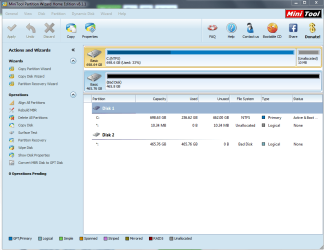
okay... here's what I get when running it in windows...
 

Attachments

  • Wpw.PNG
    Wpw.PNG
    40.4 KB · Views: 1

My Computer My Computer

At a glance

Windows 7 Home Premium 32 bitIntel(R) Core(TM)2 Duo CPU E6750 @ 2.66GHz4.00 GB with 3.25 GB available(1) Radeon X1950 Series (Microsoft Corporatio...
OS
Windows 7 Home Premium 32 bit
CPU
Intel(R) Core(TM)2 Duo CPU E6750 @ 2.66GHz
Motherboard
ASUSTeK Computer INC. P5E
Memory
4.00 GB with 3.25 GB available
Graphics Card(s)
(1) Radeon X1950 Series (Microsoft Corporation - WDDM) (
Sound Card
High Definition Audio Device
Hard Drives
(1) WDC WD7501AALS-00J7B0 ATA Device
That is a shocker !!!!!! How come it shows as a Bad disk?

Check whether it shows up in Windows Disk Management and post a screenshot.
 

My Computer My Computer

At a glance

Windows 7 Home Premium 32 bit
OS
Windows 7 Home Premium 32 bit
That is a shocker !!!!!! How come it shows as a Bad disk?

Check whether it shows up in Windows Disk Management and post a screenshot.


okay, but the last time I tried that with the drive installed, it took about 5 hours for Disk Management to load.
So the screen shot may have to wait until the morning. (my morning)
 

My Computer My Computer

At a glance

Windows 7 Home Premium 32 bitIntel(R) Core(TM)2 Duo CPU E6750 @ 2.66GHz4.00 GB with 3.25 GB available(1) Radeon X1950 Series (Microsoft Corporatio...
OS
Windows 7 Home Premium 32 bit
CPU
Intel(R) Core(TM)2 Duo CPU E6750 @ 2.66GHz
Motherboard
ASUSTeK Computer INC. P5E
Memory
4.00 GB with 3.25 GB available
Graphics Card(s)
(1) Radeon X1950 Series (Microsoft Corporation - WDDM) (
Sound Card
High Definition Audio Device
Hard Drives
(1) WDC WD7501AALS-00J7B0 ATA Device
Back
Top