how do I recover data from a non responsive hard drive?

OK, If you are prepared for another hour, Close Windows Disk Management and boot Partition Wizard from the pen drive again and post the screenshot of the main screen.
 

My Computer My Computer

At a glance

Windows 7 Home Premium 32 bit
OS
Windows 7 Home Premium 32 bit
too late for me... but the screen caps in post #67 and 68 show the latest from the last time I booted from the pen drive.

if you want me to re-do it again, I'll do it in the morning.

thanks again for you help
 

My Computer My Computer

At a glance

Windows 7 Home Premium 32 bitIntel(R) Core(TM)2 Duo CPU E6750 @ 2.66GHz4.00 GB with 3.25 GB available(1) Radeon X1950 Series (Microsoft Corporatio...
OS
Windows 7 Home Premium 32 bit
CPU
Intel(R) Core(TM)2 Duo CPU E6750 @ 2.66GHz
Motherboard
ASUSTeK Computer INC. P5E
Memory
4.00 GB with 3.25 GB available
Graphics Card(s)
(1) Radeon X1950 Series (Microsoft Corporation - WDDM) (
Sound Card
High Definition Audio Device
Hard Drives
(1) WDC WD7501AALS-00J7B0 ATA Device
OK, I want to see the snapshot in PW after you changed the active Flag. Do it tom morning. Good night.
 

My Computer My Computer

At a glance

Windows 7 Home Premium 32 bit
OS
Windows 7 Home Premium 32 bit
here's those screen caps...
 

Attachments

  • apw2.jpg
    apw2.jpg
    137.9 KB · Views: 2
  • apw1.jpg
    apw1.jpg
    176.4 KB · Views: 1

My Computer My Computer

At a glance

Windows 7 Home Premium 32 bitIntel(R) Core(TM)2 Duo CPU E6750 @ 2.66GHz4.00 GB with 3.25 GB available(1) Radeon X1950 Series (Microsoft Corporatio...
OS
Windows 7 Home Premium 32 bit
CPU
Intel(R) Core(TM)2 Duo CPU E6750 @ 2.66GHz
Motherboard
ASUSTeK Computer INC. P5E
Memory
4.00 GB with 3.25 GB available
Graphics Card(s)
(1) Radeon X1950 Series (Microsoft Corporation - WDDM) (
Sound Card
High Definition Audio Device
Hard Drives
(1) WDC WD7501AALS-00J7B0 ATA Device
OK, I am a bit relieved.

I don't want you to run Quick Scan.

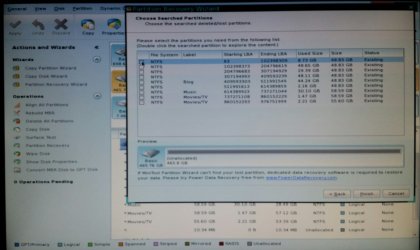
Can you confirm that the first screen as soon as you open Partition Wizard, shows all the partitions on your Disk2.?
 

My Computer My Computer

At a glance

Windows 7 Home Premium 32 bit
OS
Windows 7 Home Premium 32 bit
OK, I am a bit relieved.

I don't want you to run Quick Scan.

Can you confirm that the first screen as soon as you open Partition Wizard, shows all the partitions on your Disk2.?

yes, as seen in the screen cap, before running any scans, all partitions are shown for disk 2, as well I can double click on them and they show the folders as seen in previous screen caps.
 

My Computer My Computer

At a glance

Windows 7 Home Premium 32 bitIntel(R) Core(TM)2 Duo CPU E6750 @ 2.66GHz4.00 GB with 3.25 GB available(1) Radeon X1950 Series (Microsoft Corporatio...
OS
Windows 7 Home Premium 32 bit
CPU
Intel(R) Core(TM)2 Duo CPU E6750 @ 2.66GHz
Motherboard
ASUSTeK Computer INC. P5E
Memory
4.00 GB with 3.25 GB available
Graphics Card(s)
(1) Radeon X1950 Series (Microsoft Corporation - WDDM) (
Sound Card
High Definition Audio Device
Hard Drives
(1) WDC WD7501AALS-00J7B0 ATA Device
Ok that is fine.

Now I don't know why Partition Wizard run from Windows shows it as a bad disk. It really rattled me.

As you said with the drive connected you are still unable to boot faster and Disk Management still slow even after removing the active Flag. Actually whether the first primary partition is active or inactive on the external drive does not matter at all. We just made it inactive hoping that it may make your Windows booting faster. But that did not happen.

PW run from the pen drive shows all partitions. Why is it showing as a bad drive in Windows?

Let me wait and see what Slartybart and Anshad have to say. As you have seen, the data is all there. So don't worry.

Worst comes to worst, we can run Test Disk and try to copy all data to another external drive. But I am looking to restore the drive as it is and access the data.

Let me also think and come back after about eight hours of sleep. Anyway I can sleep peacefully, knowing that it is not really a bad disk.
 

My Computer My Computer

At a glance

Windows 7 Home Premium 32 bit
OS
Windows 7 Home Premium 32 bit
You're always one step ahead of me jumanji. I am beginning to lose confidence in PW under Windows.

You mentioned rebuilding the MBR a wile ago, is this disk GPT or MBR? I searched the thread for GPT and came up empty. Based on the logical drives on the screen shot, I'd guess MBR.

It's a crap shoot, but I'd rebuild the MBR and see if PW under Windows still reports a bad disk.

We know the data is there.

Let's take it slow and see what Anshad thinks before taking any action.

Sleep well jumanji.
 

My Computer My Computer

At a glance

x64 (6.3.9600) Win8.1 Pro & soon dual boot x6...AMD A6-3420M APU with Radeon(tm) HD Graphics6.00 GBAMD Radeon(TM) HD 6520G
Computer type
Laptop
Computer Manufacturer/Model Number
HP Pavilion dv6-6c10us
OS
x64 (6.3.9600) Win8.1 Pro & soon dual boot x64 (6.1.7601) Win7_SP1 HomePrem
CPU
AMD A6-3420M APU with Radeon(tm) HD Graphics
Motherboard
Hewlett-Packard 1805
Memory
6.00 GB
Graphics Card(s)
AMD Radeon(TM) HD 6520G
Sound Card
(1) AMD High Definition Audio Device (2) IDT High Definiti
Monitor(s) Displays
HP W2072a 20" LCD (1600 x 900) @ 60 Hz
Screen Resolution
1366 x 768 x 32 bits (4294967296 colors) @ 60 Hz
Hard Drives
ST640LM0 00 HM641JI SATA Disk Device
Keyboard
Logitech k520 wireless KB
Mouse
Logitech m320 wireless mouse (bundled with KB)
Internet Speed
15/5 | 54 MB Wireless 'n'
Antivirus
Realtime: Defender or Avast | On-demand: Malwarebytes, ESET
Browser
IE 11 on Win8, IE 10 on win 7
Other Info
Media: [Gimp, Audacity, VLC] || Comm: [WEmail 2012, Skype] || Productivity: [OpenOffice,| Textpad] || Utils: [Sysinternals, cCleaner, Speccy, Defraggler]
Thanks Slarty.

The OP has one Primary partition and eight logical in the extended partition. So it is MBR. Moreover if a GPT drive, PW will show the partitions as GPT(Data Partition) under Type. ( I am also learning as you question :D what I had overlooked.)

I woke up this morning with a nasty feeling. That nasty feeling is that the OP's drive may be slowly developing more and more bad sectors.Second OP's Windows may not be in its best health and safety mechanisms that Windows should exhibit have failed or failing.May be right , may be wrong.,partly right, partly wrong but that's my instinct and shall err on the safe side..

So my first instruction to the OP:

Shut down the computer, pull out the data cable and power cable from the problem drive and let it rest, till we decide what next to do. The OP can use his computer with his system drive powered.

Initially I planned to do a rebuild MBR running PW in Windows but now abandoned that and go whole hog with data recovery.

I shall be back after an hour or two.
 

My Computer My Computer

At a glance

Windows 7 Home Premium 32 bit
OS
Windows 7 Home Premium 32 bit
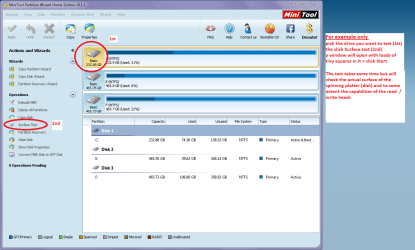
My 2 cents again fellas if the drive is in quetion then another test is this

HARD DRIVE SURFACE TEST

Now as opposed to the usual drive testersthis specifically tests the surface of (usually) a spinner.

It will test the surface of the spinningdisk, and I suspect some idea of the performance of the read / write heads.

Download this http://www.partitionwizard.com/free-partition-manager.html my pic will give you the instruction on what to do. It doestake some time but it does cover most possibilities with a drive in conjunctionwith the other testers like Seatools http://www.seagate.com/au/en/support/downloads/item/seatools-win-master/
 

Attachments

  • MINI TOOL SURFACE.PNG
    MINI TOOL SURFACE.PNG
    50.6 KB · Views: 0

My Computer My Computer

At a glance

Desk1 7 Home Prem / Desk2 10 Pro / Main lap A...Desk1 i5 3750K / Laptop i7 GTX 860M / Desk2 i...Desk1 8GB (1866) / Desk2 16GB (1333) / Laptop...Desk 1& 2NVidia GTX 650 & Laptops on board Intel
Computer type
PC/Desktop
Computer Manufacturer/Model Number
Own build (new) Desk1 / Asus ROG Win 7 / Desk2 1st build
OS
Desk1 7 Home Prem / Desk2 10 Pro / Main lap Asus ROG 10 Pro 2 laptop Toshiba 7 Pro Asus P2520 7 & 10
CPU
Desk1 i5 3750K / Laptop i7 GTX 860M / Desk2 i5 2500
Motherboard
Desk1 Asus P877-V / Desk2 Gigabyte H67 UD3H / Laptop ?
Memory
Desk1 8GB (1866) / Desk2 16GB (1333) / Laptop 8Gb DDR3
Graphics Card(s)
Desk 1& 2NVidia GTX 650 & Laptops on board Intel
Sound Card
Desk 1 & 2 -XONAR DG Realtek High Def audio Laptop
Monitor(s) Displays
Desk 1 Benq HD 2450 / Desk2 Philips 24" / Laptop 17.5"
Screen Resolution
1920x1080 D1 & D2 & Laptop 1
Hard Drives
Desk1 Samsung 120GB 830 SSD
Asus ROG 256GB 850 Pro SSD
Desk2 Samsung 840 256 SSD
Toshiba 120GB EVO
PSU
Desk 1 Corsair HX 1050/ Laptop ? / Desk 2 Corsair HX 650
Case
Desk 1 Cooler HAF XM ? Toshiba laptop / Desk2 Coolermaster
Cooling
Fans on all Desk1 -2 Desk2 - all Coolermasters 5 Laptop ?
Keyboard
Desk 1 MS Sidewinder X6 Desk 2 MS Sidewinder X 4
Mouse
Desk 1&2 - Gigabyte MS 900 gamer - laptop - Logitec wireless
Internet Speed
ADSL2+
Other Info
One other Desktop (tester) and spare Toshba laptop both with SSD's
Running Kaspersky 2016 ISS on all machines config'd identically
Logitec audio stereo systems on each machine (x3)
Canon MG5250MFC
Router/modem TP-Link running WPA2SK
okay.. conflicting instructions here... but I'm pulling the plug on the drive, as the data is what's important to me... if the drive is dead, so be it.
 

My Computer My Computer

At a glance

Windows 7 Home Premium 32 bitIntel(R) Core(TM)2 Duo CPU E6750 @ 2.66GHz4.00 GB with 3.25 GB available(1) Radeon X1950 Series (Microsoft Corporatio...
OS
Windows 7 Home Premium 32 bit
CPU
Intel(R) Core(TM)2 Duo CPU E6750 @ 2.66GHz
Motherboard
ASUSTeK Computer INC. P5E
Memory
4.00 GB with 3.25 GB available
Graphics Card(s)
(1) Radeon X1950 Series (Microsoft Corporation - WDDM) (
Sound Card
High Definition Audio Device
Hard Drives
(1) WDC WD7501AALS-00J7B0 ATA Device
Not to worry. Your data is there. You have seen it show.

At the moment it is only a suspicion that the drive may be going bad. Let your HDD rest. We don't want it to keep spinning till we decide on the best method of recovering the data without making it worse. I have some plans. But I would like to take a first, second and third opinion on it before we start executing it. You can go to sleep.

I shall also be away for sometime.
 

My Computer My Computer

At a glance

Windows 7 Home Premium 32 bit
OS
Windows 7 Home Premium 32 bit
thanks again everyone
 

My Computer My Computer

At a glance

Windows 7 Home Premium 32 bitIntel(R) Core(TM)2 Duo CPU E6750 @ 2.66GHz4.00 GB with 3.25 GB available(1) Radeon X1950 Series (Microsoft Corporatio...
OS
Windows 7 Home Premium 32 bit
CPU
Intel(R) Core(TM)2 Duo CPU E6750 @ 2.66GHz
Motherboard
ASUSTeK Computer INC. P5E
Memory
4.00 GB with 3.25 GB available
Graphics Card(s)
(1) Radeon X1950 Series (Microsoft Corporation - WDDM) (
Sound Card
High Definition Audio Device
Hard Drives
(1) WDC WD7501AALS-00J7B0 ATA Device
.....
So my first instruction to the OP:

Shut down the computer, pull out the data cable and power cable from the problem drive and let it rest, till we decide what next to do. The OP can use his computer with his system drive powered.

Initially I planned to do a rebuild MBR running PW in Windows but now abandoned that and go whole hog with data recovery.

I shall be back after an hour or two.

I agree recover the data first.

I was concerned when Windows PW reported Bad disk, and relieved when the USB PW showed hope. I am using this experience to help another member, as you already know.

The only activity on the drive should be trying a recovery. Any other testing should be deferred until the data is safe. That's always the case, we just got side tracked a few times by the tools.

I think a clone might work best, but I'll leave the final decision up to you on whether to copy files / folders or copy the sectors. The condition of the drive might dictate that decision anyway.

@ICit2lol: This drive is touchy at the moment. Under these conditions, we don't want vigorous testing of the surface. The chance of failure increases and the chances of data recovery decrease.

Bill
.
 

My Computer My Computer

At a glance

x64 (6.3.9600) Win8.1 Pro & soon dual boot x6...AMD A6-3420M APU with Radeon(tm) HD Graphics6.00 GBAMD Radeon(TM) HD 6520G
Computer type
Laptop
Computer Manufacturer/Model Number
HP Pavilion dv6-6c10us
OS
x64 (6.3.9600) Win8.1 Pro & soon dual boot x64 (6.1.7601) Win7_SP1 HomePrem
CPU
AMD A6-3420M APU with Radeon(tm) HD Graphics
Motherboard
Hewlett-Packard 1805
Memory
6.00 GB
Graphics Card(s)
AMD Radeon(TM) HD 6520G
Sound Card
(1) AMD High Definition Audio Device (2) IDT High Definiti
Monitor(s) Displays
HP W2072a 20" LCD (1600 x 900) @ 60 Hz
Screen Resolution
1366 x 768 x 32 bits (4294967296 colors) @ 60 Hz
Hard Drives
ST640LM0 00 HM641JI SATA Disk Device
Keyboard
Logitech k520 wireless KB
Mouse
Logitech m320 wireless mouse (bundled with KB)
Internet Speed
15/5 | 54 MB Wireless 'n'
Antivirus
Realtime: Defender or Avast | On-demand: Malwarebytes, ESET
Browser
IE 11 on Win8, IE 10 on win 7
Other Info
Media: [Gimp, Audacity, VLC] || Comm: [WEmail 2012, Skype] || Productivity: [OpenOffice,| Textpad] || Utils: [Sysinternals, cCleaner, Speccy, Defraggler]
.....
So my first instruction to the OP:

Shut down the computer, pull out the data cable and power cable from the problem drive and let it rest, till we decide what next to do.The OP can use his computer with his system drive powered.

Initially I planned to do a rebuild MBR running PW in Windows but now abandoned that and go whole hog with data recovery.

I shall be back after an hour or two.

I agree recover the data first.

I was concerned when Windows PW reported Bad disk, and relieved when the USB PW showed hope. I am using this experience to help another member, as you already know.

The only activity on the drive should be trying a recovery. Any other testing should be deferred until the data is safe. That's always the case, we just got side tracked a few times by the tools.

I think a clone might work best, but I'll leave the final decision up to you on whether to copy files / folders or copy the sectors. The condition of the drive might dictate that decision anyway.

@ICit2lol: This drive is touchy at the moment. Under these conditions, we don't want vigorous testing of the surface. The chance of failure increases and the chances of data recovery decrease.

Bill
.
OK Bill just a thought surprised the Ubuntu couldn't pull the data though:confused:
 

My Computer My Computer

At a glance

Desk1 7 Home Prem / Desk2 10 Pro / Main lap A...Desk1 i5 3750K / Laptop i7 GTX 860M / Desk2 i...Desk1 8GB (1866) / Desk2 16GB (1333) / Laptop...Desk 1& 2NVidia GTX 650 & Laptops on board Intel
Computer type
PC/Desktop
Computer Manufacturer/Model Number
Own build (new) Desk1 / Asus ROG Win 7 / Desk2 1st build
OS
Desk1 7 Home Prem / Desk2 10 Pro / Main lap Asus ROG 10 Pro 2 laptop Toshiba 7 Pro Asus P2520 7 & 10
CPU
Desk1 i5 3750K / Laptop i7 GTX 860M / Desk2 i5 2500
Motherboard
Desk1 Asus P877-V / Desk2 Gigabyte H67 UD3H / Laptop ?
Memory
Desk1 8GB (1866) / Desk2 16GB (1333) / Laptop 8Gb DDR3
Graphics Card(s)
Desk 1& 2NVidia GTX 650 & Laptops on board Intel
Sound Card
Desk 1 & 2 -XONAR DG Realtek High Def audio Laptop
Monitor(s) Displays
Desk 1 Benq HD 2450 / Desk2 Philips 24" / Laptop 17.5"
Screen Resolution
1920x1080 D1 & D2 & Laptop 1
Hard Drives
Desk1 Samsung 120GB 830 SSD
Asus ROG 256GB 850 Pro SSD
Desk2 Samsung 840 256 SSD
Toshiba 120GB EVO
PSU
Desk 1 Corsair HX 1050/ Laptop ? / Desk 2 Corsair HX 650
Case
Desk 1 Cooler HAF XM ? Toshiba laptop / Desk2 Coolermaster
Cooling
Fans on all Desk1 -2 Desk2 - all Coolermasters 5 Laptop ?
Keyboard
Desk 1 MS Sidewinder X6 Desk 2 MS Sidewinder X 4
Mouse
Desk 1&2 - Gigabyte MS 900 gamer - laptop - Logitec wireless
Internet Speed
ADSL2+
Other Info
One other Desktop (tester) and spare Toshba laptop both with SSD's
Running Kaspersky 2016 ISS on all machines config'd identically
Logitec audio stereo systems on each machine (x3)
Canon MG5250MFC
Router/modem TP-Link running WPA2SK
Yeah John, this one is a sticky wicket. That's why it's important to tread lightly. Sometimes the drive can be read, sometimes it throws a fit.

Running a surface scan on a drive exhibiting this behavior can often tip it over the edge. The disk's regular operation checks for read and write errors. When it has to try x number of times, it marks that sector bad and moves the data. A surface scan is far more aggressive and you don't want on a drive like this.

As you noted, the data had trouble on an Ubuntu attempt, and I'm not sure if you followed the OMG moment, but Windows PW flagged it as a Bad disk.

So the best hope is to baby the poor thing.
 

My Computer My Computer

At a glance

x64 (6.3.9600) Win8.1 Pro & soon dual boot x6...AMD A6-3420M APU with Radeon(tm) HD Graphics6.00 GBAMD Radeon(TM) HD 6520G
Computer type
Laptop
Computer Manufacturer/Model Number
HP Pavilion dv6-6c10us
OS
x64 (6.3.9600) Win8.1 Pro & soon dual boot x64 (6.1.7601) Win7_SP1 HomePrem
CPU
AMD A6-3420M APU with Radeon(tm) HD Graphics
Motherboard
Hewlett-Packard 1805
Memory
6.00 GB
Graphics Card(s)
AMD Radeon(TM) HD 6520G
Sound Card
(1) AMD High Definition Audio Device (2) IDT High Definiti
Monitor(s) Displays
HP W2072a 20" LCD (1600 x 900) @ 60 Hz
Screen Resolution
1366 x 768 x 32 bits (4294967296 colors) @ 60 Hz
Hard Drives
ST640LM0 00 HM641JI SATA Disk Device
Keyboard
Logitech k520 wireless KB
Mouse
Logitech m320 wireless mouse (bundled with KB)
Internet Speed
15/5 | 54 MB Wireless 'n'
Antivirus
Realtime: Defender or Avast | On-demand: Malwarebytes, ESET
Browser
IE 11 on Win8, IE 10 on win 7
Other Info
Media: [Gimp, Audacity, VLC] || Comm: [WEmail 2012, Skype] || Productivity: [OpenOffice,| Textpad] || Utils: [Sysinternals, cCleaner, Speccy, Defraggler]
@IC2...No, OP hasn't tried any Live Linux so far. Has he ?

Most of the cases coming here have different characteristics and so the dynamics changes.We do not have a fixed solution.Right now I am doing a little homework before posting three methods of recovery and which one we should go with. Your opinions and Ubuntu will also come in. So please standby to share your thoughts. I need not call Slarty for he always follows the thread.( He has already echoed one of my thoughts cloning, as if by telepathy. :)) I may have to call Anshad if he is not visible. I would also elicit others' views.

I shall wait for all opinions before suggesting the final decision to be carried out by the OP. Because of the day-night cycles and other personal activities this may take time. The OP may wait.
 

My Computer My Computer

At a glance

Windows 7 Home Premium 32 bit
OS
Windows 7 Home Premium 32 bit
Running a surface scan on a drive exhibiting this behavior can often tip it over the edge. The disk's regular operation checks for read and write errors. When it has to try x number of times, it marks that sector bad and moves the data. A surface scan is far more aggressive and you don't want on a drive like this.

That depends on the testing tool. For example, "Western Digital Data Lifeguard Diagnostic" may try to auto repair bad sectors and may make the issue worse. On the other hand "Seagate Seatool" will only perform a read test. To repair bad sectors, user should manually enable the repair mode. I have been using "Seatool" for a decade. I should have been tested at least 1000 disks and it never screwed a single drive.

There are two reasons i prefer "Seatool" over others.

1. "Seatool" will work with any manufacturer's disk.

2. It will abort the test to prevent further damage if there are too many surface test.

Before testing with "seatool" , make sure the disk is connected to a direct SATA port and avoid USB enclosure. If it is already connected to a SATA port, replace the data cable with a good quality 6GB/s cable. Often a faulty cable may make the disk looks like bad.

For Windows version of "Seatool", the test to run is "Long generic" which will scan entire disk surface.
 
Last edited:

My Computer My Computer

At a glance

Windows 7 Ultimate x64
Computer type
PC/Desktop
OS
Windows 7 Ultimate x64
I did not know that Seatools would abort to prevent further damage - thanks.

That being said, I don't see any value add to running a read only test on this drive.

Connecting the drive internally and replacing the data cable sound like good ideas.

I would still attempt a data recovery before testing the drive - we know it's faulty.

Respecting the differences of our experience and admitting that my working knowledge is antiquated, I still think that the user data recovery takes precedence over testing the condition of the drive.

Since there is a difference of opinion on the matter, I think Canuck has to decide what to do next.

I'm back to the sidelines.

Bill
.
 
Last edited:

My Computer My Computer

At a glance

x64 (6.3.9600) Win8.1 Pro & soon dual boot x6...AMD A6-3420M APU with Radeon(tm) HD Graphics6.00 GBAMD Radeon(TM) HD 6520G
Computer type
Laptop
Computer Manufacturer/Model Number
HP Pavilion dv6-6c10us
OS
x64 (6.3.9600) Win8.1 Pro & soon dual boot x64 (6.1.7601) Win7_SP1 HomePrem
CPU
AMD A6-3420M APU with Radeon(tm) HD Graphics
Motherboard
Hewlett-Packard 1805
Memory
6.00 GB
Graphics Card(s)
AMD Radeon(TM) HD 6520G
Sound Card
(1) AMD High Definition Audio Device (2) IDT High Definiti
Monitor(s) Displays
HP W2072a 20" LCD (1600 x 900) @ 60 Hz
Screen Resolution
1366 x 768 x 32 bits (4294967296 colors) @ 60 Hz
Hard Drives
ST640LM0 00 HM641JI SATA Disk Device
Keyboard
Logitech k520 wireless KB
Mouse
Logitech m320 wireless mouse (bundled with KB)
Internet Speed
15/5 | 54 MB Wireless 'n'
Antivirus
Realtime: Defender or Avast | On-demand: Malwarebytes, ESET
Browser
IE 11 on Win8, IE 10 on win 7
Other Info
Media: [Gimp, Audacity, VLC] || Comm: [WEmail 2012, Skype] || Productivity: [OpenOffice,| Textpad] || Utils: [Sysinternals, cCleaner, Speccy, Defraggler]
Thanks Anshad for your good suggestion.

Now I am thinking of three recovery processes/methodology.

I .Cloning with ddrescue. Advantage: 1. Unlike conventional imaging/cloning software, it can do bad sector recovery as it clones with specified no. of passes. 2. Anshad Edavana can help with his experience. Especially with the second command. We are going to give only two commands and then sit and relax till the cloning is over.

Since all the partitions are intact, I see no problems in ddrescue recognising the problem drive. In the other thread , the first one in Seven Forums where it was recommended, the OP Jon Snow reported that it would not recognise the problem drive. Now we know for sure that was because his drive had gone dead long before.

Requirements: 1. A pendrive to write the bootable ddrescue ISO 2. A formatted empty external drive of not less than 500GB. ( I am not sure of the the ddrescue log file size which it will create. We may not afford to lose it for want of space. So maybe a 750GB or 1TB drive???)

(During the initial phase of this thread, with the OP's sluggish Windows with the problem drive connected, we made a marathon effort to make a bootable pendrive with PW ISO with the onetime boot menu key for the OP's motherboard not known. Thanks to Slarty's find we could get over it and the OP is now well-versed in creating a bootable pendrive and booting from it.)


II. TestDisk: The first and only screen of Windows Disk Management the OP presented after a long read by Windows shows all logical partitions in the drive as RAW. So I would consider using TestDisk > Advanced File utilities to report the health of BootSector/backup Boot Sector and whether an MFT repair will be required all of which it can do hopefully. If these are the only cause of the problem ( like corrupt MFT but not caused by bad sectors), if repaired his drive should be back in shape and the OP can directly list the files and copy those into the external drive. May be as suggested by Anshad which I include now after his previous post on Seatools for DOS, a first run by SeaTools to repair badsectors and then TeskDisk may be a better option? ? Or should we stick to only TestDisk?

Requirements: 1. Two pendrives one for TestDisk and one for Seatools for DOS depending upon which course is decided upon. 2. Same formatted empty drive of 500GB capacity

III. Try Live Linux and copy the files. Distros: Peppermint -1. Golden Tutorial 2. Mate- whs Tutorial and I think Slarty is authoring one 3.Lucid Puppy - jumanji 4.Ubuntu - ICit2lol

Advantage: Authors 2.(Slartybart) 3. and 4. are live on this thread to give an interactive support which the OP may need in dealing with the specific distros.

Disadvantage: 1. No bad sector correction Solution: Seatools for DOS followed by Live Linux ??? 2. OP's inclination to undertake the Linux load also matters.

Requirements: 1. Two pendrives one for the live Linux ISO and one for Seatools for DOS again depending upon the course to be decided 2. The same formatted external HDD of 500GB capacity.

I am not sure which one to go for:D .It is for the Jury to decide. I have only presented the possible scenario for experts' opinion. Jurors: 1. Slartybart 2. Anshad Edavana 3. Icit2lol ( who are already in) and 4. Other's who may want to throw themselves in with their opinions.

There may be small holes here and there in my perception and presentation. Those obviously need to be filled up. Bad section repair. :D

My day is over. Dinner, coffee and then bed.:)
 
Last edited:

My Computer My Computer

At a glance

Windows 7 Home Premium 32 bit
OS
Windows 7 Home Premium 32 bit
Back
Top