how do I recover data from a non responsive hard drive?

Thanks ICit2 for coming in. DEL key gets you into BIOS set up menu. (At the moment I don't want the OP to get into BIOS setup menu > Boot Priority and meddle with it.:))

Do you know which key brings the onetime boot menu on P5E?

alphanumeric in this post http://www.sevenforums.com/general-discussion/202692-why-del-key-bios-boot-menu.html#post1701221 (This takes you to that post)
has mentioned F8. Also http://www.sevenforums.com/general-discussion/202692-why-del-key-bios-boot-menu.html#post1702108 (This takes you to another post in the same thread)

I wanted the OP to read the first BIOS screen where at the bottom the relevant keys are normally mentioned. He hasn't done it yet. I allowed him to sleep and then come back.

Let us see what he does when he wakes up.
Ok mate I thought or was under the impression - perhaps I read it wrong that the OP could not boot the Ubuntu or it was running strange and so couldn't "see" the drive
I will see how you go with the problem.

Am not sure about that other key mate - sorry. What I was wondering though was about the age of the board maybe it is not that crash hot??
 

My Computer My Computer

At a glance

Desk1 7 Home Prem / Desk2 10 Pro / Main lap A...Desk1 i5 3750K / Laptop i7 GTX 860M / Desk2 i...Desk1 8GB (1866) / Desk2 16GB (1333) / Laptop...Desk 1& 2NVidia GTX 650 & Laptops on board Intel
Computer type
PC/Desktop
Computer Manufacturer/Model Number
Own build (new) Desk1 / Asus ROG Win 7 / Desk2 1st build
OS
Desk1 7 Home Prem / Desk2 10 Pro / Main lap Asus ROG 10 Pro 2 laptop Toshiba 7 Pro Asus P2520 7 & 10
CPU
Desk1 i5 3750K / Laptop i7 GTX 860M / Desk2 i5 2500
Motherboard
Desk1 Asus P877-V / Desk2 Gigabyte H67 UD3H / Laptop ?
Memory
Desk1 8GB (1866) / Desk2 16GB (1333) / Laptop 8Gb DDR3
Graphics Card(s)
Desk 1& 2NVidia GTX 650 & Laptops on board Intel
Sound Card
Desk 1 & 2 -XONAR DG Realtek High Def audio Laptop
Monitor(s) Displays
Desk 1 Benq HD 2450 / Desk2 Philips 24" / Laptop 17.5"
Screen Resolution
1920x1080 D1 & D2 & Laptop 1
Hard Drives
Desk1 Samsung 120GB 830 SSD
Asus ROG 256GB 850 Pro SSD
Desk2 Samsung 840 256 SSD
Toshiba 120GB EVO
PSU
Desk 1 Corsair HX 1050/ Laptop ? / Desk 2 Corsair HX 650
Case
Desk 1 Cooler HAF XM ? Toshiba laptop / Desk2 Coolermaster
Cooling
Fans on all Desk1 -2 Desk2 - all Coolermasters 5 Laptop ?
Keyboard
Desk 1 MS Sidewinder X6 Desk 2 MS Sidewinder X 4
Mouse
Desk 1&2 - Gigabyte MS 900 gamer - laptop - Logitec wireless
Internet Speed
ADSL2+
Other Info
One other Desktop (tester) and spare Toshba laptop both with SSD's
Running Kaspersky 2016 ISS on all machines config'd identically
Logitec audio stereo systems on each machine (x3)
Canon MG5250MFC
Router/modem TP-Link running WPA2SK
..... What I was wondering though was about the age of the board maybe it is not that crash hot??

Yep, I am mentally prepared for that eventuality. .:)

EDIT: One search tells me that the key is Alt+F2. Want it from the horse's mouth nevertheless.

"Is is possible for ASUS P5E mobo to boot from a USB drive?"

" Yes you can. I have that motherboard. Just press Alt+F2 at startup" - post dated 03 Feb 2008
 
Last edited:

My Computer My Computer

At a glance

Windows 7 Home Premium 32 bit
OS
Windows 7 Home Premium 32 bit
okay, thanks again everyone for the help.

the first screen at start up gives me the option of the DEL key or the TAB key to display BIOS post message.

so I hit TAB.

that screen lasts less than half a second.... so after about 30 re-boots, I managed to read half of it... it gives me three options.
DEL to enter start up
F8 to enter BIOS set up menu
ALT - F2 to enter ASUSTeK EZ Flash 2 BIOS ROM Utility V3 06

after hitting ALT F2, it takes me to a bright blue screen with that heading....

am I in the right neighbourhood?
 

My Computer My Computer

At a glance

Windows 7 Home Premium 32 bitIntel(R) Core(TM)2 Duo CPU E6750 @ 2.66GHz4.00 GB with 3.25 GB available(1) Radeon X1950 Series (Microsoft Corporatio...
OS
Windows 7 Home Premium 32 bit
CPU
Intel(R) Core(TM)2 Duo CPU E6750 @ 2.66GHz
Motherboard
ASUSTeK Computer INC. P5E
Memory
4.00 GB with 3.25 GB available
Graphics Card(s)
(1) Radeon X1950 Series (Microsoft Corporation - WDDM) (
Sound Card
High Definition Audio Device
Hard Drives
(1) WDC WD7501AALS-00J7B0 ATA Device
Try Shift + f8 at boot -

This stuff is always like state secrets - very hard to find the fkey for Boot Device menu.
 

My Computer My Computer

At a glance

x64 (6.3.9600) Win8.1 Pro & soon dual boot x6...AMD A6-3420M APU with Radeon(tm) HD Graphics6.00 GBAMD Radeon(TM) HD 6520G
Computer type
Laptop
Computer Manufacturer/Model Number
HP Pavilion dv6-6c10us
OS
x64 (6.3.9600) Win8.1 Pro & soon dual boot x64 (6.1.7601) Win7_SP1 HomePrem
CPU
AMD A6-3420M APU with Radeon(tm) HD Graphics
Motherboard
Hewlett-Packard 1805
Memory
6.00 GB
Graphics Card(s)
AMD Radeon(TM) HD 6520G
Sound Card
(1) AMD High Definition Audio Device (2) IDT High Definiti
Monitor(s) Displays
HP W2072a 20" LCD (1600 x 900) @ 60 Hz
Screen Resolution
1366 x 768 x 32 bits (4294967296 colors) @ 60 Hz
Hard Drives
ST640LM0 00 HM641JI SATA Disk Device
Keyboard
Logitech k520 wireless KB
Mouse
Logitech m320 wireless mouse (bundled with KB)
Internet Speed
15/5 | 54 MB Wireless 'n'
Antivirus
Realtime: Defender or Avast | On-demand: Malwarebytes, ESET
Browser
IE 11 on Win8, IE 10 on win 7
Other Info
Media: [Gimp, Audacity, VLC] || Comm: [WEmail 2012, Skype] || Productivity: [OpenOffice,| Textpad] || Utils: [Sysinternals, cCleaner, Speccy, Defraggler]
My Asus motherboard use the Delete key to access the bois.
 

My Computer My Computer

At a glance

Windows 10 Pro. 64/ version 1709 Windows 7 Pr...Intel i7-6800K @ 4.3Corsair Platinum 16 gig @2400EVGA GTX 1070 OC
Computer type
PC/Desktop
Computer Manufacturer/Model Number
Home made Desktop
OS
Windows 10 Pro. 64/ version 1709 Windows 7 Pro/64
CPU
Intel i7-6800K @ 4.3
Motherboard
ASUS X-99 Deluxe II
Memory
Corsair Platinum 16 gig @2400
Graphics Card(s)
EVGA GTX 1070 OC
Monitor(s) Displays
Asus 27" LED LCD/VE278Q
Screen Resolution
1920-1080 or 1280-720 HDMI
Hard Drives
INTEL SSD 730-240 Gb Sata 3.0/
PSU
EVGA Platium 1200W
Case
Phanteks Luxe Tempered Glass 8 fans/ one radiator
Cooling
XSPC/ Water Cooled CPU
Keyboard
Das 4 Professional
Mouse
Logitech M705/MX Anywhere 2-S
Internet Speed
100 mbits
Antivirus
Microsoft Security Essentials/ Malwarebytes Premium 3.0/ SAS
Browser
I.E. 11 default/Firefox/ ISP Time Warner Cable/Spectrum
Other Info
LG BluRay Burner/
Sound system-KLipsch-THX/
Icy Dock ssd Hot Swap bays.
My Asus motherboard use the Delete key to access the bois.

Thanks Jack, what key takes you to the Boot Device menu on your board?

I think Canuck can get to the BIOS screen but jumanji doesn't want to make a permanent change to the order, only a one time boot from USB or DVD.
 

My Computer My Computer

At a glance

x64 (6.3.9600) Win8.1 Pro & soon dual boot x6...AMD A6-3420M APU with Radeon(tm) HD Graphics6.00 GBAMD Radeon(TM) HD 6520G
Computer type
Laptop
Computer Manufacturer/Model Number
HP Pavilion dv6-6c10us
OS
x64 (6.3.9600) Win8.1 Pro & soon dual boot x64 (6.1.7601) Win7_SP1 HomePrem
CPU
AMD A6-3420M APU with Radeon(tm) HD Graphics
Motherboard
Hewlett-Packard 1805
Memory
6.00 GB
Graphics Card(s)
AMD Radeon(TM) HD 6520G
Sound Card
(1) AMD High Definition Audio Device (2) IDT High Definiti
Monitor(s) Displays
HP W2072a 20" LCD (1600 x 900) @ 60 Hz
Screen Resolution
1366 x 768 x 32 bits (4294967296 colors) @ 60 Hz
Hard Drives
ST640LM0 00 HM641JI SATA Disk Device
Keyboard
Logitech k520 wireless KB
Mouse
Logitech m320 wireless mouse (bundled with KB)
Internet Speed
15/5 | 54 MB Wireless 'n'
Antivirus
Realtime: Defender or Avast | On-demand: Malwarebytes, ESET
Browser
IE 11 on Win8, IE 10 on win 7
Other Info
Media: [Gimp, Audacity, VLC] || Comm: [WEmail 2012, Skype] || Productivity: [OpenOffice,| Textpad] || Utils: [Sysinternals, cCleaner, Speccy, Defraggler]
Try Shift + f8 at boot -

This stuff is always like state secrets - very hard to find the fkey for Boot Device menu.

we have a winner.

shift + F8 gets me a screen called
Please select Boot drive
1. 1st Floppy Drive (I don't have a floppy drive installed)
2. HDD:
3. CD-ROM
 

My Computer My Computer

At a glance

Windows 7 Home Premium 32 bitIntel(R) Core(TM)2 Duo CPU E6750 @ 2.66GHz4.00 GB with 3.25 GB available(1) Radeon X1950 Series (Microsoft Corporatio...
OS
Windows 7 Home Premium 32 bit
CPU
Intel(R) Core(TM)2 Duo CPU E6750 @ 2.66GHz
Motherboard
ASUSTeK Computer INC. P5E
Memory
4.00 GB with 3.25 GB available
Graphics Card(s)
(1) Radeon X1950 Series (Microsoft Corporation - WDDM) (
Sound Card
High Definition Audio Device
Hard Drives
(1) WDC WD7501AALS-00J7B0 ATA Device
Good going with Slartybart in.

I think @Canuck67, with a USB drive plugged in, rebooting and hitting that combination may add USB also as a bootable from device in that menu.

Try and let us know whether it happens.
 

My Computer My Computer

At a glance

Windows 7 Home Premium 32 bit
OS
Windows 7 Home Premium 32 bit
Good going with Slartybart in.

I think @Canuck67, with a USB drive plugged in, rebooting and hitting that combination may add USB also as a bootable from device in that menu.

Try and let us know whether it happens.

what do you want me to plug in the usb port?
 

My Computer My Computer

At a glance

Windows 7 Home Premium 32 bitIntel(R) Core(TM)2 Duo CPU E6750 @ 2.66GHz4.00 GB with 3.25 GB available(1) Radeon X1950 Series (Microsoft Corporatio...
OS
Windows 7 Home Premium 32 bit
CPU
Intel(R) Core(TM)2 Duo CPU E6750 @ 2.66GHz
Motherboard
ASUSTeK Computer INC. P5E
Memory
4.00 GB with 3.25 GB available
Graphics Card(s)
(1) Radeon X1950 Series (Microsoft Corporation - WDDM) (
Sound Card
High Definition Audio Device
Hard Drives
(1) WDC WD7501AALS-00J7B0 ATA Device
On my Asus system (F8) all by itself get me into boot order selection.
 

My Computer My Computer

At a glance

Windows 10 Pro. 64/ version 1709 Windows 7 Pr...Intel i7-6800K @ 4.3Corsair Platinum 16 gig @2400EVGA GTX 1070 OC
Computer type
PC/Desktop
Computer Manufacturer/Model Number
Home made Desktop
OS
Windows 10 Pro. 64/ version 1709 Windows 7 Pro/64
CPU
Intel i7-6800K @ 4.3
Motherboard
ASUS X-99 Deluxe II
Memory
Corsair Platinum 16 gig @2400
Graphics Card(s)
EVGA GTX 1070 OC
Monitor(s) Displays
Asus 27" LED LCD/VE278Q
Screen Resolution
1920-1080 or 1280-720 HDMI
Hard Drives
INTEL SSD 730-240 Gb Sata 3.0/
PSU
EVGA Platium 1200W
Case
Phanteks Luxe Tempered Glass 8 fans/ one radiator
Cooling
XSPC/ Water Cooled CPU
Keyboard
Das 4 Professional
Mouse
Logitech M705/MX Anywhere 2-S
Internet Speed
100 mbits
Antivirus
Microsoft Security Essentials/ Malwarebytes Premium 3.0/ SAS
Browser
I.E. 11 default/Firefox/ ISP Time Warner Cable/Spectrum
Other Info
LG BluRay Burner/
Sound system-KLipsch-THX/
Icy Dock ssd Hot Swap bays.
ding-ding-ding-ding-ding ... Can I select a prize from the third shelf?

Glad it worked.

Now jumanji can guide you through the rest of his plan.

Back to the sidelines for me, good luck - you have some excellent help on the thread already.

Bill
.
 

My Computer My Computer

At a glance

x64 (6.3.9600) Win8.1 Pro & soon dual boot x6...AMD A6-3420M APU with Radeon(tm) HD Graphics6.00 GBAMD Radeon(TM) HD 6520G
Computer type
Laptop
Computer Manufacturer/Model Number
HP Pavilion dv6-6c10us
OS
x64 (6.3.9600) Win8.1 Pro & soon dual boot x64 (6.1.7601) Win7_SP1 HomePrem
CPU
AMD A6-3420M APU with Radeon(tm) HD Graphics
Motherboard
Hewlett-Packard 1805
Memory
6.00 GB
Graphics Card(s)
AMD Radeon(TM) HD 6520G
Sound Card
(1) AMD High Definition Audio Device (2) IDT High Definiti
Monitor(s) Displays
HP W2072a 20" LCD (1600 x 900) @ 60 Hz
Screen Resolution
1366 x 768 x 32 bits (4294967296 colors) @ 60 Hz
Hard Drives
ST640LM0 00 HM641JI SATA Disk Device
Keyboard
Logitech k520 wireless KB
Mouse
Logitech m320 wireless mouse (bundled with KB)
Internet Speed
15/5 | 54 MB Wireless 'n'
Antivirus
Realtime: Defender or Avast | On-demand: Malwarebytes, ESET
Browser
IE 11 on Win8, IE 10 on win 7
Other Info
Media: [Gimp, Audacity, VLC] || Comm: [WEmail 2012, Skype] || Productivity: [OpenOffice,| Textpad] || Utils: [Sysinternals, cCleaner, Speccy, Defraggler]

My Computer My Computer

At a glance

Windows 7 Home Premium 32 bit
OS
Windows 7 Home Premium 32 bit
Yes, it gives me option 4. USB
 

My Computer My Computer

At a glance

Windows 7 Home Premium 32 bitIntel(R) Core(TM)2 Duo CPU E6750 @ 2.66GHz4.00 GB with 3.25 GB available(1) Radeon X1950 Series (Microsoft Corporatio...
OS
Windows 7 Home Premium 32 bit
CPU
Intel(R) Core(TM)2 Duo CPU E6750 @ 2.66GHz
Motherboard
ASUSTeK Computer INC. P5E
Memory
4.00 GB with 3.25 GB available
Graphics Card(s)
(1) Radeon X1950 Series (Microsoft Corporation - WDDM) (
Sound Card
High Definition Audio Device
Hard Drives
(1) WDC WD7501AALS-00J7B0 ATA Device
OK, we have hit the gold mine, thanks to Slarty.(.( I don't want Slarty to retire from this thread. I want him to strike me on my knuckles if I go blatantly wrong as we proceed and the tinkerer ICit2.....LOL too :))

Now back to business. The real work starts now.

Our intention is to run Partition Wizard from a bootable pendrive and try our luck to resurrect the hard drive. ( I have to refresh myself by going back on this thread since too many things have gone in various threads that I may get easily confused but I will refresh later.)

Now have an empty pendrive ready. Backup all data in it elsewhere for it will be lost now.

Download Partition Wizard Home Edition bootable CD version 48.34MB from Free download Magic Partition Manager Software, partition magic alternative, free partition magic, partition magic Windows 7 and server partition software - Partition Wizard Online

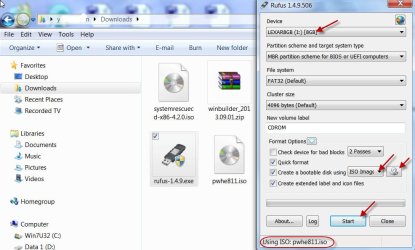
Download Rufus 1.4.9 (615KB) from Rufus - Create bootable USB drives the easy way

By default these will be downloaded into the Downloads folder.

17-06-2014 08-04-59.jpg

Plug in your empty pendrive and click on Rufus to run. Check that your correct pendrive is shown on it.

Leave most of the settings to default and with "Create a bootable disk using" select "ISO Image" from the drop down arrow and then click on the drive icon next to it.

In the ensuing dialog box, navigate to the Downloads folder and click on the pwhe811.iso to select it.

Check "Using ISO: pwhe811.iso" appears at the bottom of the Rufus Screen.

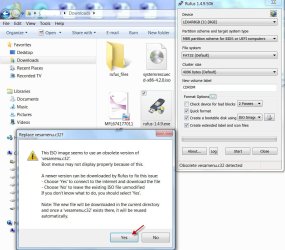
Click on Start. Don't relax.

17-06-2014 08-10-12.jpg

In the ensuing dialog box, click on Yes. Rufus will automatically download the new vesamenu and use it to create the bootable pendrive.

Wait for it to complete writing the bootable ISO to the pendrive.

When completed close Rufus, safely remove the pendrive.

Now you are ready to boot from the pendrive and run PW.

I hope you have already plugged in your HDD back into where it was as an internal drive.

Run PW from Windows. If Windows fumbles and tumbles as before, plug in the pendrive, reboot, select USB in the onetime bootmenu and allow Partition Wizard to boot.

You may do it tom morning after your sleep.
 

My Computer My Computer

At a glance

Windows 7 Home Premium 32 bit
OS
Windows 7 Home Premium 32 bit
okay, I'll do all of that.

Assuming I have to boot from the usb .... what do I do then?

If everything goes well, will PW allow me to copy files from the dead drive to my working drive? Or are there other steps I need to take first?
 

My Computer My Computer

At a glance

Windows 7 Home Premium 32 bitIntel(R) Core(TM)2 Duo CPU E6750 @ 2.66GHz4.00 GB with 3.25 GB available(1) Radeon X1950 Series (Microsoft Corporatio...
OS
Windows 7 Home Premium 32 bit
CPU
Intel(R) Core(TM)2 Duo CPU E6750 @ 2.66GHz
Motherboard
ASUSTeK Computer INC. P5E
Memory
4.00 GB with 3.25 GB available
Graphics Card(s)
(1) Radeon X1950 Series (Microsoft Corporation - WDDM) (
Sound Card
High Definition Audio Device
Hard Drives
(1) WDC WD7501AALS-00J7B0 ATA Device
I won't retire from the thread, but I am just about to retire for the day. :)

@Canuck67: It sounds to me as though jumanji is preparing you for all contingencies.

If you read the end of post# 34, it ends (and I'm paraphrasing)
"safely remove USB from computer, try PW from Windows, if it staggers because of the faulty drive, boot from pen drive."

I want to emphasize that the HD should be returned to the machine as an internal drive and not attached as an external when you attempt PW. This would be true for the 1st attempt using Windows PW again or if you resort to the portable PW on the pen drive. It just makes things easier and has averted other issues in some cases.
 

My Computer My Computer

At a glance

x64 (6.3.9600) Win8.1 Pro & soon dual boot x6...AMD A6-3420M APU with Radeon(tm) HD Graphics6.00 GBAMD Radeon(TM) HD 6520G
Computer type
Laptop
Computer Manufacturer/Model Number
HP Pavilion dv6-6c10us
OS
x64 (6.3.9600) Win8.1 Pro & soon dual boot x64 (6.1.7601) Win7_SP1 HomePrem
CPU
AMD A6-3420M APU with Radeon(tm) HD Graphics
Motherboard
Hewlett-Packard 1805
Memory
6.00 GB
Graphics Card(s)
AMD Radeon(TM) HD 6520G
Sound Card
(1) AMD High Definition Audio Device (2) IDT High Definiti
Monitor(s) Displays
HP W2072a 20" LCD (1600 x 900) @ 60 Hz
Screen Resolution
1366 x 768 x 32 bits (4294967296 colors) @ 60 Hz
Hard Drives
ST640LM0 00 HM641JI SATA Disk Device
Keyboard
Logitech k520 wireless KB
Mouse
Logitech m320 wireless mouse (bundled with KB)
Internet Speed
15/5 | 54 MB Wireless 'n'
Antivirus
Realtime: Defender or Avast | On-demand: Malwarebytes, ESET
Browser
IE 11 on Win8, IE 10 on win 7
Other Info
Media: [Gimp, Audacity, VLC] || Comm: [WEmail 2012, Skype] || Productivity: [OpenOffice,| Textpad] || Utils: [Sysinternals, cCleaner, Speccy, Defraggler]
.....Assuming I have to boot from the usb .... what do I do then?

If everything goes well, will PW allow me to copy files from the dead drive to my working drive? Or are there other steps I need to take first?

To boot from the PW pendrive:

Shut down your PC.

Plugin the PW Pendrive.

Power on the PC.

At the first screen which you said lasts only for half-a-second hit Shift+F8, right?, to bring the one time boot menu.

In the ensuing boot devices menu, use the up/down arrow keys on the keyboard to highlight USB and press Enter Key.

Hopefully it will boot from the pendrive.

It may take sometime for the boot process to complete so just watch and wait. Finally Partition Wizard wil kick in. It is the same as you see when you run it on Windows - nothing different except it now runs on Linux from the pendrive.

Post the screenshot. ( You have to take a camera snap. Try if you have a good camera tuned to closeup or Micro.Turn off the autoflash and use available light including the room lights. The more the light the better. You may also try a mobile phone camera. The shot I posted earlier showing the first Bios screen was taken by my lowly camera and I am no expert photographer :).Don't bother if you can't get a good and intelligible shot. Just describe in detail what you see and we will question you if we need more info than you described and give instructions on how to proceed further.)

PW will not allow you to copy files. But if it succeeds showing all the partitions after we go through a quick/deep scan and rebuild MBR exercise we may restore it to its original condition as before to access the data as usual. If it proves not possible, we have to resort to data recovery options. At the moment we really do not know what is the cause so we are only trying a known technique that has been successful in many cases and also not successful in many cases. :D We are still probing.
 
Last edited:

My Computer My Computer

At a glance

Windows 7 Home Premium 32 bit
OS
Windows 7 Home Premium 32 bit
Go on your knuckles LOL!! I just woke up and getting ready for wrok when I saw the breakthrough - good on you Slarty!! and soem stuff for Jumanji to work on.

I was goig to suggest just start tapping the DEL key before powering up which is what I do with those pesky quick posts but thngs are on the move. I am just glad for Canuck that there has been movement. :)

PS Meant to mention if I didn't before the Ubuntu will let you or should do into that drive and you can copy / paste etc etc if you want to another drive even if it is really on it's last gasp.
 

My Computer My Computer

At a glance

Desk1 7 Home Prem / Desk2 10 Pro / Main lap A...Desk1 i5 3750K / Laptop i7 GTX 860M / Desk2 i...Desk1 8GB (1866) / Desk2 16GB (1333) / Laptop...Desk 1& 2NVidia GTX 650 & Laptops on board Intel
Computer type
PC/Desktop
Computer Manufacturer/Model Number
Own build (new) Desk1 / Asus ROG Win 7 / Desk2 1st build
OS
Desk1 7 Home Prem / Desk2 10 Pro / Main lap Asus ROG 10 Pro 2 laptop Toshiba 7 Pro Asus P2520 7 & 10
CPU
Desk1 i5 3750K / Laptop i7 GTX 860M / Desk2 i5 2500
Motherboard
Desk1 Asus P877-V / Desk2 Gigabyte H67 UD3H / Laptop ?
Memory
Desk1 8GB (1866) / Desk2 16GB (1333) / Laptop 8Gb DDR3
Graphics Card(s)
Desk 1& 2NVidia GTX 650 & Laptops on board Intel
Sound Card
Desk 1 & 2 -XONAR DG Realtek High Def audio Laptop
Monitor(s) Displays
Desk 1 Benq HD 2450 / Desk2 Philips 24" / Laptop 17.5"
Screen Resolution
1920x1080 D1 & D2 & Laptop 1
Hard Drives
Desk1 Samsung 120GB 830 SSD
Asus ROG 256GB 850 Pro SSD
Desk2 Samsung 840 256 SSD
Toshiba 120GB EVO
PSU
Desk 1 Corsair HX 1050/ Laptop ? / Desk 2 Corsair HX 650
Case
Desk 1 Cooler HAF XM ? Toshiba laptop / Desk2 Coolermaster
Cooling
Fans on all Desk1 -2 Desk2 - all Coolermasters 5 Laptop ?
Keyboard
Desk 1 MS Sidewinder X6 Desk 2 MS Sidewinder X 4
Mouse
Desk 1&2 - Gigabyte MS 900 gamer - laptop - Logitec wireless
Internet Speed
ADSL2+
Other Info
One other Desktop (tester) and spare Toshba laptop both with SSD's
Running Kaspersky 2016 ISS on all machines config'd identically
Logitec audio stereo systems on each machine (x3)
Canon MG5250MFC
Router/modem TP-Link running WPA2SK
At the first screen which you said lasts only for half-a-second hit alt+F8, right?, to bring the one time boot menu.

Shift+F8

No knuckle busting, my friend jumanji.

Bill
.
 

My Computer My Computer

At a glance

x64 (6.3.9600) Win8.1 Pro & soon dual boot x6...AMD A6-3420M APU with Radeon(tm) HD Graphics6.00 GBAMD Radeon(TM) HD 6520G
Computer type
Laptop
Computer Manufacturer/Model Number
HP Pavilion dv6-6c10us
OS
x64 (6.3.9600) Win8.1 Pro & soon dual boot x64 (6.1.7601) Win7_SP1 HomePrem
CPU
AMD A6-3420M APU with Radeon(tm) HD Graphics
Motherboard
Hewlett-Packard 1805
Memory
6.00 GB
Graphics Card(s)
AMD Radeon(TM) HD 6520G
Sound Card
(1) AMD High Definition Audio Device (2) IDT High Definiti
Monitor(s) Displays
HP W2072a 20" LCD (1600 x 900) @ 60 Hz
Screen Resolution
1366 x 768 x 32 bits (4294967296 colors) @ 60 Hz
Hard Drives
ST640LM0 00 HM641JI SATA Disk Device
Keyboard
Logitech k520 wireless KB
Mouse
Logitech m320 wireless mouse (bundled with KB)
Internet Speed
15/5 | 54 MB Wireless 'n'
Antivirus
Realtime: Defender or Avast | On-demand: Malwarebytes, ESET
Browser
IE 11 on Win8, IE 10 on win 7
Other Info
Media: [Gimp, Audacity, VLC] || Comm: [WEmail 2012, Skype] || Productivity: [OpenOffice,| Textpad] || Utils: [Sysinternals, cCleaner, Speccy, Defraggler]
yep, Shift+F8. My bugle call to you to watch and catch worked :D.Thanks for sparing my knuckles :). Edited.
 

My Computer My Computer

At a glance

Windows 7 Home Premium 32 bit
OS
Windows 7 Home Premium 32 bit
Back
Top