how do I recover data from a non responsive hard drive?

Phew....

you booted using the PM flash drive -correct?

then you post the screen caps in post 115 - correct?

then I posted select option 1.

maybe I'm confused -

I'm not certain, but I think Anshad meant all drives except the boot and the faulty.

I can't speak for him though, so maybe he really only wants the faulty drive connected.

It's probably best to wait for him since he's the lead on this and you already have some instructions that caused some difficulty. Rather than go through all of those gyrations, wait until Anshad gives you a definite on the boot option to select.

I misunderstood that you weren't still booted on the flash drive.
 

My Computer My Computer

At a glance

x64 (6.3.9600) Win8.1 Pro & soon dual boot x6...AMD A6-3420M APU with Radeon(tm) HD Graphics6.00 GBAMD Radeon(TM) HD 6520G
Computer type
Laptop
Computer Manufacturer/Model Number
HP Pavilion dv6-6c10us
OS
x64 (6.3.9600) Win8.1 Pro & soon dual boot x64 (6.1.7601) Win7_SP1 HomePrem
CPU
AMD A6-3420M APU with Radeon(tm) HD Graphics
Motherboard
Hewlett-Packard 1805
Memory
6.00 GB
Graphics Card(s)
AMD Radeon(TM) HD 6520G
Sound Card
(1) AMD High Definition Audio Device (2) IDT High Definiti
Monitor(s) Displays
HP W2072a 20" LCD (1600 x 900) @ 60 Hz
Screen Resolution
1366 x 768 x 32 bits (4294967296 colors) @ 60 Hz
Hard Drives
ST640LM0 00 HM641JI SATA Disk Device
Keyboard
Logitech k520 wireless KB
Mouse
Logitech m320 wireless mouse (bundled with KB)
Internet Speed
15/5 | 54 MB Wireless 'n'
Antivirus
Realtime: Defender or Avast | On-demand: Malwarebytes, ESET
Browser
IE 11 on Win8, IE 10 on win 7
Other Info
Media: [Gimp, Audacity, VLC] || Comm: [WEmail 2012, Skype] || Productivity: [OpenOffice,| Textpad] || Utils: [Sysinternals, cCleaner, Speccy, Defraggler]
so maybe I'm confused here.... but I was told to remove the good drive, install the dead drive, reboot using the PM flash drive, then take screen shots.

I then have to power down, take out the dead drive, re install the good drive, re boot, and sign in here.......


First of all, we don't want to screw your good disk with OS either deliberately or accidentally and that is why i instructed you to unplug the good disk.You can optionally connect the good disk also - just choose the right disk when opening "Disk Health" ( gamsrtcontrol ).

The option you should select is "Default Settings 32 ( Runs from RAM ) ". This will boot 32 bit "Parted Magic" with full apps extracted in to RAM. You may experience some delay in booting if the drive is really bad. But eventually it will boot in to the Desktop. Then open "Disk Health" and save the SMART report as suggested.
 

My Computer My Computer

At a glance

Windows 7 Ultimate x64
Computer type
PC/Desktop
OS
Windows 7 Ultimate x64
@ICit2, PW can only explore and show the files in partitions present as well as those lost and found by Partition Recovery Wizard but there is no way to copy the files. The OP had already seen the files show..
Partition Wizard can copy partitions to unallocated space and resize if wanted. There is a wizard tool that makes it very simple. It can do the same for the whole disk. You can do this with either the boot disk or the mini Tool. It is true that it cannot copy at the file level.
 

My Computer My Computer

At a glance

Windows 7x64 Home Premium SP1Intel i7 2600kG.Skill Ripjaws (DDR3-1600) 2x4GBNvidia GeForce GTS 450; Intel HD Graphics 300...
Computer type
PC/Desktop
Computer Manufacturer/Model Number
Own build
OS
Windows 7x64 Home Premium SP1
CPU
Intel i7 2600k
Motherboard
ASUS P8Z68 Deluxe
Memory
G.Skill Ripjaws (DDR3-1600) 2x4GB
Graphics Card(s)
Nvidia GeForce GTS 450; Intel HD Graphics 3000(GT2+)
Monitor(s) Displays
Dell Ultrasharp IPS panel U2311H, Samsung SyncMaster P2350
Screen Resolution
1920x1080
Hard Drives
Samsung 850 Pro SSD 256GB, Samsung SSD 840 120GB, Seagates 1TB Barracuda ST31000528AS x2
PSU
Seasonic M12II 520W
Case
Lian Li Lancool PC-K60
Cooling
Case: 1x120mm, 3x140mm CPU: Hyper 212+
Keyboard
Logitech MK520 (wireless)
Mouse
Logitech MK520
Internet Speed
6-7 Mbps
Antivirus
Norton Security Premium, Malwarebytes on 2 (MSE on 3rd PC)
Browser
FireFox
Other Info
Audio: Logitech Z523 2.1
Also please follow these additional steps when you get in to the "Parted Magic" Desktop.

1. Open a "Terminal" Window ( the Monitor icon in the task bar ).

2. Enter the below command exactly.

fdisk -l

3.Take a close screenshot and post it with next reply.
 

My Computer My Computer

At a glance

Windows 7 Ultimate x64
Computer type
PC/Desktop
OS
Windows 7 Ultimate x64
I almost forgot the fact that "Parted Magic" can connect to the Internet and it came with a web browser. If you are using a broadband connection, Internet will work out of the box. Simply open "Firefox" and log in to the "Sevenforum".

pmagic1.png


Also there is an option to capture screen shot like "Windows Snipping Tool". You will find a link to "Take Screenshot" inside "Multimedia" or "Graphics" menu.
 

My Computer My Computer

At a glance

Windows 7 Ultimate x64
Computer type
PC/Desktop
OS
Windows 7 Ultimate x64
I almost forgot the fact that "Parted Magic" can connect to the Internet and it came with a web browser. If you are using a broadband connection, Internet will work out of the box. Simply open "Firefox" and log in to the "Sevenforum".

pmagic1.png


Also there is an option to capture screen shot like "Windows Snipping Tool". You will find a link to "Take Screenshot" inside "Multimedia" or "Graphics" menu.

I was about to check on it and then give a shout.:) ( Pendrive plugged in and ready to go) I had seen the capture utility and was thinking of posting some screenshots that OP can follow.)
 

My Computer My Computer

At a glance

Windows 7 Home Premium 32 bit
OS
Windows 7 Home Premium 32 bit
"Parted Magic" is the best recovery disc i have ever seen. The best part is that it's kernel is specially patched to work with failing hard drives. I have used it several times to copy data from disks with bad sectors ( if "File Manager" can successfully mount the partitions. Otherwise image with "DDrescue" ). There is also a GUI interface for "Photorec" is present - Qphotorec.

Sadly it went commercial now :(. But 5$ is too low for the features it offer.
 

My Computer My Computer

At a glance

Windows 7 Ultimate x64
Computer type
PC/Desktop
OS
Windows 7 Ultimate x64
Agreed. It is OK for professionals to have such a tool permanently.

For ordinary users it is generally not required. For example this case. They are merely users with just enough skills necessary to use a PC with Windows. They are never going to troubleshoot and do things themselves without guidance. It is not their vocation but only an avocation.So freeware best suits.

I wouldn't spend even $1 on it.:)
 

My Computer My Computer

At a glance

Windows 7 Home Premium 32 bit
OS
Windows 7 Home Premium 32 bit
Hi Canuck67,

When you boot into Parted Magic, by default first item in the menu is selected. Just press ENTER or wait for some 20seconds and it will start booting into Parted Magic. Wait. It may take a minute or two for the desktop to appear.It is optional to enter your time zone.OR just cancel that window to dismiss it.

To connect to the Internet and log into Seven Forums:

Click on the leftmost computer icon at the bottom task Bar . That is the start button to bring the menu. Go to Networking > Firefox will open your browser and you can log into SevenForums to communicate.( And yes this if only your ADSL modem/router is set to connect to the internet on being powered. In most cases I expect it to be so)

For Screen Capture: Go to Accessories>Screenshot. You may take a full screenshot/Active Window/region. You may save it in the default pictures folder or for convenience choose to save it to Desktop for easy access.( Just select the Desktop in the left Pane and not any alternative in the main body, and check the snapshot appears on the desktop to make sure.)

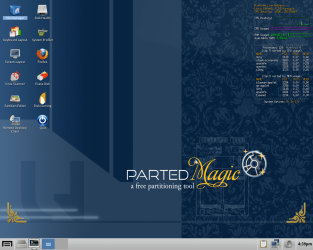
This post and screenshot is from Parted Magic.I saved the screenshot to desktop and uploaded it.

Screenshot - 06222014 - 04:40:10 PM.png

With this I would think, things will be easy.

As Anshad pointed, to disconnect your system drive is always safe. If you can communicate with the above instructions, I would prefer you do so.We would be safe.

From hereon follow the instructions already given by Anshad.

I shall come in only if I have a doubt. Not otherwise.
 
Last edited:

My Computer My Computer

At a glance

Windows 7 Home Premium 32 bit
OS
Windows 7 Home Premium 32 bit
okay, thanks for the clarification everyone.

1. Yes, I can open the File Manager and browse the various partitions and files...

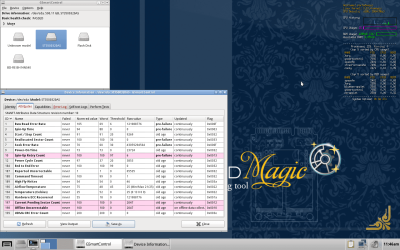
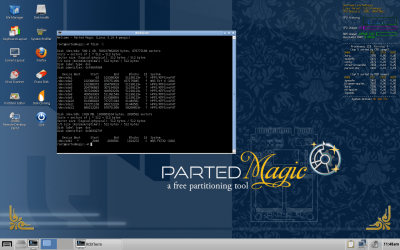
2. attached are the two requested screenshots.
Disk Health and the Attributes screen
Terminal window fdisk screen
 

Attachments

  • Screenshot - attributes.png
    Screenshot - attributes.png
    323.5 KB · Views: 5
  • Screenshot - fdisk.png
    Screenshot - fdisk.png
    367.6 KB · Views: 4

My Computer My Computer

At a glance

Windows 7 Home Premium 32 bitIntel(R) Core(TM)2 Duo CPU E6750 @ 2.66GHz4.00 GB with 3.25 GB available(1) Radeon X1950 Series (Microsoft Corporatio...
OS
Windows 7 Home Premium 32 bit
CPU
Intel(R) Core(TM)2 Duo CPU E6750 @ 2.66GHz
Motherboard
ASUSTeK Computer INC. P5E
Memory
4.00 GB with 3.25 GB available
Graphics Card(s)
(1) Radeon X1950 Series (Microsoft Corporation - WDDM) (
Sound Card
High Definition Audio Device
Hard Drives
(1) WDC WD7501AALS-00J7B0 ATA Device
Please wait till Anshad sees and comes out with further instructions. Only he will lead you. I only watch.:) I am also following his instructions on my comp just to get a feel of parted magic.

I am retiring now.
 

My Computer My Computer

At a glance

Windows 7 Home Premium 32 bit
OS
Windows 7 Home Premium 32 bit
Your hard drive seems to be in SMART Critical status ( Red flagged in GmsartControl ) and there seems to be a huge number of unstable/bad sectors. The drive surface seems to be too damaged and a "DDrescue" cloning will be better suited. However considering the drive's condition i expect a very slow copy and lots of read errors ( and partial corruption of data ).

As soon as you get a new 750 - 1000 GB disk for backup ( Preferably Seagate ), we can start the cloning process. I highly recommend to not attempt any manual data recovery/copy methods to prevent further damage.
 
Last edited:

My Computer My Computer

At a glance

Windows 7 Ultimate x64
Computer type
PC/Desktop
OS
Windows 7 Ultimate x64
Anshad what do you recommend for the cloning as I use Macrium the most and sometimes (mostly in the past) copy disk in Partition Wizard.

I only ask because you say the disk is so damaged.
 

My Computer My Computer

At a glance

Desk1 7 Home Prem / Desk2 10 Pro / Main lap A...Desk1 i5 3750K / Laptop i7 GTX 860M / Desk2 i...Desk1 8GB (1866) / Desk2 16GB (1333) / Laptop...Desk 1& 2NVidia GTX 650 & Laptops on board Intel
Computer type
PC/Desktop
Computer Manufacturer/Model Number
Own build (new) Desk1 / Asus ROG Win 7 / Desk2 1st build
OS
Desk1 7 Home Prem / Desk2 10 Pro / Main lap Asus ROG 10 Pro 2 laptop Toshiba 7 Pro Asus P2520 7 & 10
CPU
Desk1 i5 3750K / Laptop i7 GTX 860M / Desk2 i5 2500
Motherboard
Desk1 Asus P877-V / Desk2 Gigabyte H67 UD3H / Laptop ?
Memory
Desk1 8GB (1866) / Desk2 16GB (1333) / Laptop 8Gb DDR3
Graphics Card(s)
Desk 1& 2NVidia GTX 650 & Laptops on board Intel
Sound Card
Desk 1 & 2 -XONAR DG Realtek High Def audio Laptop
Monitor(s) Displays
Desk 1 Benq HD 2450 / Desk2 Philips 24" / Laptop 17.5"
Screen Resolution
1920x1080 D1 & D2 & Laptop 1
Hard Drives
Desk1 Samsung 120GB 830 SSD
Asus ROG 256GB 850 Pro SSD
Desk2 Samsung 840 256 SSD
Toshiba 120GB EVO
PSU
Desk 1 Corsair HX 1050/ Laptop ? / Desk 2 Corsair HX 650
Case
Desk 1 Cooler HAF XM ? Toshiba laptop / Desk2 Coolermaster
Cooling
Fans on all Desk1 -2 Desk2 - all Coolermasters 5 Laptop ?
Keyboard
Desk 1 MS Sidewinder X6 Desk 2 MS Sidewinder X 4
Mouse
Desk 1&2 - Gigabyte MS 900 gamer - laptop - Logitec wireless
Internet Speed
ADSL2+
Other Info
One other Desktop (tester) and spare Toshba laptop both with SSD's
Running Kaspersky 2016 ISS on all machines config'd identically
Logitec audio stereo systems on each machine (x3)
Canon MG5250MFC
Router/modem TP-Link running WPA2SK
@Icit2, I thought I had already answered this question in my post #113.

"If our suspicion that the HDD is developing bad sectors is true, some of the files copied either with TestDisk or live Linux will be corrupt even if we succeed in copying.

ddrescue while cloning the drive tries to repeatedly read the bad sectors and extract the data in it, which conventional cloning software like Macrium Reflect will not do.The algorithm used in ddrescue is different with focus on bad sector recovery as it clones. First pass clones all good sectors. Subsequent passes - as many as you can order - will target only the bad sectors as logged in its logfile - and try to extract the feeble data in it."

Normally 3 passes is considered sufficient to extract data from a bad sector the assumption being if in three passes a bad sector cannot be recovered, more number of passes may not do anything better except increasing the recovery time..That bad sector is considered irrecoverable and naturally some files recovered will remain corrupted. But the best has been done to recover bad sectors.

I am only interested in seeing how many passes Anshad is going to recommend based on his personal experience.
 

My Computer My Computer

At a glance

Windows 7 Home Premium 32 bit
OS
Windows 7 Home Premium 32 bit
As Jumanji explained "ddrescue" will be the best tool in this scenario. "Macrium" do have an option to ignore bad sectors but that option will simply skip copying bad sectors and write zeros to the target drive. On the other hand "ddrescue" will split entire HDD space in to smaller chunks or blocks and skip copying blocks with bad sectors in the first pass. This will reduce the chance of disk being crashed by trying to read damaged areas. After all good blocks are copied, "ddrescue" will attempt reading bad sectors. We can specify the maximum number of read attempts as an option. As bad sectors are physical defects, chance of successfully copying a damaged sector is low even for "ddrescue". However rescuing all possible sectors is very important in data recovery. A single 512 byte sized sector rescued by "ddrescue" may contain an NTFS boot sector or an important portion of MFT which defines NTFS.
 

My Computer My Computer

At a glance

Windows 7 Ultimate x64
Computer type
PC/Desktop
OS
Windows 7 Ultimate x64
thanks again everyone for all of your help / suggestions.

1. Just to be clear, in order to hopefully recover whatever data I can from this dead drive, I will need to purchase a new hard drive.

2. maybe I should not post this here... but here goes... what drive would you recommend? Here are the two I have my eye on... the customer reviews give me pause though...
Seagate 3TB Desktop HDD SATA III w/ 64MB Cache at Memory Express
WD 3TB Green Hard Drive, SATA III w/ 64MB Cache at Memory Express

3. assuming I acquire one of those... is my system able to handle both that new drive, and my existing working drive? (WD 750GB)

thanks again.
 

My Computer My Computer

At a glance

Windows 7 Home Premium 32 bitIntel(R) Core(TM)2 Duo CPU E6750 @ 2.66GHz4.00 GB with 3.25 GB available(1) Radeon X1950 Series (Microsoft Corporatio...
OS
Windows 7 Home Premium 32 bit
CPU
Intel(R) Core(TM)2 Duo CPU E6750 @ 2.66GHz
Motherboard
ASUSTeK Computer INC. P5E
Memory
4.00 GB with 3.25 GB available
Graphics Card(s)
(1) Radeon X1950 Series (Microsoft Corporation - WDDM) (
Sound Card
High Definition Audio Device
Hard Drives
(1) WDC WD7501AALS-00J7B0 ATA Device

My Computer My Computer

At a glance

Windows 7 Home Premium 32 bitIntel(R) Core(TM)2 Duo CPU E6750 @ 2.66GHz4.00 GB with 3.25 GB available(1) Radeon X1950 Series (Microsoft Corporatio...
OS
Windows 7 Home Premium 32 bit
CPU
Intel(R) Core(TM)2 Duo CPU E6750 @ 2.66GHz
Motherboard
ASUSTeK Computer INC. P5E
Memory
4.00 GB with 3.25 GB available
Graphics Card(s)
(1) Radeon X1950 Series (Microsoft Corporation - WDDM) (
Sound Card
High Definition Audio Device
Hard Drives
(1) WDC WD7501AALS-00J7B0 ATA Device
That 2TB drive will work fine. You can also opt for a disk without NAND cache as it will be cheaper.
 

My Computer My Computer

At a glance

Windows 7 Ultimate x64
Computer type
PC/Desktop
OS
Windows 7 Ultimate x64
Anshad, et al: CrystalDiskInfo can affect Smart values. This might improve disk access time and also buy a bit more time before SMART flags he disk.

One member reportedly used it on a failing drive and the drive has been fine for 5 years. SMART isn't all that smart sometimes. I recently applied this method to a troublesome ext WD drive - the results are inconclusive, but the symptoms were completely different.

Using CrystalDisk in this manner is not a cure, it's a way to workaround SMART.

Health Status Setting
HealthStatusSetting.png


As far as the capacity of the drive, the only factor is that it needs to be greater than 500 GB. Other factors are cost - how much can you afford to spend on a external drive. Do you need 2 TB?

Google Search 1TB - 3TB drives

3TB drives aren't necessarily bad, there are many issues with them because of a previous capacity limitation. People also use docking stations that are not rated for > 2TB.

Of course there might be real issues with any newer technology - the capacity of drives is growing, but the disk remains the same physical size.

There is nothing actionable in this post - it is information for further research only.

Anshad has the lead and his instructions are the ones you need to follow. We're all working together on the issue and we all have experience, but jumanji, ICit2lol, and I are watching and learning about new and other tools Anshad is using. Perhaps, Anshad is learning a bit from our input as well.

Bill
.
 

My Computer My Computer

At a glance

x64 (6.3.9600) Win8.1 Pro & soon dual boot x6...AMD A6-3420M APU with Radeon(tm) HD Graphics6.00 GBAMD Radeon(TM) HD 6520G
Computer type
Laptop
Computer Manufacturer/Model Number
HP Pavilion dv6-6c10us
OS
x64 (6.3.9600) Win8.1 Pro & soon dual boot x64 (6.1.7601) Win7_SP1 HomePrem
CPU
AMD A6-3420M APU with Radeon(tm) HD Graphics
Motherboard
Hewlett-Packard 1805
Memory
6.00 GB
Graphics Card(s)
AMD Radeon(TM) HD 6520G
Sound Card
(1) AMD High Definition Audio Device (2) IDT High Definiti
Monitor(s) Displays
HP W2072a 20" LCD (1600 x 900) @ 60 Hz
Screen Resolution
1366 x 768 x 32 bits (4294967296 colors) @ 60 Hz
Hard Drives
ST640LM0 00 HM641JI SATA Disk Device
Keyboard
Logitech k520 wireless KB
Mouse
Logitech m320 wireless mouse (bundled with KB)
Internet Speed
15/5 | 54 MB Wireless 'n'
Antivirus
Realtime: Defender or Avast | On-demand: Malwarebytes, ESET
Browser
IE 11 on Win8, IE 10 on win 7
Other Info
Media: [Gimp, Audacity, VLC] || Comm: [WEmail 2012, Skype] || Productivity: [OpenOffice,| Textpad] || Utils: [Sysinternals, cCleaner, Speccy, Defraggler]
Back
Top