
Solved How do I recreate a System Reserved Partition?

ChasGrad

New member
Local time
1:10 AM
Messages
12
Location
San Diego, California
Here is a description of what I think the problem is. These occurred over 2 years. Item #11 is my question, the rest is background.
1) Installed Windows 7 upgrade from Windows XP and kept a dual boot system for several months.
2) Changed the BCD to make it just boot to Win7.
3) Later deleted Win7 from my computer.
4) I needed to reinstall Win 7, but it wouldn’t accept the product ID. Microsoft support said it was because XP was no longer present. They helped me solve that problem.
5) I later migrated Win 7 & other programs (all data are on separate HDDS) to a new SSD
6) Moved image of boot drive to a larger SSD, expanded the primary partition on the new drive to make the additional storage available.
7) Removed the old, smaller SSD from the computer, and kept it as a backup.
8) In the process of combining 2 partitions on a 3TB drive I noticed 100MB used for a System Reserved Partition. The SSD boot drive does not have one & neither Win7 or WinXP were on that HDD, so I didn’t think it was used. I booted from a repair disk and used diskpart to delete that partition and another tool to merge it with the primary partition.
9) Now, Win 7 on my new SSD hangs at the splash screen. Trying to repair using my original Windows 7 installation disk doesn’t work (and it wants to resurrect Win XP, which no longer exists except in the depths of the registry).
10) I’m back to running on the smaller SSD (Corsair Force 120 MB) I kept as a backup.
11) I know I can do a fresh install on the unbootable large SSD (Crucial M4 250 GB), but I'm concerned that I will have to first install XP & then the Win7 upgrade. That's a pain even though I have a slipstream SP3. Is there a way to recreate the System Reserved Partition and avoid that? Or is it likely something else is causing the problem?
Thanks for any help you can render
 

My Computer My Computer

At a glance

Windows 7 Home Premium 64 bit SP1 Build 7601Intel core i5-2500, 3.3GHzKingston HyperX DDR3 2x4GBRadeon HD 6850
Computer type
PC/Desktop
Computer Manufacturer/Model Number
custom build
OS
Windows 7 Home Premium 64 bit SP1 Build 7601
CPU
Intel core i5-2500, 3.3GHz
Motherboard
AzRock P67 Extreme 4
Memory
Kingston HyperX DDR3 2x4GB
Graphics Card(s)
Radeon HD 6850
Monitor(s) Displays
NEC MultiSync PA241W
Screen Resolution
1920x1200
Hard Drives
Corsair Force SSD 120 GB
Crucial M4 SSD 250GB
Hitachi 3TB
HD Black 2TB
HD Black 500GB
PSU
Antec CP-850
Case
Antec P183 Ve
Cooling
stock
Keyboard
Logitech wireless
Mouse
Logitech wireless
Internet Speed
28 Mbps download, 4 Mbps upload
Antivirus
Norton 360
Browser
IE11
Use a win7 install disk and boot to "recovery environment". Mark the SSD partition ACTIVE. Try "startup repair".
 

My Computer My Computer

At a glance

Microsoft Windows 7 Home Premium 64-bits 7601...Intel(R) Core(TM) i3 CPU M 370 @ 2.40GHz4,00 GBATI Mobility Radeon HD 5400 Series
Computer type
Laptop
Computer Manufacturer/Model Number
ACER ASPIRE 5742G
OS
Microsoft Windows 7 Home Premium 64-bits 7601 Multiprocessor Free Service Pack 1
CPU
Intel(R) Core(TM) i3 CPU M 370 @ 2.40GHz
Motherboard
Acer Aspire 5742G
Memory
4,00 GB
Graphics Card(s)
ATI Mobility Radeon HD 5400 Series
Sound Card
(1) AMD High Definition Audio Device (2) Realtek High Defi
Screen Resolution
1366 x 768 x 32 bits (4294967296 colors) @ 60 Hz
Hard Drives
WDC WD5000BEVT-22ZAT0
Update: I tried this and got a screen saying "Startup Repair cannot repair this computer automatically"
In running diagnostics I saw the surprise shown here (there is no Windows software on E:), which is likely related to my problem:
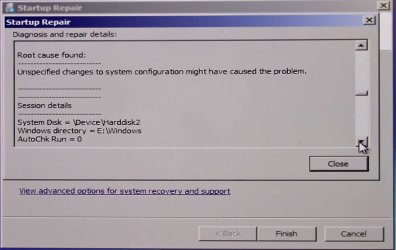
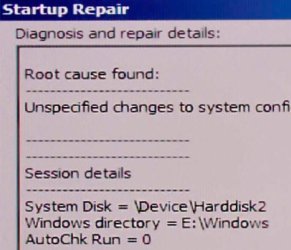
Thanks again for the suggestion.

Thanks, Kaktussot. I've been away for a day. I'll your approach tomorrow, but I've already tried what I could find with the Win7 installation disk. I saw "Repair", but don't recall anything under recovery except the offer to recover XP. But I'll try again. Thanks for responding.
 

Attachments

  • screen 8.jpg
    screen 8.jpg
    200.4 KB · Views: 2
Last edited:

My Computer My Computer

At a glance

Windows 7 Home Premium 64 bit SP1 Build 7601Intel core i5-2500, 3.3GHzKingston HyperX DDR3 2x4GBRadeon HD 6850
Computer type
PC/Desktop
Computer Manufacturer/Model Number
custom build
OS
Windows 7 Home Premium 64 bit SP1 Build 7601
CPU
Intel core i5-2500, 3.3GHz
Motherboard
AzRock P67 Extreme 4
Memory
Kingston HyperX DDR3 2x4GB
Graphics Card(s)
Radeon HD 6850
Monitor(s) Displays
NEC MultiSync PA241W
Screen Resolution
1920x1200
Hard Drives
Corsair Force SSD 120 GB
Crucial M4 SSD 250GB
Hitachi 3TB
HD Black 2TB
HD Black 500GB
PSU
Antec CP-850
Case
Antec P183 Ve
Cooling
stock
Keyboard
Logitech wireless
Mouse
Logitech wireless
Internet Speed
28 Mbps download, 4 Mbps upload
Antivirus
Norton 360
Browser
IE11
Last edited:

My Computer My Computer

At a glance

Windows 10 Pro x64Intel Core i7 6700KGSkill TridentZ RGB 16GB 3600 16-16-16-36EVGA GTX 980 Ti SC x2
Computer type
PC/Desktop
Computer Manufacturer/Model Number
Skylake Special #666
OS
Windows 10 Pro x64
CPU
Intel Core i7 6700K
Motherboard
Asus Sabertooth Z170 Mark 1
Memory
GSkill TridentZ RGB 16GB 3600 16-16-16-36
Graphics Card(s)
EVGA GTX 980 Ti SC x2
Sound Card
Realtek High Definition
Monitor(s) Displays
AOC G2460PG
Screen Resolution
1920 x 1080 144Hz
Hard Drives
Samsung 860 Pro 256GB, Seagate Barracuda 4TB x2
PSU
EVGA 1000 P2, EVGA White Custom Braided Cables
Case
Corsair Vengeance C70 Gunmetal Black
Cooling
Corsair H100i v2, Corsair ML120 x2, Thermal Grizzly Kryonaut
Keyboard
Logitech G910 Orion Spectrum
Mouse
Logitech G700s
Internet Speed
Verizon Fios Quantum Gateway 75/75
Antivirus
Windows Defender, Malwarebytes Free 3.8.3
Browser
Chrome
Other Info
Corsair SP120 x4, LG Blu-ray Drive, Durabrand HT-395 100 Watt Dolby Digital Amp, Corsair H2100 Wireless 7.1 Headset
I've used a System Partition for many years - Long before the release of Windows 7 - as it segregates the system boot operations from the actual operating system or systems. In practical terms this means that any changes to the overall system boot procedures, especially where Multi-boot systems are involved, can be performed more easily, and reliably.

It is not really needed, per se on a single OS machine but even here can provide a little extra security.

In this case I would create a new empty 200-300MB partition at the start of the new SSD, make this active and run the repair option from the installation disk, at least three times, on the new partition, this should set everything up correctly to boot from the new SSD.

However , due to the upgrade situation where this is an ex XP system that has been upgraded I would probably go for a clean install from a full install retail disk, This disk is available from legitimate online sites or could be borrowed from friends, family etc. A clean install should be performed on a completely empty SSD, indeed a formatted disk without any partitioning is often the best media - this re-install will remove all traces of the former XP install and reduce the possibilities of any future issues
 
Last edited:

My Computers My Computers

  • At a glance

    Windows 11 Pro x64 [Latest Release and Releas...Ryzen 9 5950X, 3.8 - 5.2 MHz64GB [2 x 32GB] DDR4 3200MHz4GB NVIDIA GEFORCE GTX 1650 Ti
    Computer type
    PC/Desktop
    Computer Manufacturer/Model Number
    ChillBlast - Custom to my design
    OS
    Windows 11 Pro x64 [Latest Release and Release Preview]
    CPU
    Ryzen 9 5950X, 3.8 - 5.2 MHz
    Motherboard
    Asus Prime X570-Pro
    Memory
    64GB [2 x 32GB] DDR4 3200MHz
    Graphics Card(s)
    4GB NVIDIA GEFORCE GTX 1650 Ti
    Sound Card
    On-board SPDIF to 5.1 System + HDMI [5.1 system]
    Monitor(s) Displays
    32" UHD 32 Bit HDR Monitor + 43" UHD 4K 32Bit HDR TV
    Screen Resolution
    2 x 3840 x 2160 @60Hz
    Hard Drives
    1TB M2 SSD OS, 500GB Fast Access SSD, 2 x 8TB Data + Various Externals from 1TB to 4TB, 10TB NAS
    PSU
    NZXT C750 80 PLUS Gold 750W Modular PSU
    Case
    Workstation Case [Matt Black]
    Cooling
    NZXT Kraken X63 280mm CPU Cooler +2x Quiet Case fans
    Keyboard
    Logitech Wireless MX Keys & K400 + others
    Mouse
    Logitech Wireless MX Master 3S
    Internet Speed
    920 MB Down 50 MB Up
    Antivirus
    BitDefender Total Security Pro
    Browser
    Chrome (always run latest Non-Beta)
    Other Info
    Also run ...
    Laptop - Quad 8GB - Windows 10 Pro x64
    Nexus 7 Android tablet x2
    Samsung 10.2" tablet
    Blackview TAB 8 4G Android Tablet c/w Keyboard
    Wacom Intuos Pro Medium Pen Pad
    Wacom Intuos Pro Small Pen Pad
    Wacom Expresskeys Remote
    Loopdeck+ Graphics Controller
    Shuttle Pro v2 Control
  • At a glance

    Windows 11 Pro x64 Latest RPIntel I7 10750H 5.0GHz32GB [2x16GB] DDR4 2933 MHznVidia GTX1650Ti 4 GB GDDR6
    Computer type
    Laptop
    System Manufacturer/Model Number
    Dell XPS 17 10750H
    OS
    Windows 11 Pro x64 Latest RP
    CPU
    Intel I7 10750H 5.0GHz
    Motherboard
    Dell XPS
    Memory
    32GB [2x16GB] DDR4 2933 MHz
    Graphics Card(s)
    nVidia GTX1650Ti 4 GB GDDR6
    Sound Card
    Stock [Realtek] 4 Speaker
    Monitor(s) Displays
    17" IPS UHD+ Infinity Edge Touchscreen
    Screen Resolution
    3840 x 2400
    Hard Drives
    2TB M2 NVMe, 4TB External + various 500GB & 1TB External NVMe (also have access to spinner HDD from
    PSU
    Stock
    Case
    Stock XPS Aluminium & Carbon Fibre
    Cooling
    Stock - Active Fan Control
    Keyboard
    Backlit + Various Logitech
    Mouse
    Stock Track Pad + Logitech MX Trackball
    Internet Speed
    72 MB Down 18MB Up
    Browser
    Chrome
    Other Info
    Also run ...
    Laptop - Quad 8GB - Windows 10 Pro x64
    Nexus 7 Android tablet x2
    10.2" tablet
    Sony Z3 Android Smartphone
    Wacom Intuos Pro Medium Pen Pad
    Wacom Intuos Pro Small Pen Pad
    Wacom Expresskeys Remote
    Loopdeck+ Graphics Controller
    Shuttle Pro v2 Control Pad
    10TB NAS

My Computer My Computer

At a glance

Windows 10 Pro x64Intel Core i7 6700KGSkill TridentZ RGB 16GB 3600 16-16-16-36EVGA GTX 980 Ti SC x2
Computer type
PC/Desktop
Computer Manufacturer/Model Number
Skylake Special #666
OS
Windows 10 Pro x64
CPU
Intel Core i7 6700K
Motherboard
Asus Sabertooth Z170 Mark 1
Memory
GSkill TridentZ RGB 16GB 3600 16-16-16-36
Graphics Card(s)
EVGA GTX 980 Ti SC x2
Sound Card
Realtek High Definition
Monitor(s) Displays
AOC G2460PG
Screen Resolution
1920 x 1080 144Hz
Hard Drives
Samsung 860 Pro 256GB, Seagate Barracuda 4TB x2
PSU
EVGA 1000 P2, EVGA White Custom Braided Cables
Case
Corsair Vengeance C70 Gunmetal Black
Cooling
Corsair H100i v2, Corsair ML120 x2, Thermal Grizzly Kryonaut
Keyboard
Logitech G910 Orion Spectrum
Mouse
Logitech G700s
Internet Speed
Verizon Fios Quantum Gateway 75/75
Antivirus
Windows Defender, Malwarebytes Free 3.8.3
Browser
Chrome
Other Info
Corsair SP120 x4, LG Blu-ray Drive, Durabrand HT-395 100 Watt Dolby Digital Amp, Corsair H2100 Wireless 7.1 Headset

My Computers My Computers

  • At a glance

    Windows 11 Pro x64 [Latest Release and Releas...Ryzen 9 5950X, 3.8 - 5.2 MHz64GB [2 x 32GB] DDR4 3200MHz4GB NVIDIA GEFORCE GTX 1650 Ti
    Computer type
    PC/Desktop
    Computer Manufacturer/Model Number
    ChillBlast - Custom to my design
    OS
    Windows 11 Pro x64 [Latest Release and Release Preview]
    CPU
    Ryzen 9 5950X, 3.8 - 5.2 MHz
    Motherboard
    Asus Prime X570-Pro
    Memory
    64GB [2 x 32GB] DDR4 3200MHz
    Graphics Card(s)
    4GB NVIDIA GEFORCE GTX 1650 Ti
    Sound Card
    On-board SPDIF to 5.1 System + HDMI [5.1 system]
    Monitor(s) Displays
    32" UHD 32 Bit HDR Monitor + 43" UHD 4K 32Bit HDR TV
    Screen Resolution
    2 x 3840 x 2160 @60Hz
    Hard Drives
    1TB M2 SSD OS, 500GB Fast Access SSD, 2 x 8TB Data + Various Externals from 1TB to 4TB, 10TB NAS
    PSU
    NZXT C750 80 PLUS Gold 750W Modular PSU
    Case
    Workstation Case [Matt Black]
    Cooling
    NZXT Kraken X63 280mm CPU Cooler +2x Quiet Case fans
    Keyboard
    Logitech Wireless MX Keys & K400 + others
    Mouse
    Logitech Wireless MX Master 3S
    Internet Speed
    920 MB Down 50 MB Up
    Antivirus
    BitDefender Total Security Pro
    Browser
    Chrome (always run latest Non-Beta)
    Other Info
    Also run ...
    Laptop - Quad 8GB - Windows 10 Pro x64
    Nexus 7 Android tablet x2
    Samsung 10.2" tablet
    Blackview TAB 8 4G Android Tablet c/w Keyboard
    Wacom Intuos Pro Medium Pen Pad
    Wacom Intuos Pro Small Pen Pad
    Wacom Expresskeys Remote
    Loopdeck+ Graphics Controller
    Shuttle Pro v2 Control
  • At a glance

    Windows 11 Pro x64 Latest RPIntel I7 10750H 5.0GHz32GB [2x16GB] DDR4 2933 MHznVidia GTX1650Ti 4 GB GDDR6
    Computer type
    Laptop
    System Manufacturer/Model Number
    Dell XPS 17 10750H
    OS
    Windows 11 Pro x64 Latest RP
    CPU
    Intel I7 10750H 5.0GHz
    Motherboard
    Dell XPS
    Memory
    32GB [2x16GB] DDR4 2933 MHz
    Graphics Card(s)
    nVidia GTX1650Ti 4 GB GDDR6
    Sound Card
    Stock [Realtek] 4 Speaker
    Monitor(s) Displays
    17" IPS UHD+ Infinity Edge Touchscreen
    Screen Resolution
    3840 x 2400
    Hard Drives
    2TB M2 NVMe, 4TB External + various 500GB & 1TB External NVMe (also have access to spinner HDD from
    PSU
    Stock
    Case
    Stock XPS Aluminium & Carbon Fibre
    Cooling
    Stock - Active Fan Control
    Keyboard
    Backlit + Various Logitech
    Mouse
    Stock Track Pad + Logitech MX Trackball
    Internet Speed
    72 MB Down 18MB Up
    Browser
    Chrome
    Other Info
    Also run ...
    Laptop - Quad 8GB - Windows 10 Pro x64
    Nexus 7 Android tablet x2
    10.2" tablet
    Sony Z3 Android Smartphone
    Wacom Intuos Pro Medium Pen Pad
    Wacom Intuos Pro Small Pen Pad
    Wacom Expresskeys Remote
    Loopdeck+ Graphics Controller
    Shuttle Pro v2 Control Pad
    10TB NAS
You've been given several good suggestions. If you have any problems doing the http://www.sevenforums.com/tutorials/71432-partition-mark-active.html to run http://www.sevenforums.com/tutorials/105541-startup-repair-run-3-separate-times.html on either C or a SysReserved partition you Create Primary, please boot free Partition Wizard CD to take a picture of the full drive map and listings and post it back attaching picture using paper clip in Reply Box. We can normally spot the problem, like a Logical partition which needs to be converted to Primary first.

Burn PW CD ISO to disk using WIndows Image Burner. It can also be used to shrink to create SySReserved, Create and Format NTFS, Mark Active, and an interim step before repairs to highlight the disk # to Rebuild MBR from Disk tab which might preclude the need for the repairs.
 
I extend a heartfelt THANK YOU to all of you have taken time to answer my question. I have read every one of them (as well as many of the places they led me). I have decided that, though it might be interesting to try the various methods proposed to get that drive to boot again, I am rapidly approaching the point where I will have spent more time trying to avoid a fresh install than it would take me to do it. This is especially true since I learned from you how to download an up-to-date Win7 iso and install it without XP being present. So, I now have a list of all my installed programs and their IDs and disks or installer locations. Now all I need is time to do it. I’m going to try the UEFI approach, since I’m pretty sure my Asrock P67 Extreme 4 mobo supports it. I figure the worst that happen is that I'll have to start over.
I plan to unplug the small SSD I’m booting from now before I install Win7 on the larger one. I have a related question, which might be better on its own thread, but it is related to what I’ve decided to do based on your advice. I never got around to implementing ACHI because I didn’t think to do it at first then became worried about what happen if did it later. This seems as good a time as any. My question is: should I do it before I unplug the current bootable SSD (which will become my new disaster recovery plan for a while) or after or does it make any difference? Once I select that option is it applied to all SATA drives? It didn’t look like there was a way to just apply it to a single drive.
I am sorry for not replying for a few days. My little consulting company needed a lot of my attention and I need every nickel of revenue I can get from it, so I can’t afford to put off responding to requests for help. I will let you all know if I am successful. Thank you again for all your suggestions. I learned from the suggestions I’m not going to use as well as the ones I am going to use. What a wealth of knowledge is available for the asking!
 

My Computer My Computer

At a glance

Windows 7 Home Premium 64 bit SP1 Build 7601Intel core i5-2500, 3.3GHzKingston HyperX DDR3 2x4GBRadeon HD 6850
Computer type
PC/Desktop
Computer Manufacturer/Model Number
custom build
OS
Windows 7 Home Premium 64 bit SP1 Build 7601
CPU
Intel core i5-2500, 3.3GHz
Motherboard
AzRock P67 Extreme 4
Memory
Kingston HyperX DDR3 2x4GB
Graphics Card(s)
Radeon HD 6850
Monitor(s) Displays
NEC MultiSync PA241W
Screen Resolution
1920x1200
Hard Drives
Corsair Force SSD 120 GB
Crucial M4 SSD 250GB
Hitachi 3TB
HD Black 2TB
HD Black 500GB
PSU
Antec CP-850
Case
Antec P183 Ve
Cooling
stock
Keyboard
Logitech wireless
Mouse
Logitech wireless
Internet Speed
28 Mbps download, 4 Mbps upload
Antivirus
Norton 360
Browser
IE11
You can first change to AHCI to make the smaller SSD bootable so it will plug and play without adjustment later: http://www.sevenforums.com/tutorials/61869-ahci-enable-windows-7-vista.html. Note that these drives under AHCI can be hotplugged and may show up in your Safely Remove queue.

I'd look for any newer BIOS updates, too, to see what they offer as it may be related.

Then work through these same steps for http://www.sevenforums.com/tutorials/219487-clean-reinstall-factory-oem-windows-7-a.html#post1839164 which compile everything that's worked best in Win7 installs since beta and assure a perfect install as long as you stick with those tools and methods.

Be sure to delete all partitions during the booted install, pay close attention to the sections in red which deal with how drivers are best handled in the first driver-complete OS.
 
You've been given several good suggestions. If you have any problems doing the http://www.sevenforums.com/tutorials/71432-partition-mark-active.html to run http://www.sevenforums.com/tutorials/105541-startup-repair-run-3-separate-times.html on either C or a SysReserved partition you Create Primary, please boot free Partition Wizard CD to take a picture of the full drive map and listings and post it back attaching picture using paper clip in Reply Box. We can normally spot the problem, like a Logical partition which needs to be converted to Primary first.

Burn PW CD ISO to disk using WIndows Image Burner. It can also be used to shrink to create SySReserved, Create and Format NTFS, Mark Active, and an interim step before repairs to highlight the disk # to Rebuild MBR from Disk tab which might preclude the need for the repairs.

Thanks for the suggestions. Partition Wizard is what I used to delete the System Partition, which is likely the cause of my problem. I also used it to change some drive letter assignments, but I don't remember the original assignments. Startup Repair couldn’t repair anything, but its diagnosis said the System Disk = Harddisk2 and that the Windows directory = E:\Windows, but the System resides on C:, which, according to PW, is disk 5. Maybe there is a registry tweak that will let me correct those. I’ve included a picture of PW’s take on my disks. Some comments:
Disk 1 (J:Win7Boot) is the 250GB SSD that won’t boot.
Disk 2 (F:WD ScorpioBlack 320GB) is an old HDD holding backups of backups.
Disk 3 (D:Data WD Black 2TB) is my main data HDD. Docs. Pictures, videos, etc.
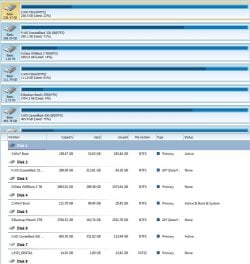
Disk 4 (C:Win7 Boot) is the 120GB SSD I’m currently booting from. Most apps live here too.
Disk 5 (E: Backup Hitachi 3TB) is now for backups. Used to have 3 partitions, 2 of which I purposely created: a 2TB chunk for data now residing on Disk 3, a new TB drive), and a 1 TB piece for backups (always filling up). After I got Partition Wizard I discovered a 3rd 100MB partition at the beginning. I guess I should have left it alone; this was the system reserved partition I deleted with PW.
Disks 6 – 8 are more data disks (7&8 are external).
Even though I’ve gathered everything for a clean installation, I’m going to try your approach first. Maybe I can learn something. If it doesn’t work I can use the clean install as plan B. BUT I don't quite understand your last instruction regarding using PW to "to shrink to create SySReserved, Create and Format NTFS, Mark Active, and an interim step before repairs to highlight the disk # to Rebuild MBR from Disk tab". It sounds like I shrink the single partition on Disk 1 to make room for system stuff, but I don't understand the rest of the stuff. Sorry to be so obtusestartup repair.jpg

2014-08-23_23-34-23.jpg. I'm trying. Thanks for any help you can render.
 

My Computer My Computer

At a glance

Windows 7 Home Premium 64 bit SP1 Build 7601Intel core i5-2500, 3.3GHzKingston HyperX DDR3 2x4GBRadeon HD 6850
Computer type
PC/Desktop
Computer Manufacturer/Model Number
custom build
OS
Windows 7 Home Premium 64 bit SP1 Build 7601
CPU
Intel core i5-2500, 3.3GHz
Motherboard
AzRock P67 Extreme 4
Memory
Kingston HyperX DDR3 2x4GB
Graphics Card(s)
Radeon HD 6850
Monitor(s) Displays
NEC MultiSync PA241W
Screen Resolution
1920x1200
Hard Drives
Corsair Force SSD 120 GB
Crucial M4 SSD 250GB
Hitachi 3TB
HD Black 2TB
HD Black 500GB
PSU
Antec CP-850
Case
Antec P183 Ve
Cooling
stock
Keyboard
Logitech wireless
Mouse
Logitech wireless
Internet Speed
28 Mbps download, 4 Mbps upload
Antivirus
Norton 360
Browser
IE11
Disk 4 is booting the System as signified by System (in Disk Mgmt, Boot in PW), Active flags. Disk0 has no System flag so cannot boot itself until it does.

There's no real reason to create a System Reserved partition unless Repairs don't work. Just unplug all other hard drives except Disk0, run http://www.sevenforums.com/tutorials/105541-startup-repair-run-3-separate-times.html. If using Partition Wizard then before running the repairs highlight the disk, from Disk tab run Rebuild MBR which may be enough.

When you plug back in the other drives make sure Disk0 remains first HD to boot in BIOS setup. Trigger your other SSD to boot if needed by using the one-time BIOS Boot menu key to choose it.
 
Startup Repair doesn't work

Disk 4 is booting the System as signified by System (in Disk Mgmt, Boot in PW), Active flags. Disk0 has no System flag so cannot boot itself until it does.

There's no real reason to create a System Reserved partition unless Repairs don't work. Just unplug all other hard drives except Disk0, run http://www.sevenforums.com/tutorials/105541-startup-repair-run-3-separate-times.html. If using Partition Wizard then before running the repairs highlight the disk, from Disk tab run Rebuild MBR which may be enough.

When you plug back in the other drives make sure Disk0 remains first HD to boot in BIOS setup. Trigger your other SSD to boot if needed by using the one-time BIOS Boot menu key to choose it.

I unplugged all other drives except Disk0 (after I got past the confusion from PW disk numbering starting at 1 and Windows Disk Management starting at 0). We do that because it's easier and more fail safe than setting any other active drives to inactive, right?

I first tried it with the original Windows installation disk, but that yielded a message saying "This version of System Recovery Options is not compatible with the version of Windows you're trying to repair". I used the 64-bit install disk & that is what I have installed. Next I tried a repair disk. That let me proceed to Startup Repair, but when it looked for installed systems to repair, it only found what it thought was Windows XP (see figure). The only drives connected were the SSD with Win7 on it and the DVD Repair Disk. I searched both for "Windows XP", but didn't find anything it looked like I could change (or even anything that looked (to me) like it might be connected to the problem). Same thing with the registry. XP only appeared there in conjunction with XPS or srvsvc.dll.

I ran Startup repair anyway (4 times since the link you provided said "at least 3 times" to no avail.

Do you have any suggestions?
 

Attachments

  • system recovery options.jpg
    system recovery options.jpg
    571.5 KB · Views: 2

My Computer My Computer

At a glance

Windows 7 Home Premium 64 bit SP1 Build 7601Intel core i5-2500, 3.3GHzKingston HyperX DDR3 2x4GBRadeon HD 6850
Computer type
PC/Desktop
Computer Manufacturer/Model Number
custom build
OS
Windows 7 Home Premium 64 bit SP1 Build 7601
CPU
Intel core i5-2500, 3.3GHz
Motherboard
AzRock P67 Extreme 4
Memory
Kingston HyperX DDR3 2x4GB
Graphics Card(s)
Radeon HD 6850
Monitor(s) Displays
NEC MultiSync PA241W
Screen Resolution
1920x1200
Hard Drives
Corsair Force SSD 120 GB
Crucial M4 SSD 250GB
Hitachi 3TB
HD Black 2TB
HD Black 500GB
PSU
Antec CP-850
Case
Antec P183 Ve
Cooling
stock
Keyboard
Logitech wireless
Mouse
Logitech wireless
Internet Speed
28 Mbps download, 4 Mbps upload
Antivirus
Norton 360
Browser
IE11
I have never seen that before. Unless XP was on the drive it is a major problem.

Scroll to the Bootrec commands in Failure to Start tutorial to see if they can sort it, especially bootsect to rebuild boot. Then run Startup Repairs. No need to back up BCD on there as it likely needs all boot code wiped with Clean command. But there are a few things to try first.
 
Last edited:
Thanks for your help!

I decided to go for the clean install. I spent more time trying to avoid it than it took to do it. But it wasn't wasted time because I learned a lot. I probably seem pretty uninformed to you guys, but a lot of even more uninformed people rely on me to keep their system working and explain things to them. I think I could have eventually solved it with more discussion, but I can't afford any more time on it. Thanks to you guys, I (finally) switched from IDE to AHCI and I did a clean install using the downloaded Win7 SP1 iso and my Win7 upgrade disk. I used UEFI and opted to keep the System Reserved Partition (which I now understand MUCH better thanks to you). Thanks especially to gregrocker and Barman58. I appreciate not only your instruction, hints and suggestions, but the tutorials you recommended. I'm marking this one solved.:D
 

My Computer My Computer

At a glance

Windows 7 Home Premium 64 bit SP1 Build 7601Intel core i5-2500, 3.3GHzKingston HyperX DDR3 2x4GBRadeon HD 6850
Computer type
PC/Desktop
Computer Manufacturer/Model Number
custom build
OS
Windows 7 Home Premium 64 bit SP1 Build 7601
CPU
Intel core i5-2500, 3.3GHz
Motherboard
AzRock P67 Extreme 4
Memory
Kingston HyperX DDR3 2x4GB
Graphics Card(s)
Radeon HD 6850
Monitor(s) Displays
NEC MultiSync PA241W
Screen Resolution
1920x1200
Hard Drives
Corsair Force SSD 120 GB
Crucial M4 SSD 250GB
Hitachi 3TB
HD Black 2TB
HD Black 500GB
PSU
Antec CP-850
Case
Antec P183 Ve
Cooling
stock
Keyboard
Logitech wireless
Mouse
Logitech wireless
Internet Speed
28 Mbps download, 4 Mbps upload
Antivirus
Norton 360
Browser
IE11
Glad to hear it.

Did you figure out why XP was listed as found OS in Win7 repair? Had XP been on the drive and not correctly had its partition deleted?

Did you wipe HD first before reinstall?

Let us know how performance goes. Should be perfect if you stick with tools and methods in Reinstall tutorial.
 
re Glad to hear it

re did I figure out why XP was listed as found OS in Windows Repair. Not exactly. I wanted to explore that, but couldn't afford any more time for it. It is related to the fact that I originally had XP installed on a regular hard drive and then installed Windows 7 on that same drive. I didn't like XP being the default OS (I had to hang around to choose Win7 after power-on), so I used Easy-BCD to change the default without knowing a lot about what or where BCD was. Later I got rid of XP (probably just deleted it while running Win7, but I don't recall for sure). Let my antivirus sw lapse for 3 days and Murphy's Law ensured that I got a rootkit virus in that period. Got rid of it but must have had vestiges that caused other boot prblms. A long call with Microsoft support ended with a support tech making a registry change that made the computer unbootable ("sorry about that. Is there anything else I can help you with?"). Tried to reinstall Win7 but couldn't because XP not there. Called Microsoft again and they helped me (I'm sure it was the same technique I learned here). I installed Win 7 on a new drive (HDD). Then I built a new rig and moved Win7 to a SSD. New drives & new partitions were added and new drive letter assignments made. The System Reserve Partition somehow survived all that and did not live on the same drive as the OS. I can (now) sort of understand how that could lead to my problem. But to the best of my recollection, no OS has ever lived on that 3TB Hitachi drive. I got it specifically for data. Since I always keep my OS (& most apps) on a separate drive than my data, I would not install an OS on a drive that size. So how did the System Reserved Partition get on that drive? It could have been some of the mucking around I did with Easy BCD. I guess that's the danger of making some things easy.
 

My Computer My Computer

At a glance

Windows 7 Home Premium 64 bit SP1 Build 7601Intel core i5-2500, 3.3GHzKingston HyperX DDR3 2x4GBRadeon HD 6850
Computer type
PC/Desktop
Computer Manufacturer/Model Number
custom build
OS
Windows 7 Home Premium 64 bit SP1 Build 7601
CPU
Intel core i5-2500, 3.3GHz
Motherboard
AzRock P67 Extreme 4
Memory
Kingston HyperX DDR3 2x4GB
Graphics Card(s)
Radeon HD 6850
Monitor(s) Displays
NEC MultiSync PA241W
Screen Resolution
1920x1200
Hard Drives
Corsair Force SSD 120 GB
Crucial M4 SSD 250GB
Hitachi 3TB
HD Black 2TB
HD Black 500GB
PSU
Antec CP-850
Case
Antec P183 Ve
Cooling
stock
Keyboard
Logitech wireless
Mouse
Logitech wireless
Internet Speed
28 Mbps download, 4 Mbps upload
Antivirus
Norton 360
Browser
IE11
Let us know how performance goes

Glad to hear it.

Did you figure out why XP was listed as found OS in Win7 repair? Had XP been on the drive and not correctly had its partition deleted?

Did you wipe HD first before reinstall?

Let us know how performance goes. Should be perfect if you stick with tools and methods in Reinstall tutorial.
I am a little disappointed in performance. It takes about a minute to boot (How easily we get spoiled! A whole minute!). About 15 seconds to the Windows logo and another 50 seconds to where I can actually do something. It takes a second or so for Fences and some other startup apps that I'm OK with to start. I haven't checked Startup yet to see if there are things I need to stop. Websites also seem a little sluggish in IE11. There's no reason I know of to expect the 250GB Crucial SSD to be noticeably faster than the 128 GB Corsair Force 3 SSD, but I though a fresh install might speed things up a little. I also read that AHCI would give about a 10% improvement over IDE, but boot-up time is the same as near as I can tell.

I didn't "wipe" the SSD before install - I just (quick) formatted it. Would that make a difference?
 

My Computer My Computer

At a glance

Windows 7 Home Premium 64 bit SP1 Build 7601Intel core i5-2500, 3.3GHzKingston HyperX DDR3 2x4GBRadeon HD 6850
Computer type
PC/Desktop
Computer Manufacturer/Model Number
custom build
OS
Windows 7 Home Premium 64 bit SP1 Build 7601
CPU
Intel core i5-2500, 3.3GHz
Motherboard
AzRock P67 Extreme 4
Memory
Kingston HyperX DDR3 2x4GB
Graphics Card(s)
Radeon HD 6850
Monitor(s) Displays
NEC MultiSync PA241W
Screen Resolution
1920x1200
Hard Drives
Corsair Force SSD 120 GB
Crucial M4 SSD 250GB
Hitachi 3TB
HD Black 2TB
HD Black 500GB
PSU
Antec CP-850
Case
Antec P183 Ve
Cooling
stock
Keyboard
Logitech wireless
Mouse
Logitech wireless
Internet Speed
28 Mbps download, 4 Mbps upload
Antivirus
Norton 360
Browser
IE11
You may have weird boot code which would produce that repair result which is why I suggested wiping the HD - the whole point of the reinstall.

If you have a bunch of crap starting with Win7 then you're also not following the tutorial which has helped a million users get a perfect install. You don't need anything except AV and sync starting with Windows
 
Not sure why it`s taking so long, I just put a Crucial M550 in my HP 6300 and it takes 18 seconds from the time I push the power button to get to the desktop.

As Greg suggested, go through your startup programs.
 

My Computer My Computer

At a glance

Windows 10 Pro x64Intel Core i7 6700KGSkill TridentZ RGB 16GB 3600 16-16-16-36EVGA GTX 980 Ti SC x2
Computer type
PC/Desktop
Computer Manufacturer/Model Number
Skylake Special #666
OS
Windows 10 Pro x64
CPU
Intel Core i7 6700K
Motherboard
Asus Sabertooth Z170 Mark 1
Memory
GSkill TridentZ RGB 16GB 3600 16-16-16-36
Graphics Card(s)
EVGA GTX 980 Ti SC x2
Sound Card
Realtek High Definition
Monitor(s) Displays
AOC G2460PG
Screen Resolution
1920 x 1080 144Hz
Hard Drives
Samsung 860 Pro 256GB, Seagate Barracuda 4TB x2
PSU
EVGA 1000 P2, EVGA White Custom Braided Cables
Case
Corsair Vengeance C70 Gunmetal Black
Cooling
Corsair H100i v2, Corsair ML120 x2, Thermal Grizzly Kryonaut
Keyboard
Logitech G910 Orion Spectrum
Mouse
Logitech G700s
Internet Speed
Verizon Fios Quantum Gateway 75/75
Antivirus
Windows Defender, Malwarebytes Free 3.8.3
Browser
Chrome
Other Info
Corsair SP120 x4, LG Blu-ray Drive, Durabrand HT-395 100 Watt Dolby Digital Amp, Corsair H2100 Wireless 7.1 Headset
Back
Top