How do I reinstall my Broadcom BCM 57780 Ethernet Card

Constmanger

New member
Local time
12:26 AM
Messages
4
I had to reload Windows 7 and could not get my ethernet card to work. The drivers I will trying to load were also not working. I uninstalled the hardware and can't seem to reinstall it. This came with my computer and I don't seem to have any other disks other than the Dell Driver Disk. Is there an installation driver I can download to allow the computer to recongnize the hardware again? Thanks.
 

My Computer My Computer

At a glance

Windows 7 Home Premium 64 bit
Computer type
PC/Desktop
Computer Manufacturer/Model Number
Dell Studio 8100 XPS
OS
Windows 7 Home Premium 64 bit

My Computer My Computer

At a glance

Win7 Ultimate X64Intel i5 3570K8GB DDR3 1600Onboard
Computer type
PC/Desktop
Computer Manufacturer/Model Number
Pauly Special
OS
Win7 Ultimate X64
CPU
Intel i5 3570K
Motherboard
Gigabyte Z77X-DS3H
Memory
8GB DDR3 1600
Graphics Card(s)
Onboard
Sound Card
Onboard
Screen Resolution
1280x1024
Hard Drives
Samsung 840 Evo SSD (OS)
1TB Spinner (Data)
PSU
800W Arctic
Case
Cooler Master
Cooling
3x120mm Fans
Keyboard
MS Wireless
Mouse
MS Wireless
Internet Speed
20M
Thanks for the quick response. I will try this tonight and let you know how I make out.
 

My Computer My Computer

At a glance

Windows 7 Home Premium 64 bit
Computer type
PC/Desktop
Computer Manufacturer/Model Number
Dell Studio 8100 XPS
OS
Windows 7 Home Premium 64 bit
The files unzipped, but I am getting an error message from Windows Installer "This installation package is not supported by this processor type. Contact your product vendor." Any thoughts?
 

My Computer My Computer

At a glance

Windows 7 Home Premium 64 bit
Computer type
PC/Desktop
Computer Manufacturer/Model Number
Dell Studio 8100 XPS
OS
Windows 7 Home Premium 64 bit
Just realised I went to UK dell site and you US
May be worth double checking that is the correct file for your machine as there could be differences between regional models

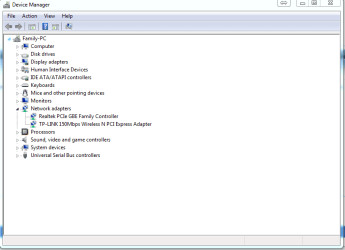
Have a look in device manager screen and see what is listed under network manager
Do you have your device listed with a yellow caution mark next to it ?

Here is an example of mine with the network tab expanded showing my onboard Ethernet and my add on wireless card, post a screen shot of yours if you are not sure

Capture.PNG
 

My Computer My Computer

At a glance

Win7 Ultimate X64Intel i5 3570K8GB DDR3 1600Onboard
Computer type
PC/Desktop
Computer Manufacturer/Model Number
Pauly Special
OS
Win7 Ultimate X64
CPU
Intel i5 3570K
Motherboard
Gigabyte Z77X-DS3H
Memory
8GB DDR3 1600
Graphics Card(s)
Onboard
Sound Card
Onboard
Screen Resolution
1280x1024
Hard Drives
Samsung 840 Evo SSD (OS)
1TB Spinner (Data)
PSU
800W Arctic
Case
Cooler Master
Cooling
3x120mm Fans
Keyboard
MS Wireless
Mouse
MS Wireless
Internet Speed
20M
I did have an exclamtion point after trying to download the driver (from the US site) and got the same message. I uninstalled the device hoping to reinstall it and am still getting the same message.
 

My Computer My Computer

At a glance

Windows 7 Home Premium 64 bit
Computer type
PC/Desktop
Computer Manufacturer/Model Number
Dell Studio 8100 XPS
OS
Windows 7 Home Premium 64 bit
Do you have any other means of getting this machine connected to the net ? if so try this
Firstly make sure you have enabled auto driver updating from windows update http://www.sevenforums.com/tutorials/2803-device-installation-settings.html
Then do manual checks through windows update to make sure you are up to date, hopefully this will allow WU to find the driver for you

If not it may be worth trying to let your machine find the driver you downloaded rather than forcing the update installer to execute, I have had limited success with this in the past
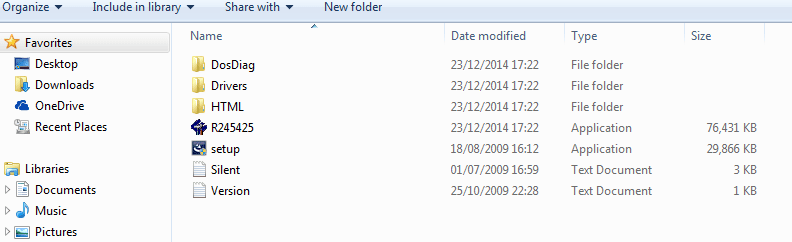
Create a folder on your desktop then put the downloaded driver into it, then extract all the files from the .exe installer into that same folder (you can do this with 7zip or similar)
You should end up with a folder that has this contents

Capturemngf.PNG

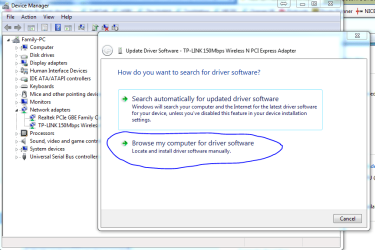
Then go to device manager and select to update the driver, when it asks select browse my computer for the driver

Capture.PNG

Then point towards the folder with the extracted driver files inside and see if it will auto install what it needs

If this doesn't work then your other option will be to try and get the driver direct from the manufacturers site but as this is a dell its probably a no go
 

My Computer My Computer

At a glance

Win7 Ultimate X64Intel i5 3570K8GB DDR3 1600Onboard
Computer type
PC/Desktop
Computer Manufacturer/Model Number
Pauly Special
OS
Win7 Ultimate X64
CPU
Intel i5 3570K
Motherboard
Gigabyte Z77X-DS3H
Memory
8GB DDR3 1600
Graphics Card(s)
Onboard
Sound Card
Onboard
Screen Resolution
1280x1024
Hard Drives
Samsung 840 Evo SSD (OS)
1TB Spinner (Data)
PSU
800W Arctic
Case
Cooler Master
Cooling
3x120mm Fans
Keyboard
MS Wireless
Mouse
MS Wireless
Internet Speed
20M
Back
Top