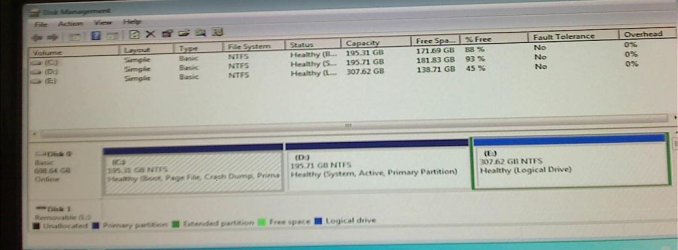
How do I remove the dual boot option for Win 7 and winXP?

ksbtradio

New member
Local time
7:09 PM
Messages
4
I upgraded from windows XP to window 7 and got stuck with the dual boot setup. All that I need to do is access the boot menu and change it. However I am finding that it isn't as easy to find in windows 7. When I checked MSconfig the only OS listed was windows 7. Still it stops at the beginning and asks the question. I want to keep windows 7 in the boot process and dump XP.

Thanks

Mike
 

My Computer My Computer

At a glance

Windows 7 Ultimate 64 bitIntel Duel Core E 6500 2.86 gigahertz4 gigsnvidia 9500
Computer Manufacturer/Model Number
I made it
OS
Windows 7 Ultimate 64 bit
CPU
Intel Duel Core E 6500 2.86 gigahertz
Motherboard
ASUS P5KPL-CM Main Board
Memory
4 gigs
Graphics Card(s)
nvidia 9500
Sound Card
Onboard Realtek
Monitor(s) Displays
Acer 21.5
Hard Drives
Weste digital Black 750 gih Sata
PSU
500 watt Galaxis
Case
Full tower
Cooling
Fan forward aft and on the side

My Computer My Computer

At a glance

Microsoft Windows 10 Pro Insider Preview 64-bitIntel(R) Core(TM) i3-4130 CPU @ 3.40GHzCorsair Vengence 4GB x2 (8.00GB Dual-Channel ...2047MB GeForce GTS 450 (ZOTAC International)
Computer type
PC/Desktop
Computer Manufacturer/Model Number
Self Assembled
OS
Microsoft Windows 10 Pro Insider Preview 64-bit
CPU
Intel(R) Core(TM) i3-4130 CPU @ 3.40GHz
Motherboard
Gigabyte Technology Co., Ltd. B85M-D3H
Memory
Corsair Vengence 4GB x2 (8.00GB Dual-Channel DDR3 @ 798MHz)
Graphics Card(s)
2047MB GeForce GTS 450 (ZOTAC International)
Sound Card
Onboard (Realtek High Definition Audio)
Monitor(s) Displays
LG Flatron E2040T
Screen Resolution
1600x900
Hard Drives
Western Digital 1 TB
Seagate 500 GB
PSU
Corsair VS550
Case
Cooler Master K380
Cooling
Cooler Master Seidon 120V Plus
Keyboard
Logitech MK260r
Mouse
Logitech MK260r
Internet Speed
PMPL Broadband
Antivirus
Windows Defender + MBAM
Browser
Firefox
Other Info
Dell Studio 15" Laptop
Hello Mike, and welcome to Seven Forums.

Before we can give you accurate advice, could you post a screenshot of your Disk Management (diskmgmt.msc) window showing all of your HDD's layout? :)

EDIT:
LOL, looks like we are thinking alike today Archie. ;)
 

My Computer My Computer

At a glance

64-bit Windows 11 Pro for WorkstationsIntel i7-8700K OC'd to 5 GHz64 GB (4x16GB) G.SKILL TridentZ RGB DDR4 3600...ASUS ROG-STRIX-GTX1080TI-O11G-GAMING
Computer type
PC/Desktop
Computer Manufacturer/Model Number
Self built custom
OS
64-bit Windows 11 Pro for Workstations
CPU
Intel i7-8700K OC'd to 5 GHz
Motherboard
ASUS ROG Maximus XI Formula Z390
Memory
64 GB (4x16GB) G.SKILL TridentZ RGB DDR4 3600 MHz
Graphics Card(s)
ASUS ROG-STRIX-GTX1080TI-O11G-GAMING
Sound Card
Integrated
Monitor(s) Displays
2 x Samsung Odyssey G7 27"
Screen Resolution
2560x1440
Hard Drives
1TB Samsung 990 PRO M.2,
4TB Samsung 990 PRO PRO M.2,
TerraMaster F8 SSD Plus NAS
PSU
Seasonic Prime Titanium 850W
Case
Thermaltake Core P3
Cooling
Corsair Hydro H115i
Keyboard
Logitech wireless K800
Mouse
Logitech MX Master 4
Internet Speed
2 Gb/s Download and 100 Mb/s Upload
Antivirus
Malwarebyte Anti-Malware Premium
Browser
Google Chrome
Other Info
Logitech Z625 speaker system,
Logitech BRIO 4K Pro webcam,
HP Color LaserJet Pro MFP M477fdn,
APC SMART-UPS RT 1000 XL - SURT1000XLI,
Galaxy S23 Plus phone
Diskmgt.JPG
 

My Computer My Computer

At a glance

Windows 7 Ultimate 64 bitIntel Duel Core E 6500 2.86 gigahertz4 gigsnvidia 9500
Computer Manufacturer/Model Number
I made it
OS
Windows 7 Ultimate 64 bit
CPU
Intel Duel Core E 6500 2.86 gigahertz
Motherboard
ASUS P5KPL-CM Main Board
Memory
4 gigs
Graphics Card(s)
nvidia 9500
Sound Card
Onboard Realtek
Monitor(s) Displays
Acer 21.5
Hard Drives
Weste digital Black 750 gih Sata
PSU
500 watt Galaxis
Case
Full tower
Cooling
Fan forward aft and on the side
Right click on the computer icon and select "manage" to open the computer management window. Look at the left pane, at the bottom, disk management is under storage. Click on it, maximize the resulting window. Now Start > all programs > accessories > snipping tool , and snip the entire window.

Then follow the steps described in http://www.sevenforums.com/tutorials/9733-screenshots-files-upload-post-seven-forums.html .

EDIT : Now it is there ! Download and install EasyBCD 2.0 from links in the the bottom left of the page http://neosmart.net/EasyBCD/ , install and run it, open the boot tab, and see how many listings are there.

If there is an XP entry, select it, and delete it.
 

My Computer My Computer

At a glance

Microsoft Windows 10 Pro Insider Preview 64-bitIntel(R) Core(TM) i3-4130 CPU @ 3.40GHzCorsair Vengence 4GB x2 (8.00GB Dual-Channel ...2047MB GeForce GTS 450 (ZOTAC International)
Computer type
PC/Desktop
Computer Manufacturer/Model Number
Self Assembled
OS
Microsoft Windows 10 Pro Insider Preview 64-bit
CPU
Intel(R) Core(TM) i3-4130 CPU @ 3.40GHz
Motherboard
Gigabyte Technology Co., Ltd. B85M-D3H
Memory
Corsair Vengence 4GB x2 (8.00GB Dual-Channel DDR3 @ 798MHz)
Graphics Card(s)
2047MB GeForce GTS 450 (ZOTAC International)
Sound Card
Onboard (Realtek High Definition Audio)
Monitor(s) Displays
LG Flatron E2040T
Screen Resolution
1600x900
Hard Drives
Western Digital 1 TB
Seagate 500 GB
PSU
Corsair VS550
Case
Cooler Master K380
Cooling
Cooler Master Seidon 120V Plus
Keyboard
Logitech MK260r
Mouse
Logitech MK260r
Internet Speed
PMPL Broadband
Antivirus
Windows Defender + MBAM
Browser
Firefox
Other Info
Dell Studio 15" Laptop
attachment.php
 

Attachments

  • Dskmgt.jpg
    Dskmgt.jpg
    277.3 KB · Views: 2,620

My Computer My Computer

At a glance

Windows 7 Ultimate 64 bitIntel Duel Core E 6500 2.86 gigahertz4 gigsnvidia 9500
Computer Manufacturer/Model Number
I made it
OS
Windows 7 Ultimate 64 bit
CPU
Intel Duel Core E 6500 2.86 gigahertz
Motherboard
ASUS P5KPL-CM Main Board
Memory
4 gigs
Graphics Card(s)
nvidia 9500
Sound Card
Onboard Realtek
Monitor(s) Displays
Acer 21.5
Hard Drives
Weste digital Black 750 gih Sata
PSU
500 watt Galaxis
Case
Full tower
Cooling
Fan forward aft and on the side

My Computer My Computer

At a glance

Windows 7 Ultimate 64 bitAMD Phenom II X4 965 Black EditionGSkill 4 X 2 GB PC 8500XFX Radeon HD 6790 D
Computer Manufacturer/Model Number
Custom built
OS
Windows 7 Ultimate 64 bit
CPU
AMD Phenom II X4 965 Black Edition
Motherboard
Gigabyte GA-MA790X-DS4
Memory
GSkill 4 X 2 GB PC 8500
Graphics Card(s)
XFX Radeon HD 6790 D
Sound Card
On board RealTek HD
Monitor(s) Displays
Dual monitors:Samsung SyncMaster S20B300
Screen Resolution
1600 X 900
Hard Drives
Seagate Barracuda 1TB (primary)
Seagate Barracuda 2 X 320 GB
PSU
Ultra X4 750 watt fully modular
Case
Thermaltake Overseer RX 1 full tower
Cooling
Core-Contact 92 mm CPU Cooler
Keyboard
Logitech G510
Mouse
Razor DeathAdder
Internet Speed
50/5 Mbps UL/DL
Other Info
Optical: Super Muliti DVD burner w/lightscribe, Hauppauge WinTV HVR-1800

My Computer My Computer

At a glance

64-bit Windows 11 Pro for WorkstationsIntel i7-8700K OC'd to 5 GHz64 GB (4x16GB) G.SKILL TridentZ RGB DDR4 3600...ASUS ROG-STRIX-GTX1080TI-O11G-GAMING
Computer type
PC/Desktop
Computer Manufacturer/Model Number
Self built custom
OS
64-bit Windows 11 Pro for Workstations
CPU
Intel i7-8700K OC'd to 5 GHz
Motherboard
ASUS ROG Maximus XI Formula Z390
Memory
64 GB (4x16GB) G.SKILL TridentZ RGB DDR4 3600 MHz
Graphics Card(s)
ASUS ROG-STRIX-GTX1080TI-O11G-GAMING
Sound Card
Integrated
Monitor(s) Displays
2 x Samsung Odyssey G7 27"
Screen Resolution
2560x1440
Hard Drives
1TB Samsung 990 PRO M.2,
4TB Samsung 990 PRO PRO M.2,
TerraMaster F8 SSD Plus NAS
PSU
Seasonic Prime Titanium 850W
Case
Thermaltake Core P3
Cooling
Corsair Hydro H115i
Keyboard
Logitech wireless K800
Mouse
Logitech MX Master 4
Internet Speed
2 Gb/s Download and 100 Mb/s Upload
Antivirus
Malwarebyte Anti-Malware Premium
Browser
Google Chrome
Other Info
Logitech Z625 speaker system,
Logitech BRIO 4K Pro webcam,
HP Color LaserJet Pro MFP M477fdn,
APC SMART-UPS RT 1000 XL - SURT1000XLI,
Galaxy S23 Plus phone
Thank you

Actually Someone had suggested EasyBCD. I had never heard of it or used it. But I downloaded and gave it a try and it actually works. Yes I have Windows XP installed on Drive D. So strange because I had both Drives C and D empty and formatted and I couldn't get windows 7 to install. So I actually had to do a installation of XP on Drive D before The DVD would install. on C. Anyway it has been a sorted experience trying to Windows 7 installed but I'm there and I do appreciate all of the help! :D
 

My Computer My Computer

At a glance

Windows 7 Ultimate 64 bitIntel Duel Core E 6500 2.86 gigahertz4 gigsnvidia 9500
Computer Manufacturer/Model Number
I made it
OS
Windows 7 Ultimate 64 bit
CPU
Intel Duel Core E 6500 2.86 gigahertz
Motherboard
ASUS P5KPL-CM Main Board
Memory
4 gigs
Graphics Card(s)
nvidia 9500
Sound Card
Onboard Realtek
Monitor(s) Displays
Acer 21.5
Hard Drives
Weste digital Black 750 gih Sata
PSU
500 watt Galaxis
Case
Full tower
Cooling
Fan forward aft and on the side
I want to keep windows 7 in the boot process and dump XP.


You still have the XP OS on D holding the Win7 System boot files. You need to transfer them to Win7 so you can delete D and extend the C partition into it.

To do this first make a System Repair Disc - Create

Next mark C Active: Partition - Mark as Active

Then boot into the Repair CD to run Startup Repair - Run 3 Separate Times until Win7 starts on its own and holds the System Active flags on its partition in Disk Mgmt.

Make sure you have all of your files copied over from XP, delete it in Disk Mgmt, then extend C into its space: Partition or Volume - Delete
Partition or Volume - Extend
 
Back
Top