- Local time
- 12:24 PM
- Messages
- 661
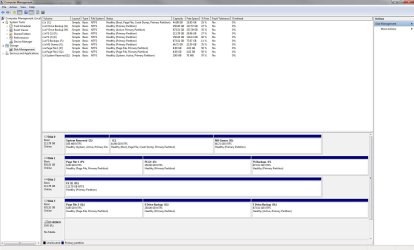
My C drive is shown as the boot partition in my Windows 7 x64 setup, instead of the System Reserved partition (my own fault). Windows boots but slowly and I want to get things back to how they were. I tried EasyBCD but it won't change the boot partition back to the System Reserved space. I booted with my Windows 7 disc and went to boot repair, but it reports that it can't find a problem.
If anyone can help me get the System Reserved partition (temporarily assigned the drive letter Z) as the bootable one, not my C drive, I'd be grateful. I attach a screenshot of my current drives.
Thanks,
Martin
If anyone can help me get the System Reserved partition (temporarily assigned the drive letter Z) as the bootable one, not my C drive, I'd be grateful. I attach a screenshot of my current drives.
Thanks,
Martin
Attachments
My Computer
- Computer type
- PC/Desktop
- Computer Manufacturer/Model Number
- Custom Build
- OS
- Windows 7 Home Premium SP1 64-bit
- CPU
- Intel Core i7-4790K CPU @ 4.5GHz
- Motherboard
- Asus H97I-PLUS
- Memory
- 16GB KINGSTON HYPER-X FURY DUAL-DDR3 1600MHz
- Graphics Card(s)
- 8GB NVIDIA GEFORCE GTX 1070
- Monitor(s) Displays
- HannsG 28" & Dell 24"
- Screen Resolution
- 1920x1200
- Hard Drives
- 1 x 2TB Samsung Evo 860 SSD
2 x 500GB Samsung Evo 850 SSD
- PSU
- CORSAIR 650W CS SERIES
- Case
- Thermaltake Core V1 Mini ITX Cube
- Cooling
- NOCTUA NH-L12
- Browser
- Firefox
- Other Info
- Custom PC used for X-Plane 11