Solved How do I restore Word as my file editor? Office 365 killed it.

soho1

New member
Power User
Local time
6:28 PM
Messages
458
Location
Earth, Mostly Chicago and London
I poked around the forum a bit and found some old dead threads, not fully answered, so i am posting for help!
I recently subscribed to Office 365 (that and the usual Microsoft updates are all that have changed on my computer in the last week) but now Windows Word (Office 2010 local installation) is no longer my default editor.

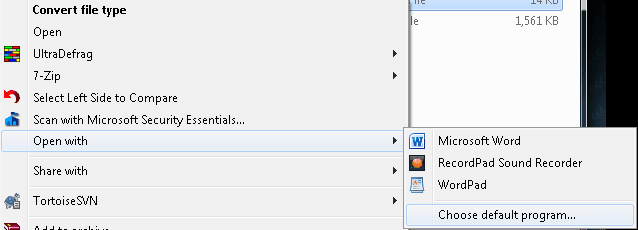
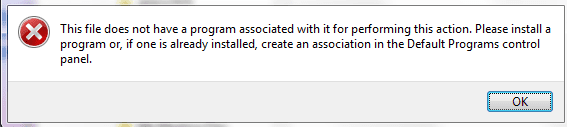
I tried the default programs utility, but it does not even know that Office 2010 is still installed. I can run Word manually, browse and open a file. I can browse to a file and Open With to get to Word, but by default, DOCx files want to open with wordpad of all things!

How can I get this reconfigured. I would NOT like to have to reinstall office.

RECAP FOR THIS THREAD (for members finding this same problem)
There is some root cause problem yet undetermined with the assignment of default programs.
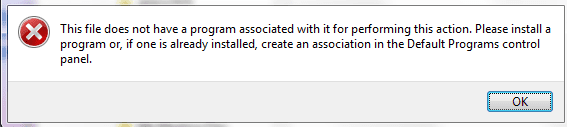
An error message appears where a list of programs should appear.
The root problem affects other types of file associations too, this problem is not limited to office.
Re-registering Microsoft Office (i.e. winword /r) had a positive effect on being able to click an office file to open it, but none of the office programs appear available as a select-able default.

Right-click "open with" > "set default program" still results in an error message. (MOVING THIS ASPECT TO ANOTHER THREAD.)
 
Last edited:

My Computer My Computer

At a glance

Win 7 Pro 64-bitIntel Core i516 GB Dell, 6 GB ToshibaIntel crap on both but Dell also has nVidia G...
Computer type
Laptop
Computer Manufacturer/Model Number
Dell Insprion 7559 next to a Toshiba Portege
OS
Win 7 Pro 64-bit
CPU
Intel Core i5
Motherboard
Intel
Memory
16 GB Dell, 6 GB Toshiba
Graphics Card(s)
Intel crap on both but Dell also has nVidia GeForce GTX960M
Sound Card
RealTek
Monitor(s) Displays
internal and external ACER KA270H 27"
Screen Resolution
1920x1080
Hard Drives
SSD 256 GB plus numerous WD Red or Purple on USB3 docks. Used to buy a lot of Seagate but tossed them the second time I got unrecoverable disc corruption in the midst of use.
Keyboard
Garage Mouse SW and some cheap Amazon China made USB device
Mouse
Garage Mouse and some cheap Amazon China made USB device
Internet Speed
50 Mbps (allegedly, depends on server)
Antivirus
Defender, Malwarebytes Premium and Kaspersky
Browser
IE 11, and Chrome something
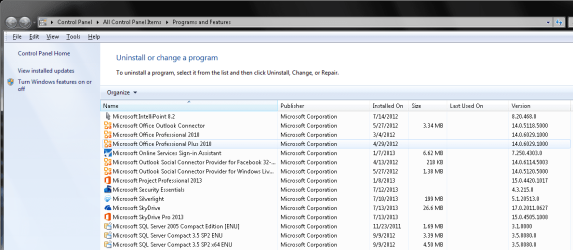
Do you have Office 2010 installed ?
 

My Computer My Computer

At a glance

Windows 7 Ultimate 32-Bit & Windows 7 Ultimat...Intel Core i7 CPU 950 @ 3.07GHzOCZ 6GB (3 x 2GB) 240-Pin DDR3 SDRAM DDR3 160...ATI Radeon HD 5700 Series
Computer Manufacturer/Model Number
Custom Built
OS
Windows 7 Ultimate 32-Bit & Windows 7 Ultimate 64-Bit
CPU
Intel Core i7 CPU 950 @ 3.07GHz
Motherboard
ASUS P6T DELUXE V2
Memory
OCZ 6GB (3 x 2GB) 240-Pin DDR3 SDRAM DDR3 1600 OCZ3X1600R2
Graphics Card(s)
ATI Radeon HD 5700 Series
Sound Card
OnBoard
Hard Drives
WD6400AACS-00M3B0 (640GB SATA )
PSU
CORSAIR 850w
Case
NZXT LEXA
Cooling
Intel Stock Heatsink Fan
Keyboard
Microsoft Wireless Laser Keyboard 7000
Mouse
Microsoft Wireless Laser Mouse 7000
Browse to a word file with the docx extension then right-click and select "Open with ..." then click on "Choose default program...". On the Open with dialog, put a checkmark in the box that says "Always use the selected program to open this kind of file" and then click on browse. Navigate to where Word is installed, should be someplace like C:\Program Files\Microsoft Office\Office 14 and find the file winword.exe, click on it then click Open. That dialog will close, click OK on the remaining dialog and you should be good to go.
 

My Computer My Computer

At a glance

W10 Pro desktop, W11 laptop, W11 Pro tablet (...3.7Ghz 8700K i7, i7-11800H, i7-1065G716G desktop, 16G laptop, 4G tabletAMD Radeon RX580, RTX 3060, Intel Iris Plus
Computer type
PC/Desktop
Computer Manufacturer/Model Number
Home Built desktop, Dell G15 5511 Gaming laptop,MS Surface Pro 7 tablet
OS
W10 Pro desktop, W11 laptop, W11 Pro tablet (all 64-bit)
CPU
3.7Ghz 8700K i7, i7-11800H, i7-1065G7
Motherboard
ASUS TUF Z370-Pro Gaming in desktop
Memory
16G desktop, 16G laptop, 4G tablet
Graphics Card(s)
AMD Radeon RX580, RTX 3060, Intel Iris Plus
Sound Card
High Definition Audio (Built-in to mobo)
Monitor(s) Displays
Samsung U32J59 32" (2x), 15.6", 12"
Screen Resolution
3840x2160, 3840x2160, 1920x1080, 2160x1440
Hard Drives
500G SSD for OS; 2T, 10T & 15T HDDs for Data on Desktop, 1TB SSD laptop, 128G SSD tablet.
PSU
Corsair CX 750M
Case
Antec 100
Cooling
CM 212+
Keyboard
IBM Model M - used continuously since 1986
Mouse
Microsoft Pro IntelliMouse
Internet Speed
400M down 8M up
Antivirus
Windows Defender
Browser
FireFox
Other Info
Built my first computer (8Mhz 8088cpu, 640K RAM, 20MB HDD, 2 360K floppy drives) in 1985 and have been building them for myself, relatives and friends ever since.
Yes, I have Office 2010 installed.
 

Attachments

  • Yes_Office_is_Installed.png
    Yes_Office_is_Installed.png
    39.7 KB · Views: 4

My Computer My Computer

At a glance

Win 7 Pro 64-bitIntel Core i516 GB Dell, 6 GB ToshibaIntel crap on both but Dell also has nVidia G...
Computer type
Laptop
Computer Manufacturer/Model Number
Dell Insprion 7559 next to a Toshiba Portege
OS
Win 7 Pro 64-bit
CPU
Intel Core i5
Motherboard
Intel
Memory
16 GB Dell, 6 GB Toshiba
Graphics Card(s)
Intel crap on both but Dell also has nVidia GeForce GTX960M
Sound Card
RealTek
Monitor(s) Displays
internal and external ACER KA270H 27"
Screen Resolution
1920x1080
Hard Drives
SSD 256 GB plus numerous WD Red or Purple on USB3 docks. Used to buy a lot of Seagate but tossed them the second time I got unrecoverable disc corruption in the midst of use.
Keyboard
Garage Mouse SW and some cheap Amazon China made USB device
Mouse
Garage Mouse and some cheap Amazon China made USB device
Internet Speed
50 Mbps (allegedly, depends on server)
Antivirus
Defender, Malwarebytes Premium and Kaspersky
Browser
IE 11, and Chrome something
As I said, I can choose Word from the list to "Open With". However, there is no "list" of programs when chosing to set the default program. Instead I am directed to use the Set Defaults program, which does not show Word in the list.
 

Attachments

  • Right_click_to_open.png
    Right_click_to_open.png
    5.7 KB · Views: 24
  • No_there_is_no_list_from_chose_default.png
    No_there_is_no_list_from_chose_default.png
    4.6 KB · Views: 21

My Computer My Computer

At a glance

Win 7 Pro 64-bitIntel Core i516 GB Dell, 6 GB ToshibaIntel crap on both but Dell also has nVidia G...
Computer type
Laptop
Computer Manufacturer/Model Number
Dell Insprion 7559 next to a Toshiba Portege
OS
Win 7 Pro 64-bit
CPU
Intel Core i5
Motherboard
Intel
Memory
16 GB Dell, 6 GB Toshiba
Graphics Card(s)
Intel crap on both but Dell also has nVidia GeForce GTX960M
Sound Card
RealTek
Monitor(s) Displays
internal and external ACER KA270H 27"
Screen Resolution
1920x1080
Hard Drives
SSD 256 GB plus numerous WD Red or Purple on USB3 docks. Used to buy a lot of Seagate but tossed them the second time I got unrecoverable disc corruption in the midst of use.
Keyboard
Garage Mouse SW and some cheap Amazon China made USB device
Mouse
Garage Mouse and some cheap Amazon China made USB device
Internet Speed
50 Mbps (allegedly, depends on server)
Antivirus
Defender, Malwarebytes Premium and Kaspersky
Browser
IE 11, and Chrome something
Here is a screen shot of trying to set the default program. Word is not included.
 

Attachments

  • set_your_default_does_not_include_word.png
    set_your_default_does_not_include_word.png
    17.6 KB · Views: 7

My Computer My Computer

At a glance

Win 7 Pro 64-bitIntel Core i516 GB Dell, 6 GB ToshibaIntel crap on both but Dell also has nVidia G...
Computer type
Laptop
Computer Manufacturer/Model Number
Dell Insprion 7559 next to a Toshiba Portege
OS
Win 7 Pro 64-bit
CPU
Intel Core i5
Motherboard
Intel
Memory
16 GB Dell, 6 GB Toshiba
Graphics Card(s)
Intel crap on both but Dell also has nVidia GeForce GTX960M
Sound Card
RealTek
Monitor(s) Displays
internal and external ACER KA270H 27"
Screen Resolution
1920x1080
Hard Drives
SSD 256 GB plus numerous WD Red or Purple on USB3 docks. Used to buy a lot of Seagate but tossed them the second time I got unrecoverable disc corruption in the midst of use.
Keyboard
Garage Mouse SW and some cheap Amazon China made USB device
Mouse
Garage Mouse and some cheap Amazon China made USB device
Internet Speed
50 Mbps (allegedly, depends on server)
Antivirus
Defender, Malwarebytes Premium and Kaspersky
Browser
IE 11, and Chrome something
On the Open with dialog, put a checkmark in the box that says "Always use the selected program to open this kind of file" and then click on browse...
I do not get the dialog that you are expecting.
 

Attachments

  • No_there_is_no_list_from_chose_default.png
    No_there_is_no_list_from_chose_default.png
    4.6 KB · Views: 22

My Computer My Computer

At a glance

Win 7 Pro 64-bitIntel Core i516 GB Dell, 6 GB ToshibaIntel crap on both but Dell also has nVidia G...
Computer type
Laptop
Computer Manufacturer/Model Number
Dell Insprion 7559 next to a Toshiba Portege
OS
Win 7 Pro 64-bit
CPU
Intel Core i5
Motherboard
Intel
Memory
16 GB Dell, 6 GB Toshiba
Graphics Card(s)
Intel crap on both but Dell also has nVidia GeForce GTX960M
Sound Card
RealTek
Monitor(s) Displays
internal and external ACER KA270H 27"
Screen Resolution
1920x1080
Hard Drives
SSD 256 GB plus numerous WD Red or Purple on USB3 docks. Used to buy a lot of Seagate but tossed them the second time I got unrecoverable disc corruption in the midst of use.
Keyboard
Garage Mouse SW and some cheap Amazon China made USB device
Mouse
Garage Mouse and some cheap Amazon China made USB device
Internet Speed
50 Mbps (allegedly, depends on server)
Antivirus
Defender, Malwarebytes Premium and Kaspersky
Browser
IE 11, and Chrome something

My Computer My Computer

At a glance

Win 7 Pro 64-bitIntel Core i516 GB Dell, 6 GB ToshibaIntel crap on both but Dell also has nVidia G...
Computer type
Laptop
Computer Manufacturer/Model Number
Dell Insprion 7559 next to a Toshiba Portege
OS
Win 7 Pro 64-bit
CPU
Intel Core i5
Motherboard
Intel
Memory
16 GB Dell, 6 GB Toshiba
Graphics Card(s)
Intel crap on both but Dell also has nVidia GeForce GTX960M
Sound Card
RealTek
Monitor(s) Displays
internal and external ACER KA270H 27"
Screen Resolution
1920x1080
Hard Drives
SSD 256 GB plus numerous WD Red or Purple on USB3 docks. Used to buy a lot of Seagate but tossed them the second time I got unrecoverable disc corruption in the midst of use.
Keyboard
Garage Mouse SW and some cheap Amazon China made USB device
Mouse
Garage Mouse and some cheap Amazon China made USB device
Internet Speed
50 Mbps (allegedly, depends on server)
Antivirus
Defender, Malwarebytes Premium and Kaspersky
Browser
IE 11, and Chrome something
Am currently looking suspiciously at Service Pack 2 for Microsoft Office 2010 (KB2687455). :rolleyes:
 

My Computer My Computer

At a glance

Win 7 Pro 64-bitIntel Core i516 GB Dell, 6 GB ToshibaIntel crap on both but Dell also has nVidia G...
Computer type
Laptop
Computer Manufacturer/Model Number
Dell Insprion 7559 next to a Toshiba Portege
OS
Win 7 Pro 64-bit
CPU
Intel Core i5
Motherboard
Intel
Memory
16 GB Dell, 6 GB Toshiba
Graphics Card(s)
Intel crap on both but Dell also has nVidia GeForce GTX960M
Sound Card
RealTek
Monitor(s) Displays
internal and external ACER KA270H 27"
Screen Resolution
1920x1080
Hard Drives
SSD 256 GB plus numerous WD Red or Purple on USB3 docks. Used to buy a lot of Seagate but tossed them the second time I got unrecoverable disc corruption in the midst of use.
Keyboard
Garage Mouse SW and some cheap Amazon China made USB device
Mouse
Garage Mouse and some cheap Amazon China made USB device
Internet Speed
50 Mbps (allegedly, depends on server)
Antivirus
Defender, Malwarebytes Premium and Kaspersky
Browser
IE 11, and Chrome something
As I said, I can choose Word from the list to "Open With". However, there is no "list" of programs when chosing to set the default program. Instead I am directed to use the Set Defaults program, which does not show Word in the list.

On this screen here,


If you select Choose default program, do you get this screen?


From there you can use the browse button to go to the location strollin posted to find the winword.exe
 

My Computer My Computer

At a glance

Win 10 Pro x64Intel I5-2500K @3.3GHz16GB G.Skill Ripjaws X (4x4GB)EVGA GeForce 750 Ti SC 2GB
Computer type
PC/Desktop
Computer Manufacturer/Model Number
Self Built
OS
Win 10 Pro x64
CPU
Intel I5-2500K @3.3GHz
Motherboard
Asrock P67 Extreme4
Memory
16GB G.Skill Ripjaws X (4x4GB)
Graphics Card(s)
EVGA GeForce 750 Ti SC 2GB
Sound Card
ASUS Xonar DG 5.1 Channels 24-bit 96KHz PCI Interface Sound
Monitor(s) Displays
auria eq2367
Screen Resolution
1920 x 1080
Hard Drives
250GB Samsung 850 EVO SSD
1TB WD Blue
1TB Hitachi
PSU
SeaSonic X 650W 80 Plus Gold
Case
Corsair Obsidian 750D
Cooling
Corsair H60, Three 140mm case fans
Keyboard
Logitech Wireless Keyboard K520
Mouse
Logitech Wireless Mouse M310
Internet Speed
Wave Broadband ~ 100 dn 5 up
Antivirus
Windows Defender, Malwarebytes Premium
Browser
Edge, IE11, Chrome
Other Info
Laptop specs: HP g7-1365dx /
CPU: AMD A6-3420M APU with Radeon(tm) HD Graphics /
RAM: Crucial 8Gb (2x4Gb) /
SSD: Crucial M4-CT128M4SSD2 ATA Device/ FW 000F /
GFX: AMD Radeon HD 6520G /
OS: Windows 10 Pro x64
I get the 1st screen BUT NOT THE SECOND. Sorry if that was not clear in my post above. Attached is an example.
 

Attachments

  • No_there_is_no_list_from_chose_default.png
    No_there_is_no_list_from_chose_default.png
    4.6 KB · Views: 24

My Computer My Computer

At a glance

Win 7 Pro 64-bitIntel Core i516 GB Dell, 6 GB ToshibaIntel crap on both but Dell also has nVidia G...
Computer type
Laptop
Computer Manufacturer/Model Number
Dell Insprion 7559 next to a Toshiba Portege
OS
Win 7 Pro 64-bit
CPU
Intel Core i5
Motherboard
Intel
Memory
16 GB Dell, 6 GB Toshiba
Graphics Card(s)
Intel crap on both but Dell also has nVidia GeForce GTX960M
Sound Card
RealTek
Monitor(s) Displays
internal and external ACER KA270H 27"
Screen Resolution
1920x1080
Hard Drives
SSD 256 GB plus numerous WD Red or Purple on USB3 docks. Used to buy a lot of Seagate but tossed them the second time I got unrecoverable disc corruption in the midst of use.
Keyboard
Garage Mouse SW and some cheap Amazon China made USB device
Mouse
Garage Mouse and some cheap Amazon China made USB device
Internet Speed
50 Mbps (allegedly, depends on server)
Antivirus
Defender, Malwarebytes Premium and Kaspersky
Browser
IE 11, and Chrome something
Try opening a command prompt and navigating to the office folder (should be something like C:\Program Files\Microsoft Office\Office14). Once in the correct folder, enter winword /r which should register Word so the systen knows it's installed. Once that's done then you should be able to find it in the default programs list.
 

My Computer My Computer

At a glance

W10 Pro desktop, W11 laptop, W11 Pro tablet (...3.7Ghz 8700K i7, i7-11800H, i7-1065G716G desktop, 16G laptop, 4G tabletAMD Radeon RX580, RTX 3060, Intel Iris Plus
Computer type
PC/Desktop
Computer Manufacturer/Model Number
Home Built desktop, Dell G15 5511 Gaming laptop,MS Surface Pro 7 tablet
OS
W10 Pro desktop, W11 laptop, W11 Pro tablet (all 64-bit)
CPU
3.7Ghz 8700K i7, i7-11800H, i7-1065G7
Motherboard
ASUS TUF Z370-Pro Gaming in desktop
Memory
16G desktop, 16G laptop, 4G tablet
Graphics Card(s)
AMD Radeon RX580, RTX 3060, Intel Iris Plus
Sound Card
High Definition Audio (Built-in to mobo)
Monitor(s) Displays
Samsung U32J59 32" (2x), 15.6", 12"
Screen Resolution
3840x2160, 3840x2160, 1920x1080, 2160x1440
Hard Drives
500G SSD for OS; 2T, 10T & 15T HDDs for Data on Desktop, 1TB SSD laptop, 128G SSD tablet.
PSU
Corsair CX 750M
Case
Antec 100
Cooling
CM 212+
Keyboard
IBM Model M - used continuously since 1986
Mouse
Microsoft Pro IntelliMouse
Internet Speed
400M down 8M up
Antivirus
Windows Defender
Browser
FireFox
Other Info
Built my first computer (8Mhz 8088cpu, 640K RAM, 20MB HDD, 2 360K floppy drives) in 1985 and have been building them for myself, relatives and friends ever since.
I opened a DOS command windows
I did a CD "C:\Program Files (x86)\Microsoft Office\Office14"
I performed the winword /r
Office re-registered.

Kudos to Strollin, as Winword DOES indeed now open the file if I click on it. :)
However, my other symptoms of the root problem have not disappeared.:(

This did NOT change the list of default programs (as seen by start > run > set default programs, which can also be found directly in the control panel).
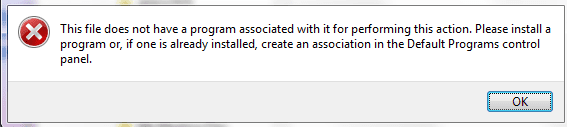
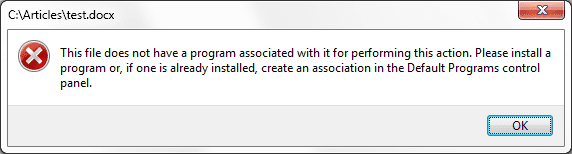
and the ERROR MESSAGE, instead of an "open with" list, has not changed (see my posts above) - so I am moving this registry issue to another thread.

Thank you.

Attached is another example of the error when I try to "open with" on right-click.

Also, I have checked that this problem is affecting ALL existing and new users on the computer.
 

Attachments

  • test for default file associations.png
    test for default file associations.png
    5.8 KB · Views: 21
Last edited:

My Computer My Computer

At a glance

Win 7 Pro 64-bitIntel Core i516 GB Dell, 6 GB ToshibaIntel crap on both but Dell also has nVidia G...
Computer type
Laptop
Computer Manufacturer/Model Number
Dell Insprion 7559 next to a Toshiba Portege
OS
Win 7 Pro 64-bit
CPU
Intel Core i5
Motherboard
Intel
Memory
16 GB Dell, 6 GB Toshiba
Graphics Card(s)
Intel crap on both but Dell also has nVidia GeForce GTX960M
Sound Card
RealTek
Monitor(s) Displays
internal and external ACER KA270H 27"
Screen Resolution
1920x1080
Hard Drives
SSD 256 GB plus numerous WD Red or Purple on USB3 docks. Used to buy a lot of Seagate but tossed them the second time I got unrecoverable disc corruption in the midst of use.
Keyboard
Garage Mouse SW and some cheap Amazon China made USB device
Mouse
Garage Mouse and some cheap Amazon China made USB device
Internet Speed
50 Mbps (allegedly, depends on server)
Antivirus
Defender, Malwarebytes Premium and Kaspersky
Browser
IE 11, and Chrome something
Same Problem Solved

Hello

I had exactly the same problem and only came across this forum today. I managed to fix mine so I thought I should post to see if it solves anyone elses problem.

I have Windows 7 and the option to 'Open With' does not appear. I had to:

1) Click Open
2) Select program from list
3) Searched my C drive for 'Word', found it: C drive> Program Files(x86)> Common files> microsoft shared> Virtualisation Handler>
...and the file name was CVH
4) I then went back to the program list and browsed through the folders to find CVH.

And hey presto it worked! I hope this helps someone else. :)
 

My Computer My Computer

At a glance

Windows 7
Computer type
PC/Desktop
OS
Windows 7
This is an old post, but it's important to know a valid, working solution (because I scoured the Internet and few people actually had a working solution). This issue annoyed the heck out of me too. I found something that actually works and I feel the world must know. There has to be something decent and good left in this world.


Symptoms:


  • 365 broke my 2010 as the original poster noted. No surprises there.
  • Anyways, double-clicking any *.doc, *.docx and *.docm files launches Word 365/2013 (ugly, annoying color scheme).
  • If you launch Office 2010 products directly and then open existing files it'll open those files in Office 2010.
  • If you look at any sort of "default" Control Panel screen, Word/Excel 2010 is nowhere to be found.
  • If you attempt to right-click and Open With and attempt to browse into the proper "Office14" path to open the proper 2010 Word or Excel EXE files, it doesn't fix the Office 365 file association.
I tried various things people suggested such as messing with the registry, Default Programs in Control Panel, even the tip immediately above my post etc.. No go.


The solution that worked for me (Windows 7, 64-bit):

1. Go into Control Panel > Programs and Features.
2. Right-click Office 2010 and select Change.
3. Select Repair. Allow repair to finish.

The icons for my *.doc, *.docx and *.docm files all now show the familiar 2010 version. When double-clicking those files, Word 2010 now launches.
 

My Computer My Computer

At a glance

Win 7 64-bit
Computer type
PC/Desktop
OS
Win 7 64-bit
Works with Open Office as well

>>>>The solution that worked for me (Windows 7, 64-bit):

1. Go into Control Panel > Programs and Features.
2. Right-click Office 2010 and select Change.
3. Select Repair. Allow repair to finish. <<<<


Wang Sage:

Thank you so much for posting this solution. I had a similar problem with Office 2013 that I believe was caused by Open Office rather than 365.

After uninstalling Open Office. .docx files opened with Wordpad by default. No amount of reassigning the file extension to winword.exe changed that, nor did running the winword /r fix, even from within the directory.

Running the repair as you described from Control Panel did the trick.
 

My Computer My Computer

At a glance

Windows 7 pro 64 biti5 34708 GBGigabyte GTX 750 Ti 4gb
Computer type
PC/Desktop
Computer Manufacturer/Model Number
Dell
OS
Windows 7 pro 64 bit
CPU
i5 3470
Memory
8 GB
Graphics Card(s)
Gigabyte GTX 750 Ti 4gb
Hard Drives
Samsung PM830 SSD
Back
Top