How do I set up for installing a SSD

Datman

New member
Member
VIP
Local time
9:29 PM
Messages
158
I watched a online video and was instructed to change the sata from native IDE to either raid or the 3rd option (can't remember) I choose the 3rd option and everything worked fine. Later in the day I wanted to restore an image and could no longer boot from cd in the bios. It took me a while to figure out that the change I made caused the issue.

I want to know the basic settings for a ssd drive .

If it is necessary to make that change how do I boot from cd?
 

My Computer My Computer

At a glance

Window 7 home x64AMD FX-8150 Zambezi 3.6GHz Socket AM3+G.SKILL Ripjaws X Series 8GB (2 x 4GBSAPPHIRE 100328L Radeon HD 6770 1GB GDDR5
OS
Window 7 home x64
CPU
AMD FX-8150 Zambezi 3.6GHz Socket AM3+
Motherboard
GIGABYTE GA-970A-UD3 AM3
Memory
G.SKILL Ripjaws X Series 8GB (2 x 4GB
Graphics Card(s)
SAPPHIRE 100328L Radeon HD 6770 1GB GDDR5
Sound Card
Asus xonar hdav 1.3 deluxe
Hard Drives
Seagate Barracuda ST31000524AS 1TB 7200 RPM SATA 6.0Gb/s
Case
Rosewill CHALLENGER Black Gaming ATX Mid Tower
Cooling
CORSAIR Hydro Series H60

My Computer My Computer

At a glance

Windows 10 Pro x64 ; Xubuntu x64Intel i7 860 @ 2.80 GHz O/C'ed to 4.0GHz16GB Corsair Vengance DDR3 @ 661 MHz Dual Cha...EVGA NVidia GTX 560 1024MB
Computer type
PC/Desktop
Computer Manufacturer/Model Number
Golden Mk. I.4
OS
Windows 10 Pro x64 ; Xubuntu x64
CPU
Intel i7 860 @ 2.80 GHz O/C'ed to 4.0GHz
Motherboard
Gigabyte P55A-UD3R Rev.1. Award BIOS F13
Memory
16GB Corsair Vengance DDR3 @ 661 MHz Dual Channel (9-9-9-24)
Graphics Card(s)
EVGA NVidia GTX 560 1024MB
Sound Card
Realtek Integrated
Monitor(s) Displays
Dual Samsung SyncMaster 2494HS
Screen Resolution
1920*1080 and 1920*1080
Hard Drives
1*Samsung 840 EVO 120GB SSD;
1*OCZ Vertex 2 60GB SSD;
2*Samsung F3 SpinPoint 1TB in RAID0;
1*Samsung F1 SpinPoint 1TB;
2*Western Digital 1TB External USB 3.0
1*Western Digital 500GB External USB 3.0
1*Seagate 500GB External USB 2.0
PSU
Thermaltake ToughPower QFan 750W
Case
Thermaltake Element S VK60001W2Z
Cooling
Corsair H60 Water Cooling, 2*230mm and 2*80mm case fans
Keyboard
Logitech G110
Mouse
Logitech MX518
Hi there
these days W7 and W8 don't need any extra SSD alignment or fiddling around any more.

Proceed as follows

1) Backup your OS partition (and the small system partition if it exists) to external media or another partition on your computer. Use a program like Acronis or Macrium or whatever -.

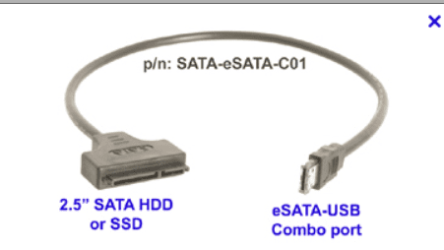
2) Connect your SSD to a USB slot via a SATA==>USB adapter (if you buy the SAMSUNG or some other makes this cable will be included -- screenshot enclosed).

3) Restore the OS image to the SSD - and the system small partition if that was on the original backup image . Shouldn't take more than around 15 - 20 mins.

4) open computer and connect SSD to SATA connector -- same principle whether Laptop or desktop.

5) Get into BIOS and set boot device as SSD . You don't have to remove the old disk on a desktop -- even if all the bays are full there's always some space to put an SSD -- it's small, no vibrations as no moving parts so you don't even have to bolt it down so you can stick it anywhere there's space - but keep it away from a GPU (Graphics card) if you have a separate one of those as these can get VERY HOT).

6) Simply boot -- job done.

Cheers jimbo

(SATA==>USB connector)
 

Attachments

  • satausb.png
    satausb.png
    13.9 KB · Views: 6

My Computer My Computer

At a glance

Linux CENTOS 7 / various Windows OS'es and se...Intel i7 Intel i58GB, 16GBOn Motherboard
Computer type
PC/Desktop
Computer Manufacturer/Model Number
Custom built, several laptops HP/ASUS
OS
Linux CENTOS 7 / various Windows OS'es and servers
CPU
Intel i7 Intel i5
Memory
8GB, 16GB
Graphics Card(s)
On Motherboard
Sound Card
Realtek HD audio
Monitor(s) Displays
Apple Cinema display, Samsung LCD
Screen Resolution
1920 X 1080
Hard Drives
4 X 1TB SATA
Mouse
Toshiba wireless laser
Internet Speed
> 20MB up
Your sata controller should be in AHCI mode. That should have nothing to do with booting from DVD. You can either use the one time boot option ( I don't know which key it is for your board) or in BIOS>Boot options, set the DVD as 1st boot device and SSD as second. You should get a brief message asking if you want to boot from DVD. You will only have a few seconds to push any key. Other than that, it could be a bad disk or bad iso or bad burn. The sata mode should not affect booting from CD/DVD.
 

My Computers My Computers

  • At a glance

    Windows 11 ProRyzen 9 5900X32GB G Skill DDR4-3600EVGA RTX 3080 FTW 3 Ultra
    Computer type
    PC/Desktop
    Computer Manufacturer/Model Number
    ALWAYS UNDER CONSTRUCTION
    OS
    Windows 11 Pro
    CPU
    Ryzen 9 5900X
    Motherboard
    Asus X570 Crosshair Viii Hero
    Memory
    32GB G Skill DDR4-3600
    Graphics Card(s)
    EVGA RTX 3080 FTW 3 Ultra
    Sound Card
    On Board/Sennheiser PC37X Headset
    Monitor(s) Displays
    3 X Asus 27"
    Screen Resolution
    2560x1440
    Hard Drives
    2 X 1 TB NVME drives
    PSU
    EVGA 850
    Case
    Phanteks Eclipse P400A
    Cooling
    EVGA 280 AIO
    Keyboard
    Logitech G510s/ Logitech G13
    Mouse
    Logitech G502
    Internet Speed
    24/1
    Antivirus
    ESET/MBAM Pro/SAS Pro
    Browser
    Chrome/ Firefox/ Edge
  • At a glance

    Windows 11 ProIntel Ultra 9 288V32 GB LPDDR5X 8533
    Computer type
    Laptop
    System Manufacturer/Model Number
    Dell 16 Plus
    OS
    Windows 11 Pro
    CPU
    Intel Ultra 9 288V
    Memory
    32 GB LPDDR5X 8533
    Monitor(s) Displays
    16" Mini-LED HDR600 Touch 90 Hz
    Screen Resolution
    2560X1600
    Hard Drives
    1 TB NVME
Your sata controller should be in AHCI mode. That should have nothing to do with booting from DVD. .

It does. I just reset it to AVCI, that is where it was before. When I rebooted I no longer get the option to boot from cd. I have a gigabyte ga-970a-ud3 mobo. in the bios there is another option for me to change sata ports 4&5 to IDE. Would I want to keep both dvd drives in ports 4&5 and leave it set to IDE?


Also presently there is no SSD option in the boot priority. Will that change when I add the drive? It should come today.
 

My Computer My Computer

At a glance

Window 7 home x64AMD FX-8150 Zambezi 3.6GHz Socket AM3+G.SKILL Ripjaws X Series 8GB (2 x 4GBSAPPHIRE 100328L Radeon HD 6770 1GB GDDR5
OS
Window 7 home x64
CPU
AMD FX-8150 Zambezi 3.6GHz Socket AM3+
Motherboard
GIGABYTE GA-970A-UD3 AM3
Memory
G.SKILL Ripjaws X Series 8GB (2 x 4GB
Graphics Card(s)
SAPPHIRE 100328L Radeon HD 6770 1GB GDDR5
Sound Card
Asus xonar hdav 1.3 deluxe
Hard Drives
Seagate Barracuda ST31000524AS 1TB 7200 RPM SATA 6.0Gb/s
Case
Rosewill CHALLENGER Black Gaming ATX Mid Tower
Cooling
CORSAIR Hydro Series H60
That would be a good option, it only matters for the SSD to be in AHCI mode. The SSD will run in IDE but it will not give you the best performance. I was not aware that DVD drives would not run in AHCI though, guess I learned something else today.
 

My Computers My Computers

  • At a glance

    Windows 11 ProRyzen 9 5900X32GB G Skill DDR4-3600EVGA RTX 3080 FTW 3 Ultra
    Computer type
    PC/Desktop
    Computer Manufacturer/Model Number
    ALWAYS UNDER CONSTRUCTION
    OS
    Windows 11 Pro
    CPU
    Ryzen 9 5900X
    Motherboard
    Asus X570 Crosshair Viii Hero
    Memory
    32GB G Skill DDR4-3600
    Graphics Card(s)
    EVGA RTX 3080 FTW 3 Ultra
    Sound Card
    On Board/Sennheiser PC37X Headset
    Monitor(s) Displays
    3 X Asus 27"
    Screen Resolution
    2560x1440
    Hard Drives
    2 X 1 TB NVME drives
    PSU
    EVGA 850
    Case
    Phanteks Eclipse P400A
    Cooling
    EVGA 280 AIO
    Keyboard
    Logitech G510s/ Logitech G13
    Mouse
    Logitech G502
    Internet Speed
    24/1
    Antivirus
    ESET/MBAM Pro/SAS Pro
    Browser
    Chrome/ Firefox/ Edge
  • At a glance

    Windows 11 ProIntel Ultra 9 288V32 GB LPDDR5X 8533
    Computer type
    Laptop
    System Manufacturer/Model Number
    Dell 16 Plus
    OS
    Windows 11 Pro
    CPU
    Intel Ultra 9 288V
    Memory
    32 GB LPDDR5X 8533
    Monitor(s) Displays
    16" Mini-LED HDR600 Touch 90 Hz
    Screen Resolution
    2560X1600
    Hard Drives
    1 TB NVME
Hi there
these days W7 and W8 don't need any extra SSD alignment or fiddling around any more.

Curious about that Jimbo. Are you saying it is no longer necessary to align a new SSD?
Why?

(I just bought my first one)
 

My Computer My Computer

At a glance

Windows 7 64 Bit Home Premium SP1i7-3820GSkill F3-14900CL9Q - 16GBEVGA GeForce GTX660 - Driver 352.86
Computer type
PC/Desktop
Computer Manufacturer/Model Number
Home Built - Jan 2013
OS
Windows 7 64 Bit Home Premium SP1
CPU
i7-3820
Motherboard
Asus P9X79-PRO - Bios 4608
Memory
GSkill F3-14900CL9Q - 16GB
Graphics Card(s)
EVGA GeForce GTX660 - Driver 352.86
Sound Card
On board Realtek ALC898
Monitor(s) Displays
Acer S271HL
Screen Resolution
1920 x 1080
Hard Drives
#1- Samsung 840 Pro Series
#2- Western Digital WD1002FAEX Sata3 Black
#3- Western Digital WD1002FAEX Sata3 Black
PSU
Corsair CMPSU-850TX-V2 - 850 watt (by Seasonic)
Case
Corsair Obsidian 550D
Cooling
Standard 3 120mm case fans, Cooler Master Hyper 212 EVO
Keyboard
MS KC-0405
Mouse
Intellimouse 5-button
Internet Speed
56 Mbits/Sec (on a good day)
Antivirus
Avast & Malwarebytes
Browser
Firefox
Other Info
Asus DVD - DRW-24B1ST 24X
I am assuming he is saying the installer will align it if you let it. SSDs still need to be aligned. I do it myself, then install. No 100MB partition and I know it is done right (OCD).
 

My Computers My Computers

  • At a glance

    Windows 11 ProRyzen 9 5900X32GB G Skill DDR4-3600EVGA RTX 3080 FTW 3 Ultra
    Computer type
    PC/Desktop
    Computer Manufacturer/Model Number
    ALWAYS UNDER CONSTRUCTION
    OS
    Windows 11 Pro
    CPU
    Ryzen 9 5900X
    Motherboard
    Asus X570 Crosshair Viii Hero
    Memory
    32GB G Skill DDR4-3600
    Graphics Card(s)
    EVGA RTX 3080 FTW 3 Ultra
    Sound Card
    On Board/Sennheiser PC37X Headset
    Monitor(s) Displays
    3 X Asus 27"
    Screen Resolution
    2560x1440
    Hard Drives
    2 X 1 TB NVME drives
    PSU
    EVGA 850
    Case
    Phanteks Eclipse P400A
    Cooling
    EVGA 280 AIO
    Keyboard
    Logitech G510s/ Logitech G13
    Mouse
    Logitech G502
    Internet Speed
    24/1
    Antivirus
    ESET/MBAM Pro/SAS Pro
    Browser
    Chrome/ Firefox/ Edge
  • At a glance

    Windows 11 ProIntel Ultra 9 288V32 GB LPDDR5X 8533
    Computer type
    Laptop
    System Manufacturer/Model Number
    Dell 16 Plus
    OS
    Windows 11 Pro
    CPU
    Intel Ultra 9 288V
    Memory
    32 GB LPDDR5X 8533
    Monitor(s) Displays
    16" Mini-LED HDR600 Touch 90 Hz
    Screen Resolution
    2560X1600
    Hard Drives
    1 TB NVME
well it seems stuck at 47% with the cloning. This is where I mess up I get impatient with windows. I never know when to go away for 3 day and let it finish or cancil it and start over. I always cancil and it gets ugly from there.

It took about 30 seconds to get to 47% hasn't moved at all in 10 min
 

My Computer My Computer

At a glance

Window 7 home x64AMD FX-8150 Zambezi 3.6GHz Socket AM3+G.SKILL Ripjaws X Series 8GB (2 x 4GBSAPPHIRE 100328L Radeon HD 6770 1GB GDDR5
OS
Window 7 home x64
CPU
AMD FX-8150 Zambezi 3.6GHz Socket AM3+
Motherboard
GIGABYTE GA-970A-UD3 AM3
Memory
G.SKILL Ripjaws X Series 8GB (2 x 4GB
Graphics Card(s)
SAPPHIRE 100328L Radeon HD 6770 1GB GDDR5
Sound Card
Asus xonar hdav 1.3 deluxe
Hard Drives
Seagate Barracuda ST31000524AS 1TB 7200 RPM SATA 6.0Gb/s
Case
Rosewill CHALLENGER Black Gaming ATX Mid Tower
Cooling
CORSAIR Hydro Series H60
Hi there
these days W7 and W8 don't need any extra SSD alignment or fiddling around any more.

Curious about that Jimbo. Are you saying it is no longer necessary to align a new SSD?
Why?

(I just bought my first one)

I use disk management in Windows to format and partition my SSDs when I first get them and that way I know they will be properly aligned. I would use diskpart, but I can never remember how to do it that way! :p
 

My Computer My Computer

At a glance

Windows 7 Home Premium 64bit SP 1Intel i5 2500k8 gigabytes Corsair PC3-12800 DDR3EVGA GeForce GTX 460 superclocked
Computer Manufacturer/Model Number
Customized build from CyberPower
OS
Windows 7 Home Premium 64bit SP 1
CPU
Intel i5 2500k
Motherboard
Asus P8P67 Deluxe
Memory
8 gigabytes Corsair PC3-12800 DDR3
Graphics Card(s)
EVGA GeForce GTX 460 superclocked
Sound Card
Integrated
Monitor(s) Displays
ViewSonic 23" LCD
Screen Resolution
1980 x 1080
Hard Drives
120 Gb Samsung 840 Pro SSD
120 Gb Kingston Hyper X SSD
1 Tb WD Caviar Black HDD
PSU
Coolermaster 1000 watt modular
Case
Coolermaster HAF X full tower
Cooling
Coolermaster Hyper 212 plus
Keyboard
Logitech USB
Mouse
Microsoft 3 button
Internet Speed
download 1.5 Mb/sec upload 300Kb/sec
)[/QUOTE]

I use disk management in Windows to format and partition my SSDs when I first get them and that way I know they will be properly aligned. I would use diskpart, but I can never remember how to do it that way! :p[/QUOTE]

I did that but added no partition and fro 2nd time it get stuck at 47%
 

My Computer My Computer

At a glance

Window 7 home x64AMD FX-8150 Zambezi 3.6GHz Socket AM3+G.SKILL Ripjaws X Series 8GB (2 x 4GBSAPPHIRE 100328L Radeon HD 6770 1GB GDDR5
OS
Window 7 home x64
CPU
AMD FX-8150 Zambezi 3.6GHz Socket AM3+
Motherboard
GIGABYTE GA-970A-UD3 AM3
Memory
G.SKILL Ripjaws X Series 8GB (2 x 4GB
Graphics Card(s)
SAPPHIRE 100328L Radeon HD 6770 1GB GDDR5
Sound Card
Asus xonar hdav 1.3 deluxe
Hard Drives
Seagate Barracuda ST31000524AS 1TB 7200 RPM SATA 6.0Gb/s
Case
Rosewill CHALLENGER Black Gaming ATX Mid Tower
Cooling
CORSAIR Hydro Series H60
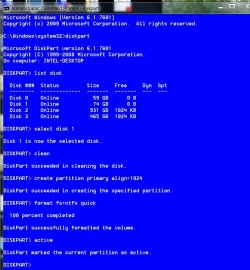
Diskpart
list disk
select disk # (where # is the number assigned to the disk)
clean
create partition primary align=1024
select partition 1
format fs=ntfs quick
active
exit
exit

It looks like this
clean-align-format SSD.JPG
 

My Computers My Computers

  • At a glance

    Windows 11 ProRyzen 9 5900X32GB G Skill DDR4-3600EVGA RTX 3080 FTW 3 Ultra
    Computer type
    PC/Desktop
    Computer Manufacturer/Model Number
    ALWAYS UNDER CONSTRUCTION
    OS
    Windows 11 Pro
    CPU
    Ryzen 9 5900X
    Motherboard
    Asus X570 Crosshair Viii Hero
    Memory
    32GB G Skill DDR4-3600
    Graphics Card(s)
    EVGA RTX 3080 FTW 3 Ultra
    Sound Card
    On Board/Sennheiser PC37X Headset
    Monitor(s) Displays
    3 X Asus 27"
    Screen Resolution
    2560x1440
    Hard Drives
    2 X 1 TB NVME drives
    PSU
    EVGA 850
    Case
    Phanteks Eclipse P400A
    Cooling
    EVGA 280 AIO
    Keyboard
    Logitech G510s/ Logitech G13
    Mouse
    Logitech G502
    Internet Speed
    24/1
    Antivirus
    ESET/MBAM Pro/SAS Pro
    Browser
    Chrome/ Firefox/ Edge
  • At a glance

    Windows 11 ProIntel Ultra 9 288V32 GB LPDDR5X 8533
    Computer type
    Laptop
    System Manufacturer/Model Number
    Dell 16 Plus
    OS
    Windows 11 Pro
    CPU
    Intel Ultra 9 288V
    Memory
    32 GB LPDDR5X 8533
    Monitor(s) Displays
    16" Mini-LED HDR600 Touch 90 Hz
    Screen Resolution
    2560X1600
    Hard Drives
    1 TB NVME
I formated it like other have done but I need the data migration software that was on the drive. I guess I go to samsung
 

My Computer My Computer

At a glance

Window 7 home x64AMD FX-8150 Zambezi 3.6GHz Socket AM3+G.SKILL Ripjaws X Series 8GB (2 x 4GBSAPPHIRE 100328L Radeon HD 6770 1GB GDDR5
OS
Window 7 home x64
CPU
AMD FX-8150 Zambezi 3.6GHz Socket AM3+
Motherboard
GIGABYTE GA-970A-UD3 AM3
Memory
G.SKILL Ripjaws X Series 8GB (2 x 4GB
Graphics Card(s)
SAPPHIRE 100328L Radeon HD 6770 1GB GDDR5
Sound Card
Asus xonar hdav 1.3 deluxe
Hard Drives
Seagate Barracuda ST31000524AS 1TB 7200 RPM SATA 6.0Gb/s
Case
Rosewill CHALLENGER Black Gaming ATX Mid Tower
Cooling
CORSAIR Hydro Series H60
Diskpart
list disk
select disk # (where # is the number assigned to the disk)
clean
create partition primary align=1024
select partition 1
format fs=ntfs quick
active
exit
exit

It looks like this
View attachment 250725
is this done in the bios?
 

My Computer My Computer

At a glance

Window 7 home x64AMD FX-8150 Zambezi 3.6GHz Socket AM3+G.SKILL Ripjaws X Series 8GB (2 x 4GBSAPPHIRE 100328L Radeon HD 6770 1GB GDDR5
OS
Window 7 home x64
CPU
AMD FX-8150 Zambezi 3.6GHz Socket AM3+
Motherboard
GIGABYTE GA-970A-UD3 AM3
Memory
G.SKILL Ripjaws X Series 8GB (2 x 4GB
Graphics Card(s)
SAPPHIRE 100328L Radeon HD 6770 1GB GDDR5
Sound Card
Asus xonar hdav 1.3 deluxe
Hard Drives
Seagate Barracuda ST31000524AS 1TB 7200 RPM SATA 6.0Gb/s
Case
Rosewill CHALLENGER Black Gaming ATX Mid Tower
Cooling
CORSAIR Hydro Series H60
It can be done from an elevated command prompt inside Windows or from the Install disk. At the 1st screen, do not select your language, hold down Shift and press F10. When finished type exit hit return, type exit again and hit return and you will be back at the same language screen. Then complete the install. You will get no 100MB partition, which means no Bit Locker. At the install screen, do not format the disk under advanced options, just install. It should be done with bios in AHCI mode and the SSD the only drive connected for a clean install.

Elevated command prompt. Click start, type cmd in the search box, on the cmd option that appears, right click it and select 'run as administrator.
 

My Computers My Computers

  • At a glance

    Windows 11 ProRyzen 9 5900X32GB G Skill DDR4-3600EVGA RTX 3080 FTW 3 Ultra
    Computer type
    PC/Desktop
    Computer Manufacturer/Model Number
    ALWAYS UNDER CONSTRUCTION
    OS
    Windows 11 Pro
    CPU
    Ryzen 9 5900X
    Motherboard
    Asus X570 Crosshair Viii Hero
    Memory
    32GB G Skill DDR4-3600
    Graphics Card(s)
    EVGA RTX 3080 FTW 3 Ultra
    Sound Card
    On Board/Sennheiser PC37X Headset
    Monitor(s) Displays
    3 X Asus 27"
    Screen Resolution
    2560x1440
    Hard Drives
    2 X 1 TB NVME drives
    PSU
    EVGA 850
    Case
    Phanteks Eclipse P400A
    Cooling
    EVGA 280 AIO
    Keyboard
    Logitech G510s/ Logitech G13
    Mouse
    Logitech G502
    Internet Speed
    24/1
    Antivirus
    ESET/MBAM Pro/SAS Pro
    Browser
    Chrome/ Firefox/ Edge
  • At a glance

    Windows 11 ProIntel Ultra 9 288V32 GB LPDDR5X 8533
    Computer type
    Laptop
    System Manufacturer/Model Number
    Dell 16 Plus
    OS
    Windows 11 Pro
    CPU
    Intel Ultra 9 288V
    Memory
    32 GB LPDDR5X 8533
    Monitor(s) Displays
    16" Mini-LED HDR600 Touch 90 Hz
    Screen Resolution
    2560X1600
    Hard Drives
    1 TB NVME
If you have a Samsung SSD, the cloning software is usually Norton Ghost and should be on the DVD sent with the disk, or you can download it here
Samsung Semiconductors Global Site
 

My Computers My Computers

  • At a glance

    Windows 11 ProRyzen 9 5900X32GB G Skill DDR4-3600EVGA RTX 3080 FTW 3 Ultra
    Computer type
    PC/Desktop
    Computer Manufacturer/Model Number
    ALWAYS UNDER CONSTRUCTION
    OS
    Windows 11 Pro
    CPU
    Ryzen 9 5900X
    Motherboard
    Asus X570 Crosshair Viii Hero
    Memory
    32GB G Skill DDR4-3600
    Graphics Card(s)
    EVGA RTX 3080 FTW 3 Ultra
    Sound Card
    On Board/Sennheiser PC37X Headset
    Monitor(s) Displays
    3 X Asus 27"
    Screen Resolution
    2560x1440
    Hard Drives
    2 X 1 TB NVME drives
    PSU
    EVGA 850
    Case
    Phanteks Eclipse P400A
    Cooling
    EVGA 280 AIO
    Keyboard
    Logitech G510s/ Logitech G13
    Mouse
    Logitech G502
    Internet Speed
    24/1
    Antivirus
    ESET/MBAM Pro/SAS Pro
    Browser
    Chrome/ Firefox/ Edge
  • At a glance

    Windows 11 ProIntel Ultra 9 288V32 GB LPDDR5X 8533
    Computer type
    Laptop
    System Manufacturer/Model Number
    Dell 16 Plus
    OS
    Windows 11 Pro
    CPU
    Intel Ultra 9 288V
    Memory
    32 GB LPDDR5X 8533
    Monitor(s) Displays
    16" Mini-LED HDR600 Touch 90 Hz
    Screen Resolution
    2560X1600
    Hard Drives
    1 TB NVME
I was able to figure all that out but it still fails at 47%. I did it from cmd. To do it from the disk, do I use the w7 disk?

what was a healthy 111.79g becomes unallocated
 

My Computer My Computer

At a glance

Window 7 home x64AMD FX-8150 Zambezi 3.6GHz Socket AM3+G.SKILL Ripjaws X Series 8GB (2 x 4GBSAPPHIRE 100328L Radeon HD 6770 1GB GDDR5
OS
Window 7 home x64
CPU
AMD FX-8150 Zambezi 3.6GHz Socket AM3+
Motherboard
GIGABYTE GA-970A-UD3 AM3
Memory
G.SKILL Ripjaws X Series 8GB (2 x 4GB
Graphics Card(s)
SAPPHIRE 100328L Radeon HD 6770 1GB GDDR5
Sound Card
Asus xonar hdav 1.3 deluxe
Hard Drives
Seagate Barracuda ST31000524AS 1TB 7200 RPM SATA 6.0Gb/s
Case
Rosewill CHALLENGER Black Gaming ATX Mid Tower
Cooling
CORSAIR Hydro Series H60
Yes, Windows 7 Installation disk. When you type clean, it should be unallocated. Then you are creating a partition and formatting it. It should then be a Primary partition. After finishing (after you type activeand it completes that) type list partition again, it should show a partition with an offset of 1024 (offset is the alignment).

You may consider a clean install. If you are stalling out on the data migration it is most likely the migration software. Norton Ghost is not the easiest software to use. I use Paragon Migrate. It's $19.95, but is almost fool proof and has never failed me. You can also read this. http://www.sevenforums.com/tutorials/149969-ssd-install-transfer-operating-system.html
 

My Computers My Computers

  • At a glance

    Windows 11 ProRyzen 9 5900X32GB G Skill DDR4-3600EVGA RTX 3080 FTW 3 Ultra
    Computer type
    PC/Desktop
    Computer Manufacturer/Model Number
    ALWAYS UNDER CONSTRUCTION
    OS
    Windows 11 Pro
    CPU
    Ryzen 9 5900X
    Motherboard
    Asus X570 Crosshair Viii Hero
    Memory
    32GB G Skill DDR4-3600
    Graphics Card(s)
    EVGA RTX 3080 FTW 3 Ultra
    Sound Card
    On Board/Sennheiser PC37X Headset
    Monitor(s) Displays
    3 X Asus 27"
    Screen Resolution
    2560x1440
    Hard Drives
    2 X 1 TB NVME drives
    PSU
    EVGA 850
    Case
    Phanteks Eclipse P400A
    Cooling
    EVGA 280 AIO
    Keyboard
    Logitech G510s/ Logitech G13
    Mouse
    Logitech G502
    Internet Speed
    24/1
    Antivirus
    ESET/MBAM Pro/SAS Pro
    Browser
    Chrome/ Firefox/ Edge
  • At a glance

    Windows 11 ProIntel Ultra 9 288V32 GB LPDDR5X 8533
    Computer type
    Laptop
    System Manufacturer/Model Number
    Dell 16 Plus
    OS
    Windows 11 Pro
    CPU
    Intel Ultra 9 288V
    Memory
    32 GB LPDDR5X 8533
    Monitor(s) Displays
    16" Mini-LED HDR600 Touch 90 Hz
    Screen Resolution
    2560X1600
    Hard Drives
    1 TB NVME
Hi there
these days W7 and W8 don't need any extra SSD alignment or fiddling around any more.

Curious about that Jimbo. Are you saying it is no longer necessary to align a new SSD?
Why?

(I just bought my first one)
No need to align when you install win7 or win8. The installer will do the alignment. In all other cases you still need to align.
 

My Computer My Computer

At a glance

Vista, Windows7, Mint Mate, Zorin, Windows 8from 1.6GHz Duo to i7
Computer Manufacturer/Model Number
HP, Dell, Gateway, Toshiba - 4 laptops and 2 desktops
OS
Vista, Windows7, Mint Mate, Zorin, Windows 8
CPU
from 1.6GHz Duo to i7
Monitor(s) Displays
2x HP w2207
Hard Drives
5x HDD, 7x SSD, 12x Externals
Keyboard
with trackball - no mices
Mouse
Trackball mice
Internet Speed
DSL 6000
WHS, maybe you can help here. I know very little about Norton Ghost. You do and you wrote the tutorial I linked to about transfering the OS.
 

My Computers My Computers

  • At a glance

    Windows 11 ProRyzen 9 5900X32GB G Skill DDR4-3600EVGA RTX 3080 FTW 3 Ultra
    Computer type
    PC/Desktop
    Computer Manufacturer/Model Number
    ALWAYS UNDER CONSTRUCTION
    OS
    Windows 11 Pro
    CPU
    Ryzen 9 5900X
    Motherboard
    Asus X570 Crosshair Viii Hero
    Memory
    32GB G Skill DDR4-3600
    Graphics Card(s)
    EVGA RTX 3080 FTW 3 Ultra
    Sound Card
    On Board/Sennheiser PC37X Headset
    Monitor(s) Displays
    3 X Asus 27"
    Screen Resolution
    2560x1440
    Hard Drives
    2 X 1 TB NVME drives
    PSU
    EVGA 850
    Case
    Phanteks Eclipse P400A
    Cooling
    EVGA 280 AIO
    Keyboard
    Logitech G510s/ Logitech G13
    Mouse
    Logitech G502
    Internet Speed
    24/1
    Antivirus
    ESET/MBAM Pro/SAS Pro
    Browser
    Chrome/ Firefox/ Edge
  • At a glance

    Windows 11 ProIntel Ultra 9 288V32 GB LPDDR5X 8533
    Computer type
    Laptop
    System Manufacturer/Model Number
    Dell 16 Plus
    OS
    Windows 11 Pro
    CPU
    Intel Ultra 9 288V
    Memory
    32 GB LPDDR5X 8533
    Monitor(s) Displays
    16" Mini-LED HDR600 Touch 90 Hz
    Screen Resolution
    2560X1600
    Hard Drives
    1 TB NVME
Back
Top