How do I Switch User at log on using Tab?

dhermosillo

New member
Local time
11:39 AM
Messages
7
Location
Seattle
In previous versions of Windows, and in Windows Server 2008 I can use the Tab key to switch the user in the logon prompt without using a mouse, but in Windows 7, the focus never cycles to Switch User.

How do I get the Tab key to focus on Switch User in Windows 7?
 

My Computer

OS
Windows 7 64 bit
Memory
24GB
Hi dhermosillo,

Welcome to Seven Forums.

This is strange, i have tested on my machine and when tabbing it does focus the switch user :confused:

I will do some testing...

Regards,
JDobbsy1987
 

My Computer

Computer type
PC/Desktop
Computer Manufacturer/Model Number
Self Built
OS
Windows 8.1 Pro x64
CPU
Intel Core i5-2500K @ 3.30GHz - S1155
Motherboard
Asus P8P67 LE Rev3, Intel P67, S115
Memory
8GB Corsair DDR3 XMS3, PC3-12800
Graphics Card(s)
NVIDIA GeForce GTX 650
Sound Card
On-Board
Monitor(s) Displays
3 x 24" {Extended Display}
Screen Resolution
1920 x 1080
Hard Drives
300GB Seagate Barracuda 7200
PSU
550W Coolermaster GX550
Case
Silverstone Precision PS04B
Cooling
Stock
Keyboard
Logitech K120
Mouse
World of Warcraft Cataclysm MMO Gaming Mouse
Internet Speed
80 MB
Antivirus
MSE / Windows Defender
Browser
Chrome
This is on a work network, so lots of users. Not sure if that makes a difference.
 

My Computer

OS
Windows 7 64 bit
Memory
24GB
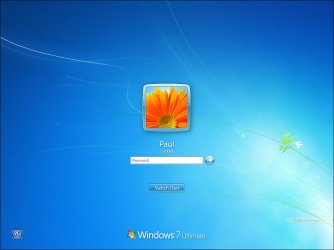
Do you normally get a screen like this...

Ch14fig02.jpg

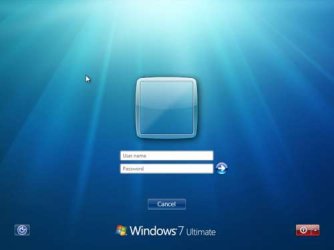
or like this...

Get-a-Classic-like-logon-screen-in-Windows-Vista.jpg
 

My Computer

Computer type
PC/Desktop
Computer Manufacturer/Model Number
Self Built
OS
Windows 8.1 Pro x64
CPU
Intel Core i5-2500K @ 3.30GHz - S1155
Motherboard
Asus P8P67 LE Rev3, Intel P67, S115
Memory
8GB Corsair DDR3 XMS3, PC3-12800
Graphics Card(s)
NVIDIA GeForce GTX 650
Sound Card
On-Board
Monitor(s) Displays
3 x 24" {Extended Display}
Screen Resolution
1920 x 1080
Hard Drives
300GB Seagate Barracuda 7200
PSU
550W Coolermaster GX550
Case
Silverstone Precision PS04B
Cooling
Stock
Keyboard
Logitech K120
Mouse
World of Warcraft Cataclysm MMO Gaming Mouse
Internet Speed
80 MB
Antivirus
MSE / Windows Defender
Browser
Chrome
I get a screen that tells me to press ctrl+alt+del, and then I get a screen like this:
log-on-as-administrator-2-468x351.png


Except the icon on the left is the last user to log in, and the one on the right is "Switch User". Also it's Windows 7 Professional.

The tab button will cycle to every element on the screen except the Switch User one.
 

My Computer

OS
Windows 7 64 bit
Memory
24GB
PS How do you get a screen capture of a log in screen?
 

My Computer

OS
Windows 7 64 bit
Memory
24GB
I get a screen that tells me to press ctrl+alt+del, and then I get a screen like this:
log-on-as-administrator-2-468x351.png


Except the icon on the left is the last user to log in, and the one on the right is "Switch User". Also it's Windows 7 Professional.

The tab button will cycle to every element on the screen except the Switch User one.

If you don't mind waiting i will test this in the morning (approx 09:00 GMT) at work as i can then test this on a Win 7 Pro on a domain environment.

PS How do you get a screen capture of a log in screen?

I have never actually tried and not sure, i have always used a virtual machine :D

Regards,
JDobbsy1987
 

My Computer

Computer type
PC/Desktop
Computer Manufacturer/Model Number
Self Built
OS
Windows 8.1 Pro x64
CPU
Intel Core i5-2500K @ 3.30GHz - S1155
Motherboard
Asus P8P67 LE Rev3, Intel P67, S115
Memory
8GB Corsair DDR3 XMS3, PC3-12800
Graphics Card(s)
NVIDIA GeForce GTX 650
Sound Card
On-Board
Monitor(s) Displays
3 x 24" {Extended Display}
Screen Resolution
1920 x 1080
Hard Drives
300GB Seagate Barracuda 7200
PSU
550W Coolermaster GX550
Case
Silverstone Precision PS04B
Cooling
Stock
Keyboard
Logitech K120
Mouse
World of Warcraft Cataclysm MMO Gaming Mouse
Internet Speed
80 MB
Antivirus
MSE / Windows Defender
Browser
Chrome
no problem. it's just something that always bugs me.

Thanks for your help.
-d
 

My Computer

OS
Windows 7 64 bit
Memory
24GB
Sorry for not getting back to you this morning, i have tested at work and tabbing still focuses the switch user option so i'm afraid i don't know what to suggest :( i have never had this issue.

Maybe someone else here will have come across this.

Regards,
JDobbsy1987
 

My Computer

Computer type
PC/Desktop
Computer Manufacturer/Model Number
Self Built
OS
Windows 8.1 Pro x64
CPU
Intel Core i5-2500K @ 3.30GHz - S1155
Motherboard
Asus P8P67 LE Rev3, Intel P67, S115
Memory
8GB Corsair DDR3 XMS3, PC3-12800
Graphics Card(s)
NVIDIA GeForce GTX 650
Sound Card
On-Board
Monitor(s) Displays
3 x 24" {Extended Display}
Screen Resolution
1920 x 1080
Hard Drives
300GB Seagate Barracuda 7200
PSU
550W Coolermaster GX550
Case
Silverstone Precision PS04B
Cooling
Stock
Keyboard
Logitech K120
Mouse
World of Warcraft Cataclysm MMO Gaming Mouse
Internet Speed
80 MB
Antivirus
MSE / Windows Defender
Browser
Chrome
I went and asked our IT guy if there was some switch he set to prohibit this functionality, and he said he hadn't.

He did show me how to do it though:

At the login screen, when presented with the two login options,
1. Press the Right Arrow key, which puts the focus on Switch User
2. Press the Space Bar which activates it (I assume Enter would work as well).
 

My Computer

OS
Windows 7 64 bit
Memory
24GB
BTW Thanks for looking into this for me. I appreciate your help. :)
 

My Computer

OS
Windows 7 64 bit
Memory
24GB
I went and asked our IT guy if there was some switch he set to prohibit this functionality, and he said he hadn't.

He did show me how to do it though:

At the login screen, when presented with the two login options,
1. Press the Right Arrow key, which puts the focus on Switch User
2. Press the Space Bar which activates it (I assume Enter would work as well).

I'm sure Enter would work too.

I'm glad you have something that does the job :thumbsup:
 

My Computer

Computer type
PC/Desktop
Computer Manufacturer/Model Number
Self Built
OS
Windows 8.1 Pro x64
CPU
Intel Core i5-2500K @ 3.30GHz - S1155
Motherboard
Asus P8P67 LE Rev3, Intel P67, S115
Memory
8GB Corsair DDR3 XMS3, PC3-12800
Graphics Card(s)
NVIDIA GeForce GTX 650
Sound Card
On-Board
Monitor(s) Displays
3 x 24" {Extended Display}
Screen Resolution
1920 x 1080
Hard Drives
300GB Seagate Barracuda 7200
PSU
550W Coolermaster GX550
Case
Silverstone Precision PS04B
Cooling
Stock
Keyboard
Logitech K120
Mouse
World of Warcraft Cataclysm MMO Gaming Mouse
Internet Speed
80 MB
Antivirus
MSE / Windows Defender
Browser
Chrome
Back
Top