How do I Switch users on Windows 7?

DeanReid

New member
Local time
2:19 PM
Messages
14
I've been looking all over the internet for the past 2 hours trying to find a decent thread that would help me, Everything seems the same and I've followed Instructions by the book..

I want to be able to use 2 Administrator accounts or 1 Administrator and 1 Standard account at the same time, for various reasons. I've read that I should try the

Code:
HKEY_LOCAL_MACHINE\SOFTWARE\Microsoft\Windows\CurrentVersi
on\Policies\System

and the

Code:
GPEDIT 
Local Computer Policy > Computer Configuration > Administrative Templates > System > Logon

Ect.
I've Tried all of these options but none of them Have Worked, I've Rebooted after each attempt but It will only let me login to the user that locked the screen.

Can anyone help?

Thanks,
Dean
 

My Computer

Computer type
PC/Desktop
Computer Manufacturer/Model Number
Custom Build
OS
Windows 7 Ultimate
CPU
Intel Core i7 3770k
Motherboard
Gigabyte B75M-D3H
Memory
16GB
Graphics Card(s)
Intel HD Graphics 4000
Sound Card
Tascam US-600
Monitor(s) Displays
32" HD TV
Screen Resolution
1920x1080
Hard Drives
900GB OS Drive
500GB Recording Drive
500GB Gaming Drive
500GB Music Production Drive
1TB External Drive

Keyboard
Mad Catz V7
Mouse
Logitech M705
Internet Speed
60MB-100MB
Antivirus
Avira AntiVir
Browser
Google Chrome
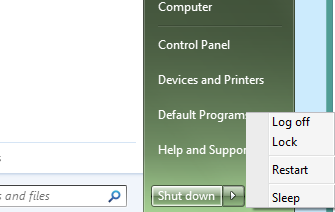
So what happens when you click :orb: then choose the arrow next to the Shut Down button to Switch User? It should take you to the Log On screen to choose one of the other accounts.

To keep your work open on one account, you'd choose Switch User instead of Log Off. You can move between all of the accounts this way.
 
QdQOs72.png


That's All I see and When I Lock my screen I cant change user but If I log off, the Switch User button appears
 

My Computer

Computer type
PC/Desktop
Computer Manufacturer/Model Number
Custom Build
OS
Windows 7 Ultimate
CPU
Intel Core i7 3770k
Motherboard
Gigabyte B75M-D3H
Memory
16GB
Graphics Card(s)
Intel HD Graphics 4000
Sound Card
Tascam US-600
Monitor(s) Displays
32" HD TV
Screen Resolution
1920x1080
Hard Drives
900GB OS Drive
500GB Recording Drive
500GB Gaming Drive
500GB Music Production Drive
1TB External Drive
Keyboard
Mad Catz V7
Mouse
Logitech M705
Internet Speed
60MB-100MB
Antivirus
Avira AntiVir
Browser
Google Chrome
Hello Dean, and welcome to Seven Forums.

Check using the tutorial below to make sure that you have Switch User enabled to see if that may help.
For now, you could also use a Switch User shortcut if you like.
Hope this helps, :)
Shawn
 

My Computer

Computer type
PC/Desktop
Computer Manufacturer/Model Number
Self built custom
OS
64-bit Windows 11 Pro for Workstations
CPU
Intel i7-8700K OC'd to 5 GHz
Motherboard
ASUS ROG Maximus XI Formula Z390
Memory
64 GB (4x16GB) G.SKILL TridentZ RGB DDR4 3600 MHz
Graphics Card(s)
ASUS ROG-STRIX-GTX1080TI-O11G-GAMING
Sound Card
Integrated
Monitor(s) Displays
2 x Samsung Odyssey G7 27"
Screen Resolution
2560x1440
Hard Drives
1TB Samsung 990 PRO M.2,
4TB Samsung 990 PRO PRO M.2,
TerraMaster F8 SSD Plus NAS
PSU
Seasonic Prime Titanium 850W
Case
Thermaltake Core P3
Cooling
Corsair Hydro H115i
Keyboard
Logitech wireless K800
Mouse
Logitech MX Master 4
Internet Speed
2 Gb/s Download and 100 Mb/s Upload
Antivirus
Malwarebyte Anti-Malware Premium
Browser
Google Chrome
Other Info
Logitech Z625 speaker system,
Logitech BRIO 4K Pro webcam,
HP Color LaserJet Pro MFP M477fdn,
APC SMART-UPS RT 1000 XL - SURT1000XLI,
Galaxy S23 Plus phone
Hi, The Switch User Desktop Shortcut Worked Somewhat, I was able to see all my users but when I clicked on another user to login it says

Code:
The Number of Connections to this computer is Limited

What does that mean?? I've never seen that error before,

Also I have checked out the Tutorial and done everything that it says but Still doesn't show for me.


EDIT: I've Just been going through my System Properties and I've noticed Remote Desktop has disappeared. Doesn't Windows 7 Ultimate Support Remote Desktop??
Thanks,

Dean
 
Last edited:

My Computer

Computer type
PC/Desktop
Computer Manufacturer/Model Number
Custom Build
OS
Windows 7 Ultimate
CPU
Intel Core i7 3770k
Motherboard
Gigabyte B75M-D3H
Memory
16GB
Graphics Card(s)
Intel HD Graphics 4000
Sound Card
Tascam US-600
Monitor(s) Displays
32" HD TV
Screen Resolution
1920x1080
Hard Drives
900GB OS Drive
500GB Recording Drive
500GB Gaming Drive
500GB Music Production Drive
1TB External Drive
Keyboard
Mad Catz V7
Mouse
Logitech M705
Internet Speed
60MB-100MB
Antivirus
Avira AntiVir
Browser
Google Chrome
Are you part of a domain by chance?

How many user accounts do you currently have logged in at the same time? You may need to log some out.
 

My Computer

Computer type
PC/Desktop
Computer Manufacturer/Model Number
Self built custom
OS
64-bit Windows 11 Pro for Workstations
CPU
Intel i7-8700K OC'd to 5 GHz
Motherboard
ASUS ROG Maximus XI Formula Z390
Memory
64 GB (4x16GB) G.SKILL TridentZ RGB DDR4 3600 MHz
Graphics Card(s)
ASUS ROG-STRIX-GTX1080TI-O11G-GAMING
Sound Card
Integrated
Monitor(s) Displays
2 x Samsung Odyssey G7 27"
Screen Resolution
2560x1440
Hard Drives
1TB Samsung 990 PRO M.2,
4TB Samsung 990 PRO PRO M.2,
TerraMaster F8 SSD Plus NAS
PSU
Seasonic Prime Titanium 850W
Case
Thermaltake Core P3
Cooling
Corsair Hydro H115i
Keyboard
Logitech wireless K800
Mouse
Logitech MX Master 4
Internet Speed
2 Gb/s Download and 100 Mb/s Upload
Antivirus
Malwarebyte Anti-Malware Premium
Browser
Google Chrome
Other Info
Logitech Z625 speaker system,
Logitech BRIO 4K Pro webcam,
HP Color LaserJet Pro MFP M477fdn,
APC SMART-UPS RT 1000 XL - SURT1000XLI,
Galaxy S23 Plus phone
I don't believe so is there any way to find that out, also There is 2 user accounts on my pc 1 My main account and 1 for Family Members and Its really inconvenient when I'm busy doing work and have to logout to let them on if they need on
 

My Computer

Computer type
PC/Desktop
Computer Manufacturer/Model Number
Custom Build
OS
Windows 7 Ultimate
CPU
Intel Core i7 3770k
Motherboard
Gigabyte B75M-D3H
Memory
16GB
Graphics Card(s)
Intel HD Graphics 4000
Sound Card
Tascam US-600
Monitor(s) Displays
32" HD TV
Screen Resolution
1920x1080
Hard Drives
900GB OS Drive
500GB Recording Drive
500GB Gaming Drive
500GB Music Production Drive
1TB External Drive
Keyboard
Mad Catz V7
Mouse
Logitech M705
Internet Speed
60MB-100MB
Antivirus
Avira AntiVir
Browser
Google Chrome
If you don't know, then most likely you are not part of a domain since it would have to be set up.

I'm afraid that it seems that you set some setting at some point that affects how many users can be logged in at the same time. I'm not sure which setting this would be, but use the tutorial below to see what group policy setting you have enabled and post a screenshot showing them to see if one of them may be responsible.

http://www.sevenforums.com/tutorial...or-quickly-view-enabled-policies-windows.html

Are they logging in to the computer locally, or trying to do so remotely?
 

My Computer

Computer type
PC/Desktop
Computer Manufacturer/Model Number
Self built custom
OS
64-bit Windows 11 Pro for Workstations
CPU
Intel i7-8700K OC'd to 5 GHz
Motherboard
ASUS ROG Maximus XI Formula Z390
Memory
64 GB (4x16GB) G.SKILL TridentZ RGB DDR4 3600 MHz
Graphics Card(s)
ASUS ROG-STRIX-GTX1080TI-O11G-GAMING
Sound Card
Integrated
Monitor(s) Displays
2 x Samsung Odyssey G7 27"
Screen Resolution
2560x1440
Hard Drives
1TB Samsung 990 PRO M.2,
4TB Samsung 990 PRO PRO M.2,
TerraMaster F8 SSD Plus NAS
PSU
Seasonic Prime Titanium 850W
Case
Thermaltake Core P3
Cooling
Corsair Hydro H115i
Keyboard
Logitech wireless K800
Mouse
Logitech MX Master 4
Internet Speed
2 Gb/s Download and 100 Mb/s Upload
Antivirus
Malwarebyte Anti-Malware Premium
Browser
Google Chrome
Other Info
Logitech Z625 speaker system,
Logitech BRIO 4K Pro webcam,
HP Color LaserJet Pro MFP M477fdn,
APC SMART-UPS RT 1000 XL - SURT1000XLI,
Galaxy S23 Plus phone
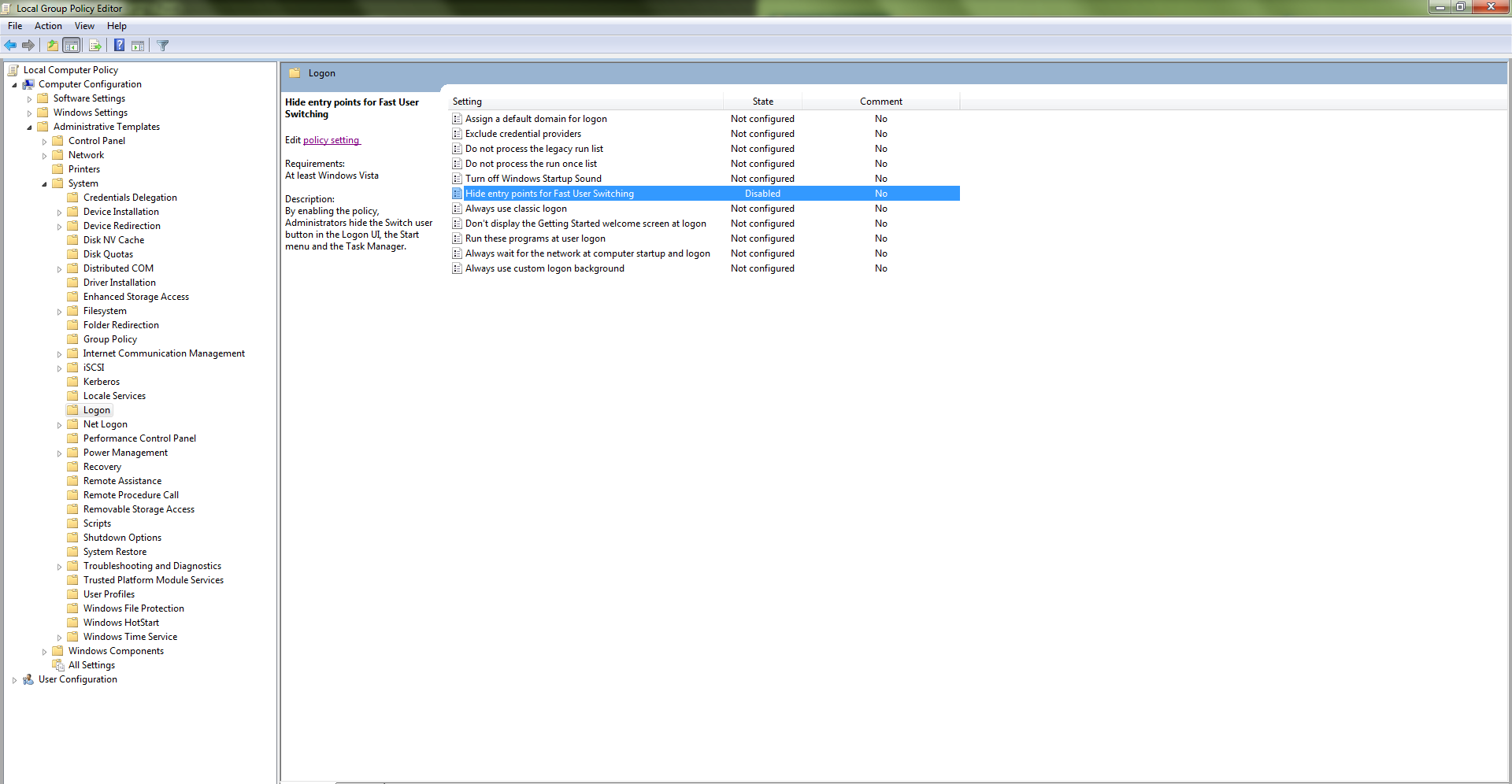
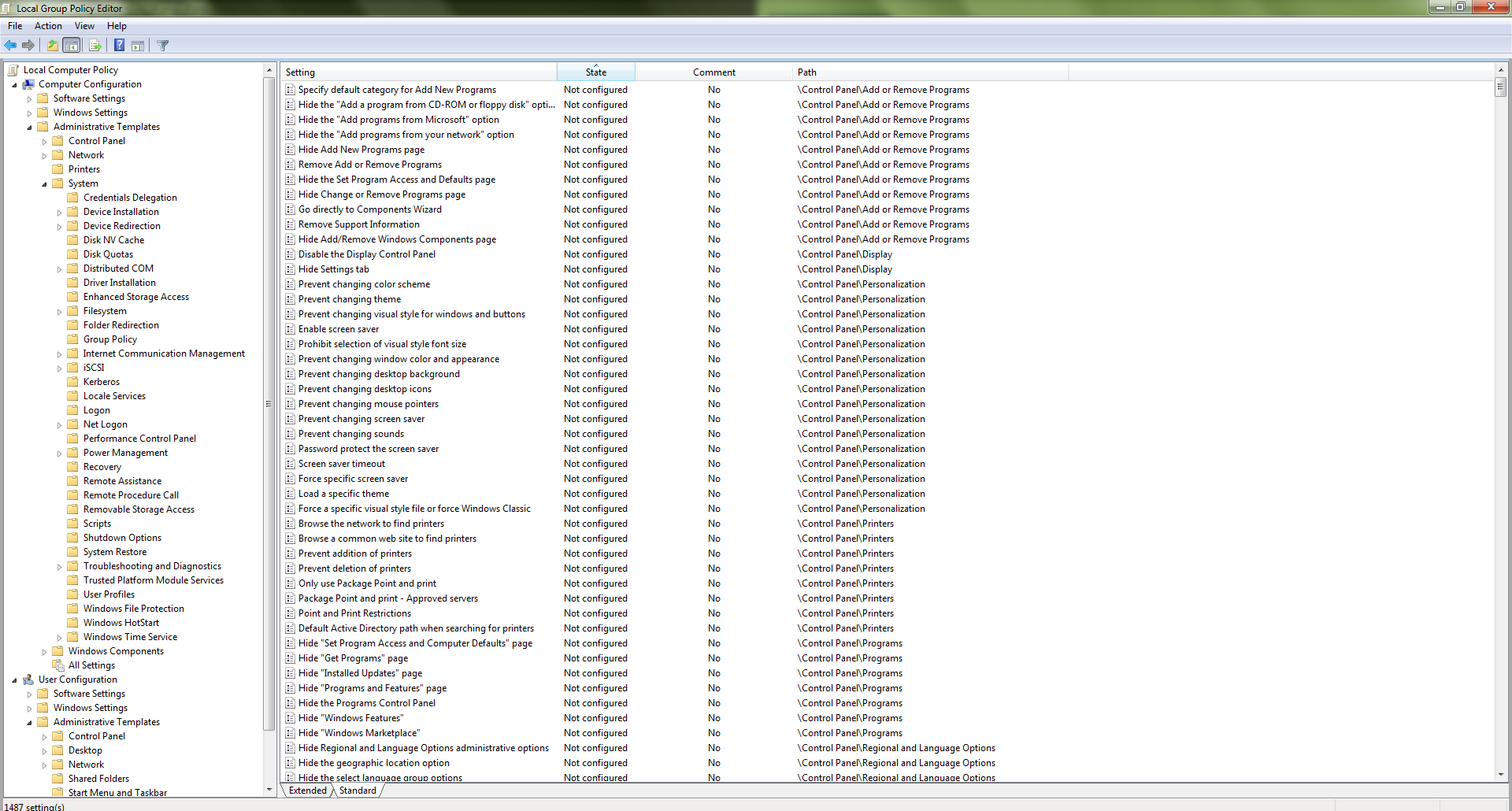
jyTHehN.png

vpWbG65.png

PEDQM6L.png


Thats 3 Images from the GPEdit

Also I'm trying to login locally
 

My Computer

Computer type
PC/Desktop
Computer Manufacturer/Model Number
Custom Build
OS
Windows 7 Ultimate
CPU
Intel Core i7 3770k
Motherboard
Gigabyte B75M-D3H
Memory
16GB
Graphics Card(s)
Intel HD Graphics 4000
Sound Card
Tascam US-600
Monitor(s) Displays
32" HD TV
Screen Resolution
1920x1080
Hard Drives
900GB OS Drive
500GB Recording Drive
500GB Gaming Drive
500GB Music Production Drive
1TB External Drive
Keyboard
Mad Catz V7
Mouse
Logitech M705
Internet Speed
60MB-100MB
Antivirus
Avira AntiVir
Browser
Google Chrome
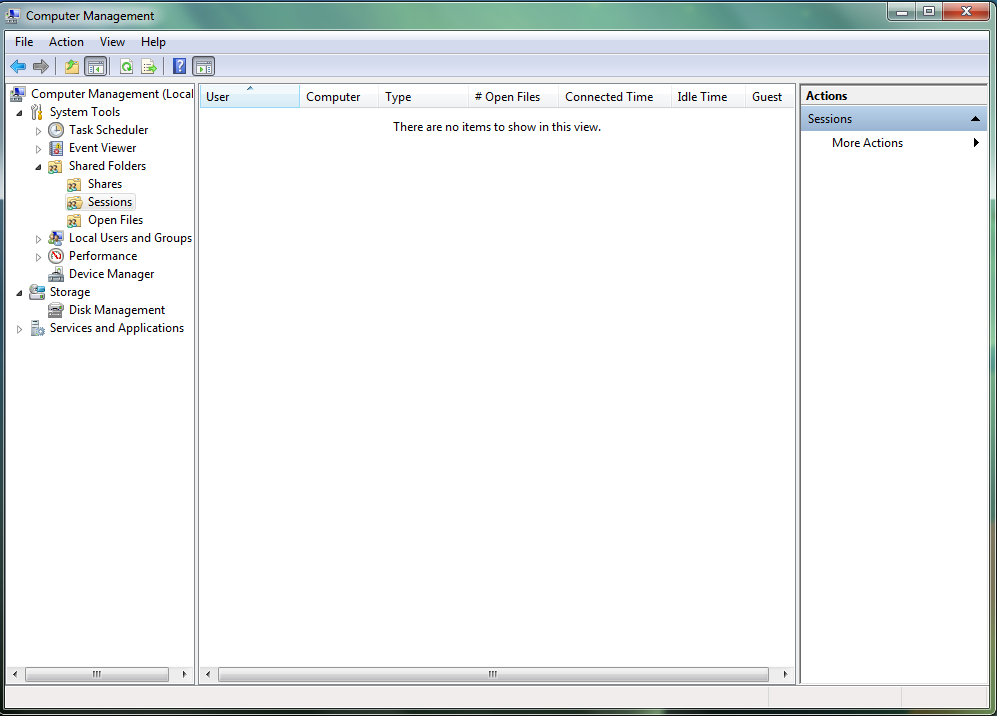
Nothing there.

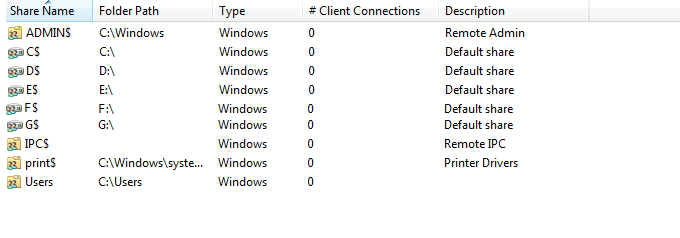
Since you only have 2 accounts on the PC and are not using it as a server or remote connections (RDC), then if you have shares, it may be possible that there are idle sessions still open causing this. Windows 7 only allows up to 10 connections at the same time by default.

To check:

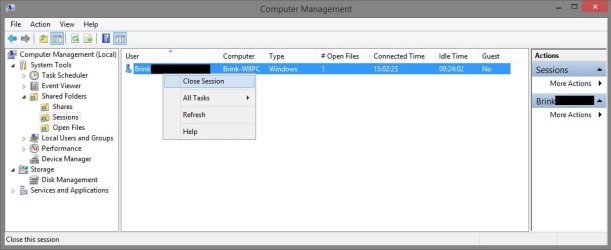
  • Open compmgmt.msc (Computer Management).
  • In the left pane, click on Shared folders to expand it, and click on Sessions to open it in the right pane.
  • If you have more than 10, then that's the issue. You could right click on listed sessions in the right pane that you want to close, and click on Close Session.
sessions.jpg
 

My Computer

Computer type
PC/Desktop
Computer Manufacturer/Model Number
Self built custom
OS
64-bit Windows 11 Pro for Workstations
CPU
Intel i7-8700K OC'd to 5 GHz
Motherboard
ASUS ROG Maximus XI Formula Z390
Memory
64 GB (4x16GB) G.SKILL TridentZ RGB DDR4 3600 MHz
Graphics Card(s)
ASUS ROG-STRIX-GTX1080TI-O11G-GAMING
Sound Card
Integrated
Monitor(s) Displays
2 x Samsung Odyssey G7 27"
Screen Resolution
2560x1440
Hard Drives
1TB Samsung 990 PRO M.2,
4TB Samsung 990 PRO PRO M.2,
TerraMaster F8 SSD Plus NAS
PSU
Seasonic Prime Titanium 850W
Case
Thermaltake Core P3
Cooling
Corsair Hydro H115i
Keyboard
Logitech wireless K800
Mouse
Logitech MX Master 4
Internet Speed
2 Gb/s Download and 100 Mb/s Upload
Antivirus
Malwarebyte Anti-Malware Premium
Browser
Google Chrome
Other Info
Logitech Z625 speaker system,
Logitech BRIO 4K Pro webcam,
HP Color LaserJet Pro MFP M477fdn,
APC SMART-UPS RT 1000 XL - SURT1000XLI,
Galaxy S23 Plus phone
Something tells me that something is wrong because this is all I see

Kt9UAuh.png


Also You said "Windows 7 only allows up to 10 connections at the same time by default. " does that mean that you can change the maximum connections?


Edit:
I do however have this, Not sure if thats what could be causing it!
VRu96Bo.png
 

My Computer

Computer type
PC/Desktop
Computer Manufacturer/Model Number
Custom Build
OS
Windows 7 Ultimate
CPU
Intel Core i7 3770k
Motherboard
Gigabyte B75M-D3H
Memory
16GB
Graphics Card(s)
Intel HD Graphics 4000
Sound Card
Tascam US-600
Monitor(s) Displays
32" HD TV
Screen Resolution
1920x1080
Hard Drives
900GB OS Drive
500GB Recording Drive
500GB Gaming Drive
500GB Music Production Drive
1TB External Drive
Keyboard
Mad Catz V7
Mouse
Logitech M705
Internet Speed
60MB-100MB
Antivirus
Avira AntiVir
Browser
Google Chrome
No worries. That just means that you do not have any shared folder sessions open. No need to change this since you do not have any.

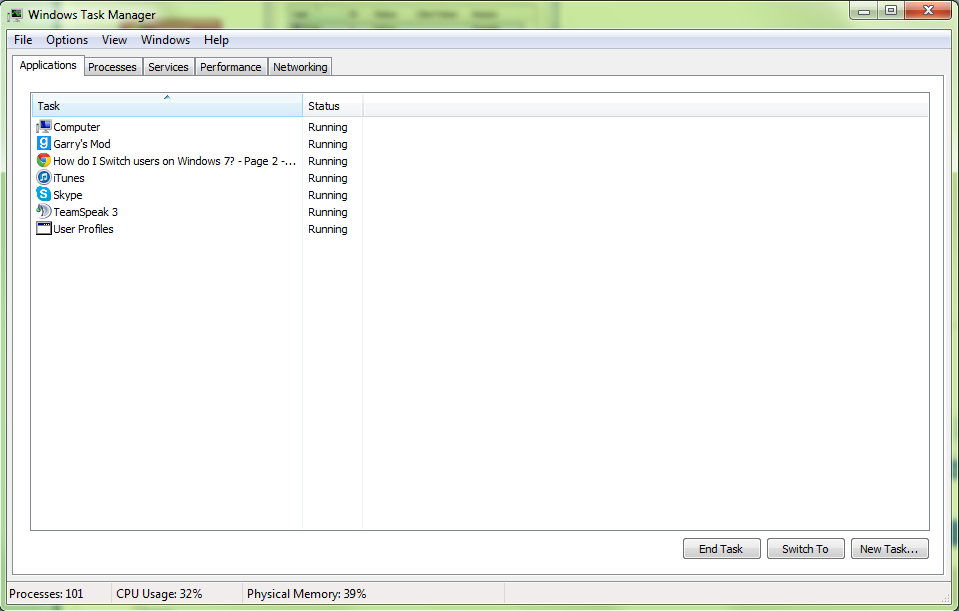
Next, open Task Manager (CTRL+Shift+ESC), and click on the Users tab to see how many user sessions you have open.

Task_Manager+Users.jpg
 

My Computer

Computer type
PC/Desktop
Computer Manufacturer/Model Number
Self built custom
OS
64-bit Windows 11 Pro for Workstations
CPU
Intel i7-8700K OC'd to 5 GHz
Motherboard
ASUS ROG Maximus XI Formula Z390
Memory
64 GB (4x16GB) G.SKILL TridentZ RGB DDR4 3600 MHz
Graphics Card(s)
ASUS ROG-STRIX-GTX1080TI-O11G-GAMING
Sound Card
Integrated
Monitor(s) Displays
2 x Samsung Odyssey G7 27"
Screen Resolution
2560x1440
Hard Drives
1TB Samsung 990 PRO M.2,
4TB Samsung 990 PRO PRO M.2,
TerraMaster F8 SSD Plus NAS
PSU
Seasonic Prime Titanium 850W
Case
Thermaltake Core P3
Cooling
Corsair Hydro H115i
Keyboard
Logitech wireless K800
Mouse
Logitech MX Master 4
Internet Speed
2 Gb/s Download and 100 Mb/s Upload
Antivirus
Malwarebyte Anti-Malware Premium
Browser
Google Chrome
Other Info
Logitech Z625 speaker system,
Logitech BRIO 4K Pro webcam,
HP Color LaserJet Pro MFP M477fdn,
APC SMART-UPS RT 1000 XL - SURT1000XLI,
Galaxy S23 Plus phone
hmm....

Should I be Worried??

kNDGc6N.png
 

My Computer

Computer type
PC/Desktop
Computer Manufacturer/Model Number
Custom Build
OS
Windows 7 Ultimate
CPU
Intel Core i7 3770k
Motherboard
Gigabyte B75M-D3H
Memory
16GB
Graphics Card(s)
Intel HD Graphics 4000
Sound Card
Tascam US-600
Monitor(s) Displays
32" HD TV
Screen Resolution
1920x1080
Hard Drives
900GB OS Drive
500GB Recording Drive
500GB Gaming Drive
500GB Music Production Drive
1TB External Drive
Keyboard
Mad Catz V7
Mouse
Logitech M705
Internet Speed
60MB-100MB
Antivirus
Avira AntiVir
Browser
Google Chrome
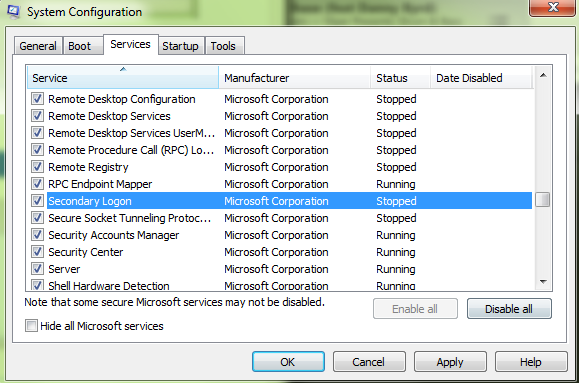
Sorry for the Bump, But I've found something a friend told me to look for

I'm not sure if this is meant to be disabled or not
oUH4NWd.png
 

My Computer

Computer type
PC/Desktop
Computer Manufacturer/Model Number
Custom Build
OS
Windows 7 Ultimate
CPU
Intel Core i7 3770k
Motherboard
Gigabyte B75M-D3H
Memory
16GB
Graphics Card(s)
Intel HD Graphics 4000
Sound Card
Tascam US-600
Monitor(s) Displays
32" HD TV
Screen Resolution
1920x1080
Hard Drives
900GB OS Drive
500GB Recording Drive
500GB Gaming Drive
500GB Music Production Drive
1TB External Drive
Keyboard
Mad Catz V7
Mouse
Logitech M705
Internet Speed
60MB-100MB
Antivirus
Avira AntiVir
Browser
Google Chrome
The Default for Secondary Logon is Manual, so I'd set it there and reboot to see if it solves the problem.

If not then Start the service to see if it can be started.

Shawn asked to see User tab in Task Manager in Post #12.
 
Just tried that, Didn't Change anything, also I don't have a User Tab in Task Manager

kNDGc6N.png


All I have is

Applications, Processes, Services, Preformance and Networking
 

My Computer

Computer type
PC/Desktop
Computer Manufacturer/Model Number
Custom Build
OS
Windows 7 Ultimate
CPU
Intel Core i7 3770k
Motherboard
Gigabyte B75M-D3H
Memory
16GB
Graphics Card(s)
Intel HD Graphics 4000
Sound Card
Tascam US-600
Monitor(s) Displays
32" HD TV
Screen Resolution
1920x1080
Hard Drives
900GB OS Drive
500GB Recording Drive
500GB Gaming Drive
500GB Music Production Drive
1TB External Drive
Keyboard
Mad Catz V7
Mouse
Logitech M705
Internet Speed
60MB-100MB
Antivirus
Avira AntiVir
Browser
Google Chrome
Dean,

It appears that Fast User Switching for "Switch User" has not been enabled yet. See if using step 3 in Method Two of the tutorial below may help.

Fast User Switching
 

My Computer

Computer type
PC/Desktop
Computer Manufacturer/Model Number
Self built custom
OS
64-bit Windows 11 Pro for Workstations
CPU
Intel i7-8700K OC'd to 5 GHz
Motherboard
ASUS ROG Maximus XI Formula Z390
Memory
64 GB (4x16GB) G.SKILL TridentZ RGB DDR4 3600 MHz
Graphics Card(s)
ASUS ROG-STRIX-GTX1080TI-O11G-GAMING
Sound Card
Integrated
Monitor(s) Displays
2 x Samsung Odyssey G7 27"
Screen Resolution
2560x1440
Hard Drives
1TB Samsung 990 PRO M.2,
4TB Samsung 990 PRO PRO M.2,
TerraMaster F8 SSD Plus NAS
PSU
Seasonic Prime Titanium 850W
Case
Thermaltake Core P3
Cooling
Corsair Hydro H115i
Keyboard
Logitech wireless K800
Mouse
Logitech MX Master 4
Internet Speed
2 Gb/s Download and 100 Mb/s Upload
Antivirus
Malwarebyte Anti-Malware Premium
Browser
Google Chrome
Other Info
Logitech Z625 speaker system,
Logitech BRIO 4K Pro webcam,
HP Color LaserJet Pro MFP M477fdn,
APC SMART-UPS RT 1000 XL - SURT1000XLI,
Galaxy S23 Plus phone
I have tried Method Two again, Still says

"The number of connection to this computer is limited and all connections are in use right now"

When I use you're Switch User Shortcut, and It still doesn't show up in the Arrow next to Shutdown
 

My Computer

Computer type
PC/Desktop
Computer Manufacturer/Model Number
Custom Build
OS
Windows 7 Ultimate
CPU
Intel Core i7 3770k
Motherboard
Gigabyte B75M-D3H
Memory
16GB
Graphics Card(s)
Intel HD Graphics 4000
Sound Card
Tascam US-600
Monitor(s) Displays
32" HD TV
Screen Resolution
1920x1080
Hard Drives
900GB OS Drive
500GB Recording Drive
500GB Gaming Drive
500GB Music Production Drive
1TB External Drive
Keyboard
Mad Catz V7
Mouse
Logitech M705
Internet Speed
60MB-100MB
Antivirus
Avira AntiVir
Browser
Google Chrome
Odd. Did you approve all of the prompts (step 7) and restart the PC after doing step 3 in Method Two?

Nar, the Switch User shortcut will not add anything. It's only a shortcut to directly Switch User.

How long have you had this issue?
 

My Computer

Computer type
PC/Desktop
Computer Manufacturer/Model Number
Self built custom
OS
64-bit Windows 11 Pro for Workstations
CPU
Intel i7-8700K OC'd to 5 GHz
Motherboard
ASUS ROG Maximus XI Formula Z390
Memory
64 GB (4x16GB) G.SKILL TridentZ RGB DDR4 3600 MHz
Graphics Card(s)
ASUS ROG-STRIX-GTX1080TI-O11G-GAMING
Sound Card
Integrated
Monitor(s) Displays
2 x Samsung Odyssey G7 27"
Screen Resolution
2560x1440
Hard Drives
1TB Samsung 990 PRO M.2,
4TB Samsung 990 PRO PRO M.2,
TerraMaster F8 SSD Plus NAS
PSU
Seasonic Prime Titanium 850W
Case
Thermaltake Core P3
Cooling
Corsair Hydro H115i
Keyboard
Logitech wireless K800
Mouse
Logitech MX Master 4
Internet Speed
2 Gb/s Download and 100 Mb/s Upload
Antivirus
Malwarebyte Anti-Malware Premium
Browser
Google Chrome
Other Info
Logitech Z625 speaker system,
Logitech BRIO 4K Pro webcam,
HP Color LaserJet Pro MFP M477fdn,
APC SMART-UPS RT 1000 XL - SURT1000XLI,
Galaxy S23 Plus phone
Yeah, I restarted a few times and I haven't really noticed until today as this is the main account and I've never had more than one account until my Parents broke their laptop *bloody idiots* xD Is there not a way to extend the amount of users that can login?
 

My Computer

Computer type
PC/Desktop
Computer Manufacturer/Model Number
Custom Build
OS
Windows 7 Ultimate
CPU
Intel Core i7 3770k
Motherboard
Gigabyte B75M-D3H
Memory
16GB
Graphics Card(s)
Intel HD Graphics 4000
Sound Card
Tascam US-600
Monitor(s) Displays
32" HD TV
Screen Resolution
1920x1080
Hard Drives
900GB OS Drive
500GB Recording Drive
500GB Gaming Drive
500GB Music Production Drive
1TB External Drive
Keyboard
Mad Catz V7
Mouse
Logitech M705
Internet Speed
60MB-100MB
Antivirus
Avira AntiVir
Browser
Google Chrome
Back
Top